187 ·GitHub
这是什么?
 Nari Qwen3-TTS 是 Qwen3-TTS 1.7B CustomVoice 模型的高性能服务化实现,专为在单张 NVIDIA H100 上运行而构建,以 API 形式提供流式和非流式语音生成。
Nari Qwen3-TTS 是 Qwen3-TTS 1.7B CustomVoice 模型的高性能服务化实现,专为在单张 NVIDIA H100 上运行而构建,以 API 形式提供流式和非流式语音生成。这是我要下载的模型文件,还是要运行的服务器?它是一个服务器/API,不是独立的模型文件:它通过 HTTP 和 WebSocket 端点(例如 POST /v1/audio/speech 和 WS /v1/audio/speech/ws)提供文本转语音生成。
它是一个服务器/API,不是独立的模型文件:它通过 HTTP 和 WebSocket 端点(例如 POST /v1/audio/speech 和 WS /v1/audio/speech/ws)提供文本转语音生成。怎么把它跑起来?在 H100 主机上拉取并运行已发布的 Docker 镜像;或者用 uv 在本地安装,使用锁定的 .python-version、pyproject.toml 和 uv.lock 文件。模型文件和编译好的 CUDA 内核缓存在一个命名卷里。
在 H100 主机上拉取并运行已发布的 Docker 镜像;或者用 uv 在本地安装,使用锁定的 .python-version、pyproject.toml 和 uv.lock 文件。模型文件和编译好的 CUDA 内核缓存在一个命名卷里。运行它需要特定的 GPU 吗?需要。它要求一张 NVIDIA H100、NVIDIA Container Toolkit,以及兼容 CUDA 13.0 的驱动;已发布的 Docker 镜像只面向 Linux x86-64 的 H100 主机。
需要。它要求一张 NVIDIA H100、NVIDIA Container Toolkit,以及兼容 CUDA 13.0 的驱动;已发布的 Docker 镜像只面向 Linux x86-64 的 H100 主机。它支持英语以外的语言吗?它只以英语为主要语言做过测试,其他语言不保证效果良好。
它只以英语为主要语言做过测试,其他语言不保证效果良好。可以选择哪些调度配置(profile)?提供三个内置配置:“ttfa”用更小的分块优化最低的首音频延迟,“balanced”是默认值,“throughput”用更大的批次承载更高的聚合负载;通过 QWEN3_TTS_PROFILE 或 --profile 选择。
提供三个内置配置:“ttfa”用更小的分块优化最低的首音频延迟,“balanced”是默认值,“throughput”用更大的批次承载更高的聚合负载;通过 QWEN3_TTS_PROFILE 或 --profile 选择。这个 API 与 OpenAI 的 TTS 端点兼容吗?POST /v1/audio/speech 遵循 OpenAI Audio Speech 的请求结构,但该服务器只支持其自带的单一模型、wav/pcm 输出和 1.0 倍速,外加 language 等 Nari 特有的控制项。
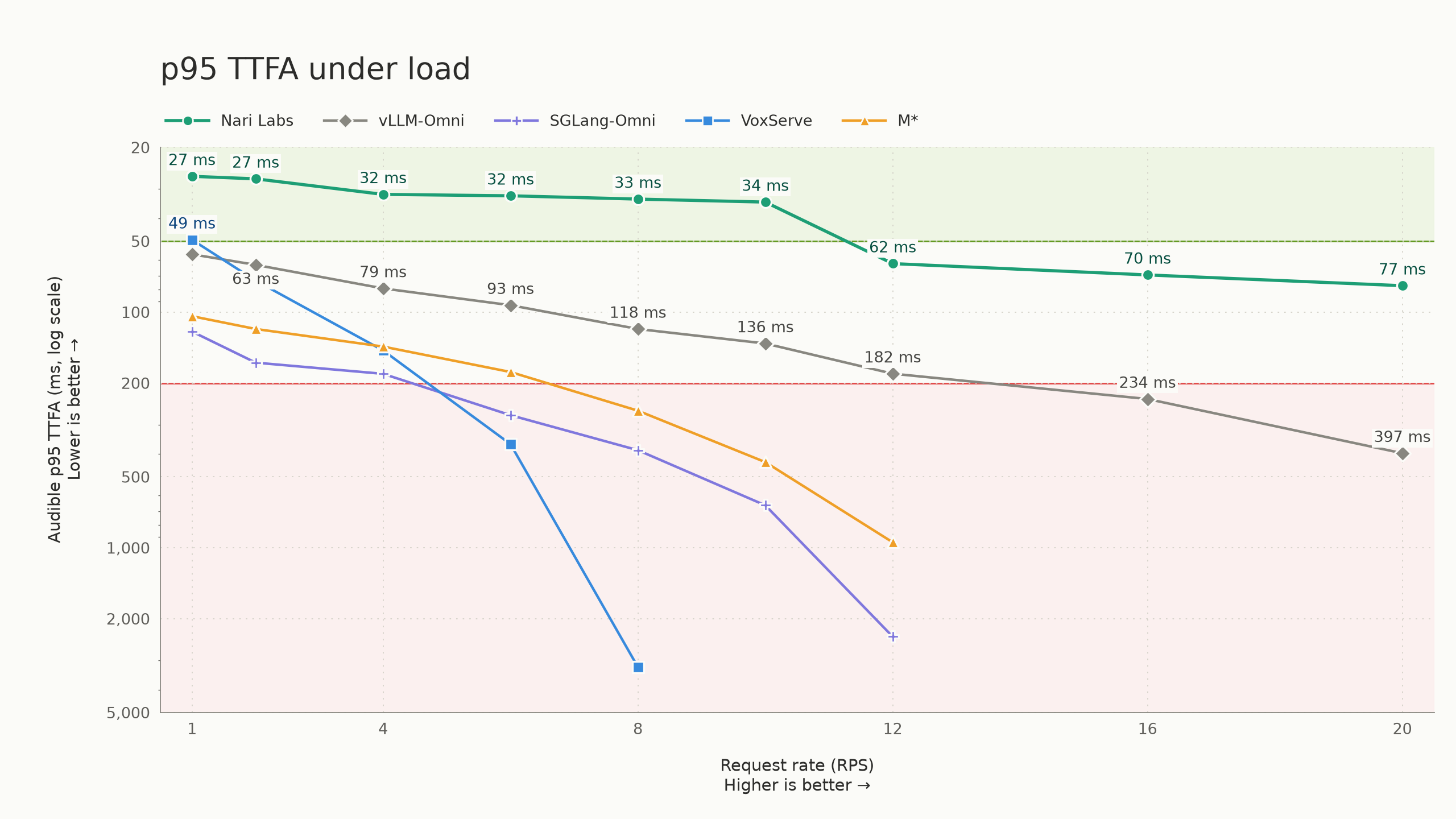
POST /v1/audio/speech 遵循 OpenAI Audio Speech 的请求结构,但该服务器只支持其自带的单一模型、wav/pcm 输出和 1.0 倍速,外加 language 等 Nari 特有的控制项。语音生成有多快?在单张 H100 SXM 上,它能持续承受每秒 10 个请求,p95 首音频延迟低于 50 毫秒;即使到每秒 20 个请求,p95 TTFA 仍保持在 80 毫秒以内,同时维持实时播放。
在单张 H100 SXM 上,它能持续承受每秒 10 个请求,p95 首音频延迟低于 50 毫秒;即使到每秒 20 个请求,p95 TTFA 仍保持在 80 毫秒以内,同时维持实时播放。与其他 TTS 服务引擎相比它怎么样?README 把它与 vLLM-Omni、SGLang-Omni 和 VoxServe 等其他高性能服务引擎做了基准对比,完整的方法论见单独的基准仓库和博客文章。
README 把它与 vLLM-Omni、SGLang-Omni 和 VoxServe 等其他高性能服务引擎做了基准对比,完整的方法论见单独的基准仓库和博客文章。What are similar projects?vllm-omni, HyperQwen, InstinctFlash, TensorFold, text-generation-inference, csm, project-maya, dgx-spark-qwen38
vllm-omni, HyperQwen, InstinctFlash, TensorFold, text-generation-inference, csm, project-maya, dgx-spark-qwen38Which topics is it in?streaming-audio, inference-optimization, http-server, inference-engine, model-serving, audio-generation, text-to-speech, websocket, openai-compatible, streaming, inference, nvidia
streaming-audio, inference-optimization, http-server, inference-engine, model-serving, audio-generation, text-to-speech, websocket, openai-compatible, streaming, inference, nvidia