187 ·GitHub
Что это?
 Nari Qwen3-TTS — высокопроизводительная реализация обслуживания модели Qwen3-TTS 1.7B CustomVoice, рассчитанная на одну NVIDIA H100 и предоставляемая как API с потоковой и непотоковой генерацией речи.
Nari Qwen3-TTS — высокопроизводительная реализация обслуживания модели Qwen3-TTS 1.7B CustomVoice, рассчитанная на одну NVIDIA H100 и предоставляемая как API с потоковой и непотоковой генерацией речи.Это файл модели для скачивания или сервер для запуска?Это сервер/API, а не отдельный файл модели: он открывает генерацию речи из текста через HTTP- и WebSocket-эндпоинты вроде POST /v1/audio/speech и WS /v1/audio/speech/ws.
Это сервер/API, а не отдельный файл модели: он открывает генерацию речи из текста через HTTP- и WebSocket-эндпоинты вроде POST /v1/audio/speech и WS /v1/audio/speech/ws.Как его запустить?Скачайте и запустите опубликованный Docker-образ на хосте с H100 либо установите локально через uv, используя зафиксированные файлы .python-version, pyproject.toml и uv.lock; файлы модели и скомпилированные CUDA-ядра кэшируются в именованном томе.
Скачайте и запустите опубликованный Docker-образ на хосте с H100 либо установите локально через uv, используя зафиксированные файлы .python-version, pyproject.toml и uv.lock; файлы модели и скомпилированные CUDA-ядра кэшируются в именованном томе.Нужна ли конкретная видеокарта для запуска?Да, требуется одна NVIDIA H100, NVIDIA Container Toolkit и драйвер, совместимый с CUDA 13.0; опубликованный Docker-образ рассчитан только на Linux-хосты x86-64 с H100.
Да, требуется одна NVIDIA H100, NVIDIA Container Toolkit и драйвер, совместимый с CUDA 13.0; опубликованный Docker-образ рассчитан только на Linux-хосты x86-64 с H100.Поддерживает ли он языки, кроме английского?Он тестировался только с английским как основным языком, поэтому хорошая работа других языков не гарантирована.
Он тестировался только с английским как основным языком, поэтому хорошая работа других языков не гарантирована.Какие профили планирования можно выбрать?Доступны три встроенных профиля: «ttfa» оптимизирует минимальную задержку до первого звука за счёт меньших чанков, «balanced» — вариант по умолчанию, а «throughput» использует более крупные батчи для большей суммарной нагрузки; выбор через QWEN3_TTS_PROFILE или --profile.
Доступны три встроенных профиля: «ttfa» оптимизирует минимальную задержку до первого звука за счёт меньших чанков, «balanced» — вариант по умолчанию, а «throughput» использует более крупные батчи для большей суммарной нагрузки; выбор через QWEN3_TTS_PROFILE или --profile.Совместим ли API с TTS-эндпоинтом OpenAI?POST /v1/audio/speech повторяет форму запроса OpenAI Audio Speech, но этот сервер поддерживает только единственную встроенную модель, вывод wav/pcm и скорость 1.0, плюс специфичные для Nari параметры вроде языка.
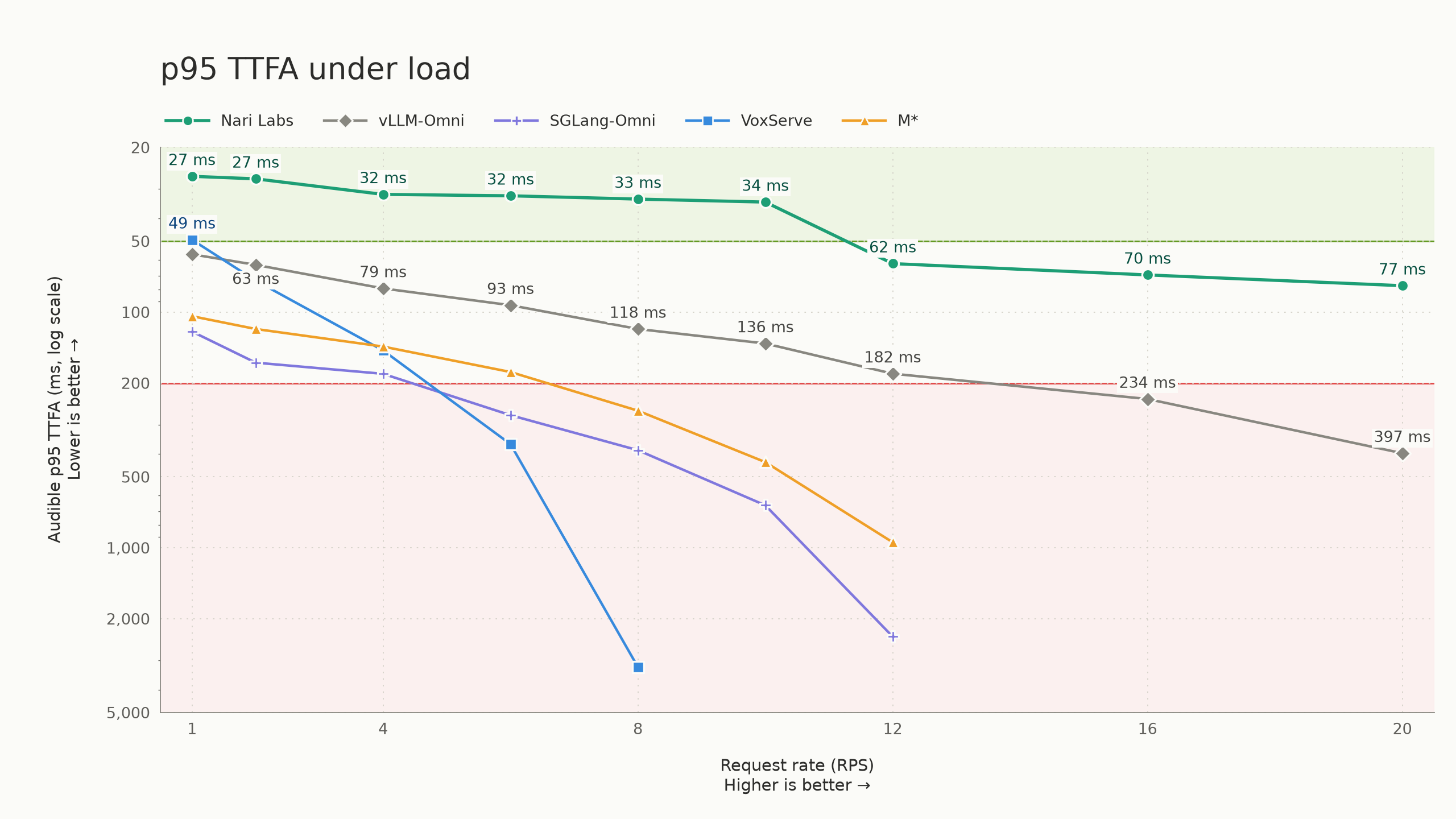
POST /v1/audio/speech повторяет форму запроса OpenAI Audio Speech, но этот сервер поддерживает только единственную встроенную модель, вывод wav/pcm и скорость 1.0, плюс специфичные для Nari параметры вроде языка.Насколько быстрая генерация речи?На одной H100 SXM он удерживает 10 запросов в секунду с p95 задержкой до первого звука ниже 50 мс, и даже при 20 RPS держит p95 TTFA ниже 80 мс, сохраняя воспроизведение в реальном времени.
На одной H100 SXM он удерживает 10 запросов в секунду с p95 задержкой до первого звука ниже 50 мс, и даже при 20 RPS держит p95 TTFA ниже 80 мс, сохраняя воспроизведение в реальном времени.Как он сравнивается с другими движками обслуживания TTS?В README приводится сравнение с другими высокопроизводительными движками вроде vLLM-Omni, SGLang-Omni и VoxServe; за полной методологией отсылают к отдельному репозиторию бенчмарков и посту в блоге.
В README приводится сравнение с другими высокопроизводительными движками вроде vLLM-Omni, SGLang-Omni и VoxServe; за полной методологией отсылают к отдельному репозиторию бенчмарков и посту в блоге.What are similar projects?vllm-omni, HyperQwen, InstinctFlash, TensorFold, text-generation-inference, csm, project-maya, dgx-spark-qwen38
vllm-omni, HyperQwen, InstinctFlash, TensorFold, text-generation-inference, csm, project-maya, dgx-spark-qwen38Which topics is it in?streaming-audio, inference-optimization, http-server, inference-engine, model-serving, audio-generation, text-to-speech, websocket, openai-compatible, streaming, inference, nvidia
streaming-audio, inference-optimization, http-server, inference-engine, model-serving, audio-generation, text-to-speech, websocket, openai-compatible, streaming, inference, nvidia