187 ·GitHub
What is this?
 Nari Qwen3-TTS is a high-performance serving implementation of the Qwen3-TTS 1.7B CustomVoice model, built to run on a single NVIDIA H100 and exposed as an API with streaming and non-streaming speech generation.
Nari Qwen3-TTS is a high-performance serving implementation of the Qwen3-TTS 1.7B CustomVoice model, built to run on a single NVIDIA H100 and exposed as an API with streaming and non-streaming speech generation.Is this a model file I download, or a server I run?It is a server/API, not a standalone model file: it exposes text-to-speech generation over HTTP and WebSocket endpoints such as POST /v1/audio/speech and WS /v1/audio/speech/ws.
It is a server/API, not a standalone model file: it exposes text-to-speech generation over HTTP and WebSocket endpoints such as POST /v1/audio/speech and WS /v1/audio/speech/ws.How do I get it running?Pull and run the published Docker image on an H100 host, or install locally with uv using the pinned .python-version, pyproject.toml, and uv.lock files; model files and compiled CUDA kernels are cached in a named volume.
Pull and run the published Docker image on an H100 host, or install locally with uv using the pinned .python-version, pyproject.toml, and uv.lock files; model files and compiled CUDA kernels are cached in a named volume.Do I need a specific GPU to run this?Yes, it requires a single NVIDIA H100, the NVIDIA Container Toolkit, and a driver compatible with CUDA 13.0; the published Docker image only targets Linux x86-64 H100 hosts.
Yes, it requires a single NVIDIA H100, the NVIDIA Container Toolkit, and a driver compatible with CUDA 13.0; the published Docker image only targets Linux x86-64 H100 hosts.Does it support languages other than English?It has only been tested with English as the primary language, so other languages are not guaranteed to work well.
It has only been tested with English as the primary language, so other languages are not guaranteed to work well.What scheduling profiles can I pick?Three built-in profiles are offered: 'ttfa' optimizes for lowest first-audio latency with smaller chunks, 'balanced' is the default, and 'throughput' uses larger batches for higher aggregate load; select via QWEN3_TTS_PROFILE or --profile.
Three built-in profiles are offered: 'ttfa' optimizes for lowest first-audio latency with smaller chunks, 'balanced' is the default, and 'throughput' uses larger batches for higher aggregate load; select via QWEN3_TTS_PROFILE or --profile.Is the API compatible with OpenAI's TTS endpoint?POST /v1/audio/speech follows the OpenAI Audio Speech request shape, though this server only supports its single bundled model, wav/pcm output, and speed 1.0, plus Nari-specific controls like language.
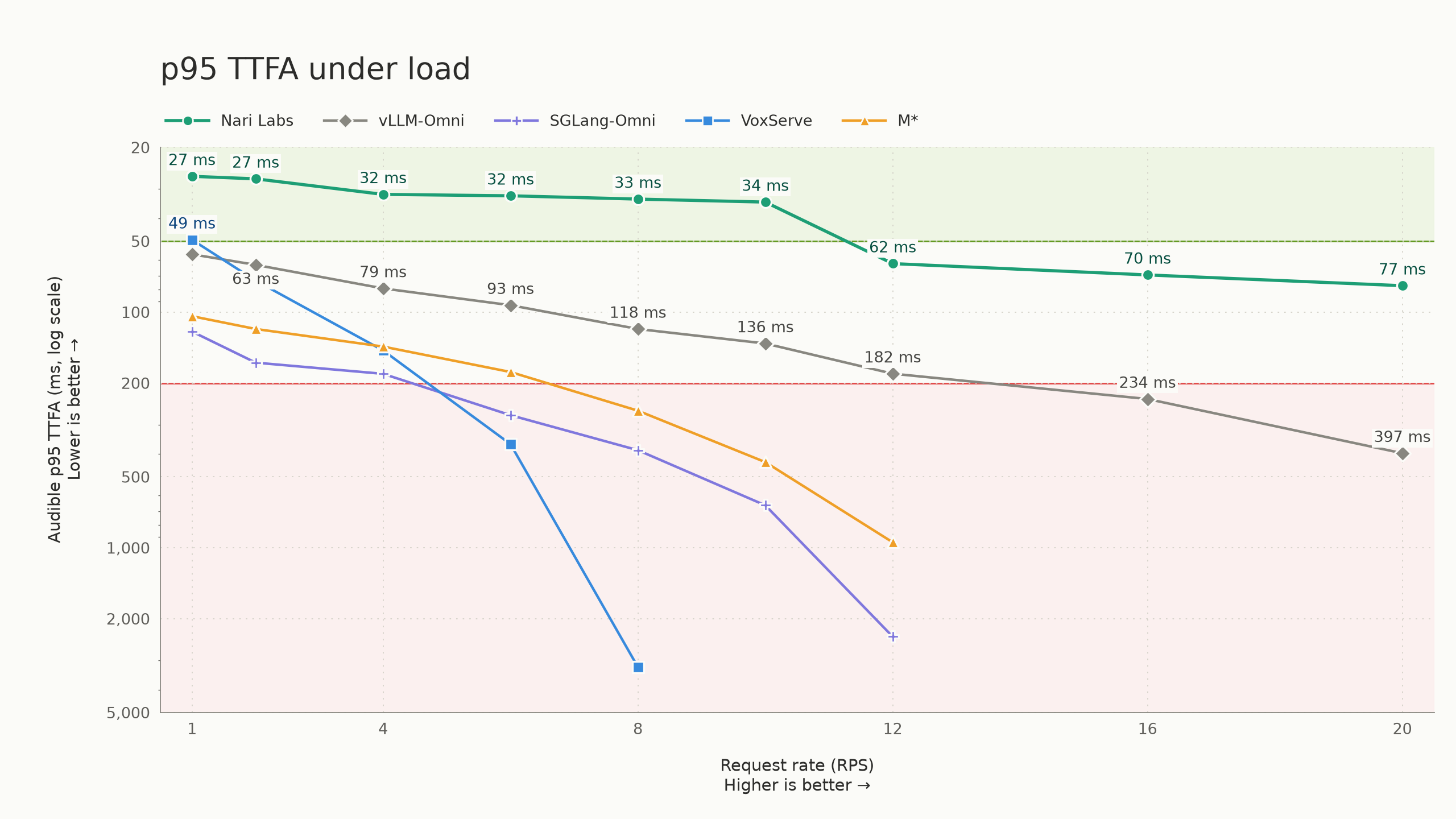
POST /v1/audio/speech follows the OpenAI Audio Speech request shape, though this server only supports its single bundled model, wav/pcm output, and speed 1.0, plus Nari-specific controls like language.How fast is the speech generation?On a single H100 SXM it sustains 10 requests per second with sub-50ms p95 time-to-first-audio, and even at 20 RPS it holds sub-80ms p95 TTFA while keeping real-time playback.
On a single H100 SXM it sustains 10 requests per second with sub-50ms p95 time-to-first-audio, and even at 20 RPS it holds sub-80ms p95 TTFA while keeping real-time playback.How does it compare to other TTS serving engines?The README benchmarks it against other high-performance serving engines like vLLM-Omni, SGLang-Omni and VoxServe, pointing to a separate benchmark repository and blog post for the full methodology.
The README benchmarks it against other high-performance serving engines like vLLM-Omni, SGLang-Omni and VoxServe, pointing to a separate benchmark repository and blog post for the full methodology.What are similar projects?vllm-omni, HyperQwen, InstinctFlash, TensorFold, text-generation-inference, csm, project-maya, dgx-spark-qwen38
vllm-omni, HyperQwen, InstinctFlash, TensorFold, text-generation-inference, csm, project-maya, dgx-spark-qwen38Which topics is it in?streaming-audio, inference-optimization, http-server, inference-engine, model-serving, audio-generation, text-to-speech, websocket, openai-compatible, streaming, inference, nvidia
streaming-audio, inference-optimization, http-server, inference-engine, model-serving, audio-generation, text-to-speech, websocket, openai-compatible, streaming, inference, nvidia