










Что это такое?
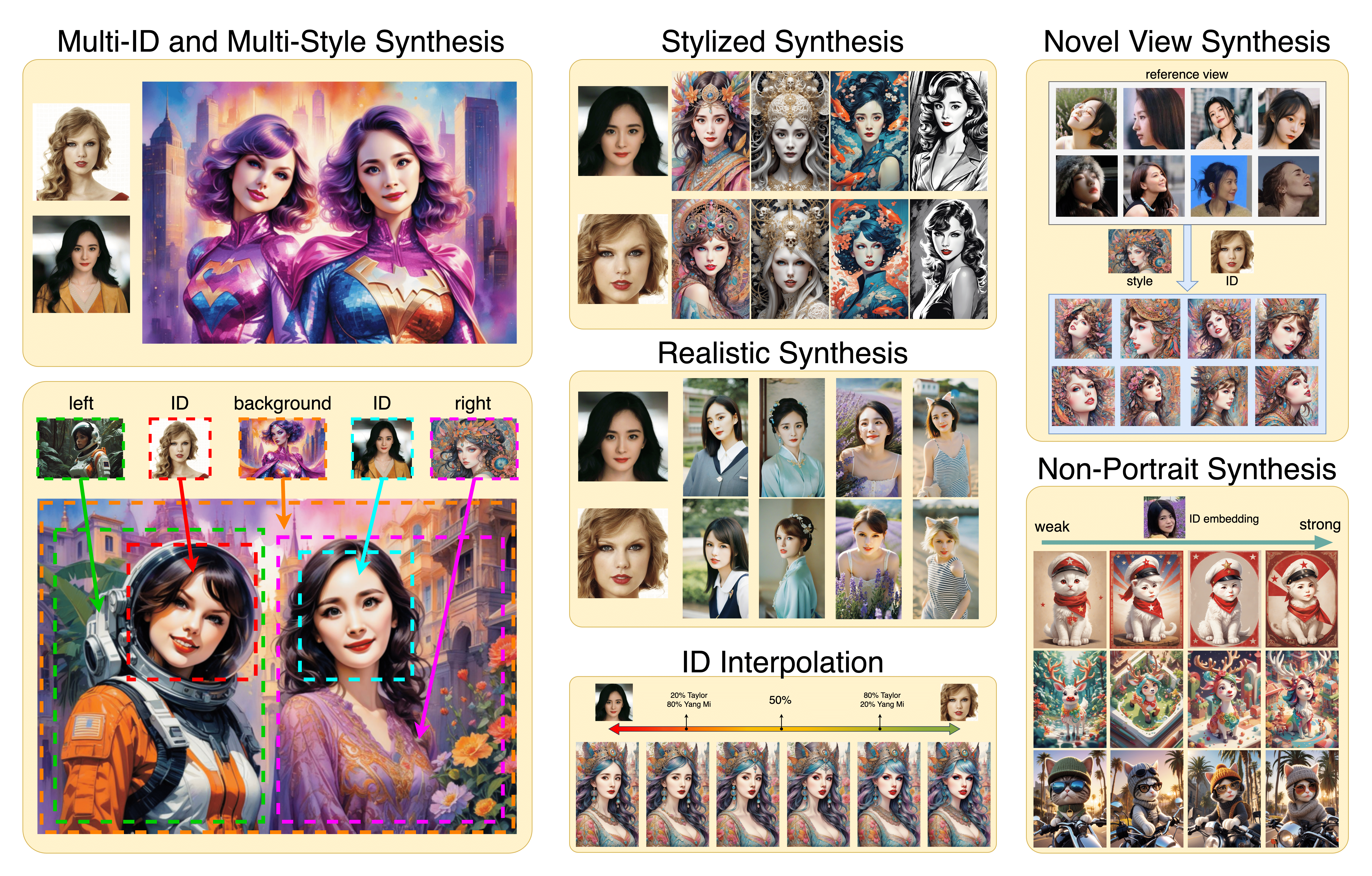
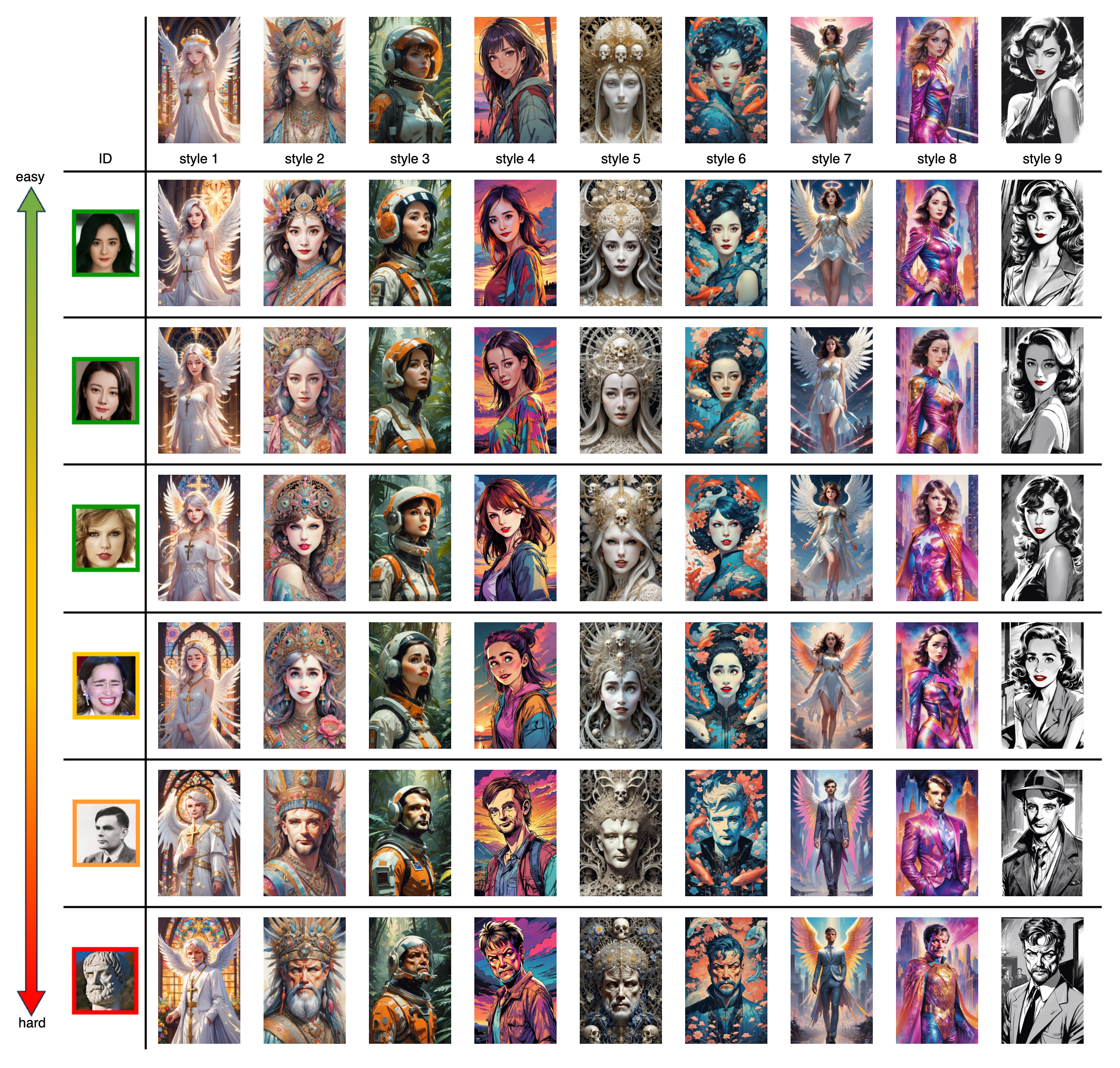
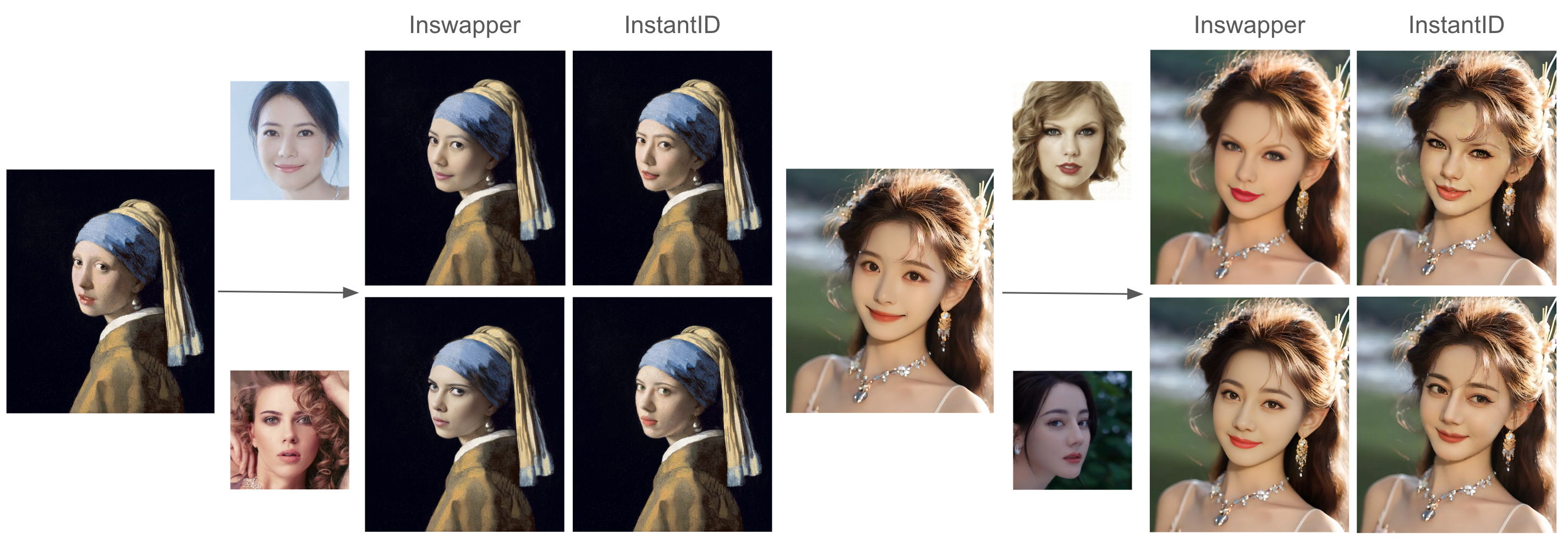
 InstantID — это метод генерации изображений с сохранением внешности человека, которому не нужна донастройка: достаточно одного референсного фото лица и текстового запроса, чтобы за секунды создать новые изображения с похожим человеком.
InstantID — это метод генерации изображений с сохранением внешности человека, которому не нужна донастройка: достаточно одного референсного фото лица и текстового запроса, чтобы за секунды создать новые изображения с похожим человеком.Это приложение, которое я устанавливаю, или код с моделями, которые встраиваются во что-то другое?Скорее исследовательский код, чем готовое приложение: пайплайн на Python, вошедший в Hugging Face diffusers, плюс скрипты для инференса и локальное gradio-демо в репозитории. Есть интеграции от сообщества для ComfyUI, sd-webui-controlnet и Replicate.
Скорее исследовательский код, чем готовое приложение: пайплайн на Python, вошедший в Hugging Face diffusers, плюс скрипты для инференса и локальное gradio-демо в репозитории. Есть интеграции от сообщества для ComfyUI, sd-webui-controlnet и Replicate.Как запустить это у себя?Склонируйте репозиторий, скачайте чекпоинты с Hugging Face (или через hf-mirror, если доступ заблокирован) и вручную положите энкодер лиц antelopev2 в models/antelopev2. Затем запустите скрипт инференса или локальное gradio-демо.
Склонируйте репозиторий, скачайте чекпоинты с Hugging Face (или через hf-mirror, если доступ заблокирован) и вручную положите энкодер лиц antelopev2 в models/antelopev2. Затем запустите скрипт инференса или локальное gradio-демо.Что нужно помимо кода — GPU, модели, что-то ещё?Установленный Python и GPU, а также несколько файлов моделей: чекпоинт InstantID, ControlNet для IdentityNet, IP-Adapter, базовая модель Stable Diffusion и энкодер antelopev2. Если не хватает видеопамяти, поможет выгрузка на CPU (CPU offloading).
Установленный Python и GPU, а также несколько файлов моделей: чекпоинт InstantID, ControlNet для IdentityNet, IP-Adapter, базовая модель Stable Diffusion и энкодер antelopev2. Если не хватает видеопамяти, поможет выгрузка на CPU (CPU offloading).Чего он пока не умеет?Он работает только с одним лицом: сцены с несколькими людьми не поддерживаются — пайплайн просто берёт самое крупное лицо на фото в качестве референса.
Он работает только с одним лицом: сцены с несколькими людьми не поддерживаются — пайплайн просто берёт самое крупное лицо на фото в качестве референса.Можно ли использовать это в коммерческих проектах?Частично — код под лицензией Apache 2.0 и разрешён и в науке, и в коммерции, но модели лиц insightface и выпущенные чекпоинты InstantID предназначены только для исследований, поэтому в коммерческой работе можно опираться на код, но не на поставляемые модели.
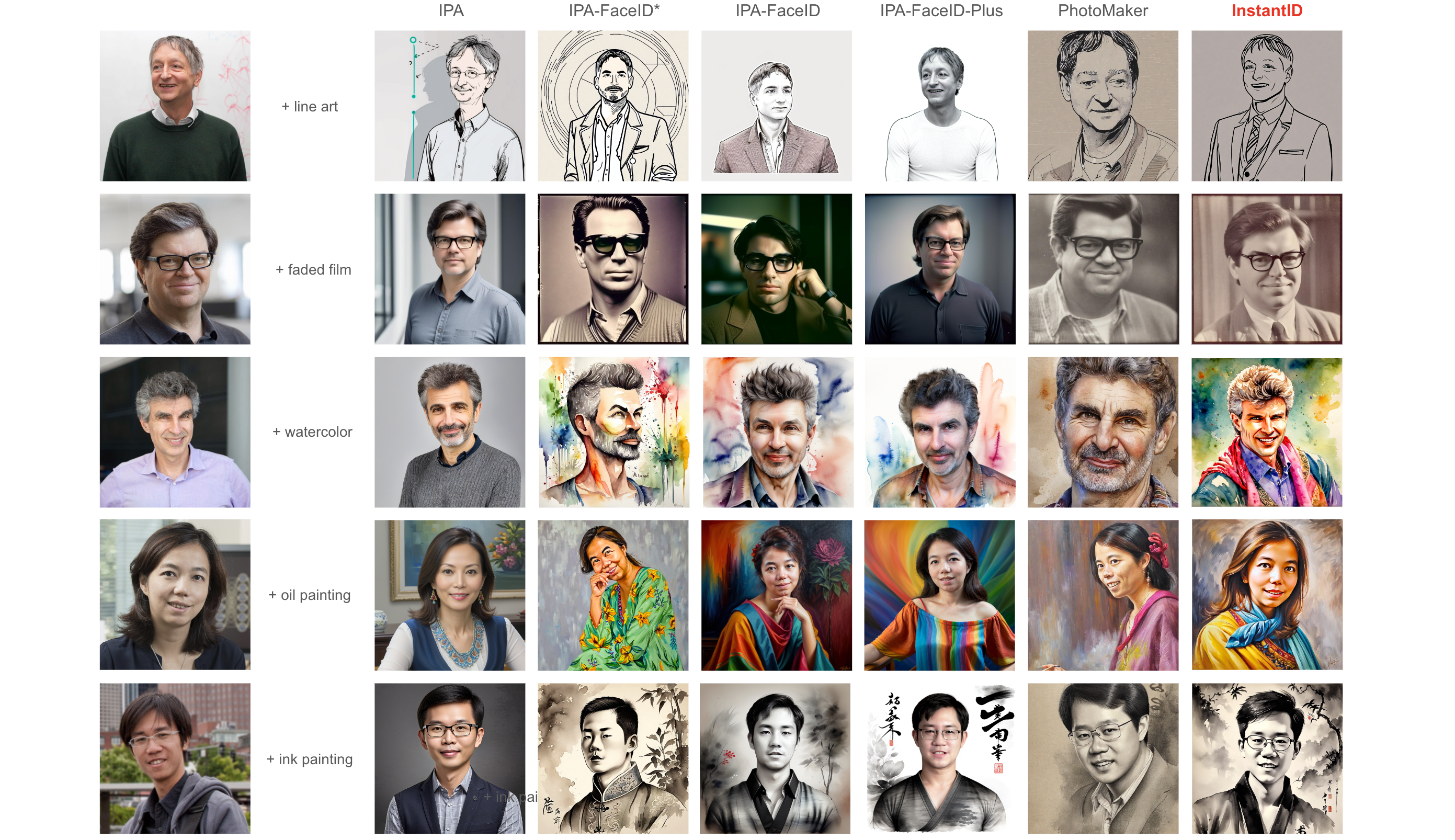
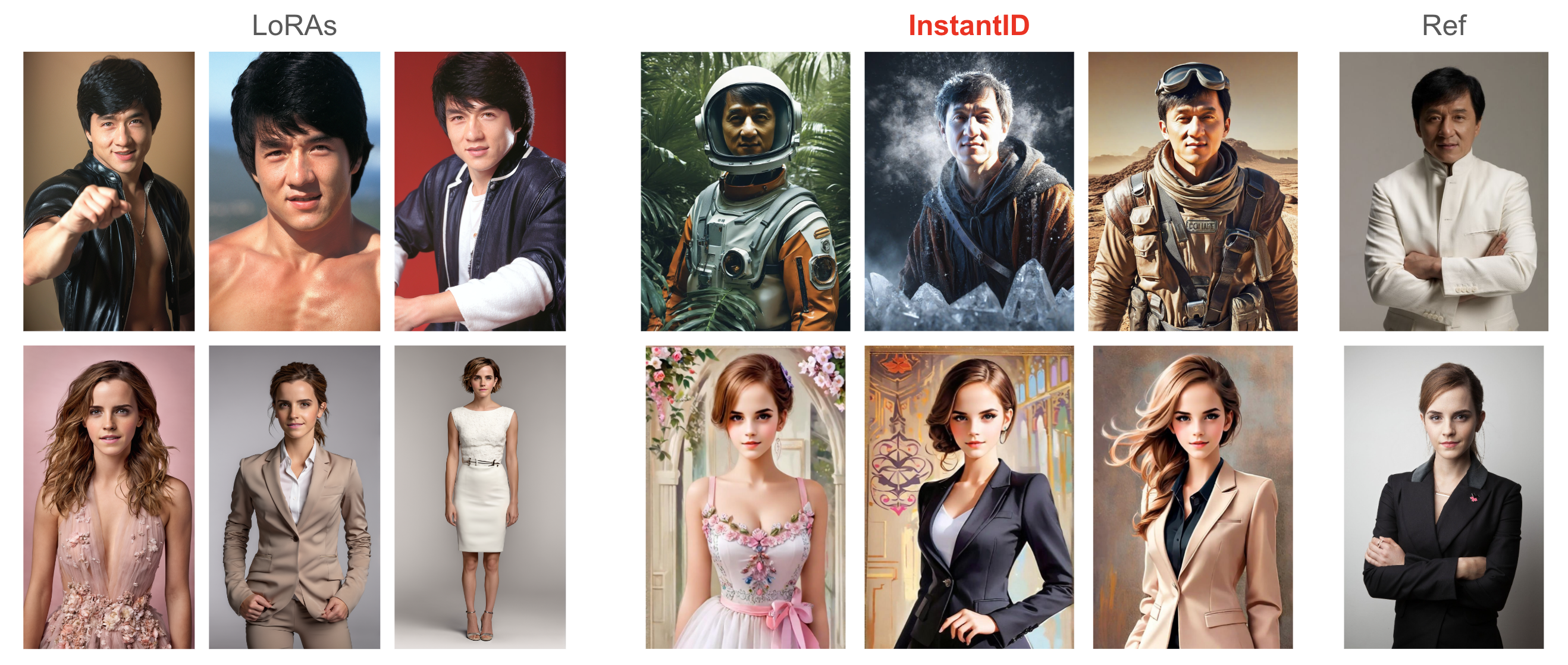
Частично — код под лицензией Apache 2.0 и разрешён и в науке, и в коммерции, но модели лиц insightface и выпущенные чекпоинты InstantID предназначены только для исследований, поэтому в коммерческой работе можно опираться на код, но не на поставляемые модели.Чем это отличается от обучения LoRA на лицо конкретного человека?Обучения нет вообще: для персонажной LoRA нужно много фото человека и запуск файнтюнинга, а InstantID работает без донастройки и всего с одной картинки — в README утверждается, что результаты конкурентоспособны, а лица и стили смешиваются лучше, чем у предыдущих методов без донастройки.
Обучения нет вообще: для персонажной LoRA нужно много фото человека и запуск файнтюнинга, а InstantID работает без донастройки и всего с одной картинки — в README утверждается, что результаты конкурентоспособны, а лица и стили смешиваются лучше, чем у предыдущих методов без донастройки.Результат слишком непохож на моё референсное фото — как это исправить?Увеличьте controlnet_conditioning_scale (IdentityNet) и ip_adapter_scale, чтобы повысить сходство. Если цвета становятся пересыщенными, сначала уменьшите ip_adapter_scale, а если не помогло — controlnet_conditioning_scale. Меньший ip_adapter_scale также даёт текстовому запросу больше влияния.
Увеличьте controlnet_conditioning_scale (IdentityNet) и ip_adapter_scale, чтобы повысить сходство. Если цвета становятся пересыщенными, сначала уменьшите ip_adapter_scale, а если не помогло — controlnet_conditioning_scale. Меньший ip_adapter_scale также даёт текстовому запросу больше влияния.Можно попробовать InstantID без установки чего-либо?Да — есть демо на Hugging Face Spaces с поддержкой ускорения LCM и Multi-ControlNets, а также демо на Replicate (zsxkib/instant-id). Пользователи WebUI могут воспользоваться расширением sd-webui-controlnet от Mikubill.
Да — есть демо на Hugging Face Spaces с поддержкой ускорения LCM и Multi-ControlNets, а также демо на Replicate (zsxkib/instant-id). Пользователи WebUI могут воспользоваться расширением sd-webui-controlnet от Mikubill.Можно ускорить генерацию?Да, InstantID совместим с LCM-LoRA: загрузите её и запускайте инференс с небольшим num_inference_steps, удерживая guidance_scale в диапазоне от 0 до 1. В примечаниях к релизу также упоминается OneDiff как вариант ускоренного инференса.
Да, InstantID совместим с LCM-LoRA: загрузите её и запускайте инференс с небольшим num_inference_steps, удерживая guidance_scale в диапазоне от 0 до 1. В примечаниях к релизу также упоминается OneDiff как вариант ускоренного инференса.What are similar projects?ControlNet, PhotoMaker, latent-diffusion, kohya_ss, diffusers, stable-diffusion-webui-colab, stable-diffusion, generative-models
ControlNet, PhotoMaker, latent-diffusion, kohya_ss, diffusers, stable-diffusion-webui-colab, stable-diffusion, generative-modelsWhich topics is it in?controlnet, face-recognition, comfyui, stable-diffusion, gradio, text-to-image, pretrained-models, diffusion-models, image-generation, inference, generative-ai, huggingface
controlnet, face-recognition, comfyui, stable-diffusion, gradio, text-to-image, pretrained-models, diffusion-models, image-generation, inference, generative-ai, huggingface