@inproceedings{wang2025vggt,
  title={VGGT: Visual Geometry Grounded Transformer},
  author={Wang, Jianyuan and Chen, Minghao and Karaev, Nikita and Vedaldi, Andrea and Rupprecht, Christian and Novotny, David},
  booktitle={Proceedings of the IEEE/CVF Conference on Computer Vision and Pattern Recognition},
  year={2025}
}
Updates
[May 18, 2026] The next step of VGGT — VGGT-Omega — has been released! Check it out at https://vggt-omega.github.io/.
[May 15, 2026] We fixed an implementation issue that was keeping redundant intermediate tensors in memory. With the same GPU memory budget, VGGT can now run on roughly 2-3x more input frames! See VGGT-Omega for more details.
[July 29, 2025] We've updated the license for VGGT to permit commercial use (excluding military applications). All code in this repository is now under a commercial-use-friendly license. However, only the newly released checkpoint VGGT-1B-Commercial is licensed for commercial usage — the original checkpoint remains non-commercial. Full license details are available here. Access to the checkpoint requires completing an application form, which is processed by a system similar to LLaMA's approval workflow, automatically. The new checkpoint delivers similar performance to the original model. Please submit an issue if you notice a significant performance discrepancy.
[July 6, 2025] Training code is now available in the training folder, including an example to finetune VGGT on a custom dataset.
[June 13, 2025] Honored to receive the Best Paper Award at CVPR 2025! Apologies if I’m slow to respond to queries or GitHub issues these days. If you’re interested, our oral presentation is available here. Another long presentation can be found here (Note: it’s shared in .pptx format with animations — quite large, but feel free to use it as a template if helpful.)
[June 2, 2025] Added a script to run VGGT and save predictions in COLMAP format, with bundle adjustment support optional. The saved COLMAP files can be directly used with gsplat or other NeRF/Gaussian splatting libraries.
[May 3, 2025] Evaluation code for reproducing our camera pose estimation results on Co3D is now available in the evaluation branch.
Overview
Visual Geometry Grounded Transformer (VGGT, CVPR 2025) is a feed-forward neural network that directly infers all key 3D attributes of a scene, including extrinsic and intrinsic camera parameters, point maps, depth maps, and 3D point tracks, from one, a few, or hundreds of its views, within seconds.
Quick Start
First, clone this repository to your local machine, and install the dependencies (torch, torchvision, numpy, Pillow, and huggingface_hub).
git clone [email protected]:facebookresearch/vggt.git
cd vggt
pip install -r requirements.txt
Alternatively, you can install VGGT as a package (click here for details).
Now, try the model with just a few lines of code:
import torch
from vggt.models.vggt import VGGT
from vggt.utils.load_fn import load_and_preprocess_images

device = "cuda" if torch.cuda.is_available() else "cpu"
# bfloat16 is supported on Ampere GPUs (Compute Capability 8.0+)
dtype = torch.bfloat16 if torch.cuda.get_device_capability()[0] >= 8 else torch.float16

# Initialize the model and load the pretrained weights.
# This will automatically download the model weights the first time it's run, which may take a while.
model = VGGT.from_pretrained("facebook/VGGT-1B").to(device)

# Load and preprocess example images (replace with your own image paths)
image_names = ["path/to/imageA.png", "path/to/imageB.png", "path/to/imageC.png"]
images = load_and_preprocess_images(image_names).to(device)

with torch.no_grad():
    with torch.cuda.amp.autocast(dtype=dtype):
        # Predict attributes including cameras, depth maps, and point maps.
        predictions = model(images)
The model weights will be automatically downloaded from Hugging Face. If you encounter issues such as slow loading, you can manually download them here and load, or:
model = VGGT()
_URL = "https://huggingface.co/facebook/VGGT-1B/resolve/main/model.pt"
model.load_state_dict(torch.hub.load_state_dict_from_url(_URL))
Detailed Usage
Click to expand
You can also optionally choose which attributes (branches) to predict, as shown below. This achieves the same result as the example above. This example uses a batch size of 1 (processing a single scene), but it naturally works for multiple scenes.
from vggt.utils.pose_enc import pose_encoding_to_extri_intri
from vggt.utils.geometry import unproject_depth_map_to_point_map

with torch.no_grad():
    with torch.cuda.amp.autocast(dtype=dtype):
        images = images[None]  # add batch dimension
        aggregated_tokens_list, ps_idx = model.aggregator(images)

    # Predict Cameras
    pose_enc = model.camera_head(aggregated_tokens_list)[-1]
    # Extrinsic and intrinsic matrices, following OpenCV convention (camera from world)
    extrinsic, intrinsic = pose_encoding_to_extri_intri(pose_enc, images.shape[-2:])

    # Predict Depth Maps
    depth_map, depth_conf = model.depth_head(aggregated_tokens_list, images, ps_idx)

    # Predict Point Maps
    point_map, point_conf = model.point_head(aggregated_tokens_list, images, ps_idx)

    # Construct 3D Points from Depth Maps and Cameras
    # which usually leads to more accurate 3D points than point map branch
    point_map_by_unprojection = unproject_depth_map_to_point_map(depth_map.squeeze(0),
                                                                extrinsic.squeeze(0),
                                                                intrinsic.squeeze(0))

    # Predict Tracks
    # choose your own points to track, with shape (N, 2) for one scene
    query_points = torch.FloatTensor([[100.0, 200.0],
                                        [60.72, 259.94]]).to(device)
    track_list, vis_score, conf_score = model.track_head(aggregated_tokens_list, images, ps_idx, query_points=query_points[None])
Furthermore, if certain pixels in the input frames are unwanted (e.g., reflective surfaces, sky, or water), you can simply mask them by setting the corresponding pixel values to 0 or 1. Precise segmentation masks aren't necessary - simple bounding box masks work effectively (check this issue for an example).
Interactive Demo
We provide multiple ways to visualize your 3D reconstructions. Before using these visualization tools, install the required dependencies:
pip install -r requirements_demo.txt
Interactive 3D Visualization
Please note: VGGT typically reconstructs a scene in less than 1 second. However, visualizing 3D points may take tens of seconds due to third-party rendering, independent of VGGT's processing time. The visualization is slow especially when the number of images is large.
Gradio Web Interface
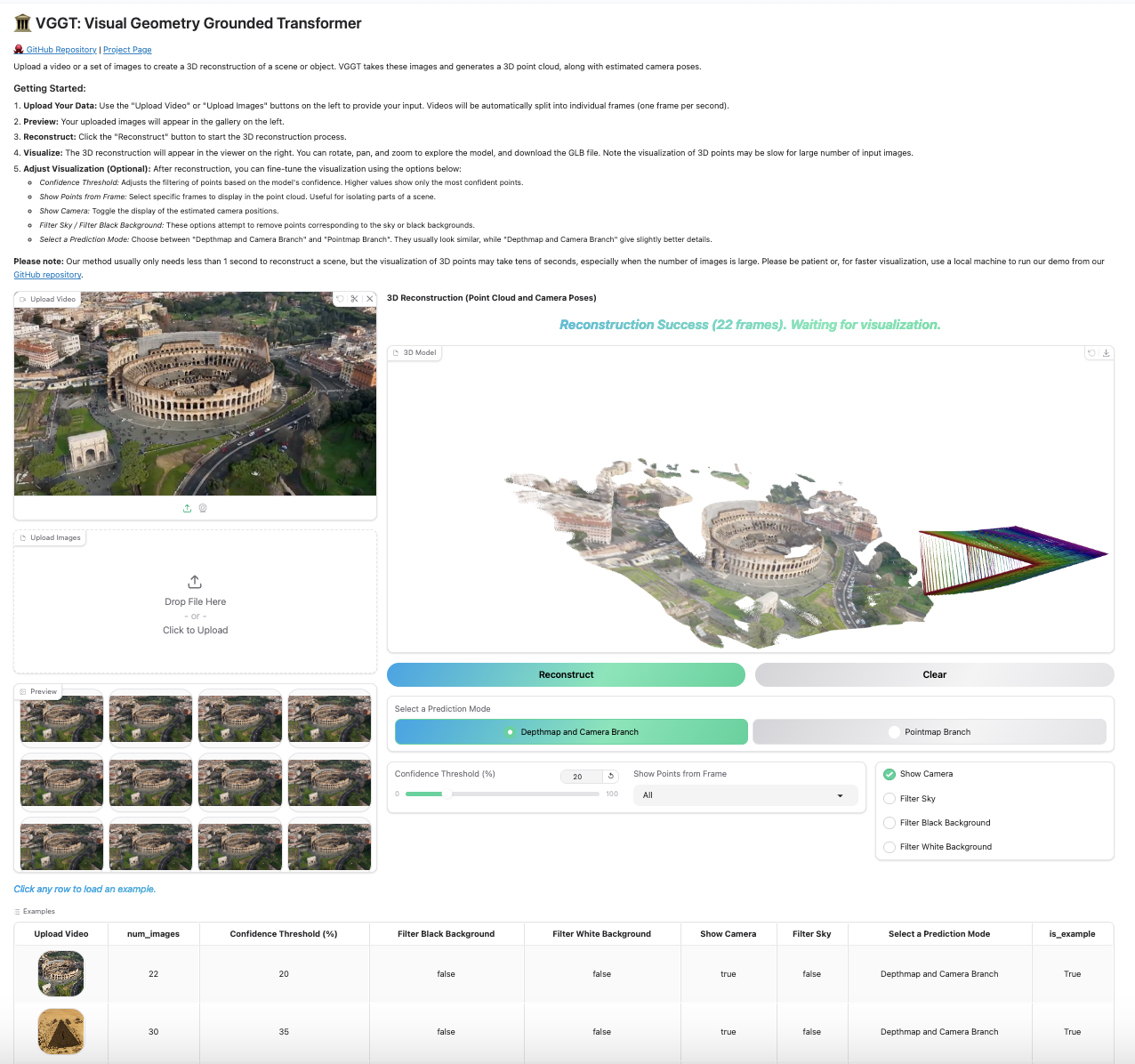
Our Gradio-based interface allows you to upload images/videos, run reconstruction, and interactively explore the 3D scene in your browser. You can launch this in your local machine or try it on Hugging Face.
python demo_gradio.py
Click to preview the Gradio interactive interface
Viser 3D Viewer
Run the following command to run reconstruction and visualize the point clouds in viser. Note this script requires a path to a folder containing images. It assumes only image files under the folder. You can set --use_point_map to use the point cloud from the point map branch, instead of the depth-based point cloud.
python demo_viser.py --image_folder path/to/your/images/folder
We also support exporting VGGT's predictions directly to COLMAP format, by:
# Feedforward prediction only
python demo_colmap.py --scene_dir=/YOUR/SCENE_DIR/

# With bundle adjustment
python demo_colmap.py --scene_dir=/YOUR/SCENE_DIR/ --use_ba

# Run with bundle adjustment using reduced parameters
# Reduces max_query_pts from 4096 (default) to 2048 and query_frame_num from 8 (default) to 5
# Trade-off: Potentially less robust reconstruction in complex scenes (you may consider setting query_frame_num equal to your total number of images)
# See demo_colmap.py for additional bundle adjustment configuration options
python demo_colmap.py --scene_dir=/YOUR/SCENE_DIR/ --use_ba --max_query_pts=2048 --query_frame_num=5
Please ensure that the images are stored in /YOUR/SCENE_DIR/images/. This folder should contain only the images. Check the examples folder for the desired data structure.
The reconstruction result (camera parameters and 3D points) will be automatically saved under /YOUR/SCENE_DIR/sparse/ in the COLMAP format, such as:
SCENE_DIR/
├── images/
└── sparse/
    ├── cameras.bin
    ├── images.bin
    └── points3D.bin
Integration with Gaussian Splatting
The exported COLMAP files can be directly used with gsplat for Gaussian Splatting training. Install gsplat following their official instructions (we recommend gsplat==1.3.0):
An example command to train the model is:
cd gsplat
python examples/simple_trainer.py  default --data_factor 1 --data_dir /YOUR/SCENE_DIR/ --result_dir /YOUR/RESULT_DIR/
Zero-shot Single-view Reconstruction
Our model shows surprisingly good performance on single-view reconstruction, although it was never trained for this task. The model does not need to duplicate the single-view image to a pair, instead, it can directly infer the 3D structure from the tokens of the single view image. Feel free to try it with our demos above, which naturally works for single-view reconstruction.
We did not quantitatively test monocular depth estimation performance ourselves, but @kabouzeid generously provided a comparison of VGGT to recent methods here. VGGT shows competitive or better results compared to state-of-the-art monocular approaches such as DepthAnything v2 or MoGe, despite never being explicitly trained for single-view tasks.
Research Progression
Our work builds upon a series of previous research projects. If you're interested in understanding how our research evolved, check out our previous works:
Acknowledgements
Thanks to these great repositories: PoseDiffusion, VGGSfM, CoTracker, DINOv2, Dust3r, Moge, PyTorch3D, Sky Segmentation, Depth Anything V2, Metric3D and many other inspiring works in the community.
Checklist
- Release the training code
- Release VGGT-500M and VGGT-200M
License
See the LICENSE file for details about the license under which this code is made available.
Please note that only this model checkpoint allows commercial usage. This new checkpoint achieves the same performance level (might be slightly better) as the original one, e.g., AUC@30: 90.37 vs. 89.98 on the Co3D dataset.





 VGGT(Visual Geometry Grounded Transformer)是一种前馈神经网络,能在几秒钟内从一张、几张或数百张图像中直接推断出场景的三维属性,包括相机内参和外参、深度图、点图以及三维点轨迹。它获得了 CVPR 2025 最佳论文奖。