A foundation model for mobiles, wearables, robots, smart home, automotive and microcontrollers. The whole model is a single 8-29 MB binary built on our Simple Attention Network, and we trade general chat capacity to beat models 10x its size on mobile tool calls and match 2-3x bigger models on extraction.
- Tool calls: given the functions your app exposes, Needle picks the right ones and fills every argument from what the user said. Ask for two things and you get two calls in order; ask for something no tool covers and you get an empty list, not a guess.
- Structured extraction: declare a shape, hand over messy text, get typed fields back: an invoice, a booking, a notification, a form. The decode grammar guarantees the output parses, and extraction generalises to classification.
- Text embedding: the same model returns a vector for a sentence, so an app can search, match and route locally.
- Speech: Whistle, our speech-to-text model, shares Needle's container and engine. One build gives Needle audio input: the clip goes in, the tool calls come out.
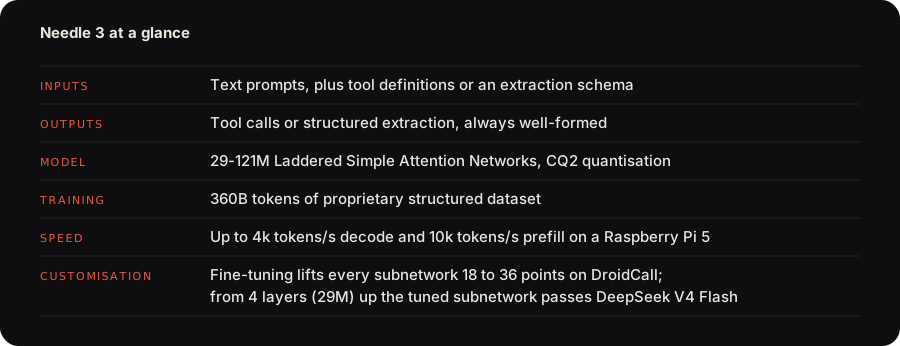
Needle 3 is a Laddered Simple Attention Network: a Monarch Hadamard MLP in place of the FFN, GQA attention with causal conv taps, engram n-gram memory read by gather, and multi-lane hyper-connections, trained so that every depth from 2 to 20 layers is a deployable model. Most of its parameters sit in the engram, so the 121M model does the arithmetic of a 50M one. A byte-level grammar compiled from your schemas constrains every token, and every response carries a calibrated confidence score from a learned head. The architecture diagram is on the release page.
Benchmarks
Tool calling is exact-match accuracy on the full test splits, extraction is field micro-F1 on the full test splits.
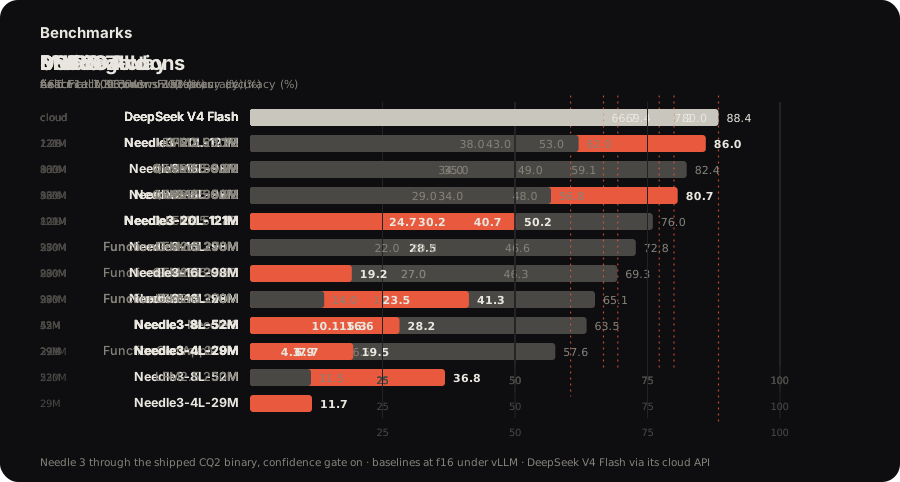
The interactive frontier plot, the architecture and the fine-tuning results are at cactuscompute.com/needle.
Get started
pip install cactus-needle
Try it in the browser at cactuscompute.com/needle; the weights and every platform engine are on Hugging Face.
Decorate a function: the signature gives the argument types, the docstring is the tool description, and run() completes the loop, executing your function and returning its results.
import needle

@needle.tool
def get_weather(city: str):
    "Get the current weather for a city."
    return {"city": city, "temp_c": 27, "sky": "clear"}

agent = needle.Needle(tools=[get_weather])
print(agent.run("what's it like in Lagos right now?")["results"])
# [{'city': 'Lagos', 'temp_c': 27, 'sky': 'clear'}]
Every turn returns one JSON object with function_calls, the model's reasoning and a calibrated confidence; an off-topic request returns an empty list rather than a guess. needle.Needle(tools=[...], generation=2) keeps running Needle 2 for existing deployments.
JavaScript / TypeScript
The community-maintained cactus-needle package runs Needle and Whistle in Node.js and browsers using WebAssembly.
npm install cactus-needle
Demo · Examples · npm
Whistle
Whistle is our speech-to-text model, one 16.9 MB file on the CPU: 16 kHz mono audio of any length, one pass up to 30 seconds and windowed beyond it, in English, German, French, Spanish, Italian, Dutch and Polish. It shares Needle's .cact container, its quantisation and its C++ engine, so the two are one runtime, and its decoder is laddered the same way, with --audio-depth N running the N-layer rung of the same weights.
import needle

print(needle.transcribe("clip.wav")["text"])
# turn off the kitchen lights
Every call returns the text, the language, the milliseconds to the first token and the decoder's tokens per second after it. word_timestamps=True adds each word with its start, end and probability, keywords=[...] favours the names, product words and jargon your users say, and language="de" forces the language instead of detecting it. needle.Whistle() is the same model as an object, for embed(audio) or to hold one tuned .cact. Silence and steady noise return an empty transcript rather than an invented sentence; other sounds, music especially, can still come out as text, so put a voice activity detector or a wake word in front of an always-on microphone. needle.stream(chunks) transcribes live for as long as the microphone runs, committing the words two passes agree on. needle whistle playground transcribes from the microphone, and needle whistle compare puts Whistle next to Whisper and Moonshine on the same clip.
At 16.9 MB Whistle is 8.6x smaller than Whisper base and 6.6x quicker to the first token. It is ahead on LibriSpeech test-clean and test-other, on SPGISpeech, on Earnings-22 and on the FLEURS average. Whisper base is ahead on TED-LIUM, on AMI and on the MLS average.
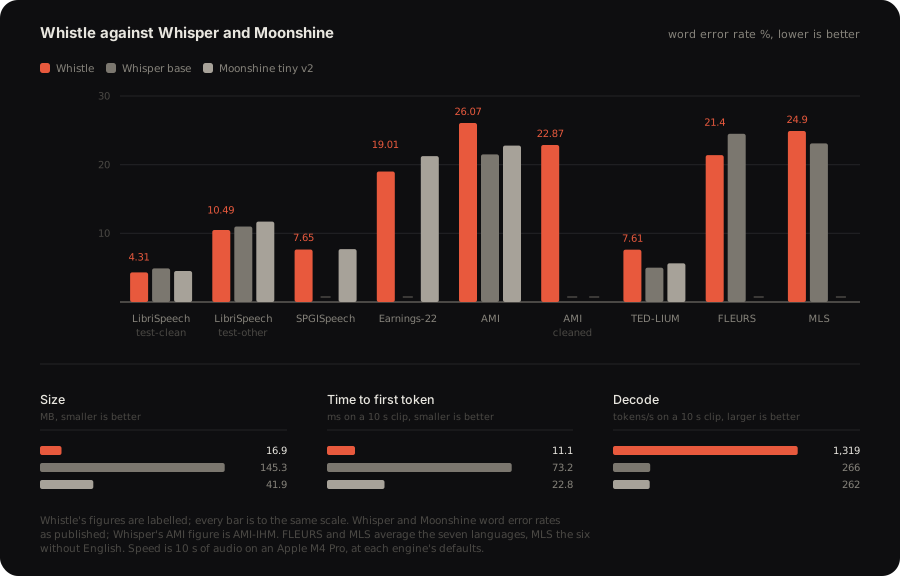
Word error rate on the full test splits, scored with the Whisper normalizers. Whisper and Moonshine figures are the ones their authors published. Latency and decode are 10 s of audio on an Apple M4 Pro, at each engine's defaults. The per-benchmark caveats are on Hugging Face.
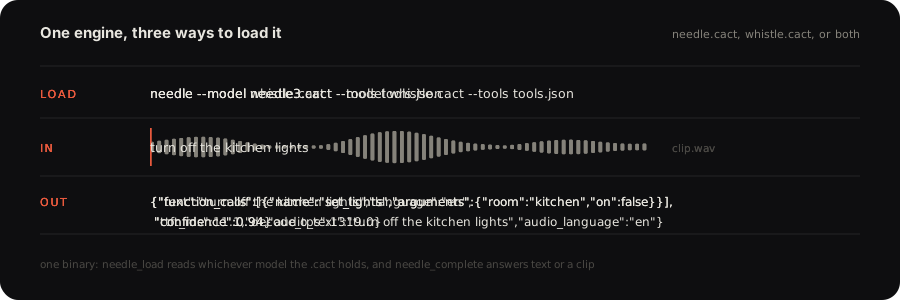
needle --model needle3.cact --model whistle.cact --tools tools.json --audio clip.wav
One engine holds both models: needle_load reads whichever one a .cact carries, and needle_complete takes a clip wherever it takes text. It transcribes, answers the transcript against your tools, and returns one JSON object with the tool calls and the speech fields, the speech ones prefixed audio_. The transcription stays inside the engine, so audio in and tool calls out is one call, and it favours the option values your schemas enumerate, so a clip that names one is transcribed as the schema spells it.
The benchmarks against Whisper and Moonshine, the architecture and the interactive demo are at cactuscompute.com/whistle; the weights and every platform engine are on Hugging Face.
Whistle fine-tunes locally: LoRA adapters on the attention projections, base frozen, merged at export, 4-bit. It takes training, validation and test JSONL files, each line {"audio": "clip.wav", "text": "...", "language": "pt"}; a language code outside the seven adds that language, and --tokens takes a file of words or characters to add to the vocabulary, one per line.
pip install "cactus-needle[train]"
needle whistle finetune train.jsonl validation.jsonl test.jsonl --tokens tokens.txt --out adapter.safetensors
needle whistle build --lora adapter.safetensors --out tuned.cact
Guides
- How to design tools for Needle 3: one tool per action, names users would say, formats in descriptions, constraints in the grammar, triggers.
- Leveraging Needle's confidence: what the score measures, what the engine withholds, and routing on act, confirm or refuse.
- Structured JSON extraction with Needle: the record as the only tool, typed results, classification with enums.
- Fine-tuning Needle: the data format, the commands, reading the loss, sizing the dataset.
- Fine-tuning Whistle: the data format, new characters, the commands, how much data a new language needs.
- Getting the most out of Whistle: input, word timestamps, live transcription, language, keywords, depth, Whistle with Needle.
- Needle Python docs: the API, the response shape, the behaviour contract, system facts, tool retrieval, offline devices, environments, the CLI.
- What devices are supported on Needle: every platform folder, the CLI runner, the C API, the browser, WASI, air-gapped setup.
- The .cact format: the file the engine maps and reads in place, Cactus Quants at 2.125 bits per weight, and how to parse it yourself.
- Porting Needle 3: notes for writing your own runtime, the oracle to test against, the tensor order the container promises, the prompt on the wire, the ladder rule, retrieval with
needle_embed.
llms.txt in this repo carries the same reference for AI coding assistants.
Customisation
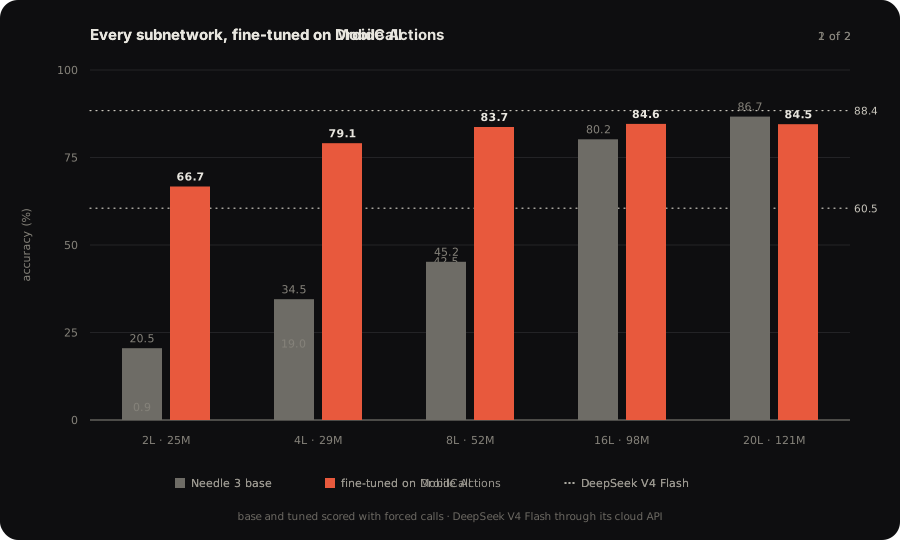
Needle was designed to be customised. Its capacity is a ladder, and a subnetwork as small as 2 layers, fine-tuned on one product's tools, runs optimally on devices far smaller than the full model needs. Fine-tuning on DroidCall lifts every subnetwork by 18 to 36 points, and from 4 layers up the tuned subnetwork passes DeepSeek V4 Flash, starting at 29M parameters.
Two ways to fine-tune, from the same package:
|
Local, needle finetune |
Platform, needle platform finetune |
| What trains |
LoRA adapters on the attention projections, base frozen, merged at export |
The full model, every depth from 2 layers up |
| What it keeps |
Your data only |
Your data reinforced with Needle's original dataset, so nothing already learned is unlearned |
| Confidence |
Head untouched; confidence is None |
Head fine-tuned with the model, calibrated on your tools |
| Precision |
4-bit |
2-bit, the same post-training as the shipped model |
| Data |
Your JSONL, query/answers or chat format |
Yours, or generated from your tool definitions, 100 to 10,000 examples per run |
| Scores |
Validation loss |
Validation and test accuracy for every depth |
| Compute |
Your machine, JAX on CPU, CUDA or Metal |
Cactus GPUs |
| Runs from |
The CLI |
The CLI, Python, the dashboard, or a coding agent holding your key |
Local:
pip install "cactus-needle[train]"
needle finetune data.jsonl --epochs 10 --out adapter.safetensors
needle build --lora adapter.safetensors --layers 8 --out tuned.cact
Platform, with a key from the console in NEEDLE_API_KEY. One command uploads the files, trains and scores every size, and downloads the .cact files; once a job is submitted it can also be followed on the dashboard:
export NEEDLE_API_KEY=needle_ft_...
needle platform generate --tools tools.json --examples 1000 --out ./data
needle platform finetune data/train.jsonl data/validation.jsonl data/test.jsonl --suffix smart-home --out ./models
from needle.platform import Platform

client = Platform()
job = client.wait(client.finetune(["train.jsonl"], ["validation.jsonl"], ["test.jsonl"], suffix="smart-home"))
paths = client.download(job["fine_tuned_model"], "models", depth=8)
Or hand the key to Claude Code or Codex with cactuscompute.com/llms.txt and let the agent run the loop. needle platform jobs | models | files | billing list what the account holds, needle download model-<id> fetches a model by id, and the fine-tuning guide covers the data format and how to read the scores.
Deploy
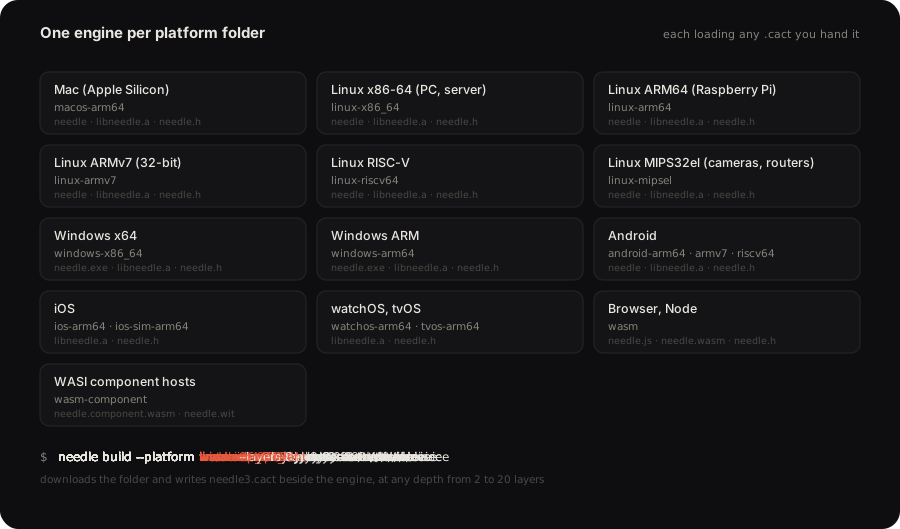
Every deployment target ships a prebuilt engine that loads the needle3.cact weights at start. needle build --platform <folder> [--layers N] fetches that engine and puts the weights beside it.
needle build --platform macos-arm64
needle build --platform linux-arm64 --layers 8 --out ./pi
./macos-arm64/needle --model needle3.cact --tools tools.json --serve
The devices guide lists every folder and what ships in it.
By default, telemetry is turned on in the binary. To turn it off, set environment variables NEEDLE_TELEMETRY=0 and DO_NOT_TRACK=1.
Citation
Needle is built by the Cactus Compute team. If you use it in your work, please cite:
@misc{needle3_2026,
  title        = {Needle: Automation Foundation Model for Tiny Devices},
  author       = {Ndubuaku, Henry and Mosoyan, Karen and Mroz, Jakub and Cylich, Noah and
                  Kumar, Satyajit and Sandhu, Parkirat and Shemet, Roman and Lee, Justin H.},
  year         = {2026},
  organization = {Cactus Compute, Inc.},
  howpublished = {\url{https://github.com/cactus-compute/needle}}
}

 Needle 2 is an open 45M-parameter model for tool calling, device use and structured extraction that ships as a single 14MB binary and runs a full session in about 28MB of RAM. This repo is its Python package for inference, LoRA fine-tuning and export.