[!CAUTION]
⚠️ Beware of Fake FluentCleaner Websites
FluentCleaner has no affiliation with fluentcleaner.org
The only official source for FluentCleaner is this GitHub repository. I do not own, operate, or endorse that website or any other third-party download site.
For your safety, only download FluentCleaner from the official releases published here on GitHub.
A polished website doesn't make it official, always verify the source. 🛡️
FluentCleaner
modern, transparent, no spyware, no scareware, no dark patterns, no upsell garbage, no fake registry magic
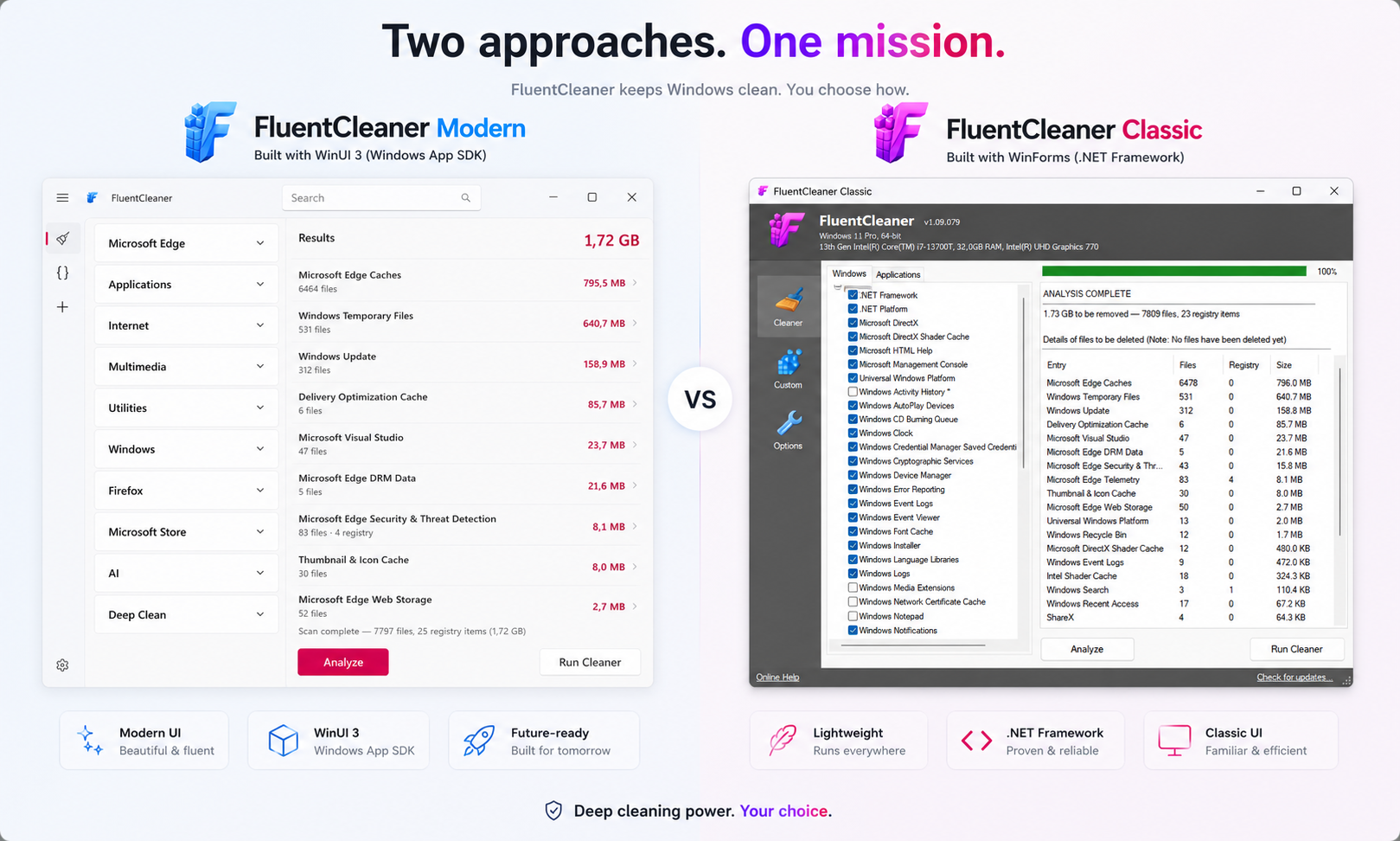
i built my own take on a cleaner, inspired by the old CCleaner from back in the 2006 days, just adapted to how things should work today. modern (built with WinUI 3), minimal and focused on actually cleaning what matters (without all the usual nonsense)
i built this because at some point you start noticing a pattern
things that were genuinely good… slowly become worse.
small devs ship something great, a company buys it, optimizes it into oblivion, and suddenly you're left wondering how a simple tool turned into a "what happened here?" story. Ccleaner is basically a case study at this point, everyone knows, nobody needs another paragraph about it
funny enough, CrapCleaner only ever really survived because of the community around it, especially things like the winapp2.ini signatures. that ecosystem did more for the tool than most official decisions ever did.
i was too lazy to rebuild all cleaners natively, so i just wrote a parser for that format instead. turns out its fast. like… surprisingly fast. faster than what i remember from the old piriform implementation (no idea why that was so slow, proprietary formats, overengineering, or just history doing its thing. doesnt matter anymore anyway)
the UI is built in WinUI3 you know, Microsofts "beautiful but slow" framework, except somehow it still manages to outperform the original. go figure
companies today dont really compete on making things better. they compete on who can add more noise without breaking everything completely. and somewhere along the way, "good tools" just turned into "things people remember fondly"
CCleaner used to be great. now it’s mostly a warning.
anyway, im not trying to fix the indutry. just wanted something that doesnt suck. i'll probably get bored, or it'll evolve into something else, and we end up back at square one like always.
for now i just called it FluentCleaner.
it wasnt even meant to be public, but a lot of genuinely nice people asked me to release it, so i probably will
here's a first preview so you can get a feel for the direction. i might end up funding it through donations, we'll see.
if you like it, cool. if not, also fair
🚀 Download Latest Stable
FluentCleaner comes in two flavors. Same cleaning engine and winapp2.ini parser underneath, different UI and runtime story.
|
FluentCleaner (WinUI 3) |
FluentCleaner Classic |
| Framework |
.NET 10 + Windows App SDK |
.NET Framework 4.8 (WinForms) |
| Deployment |
self-contained (runtime bundled) |
framework-dependent (uses the runtime already on your system) |
| Unpacked size |
~140 MB |
~3.57 MB |
| Files |
243 |
20 |
| Platform |
x64 / ARM64, Windows 10 build 17763+ |
practically any Windows |
| Shared engine |
FluentCleaner.Core (netstandard2.0) — scan/clean logic, Winapp2.ini parser |
same |
| Requirements |
Windows 10 2004 (Build 19041) or later + Windows App SDK 2.0.1 runtime (installed once, separately) |
none — uses whatever .NET Framework is already on your system |
| Download |
⬇ Latest |
⬇ Latest · more info |
Not sure which one to grab? If you want the modern look and don't mind installing the Windows App SDK once, go with the main version. If you want something tiny, portable, and framework-dependent (or you're on an older/locked-down machine), grab Classic.
Install with WinGet
The modern WinUI 3 edition is also available through Windows Package Manager:
winget install --id Builtbybel.FluentCleaner --exact
Already installed? Update to the latest release with:
winget upgrade --id Builtbybel.FluentCleaner --exact
WinGet currently installs the modern edition. FluentCleaner Classic remains available as a portable download.
💬 Classic or Modern? Vote here — curious which one people actually end up using day to day.
❤️ Support
no company behind this, no investors, no marketing department. just one person building a tool because the alternative got worse every year. every bit of support helps keep it going
small start, same as CCleaner once was
FAQ
will this make my PC faster?
honestly? it depends and that's not a cop-out
on a modern system with plenty of free space, you probably won't notice a dramatic speed boost.
but Microsoft themselves say that running low on storage can slow things down and even block
Windows updates (source) so if your drive is getting full, cleaning matters more than you'd think.
beyond speed, there are solid reasons to clean regularly:
- reclaim disk space that's been quietly eaten up over months
- troubleshoot app issues caused by corrupted cache
- shrink backup size
- privacy, browser data, recently opened file lists, leftover traces from apps you uninstalled
- keep Windows updates running smoothly
- or just because a tidy system feels better. also valid.
Microsoft recommends doing this monthly. Storage Sense does it automatically.
FluentCleaner just gives you more control over what exactly gets cleaned
FluentCleaner (Modern/WinUI version) shows "Unknown Hard Error" or won't launch
the modern version requires the exact Windows App SDK 2.0.1 x64 runtime.
an older or newer Windows App SDK runtime will not work.
after installing it, restart Windows so the runtime can register properly.
if the problem continues, add the exact error and your Windows version to issue #85.
what even is winapp2.ini?
a community-maintained database of cleaning rules for Windows apps,
thousands of entries built up over 15+ years. it tells FluentCleaner exactly
what to clean for each app: which temp folders, which cache paths, which registry keys.
no guessing, no sweeping wildcards across your whole drive.
every entry is specific, inspectable, and auditable. that's the whole point.
what are flavors?
winapp2.ini comes in different variants depending on which tool you're using.
FluentCleaner uses the original CCleaner flavor, the same one that powered
the tool back when it was still worth using
is it safe?
it's as safe as what you enable. nothing runs without you selecting it first.
winapp2.ini entries only target what they're explicitly told to target,
no broad "delete everything in temp" nonsense.
that said: it deletes files. take a backup if something feels important
why WinUI 3?
because it's 2026 and windows tools shouldn't look like they were built in 2009.
also fluent design is literally in the name. felt right
CCleaner 7 dropped winapp2.ini support, what does that mean for FluentCleaner?
nothing. FluentCleaner has its own parser, completely independent of CCleaner
CCleaner dropping support was honestly part of the motivation to build this
can i translate FluentCleaner into my language?
yes please 🙌 it's built for it. here's the whole process:
- copy
FluentCleaner/Strings/en-US/Resources.resw
- create
FluentCleaner/Strings/{your-locale}/Resources.resw (e.g. fr-FR, pt-BR, zh-CN)
- translate every
<value> — leave the key names (name="...") untouched
- set
LblTranslatorCredit to your name (add your site if you want the credit)
- open a pull request 🎉
two things that trip people up:
- don't touch the XML structure — no editing
<data>, <resheader>, the version header or the <?xml ...> line. only the text inside <value> gets translated.
- this is only for the app UI. the cleaning databases (winapp2.ini etc.) come from the upstream Winapp2 project and aren't translated here.
save the file as UTF-8 and you're good. don't see your language yet? that just means nobody's done it — could be you 😉
can i translate FluentCleaner Classic into my language?
absolutely 🙌 Classic loads its translations from loose JSON files at runtime, so no recompilation is needed.
- copy
FluentCleaner.Classic/Localization/en.json
- rename it to your locale (e.g.
fr-FR.json, pt-BR.json, ja-JP.json)
- translate the string values — keep every key and placeholder such as
{0} unchanged
- fill in
_Meta_LanguageDisplayName, _Meta_TranslatorName and optionally _Meta_TranslatorWebsite
- test it from Options > Settings > Open localization folder
- submit the JSON file through a pull request or GitHub issue 🎉
see the full Classic translation guide for details.
can i use a custom winapp2 database?
yes. FluentCleaner isn't locked to one source.
tools like BBleachBit (primarily a Linux cleaner, discovered it through this project actually,
but the UI was bad enough that it came right back off), and others have their own flavors of winapp2.ini,
slightly modified versions tuned for their specific needs. you can grab any of them
(or build your own) and plug it straight into FluentCleaner.
just drop the file somewhere on your system, then head to:
Settings > Database > Custom and point it at your file. that's it.
the official database from the winapp2 project lives here:
https://github.com/MoscaDotTo/Winapp2, it's community-maintained,
updated regularly, and covers thousands of apps. a solid starting point
if you want more coverage than the default.
where can i follow development?
i post insider stuff, early builds and the occasional rant about winui on x/twitter. if you want to know what's coming before it lands in a release, that's the place.
issues and feature requests go here on github as usual.
Can I run FluentCleaner without a UI / from Task Scheduler?
yes.
FluentCleaner.exe /AUTO
Runs a silent cleanup using your currently saved selection and exits immediately.
No window, prompts or interaction.
FluentCleaner.exe /AUTO /SHUTDOWN
Same behavior, but shuts Windows down after cleanup finishes.
/SHUTDOWN alone does nothing.
Logging
Each automatic run appends a detailed log to:
%AppData%\FluentCleaner\auto.log
The log contains:
- timestamp
- every deleted path grouped by entry
- total cleaned size
Scheduling
To automate cleanup:
- Open Windows Task Scheduler
- Create a new task
- Add
FluentCleaner.exe
- Use
/AUTO as argument
No built-in scheduler UI needed.
which Windows versions are supported?
FluentCleaner officially supports:
- Windows 10 2004 (Build 19041) and later
- Windows 11
No Windows 11 requirement.
Despite using WinUI 3, the app is intentionally built to remain compatible with modern Windows 10 systems as well
can i support development?
yes,if you'd like to 😄
FluentCleaner is a one-person project, not a multi-million dollar company with investors and a marketing department.
If you want to support development financially, you can do so here:
PayPal
Optimizer Myths
why doesn't FluentCleaner have X?
secure file deletion (dod 7-pass, gutmann 35-pass…)
short answer: it would look impressive and do nothing useful.
secure overwrite made sense in the 90s when hdds were standard and forensic recovery was a real concern. today:
- ssds use wear leveling and trim. the controller decides where bits physically land,not your software. you can overwrite a file 35 times and the controller writes to different nand blocks anyway. gutmann himself noted this in an addendum to his own paper.
- the files Fluentcleaner deletes are browser cache, temp files and log entries. if someone is forensically recovering your discord cache you have bigger problems than your cleaner's deletion method.
normal file deletion is correct here. anything else is security theater.
registry cleaner
deliberate omission, worth explaining.
the premise sounds reasonable ; orphaned keys accumulate, windows slows down, cleaning helps. in practice:
- windows loads registry keys on demand. ten thousand orphaned uninstaller entries have zero measurable impact on boot time or performance. this has been benchmarked to death.
- the risk/reward is completely inverted. a registry cleaner that removes the wrong key can break applications or in edge cases the os itself. the upside is placebo. the downside is a broken install.
ccleaner has one because it's a selling point that sounds technical. FluentCleaner doesn't have one because shipping a feature that exists to look good rather than do good would be dishonest.
if you actually need to clean up after a broken uninstaller;autoruns or a targeted manual edit is the right tool, not a bulk cleaner.
general philosophy
FluentCleaner targets things that are unambiguously junk;cache files, temp data, leftover logs. it deliberately avoids the feature creep that turned ccleaner from a focused utility into bloatware with a vpn upsell on every launch.
fewer features. honest features.

 FluentCleaner 是一款免费、开源的 Windows 清理工具,可作为 CCleaner 的替代品。它使用社区维护的 winapp2.ini 规则库来清理垃圾文件、浏览器缓存和临时数据,采用现代的 WinUI 3 界面,没有广告、增购推销或诱导性设计。