Needle 2 on an ESP32-S3
A 45M-parameter language model doing grammar-guaranteed tool calling entirely
on a microcontroller. No network, no cloud. The weights are memory-mapped from
flash; you type a request in a terminal and the board's LED does what you asked.
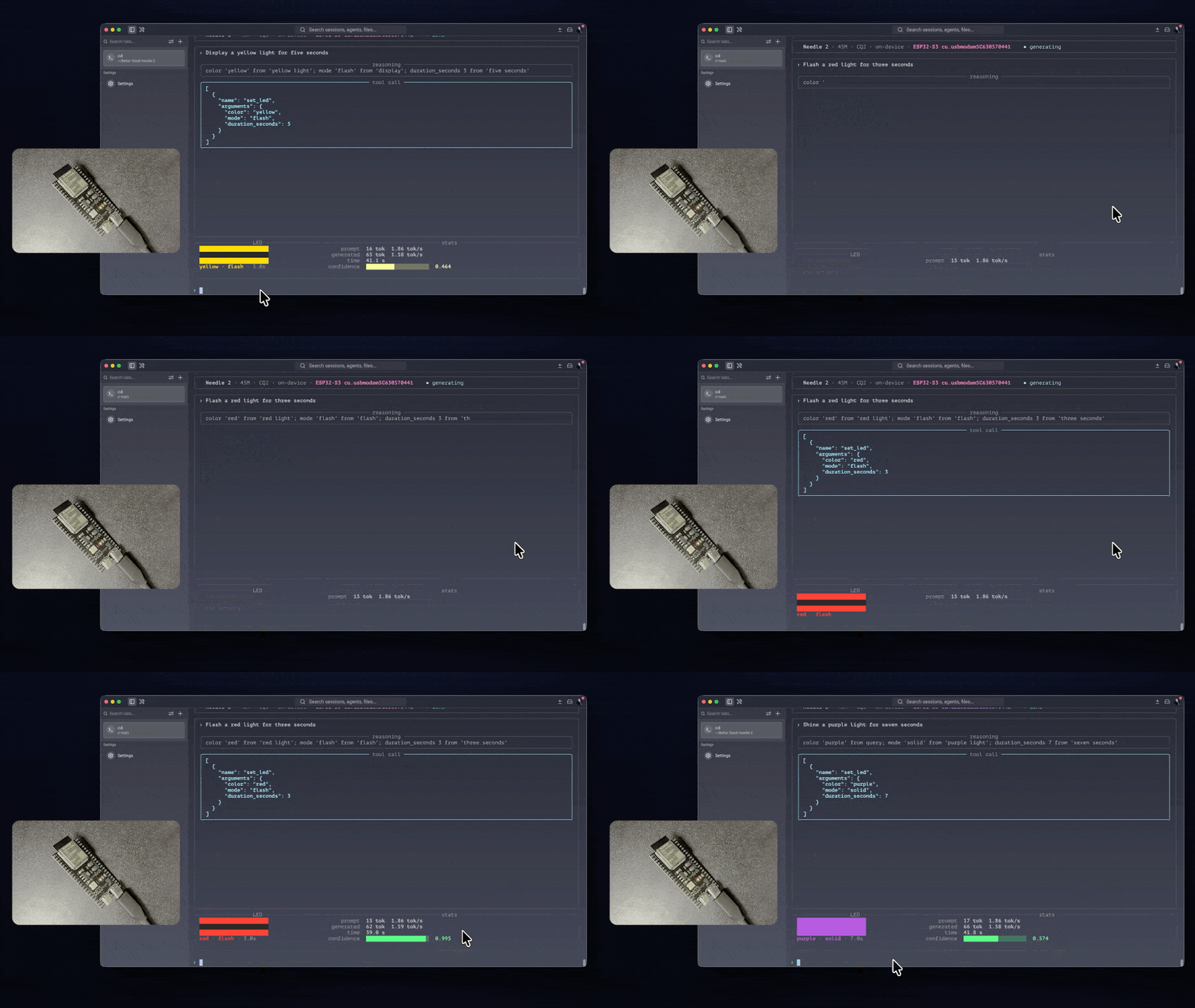
Two requests, back to back. Each one streams its reasoning, emits a
schema-valid tool call, and drives the onboard RGB LED. Nothing here touches a
network. The clip is sped up — each response takes ~40 s on the board.
This is an independent C99 implementation of the .cact inference format —
about 3,700 lines with no dependencies. It is not derived from Cactus's C++
engine, which has no ESP32 build.
Hardware
This targets one specific board. No attempt is made to be portable across
ESP32 variants; the point was to make one board work well.
|
|
| Chip |
ESP32-S3 (Xtensa LX7, dual core) |
| Flash |
16 MB — the model alone needs 13.1 MB |
| PSRAM |
8 MB octal (an "N16R8"-class module) |
| LED |
WS2812 addressable RGB on GPIO48 |
| Console |
over the UART bridge USB port |
A 2 MB or quad-PSRAM part will not work — the KV cache alone is 3.5 MB. If your
board differs, see Troubleshooting before assuming the code
is broken.
Measured on the board above, at 240 MHz:
|
|
| Per token |
534 ms (1.87 tok/s) |
| Request, reasoning off |
~25 s |
| Request, reasoning on |
~47 s |
| One-time boot prime |
~51 s |
The workload is compute-bound, not memory-bound: a GEMV reading weights from
PSRAM takes the same time as from flash, and runtime scales linearly with CPU
clock. Faster flash/PSRAM settings buy nothing.
Setup
Needs ESP-IDF v5.5+ and Python 3.
# 1. host tools and the reference implementation
python3 -m venv .venv && .venv/bin/pip install numpy rich pyserial \
    huggingface_hub sentencepiece

# 2. fetch the 13.7 MB model (not committed)
.venv/bin/python -c "
from huggingface_hub import hf_hub_download; import shutil, os
os.makedirs('model', exist_ok=True)
shutil.copy(hf_hub_download('Cactus-Compute/needle2','needle2.cact'),
            'model/needle2.cact')"

# 3. host engine, for rehearsing without the board
cmake -S host -B build -DCMAKE_BUILD_TYPE=Release && cmake --build build -j8

# 4. firmware -- ESP-IDF must be on PATH first
. $HOME/esp/esp-idf/export.sh
cd esp32/needle_demo
idf.py set-target esp32s3 && idf.py build
idf.py -p /dev/cu.usbmodemXXXX flash

# 5. the model, into its own flash partition (~3 min)
cd ../..
esptool.py --chip esp32s3 -p /dev/cu.usbmodemXXXX -b 921600 \
    write_flash 0x210000 model/needle2.cact
Find your port with ls /dev/cu.usb* (macOS) or ls /dev/ttyUSB* (Linux).
The model only needs reflashing if you change it -- firmware iterations are
just step 4.
Then:
.venv/bin/python tools/needle_tui.py --serial /dev/cu.usbmodemXXXX
The board primes its prompt prefix once (progress bar with an ETA), pulses the
LED green three times, and waits for input. --local runs the same UI against
the host engine if you want to try it without hardware.
Nothing in engine/ needs to change — the grammar is compiled from your schema
at runtime. Three steps:
1. Describe the tool in tools/led.json. This is the single source of
truth; the firmware's C string is generated from it at build time.
[{"name":"set_servo","description":"Rotate a servo",
  "parameters":{"type":"object","properties":{
    "channel":{"type":"integer","minimum":0,"maximum":3},
    "degrees":{"type":"integer","minimum":0,"maximum":180}},
  "required":["channel","degrees"]}}]
2. Write a handler in esp32/needle_demo/main/main.c, between the
YOUR TOOLS START HERE / END HERE markers:
static void tool_set_servo(const char *args)
{
    int ch  = (int)arg_num(args, "channel", 0);
    int deg = (int)arg_num(args, "degrees", 90);

    printf("ACT servo channel=%d degrees=%d\n", ch, deg);
    fflush(stdout);
    servo_write(ch, deg);            /* your hardware */
}
arg_str, arg_num and arg_bool read fields. The call is
grammar-constrained, so fields are guaranteed present, correctly typed, and
within any declared minimum/maximum — no validation needed.
3. Register it in the same file:
static const struct { const char *name; tool_fn fn; } TOOL_TABLE[] = {
    { "set_servo", tool_set_servo },
};
Rebuild and flash. Print one ACT <what> k=v ... line so the TUI can show what
happened, or ACT none if nothing matched.
What the model can and cannot do
It is a dispatcher, not a chatbot — every reply is a tool call or the empty
call []. No world knowledge, no free text.
Constraints worth knowing before designing a schema:
- The 256-token window is the real limit. The example schema costs 104
prompt tokens; adding a second tool takes it to 182. Two or three fit; past
~5 the upstream design uses a tool-retrieval head this port does not
implement. Routing between two tools was verified to match the reference
engine.
- Supported types:
string (with enum), integer, number, boolean.
Nested objects and arrays are rejected at compile time with a readable error,
rather than silently going unenforced.
- Names ≤ 39 characters (
ND_GR_STRLEN).
- Descriptions are load-bearing.
"solid or blink" on the mode field is
what makes "blink the light red" produce flash. A more verbose description
got it wrong. Treat wording as a tuning knob.
- Values must be evidenced in the text. The model omits fields it cannot
ground rather than guessing.
confidence measures groundedness, not
correctness — a correct call needing a unit conversion ("half a second" → 500)
scores low.
- Schema size drives boot time: roughly 0.5 s per prompt token, once.
- Formatting of the JSON is handled for you. The schema is compacted before
it reaches the model, because Needle was trained on whitespace-free schemas
and an indented one degrades it silently - in testing it began citing tools
that were never declared, with no error anywhere. Indent your schema freely.
Troubleshooting
Three settings account for nearly every problem on this hardware. All three
fail silently, so check them first.
No serial output, but the board is clearly running. The console is on the
UART bridge, not USB-Serial/JTAG. Leave CONFIG_ESP_CONSOLE_* at its default.
Setting CONFIG_ESP_CONSOLE_USB_SERIAL_JTAG=y produces a board that runs and
emits nothing, while ROM boot messages still appear over the same port — which
makes it look like a crash.
Boot loop with no error message. PSRAM line mode. 8 MB parts are octal:
CONFIG_SPIRAM_MODE_OCT=y
CONFIG_SPIRAM_SPEED_80M=y
Quad mode gives E quad_psram: PSRAM chip is not connected, or wrong PSRAM line mode — but only once the console works, which is why the two failures
together are hard to unpick.
It runs but is ~1.5x too slow. ESP-IDF defaults the ESP32-S3 to 160 MHz.
CONFIG_ESP_DEFAULT_CPU_FREQ_MHZ_240=y is the documented maximum, not an
overclock.
idf.py monitor needs a TTY; use tools/mon.py in scripts.
Want a timing breakdown? Uncomment the ND_PROFILE line in
esp32/needle_demo/components/needle/CMakeLists.txt for per-phase milliseconds
at boot. It is off by default because the timers cost a little speed.
Verifying a build
The engine is checked against independent references, so a fork can prove it
is still correct:
.venv/bin/python tools/check_engine.py model/needle2.cact ./build/nd_dump
.venv/bin/python tools/check_tokenizer.py model/needle2.cact ./build/nd_dump
./build/nd_gtest
cd tools && ../.venv/bin/python ref_forward.py ../model/needle2.cact --int8-kv
| Check |
Expected |
| CQ2/CQ4 dequant + GEMV vs NumPy |
< 3e-07 |
| Tokenizer vs SentencePiece |
exact, 15/15 |
| 27-layer forward vs NumPy reference |
~2.5e-05, identical argmax |
| Grammar |
18/18 |
ref_forward.py is a NumPy re-implementation of the architecture reading the
same .cact blob — full-sequence and non-incremental, so comparing against it
also validates the KV cache and its ring buffer.
Layout
engine/     portable C99 engine, no dependencies
  nd_cact.c       .cact v3 container reader
  nd_quant.c      Cactus-Quants kernels (pair-LUT GEMV, FWHT)
  nd_tokenizer.c  SentencePiece BPE
  nd_model.c      Simple Attention Network forward pass
  nd_grammar.c    JSON schema -> byte-level grammar
  nd_sample.c     grammar-constrained sampling
esp32/needle_demo/  ESP-IDF app: mmap, WS2812, serial protocol
host/               CLI harness and grammar tests
tools/              TUI, validation scripts, canonical tool schema
Credits
Needle 2 and its weights are by Cactus Compute,
Apache 2.0. This engine is an independent implementation of the published
.cact format and the architecture described in
arXiv:2607.18363.

 这是一个 C 固件,在 ESP32-S3 微控制器上完全离线运行 Cactus 的 Needle 2(一个 4500 万参数的语言模型),把自然语言请求转换成保证有效的 JSON 工具调用。