
What is this?
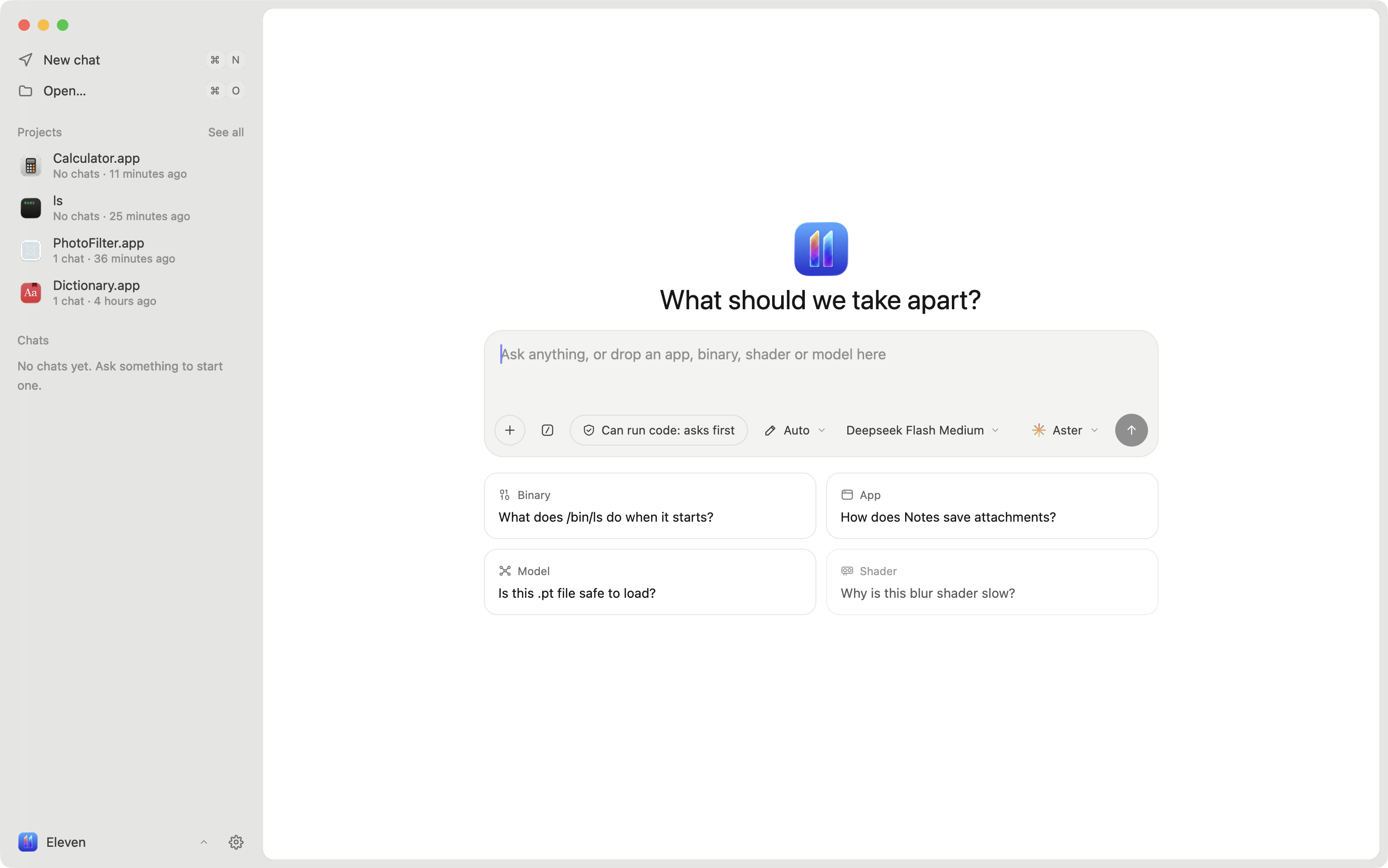
 Eleven is a reverse-engineering desktop app for macOS, Windows and Linux built around AI agents: you open a binary, Android APK, GPU kernel, shader or model, and any agent that speaks the Agent Client Protocol (ACP) reads the code, renames functions, leaves notes and proposes patches while you watch and approve each change.
Eleven is a reverse-engineering desktop app for macOS, Windows and Linux built around AI agents: you open a binary, Android APK, GPU kernel, shader or model, and any agent that speaks the Agent Client Protocol (ACP) reads the code, renames functions, leaves notes and proposes patches while you watch and approve each change.Is Eleven its own decompiler, or does it wrap tools like Ghidra?Eleven is a UI and agent-orchestration layer, not a decompiler itself: native code (Mach-O, ELF, PE) is decompiled by Ghidra through REA, or by Rizin for fast loading, and Android APKs are read with jadx; the app's own interface is React rendered natively on GPUI via GPUIX.
Eleven is a UI and agent-orchestration layer, not a decompiler itself: native code (Mach-O, ELF, PE) is decompiled by Ghidra through REA, or by Rizin for fast loading, and Android APKs are read with jadx; the app's own interface is React rendered natively on GPUI via GPUIX.How do I get Eleven running?On macOS 14+ (Apple Silicon) run the installer to drop Eleven.app into /Applications, on Windows x64 run the provided PowerShell installer, and on Linux x64 grab the AppImage or .tar.gz from the latest release; first run walks you through picking a decompile engine and an agent.
On macOS 14+ (Apple Silicon) run the installer to drop Eleven.app into /Applications, on Windows x64 run the provided PowerShell installer, and on Linux x64 grab the AppImage or .tar.gz from the latest release; first run walks you through picking a decompile engine and an agent.Which agents and decompile engines does it need?Any ACP-speaking agent works out of the box — Aster, Claude, Codex, Gemini, Cursor, Copilot, OpenCode and others — and for decompiling it needs Ghidra 12.x with Java 21 or Rizin (both auto-installed on first run); Android apps additionally need jadx, with apktool optional for smali.
Any ACP-speaking agent works out of the box — Aster, Claude, Codex, Gemini, Cursor, Copilot, OpenCode and others — and for decompiling it needs Ghidra 12.x with Java 21 or Rizin (both auto-installed on first run); Android apps additionally need jadx, with apktool optional for smali.Any install pitfalls I should know about?The macOS build isn't notarized yet, so the installer has to manually clear the download quarantine flag; macOS support is limited to Apple Silicon on macOS 14+, and Linux ships only as an AppImage or .tar.gz rather than distro packages.
The macOS build isn't notarized yet, so the installer has to manually clear the download quarantine flag; macOS support is limited to Apple Silicon on macOS 14+, and Linux ships only as an AppImage or .tar.gz rather than distro packages.What kinds of files can Eleven actually open?Mach-O, ELF and PE binaries, Android APKs and split bundles (.xapk, .apks), CUDA/HIP GPU kernels, Metal shaders, and ML model files like GGUF, safetensors, PyTorch and ONNX.
Mach-O, ELF and PE binaries, Android APKs and split bundles (.xapk, .apks), CUDA/HIP GPU kernels, Metal shaders, and ML model files like GGUF, safetensors, PyTorch and ONNX.Can I undo changes an agent makes to a binary?Yes — every edit, whether made by you or an agent, is logged with its author and can be undone, and byte patches from agents arrive as suggestions you explicitly accept or decline.
Yes — every edit, whether made by you or an agent, is logged with its author and can be undone, and byte patches from agents arrive as suggestions you explicitly accept or decline.Does Eleven include a debugger?Yes, you can run a program under LLDB directly from Eleven, break on the function you're viewing, step through execution and inspect local variables.
Yes, you can run a program under LLDB directly from Eleven, break on the function you're viewing, step through execution and inspect local variables.What are the built-in Playbooks?Playbooks are built-in skills like 'first look', 'name functions', 'trace a feature' and 'network map' that give any connected agent a structured workflow for common reverse-engineering tasks.
Playbooks are built-in skills like 'first look', 'name functions', 'trace a feature' and 'network map' that give any connected agent a structured workflow for common reverse-engineering tasks.What are similar projects?rea, rea, awesome-reverse-engineering, dnSpy, jadx, ghidra, GhidraMCP, radare2
rea, rea, awesome-reverse-engineering, dnSpy, jadx, ghidra, GhidraMCP, radare2Which topics is it in?acp, patcher, disassembler, debugger, decompiler, binary-analysis, gguf, metal, onnx, model-context-protocol, reverse-engineering, security-tools
acp, patcher, disassembler, debugger, decompiler, binary-analysis, gguf, metal, onnx, model-context-protocol, reverse-engineering, security-tools