




What is this?
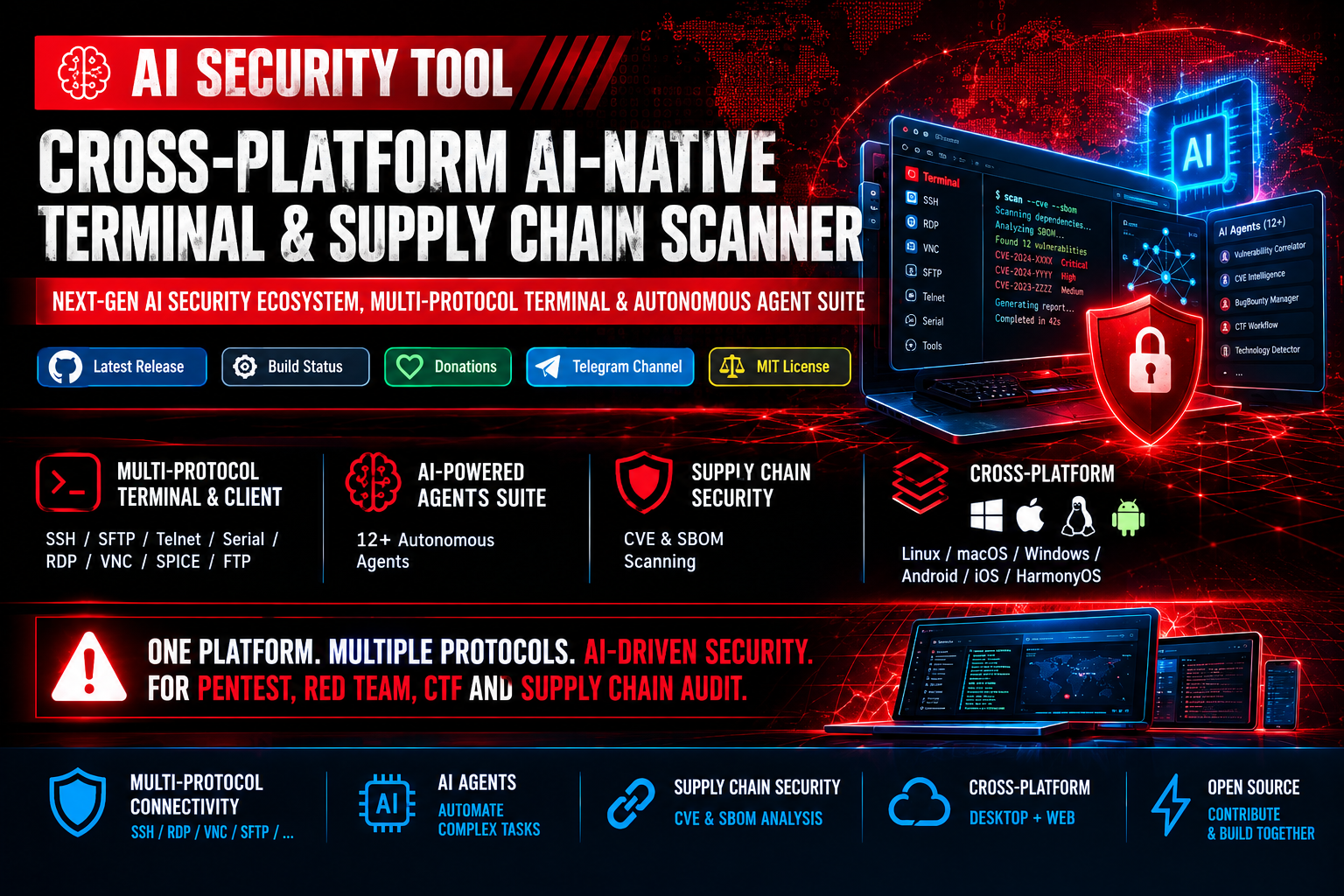
 AI Security Tool is an open-source, cross-platform terminal and vulnerability scanner that combines a multi-protocol connectivity client (SSH, RDP, VNC, etc.), CVE/SBOM supply-chain auditing, and 12+ autonomous AI agents (DeepSeek, OpenAI) to automate pentesting, Red Team, and CTF workflows.
AI Security Tool is an open-source, cross-platform terminal and vulnerability scanner that combines a multi-protocol connectivity client (SSH, RDP, VNC, etc.), CVE/SBOM supply-chain auditing, and 12+ autonomous AI agents (DeepSeek, OpenAI) to automate pentesting, Red Team, and CTF workflows.Is it a desktop app, a CLI, or a web service?It is both: a desktop application for Linux, macOS, Windows, Android, iOS and HarmonyOS, and a fully featured Web Interface that can also be self-hosted on a server.
It is both: a desktop application for Linux, macOS, Windows, Android, iOS and HarmonyOS, and a fully featured Web Interface that can also be self-hosted on a server.How do I get it running?Download a ready-to-use build for your OS (Windows installer/portable, macOS dmg, Linux tar.gz, Android apk) or run the one-line install script for Linux/macOS/Windows PowerShell, which installs dependencies and extracts the archive automatically; for web deployment, run run-ai-security-tool-web.sh.
Download a ready-to-use build for your OS (Windows installer/portable, macOS dmg, Linux tar.gz, Android apk) or run the one-line install script for Linux/macOS/Windows PowerShell, which installs dependencies and extracts the archive automatically; for web deployment, run run-ai-security-tool-web.sh.Do I need an OpenAI or DeepSeek API key to use the AI agents?Yes, the LLM integration and autonomous agents are powered by providers like DeepSeek, OpenAI or custom APIs, so you need an API key/credentials from one of these to use the AI features.
Yes, the LLM integration and autonomous agents are powered by providers like DeepSeek, OpenAI or custom APIs, so you need an API key/credentials from one of these to use the AI features.What should I watch out for when exposing the web interface?Because AI agents can execute system commands on your machine, the README warns to always enable authentication (ENABLEAUTH=1) and disable local terminal access (DISABLELOCALTERMINAL=1) before exposing the web UI publicly, and to run with least privilege.
Because AI agents can execute system commands on your machine, the README warns to always enable authentication (ENABLEAUTH=1) and disable local terminal access (DISABLELOCALTERMINAL=1) before exposing the web UI publicly, and to run with least privilege.Who is this built for?It targets cybersecurity professionals doing Red Team operations, penetration testing, bug bounty hunting, CTF challenges, and DevSecOps supply-chain audits.
It targets cybersecurity professionals doing Red Team operations, penetration testing, bug bounty hunting, CTF challenges, and DevSecOps supply-chain audits.What protocols does the multi-protocol terminal support?It supports SSH, SFTP, Telnet, Serial Port, RDP, VNC, SPICE, and FTP, with features like SSH tunneling, remote file editing over SFTP, and multi-session command broadcast.
It supports SSH, SFTP, Telnet, Serial Port, RDP, VNC, SPICE, and FTP, with features like SSH tunneling, remote file editing over SFTP, and multi-session command broadcast.What do the AI agents actually do?Agents like BugBountyWorkflowManager, CTFWorkflowManager, CVEIntelligenceManager, VulnerabilityCorrelator and others automate tasks such as recon workflow management, CTF solving support, threat intel gathering, multi-stage attack chain correlation, and rate-limit evasion.
Agents like BugBountyWorkflowManager, CTFWorkflowManager, CVEIntelligenceManager, VulnerabilityCorrelator and others automate tasks such as recon workflow management, CTF solving support, threat intel gathering, multi-stage attack chain correlation, and rate-limit evasion.Where does the vulnerability data come from?The SBOM/CVE workflow aggregates and syncs daily from NVD, OSV, GAD, and RedHat databases, correlating them with parsed SBOMs to generate exportable reports in Console, JSON, CSV, HTML or PDF.
The SBOM/CVE workflow aggregates and syncs daily from NVD, OSV, GAD, and RedHat databases, correlating them with parsed SBOMs to generate exportable reports in Console, JSON, CSV, HTML or PDF.Can I customize the terminal's look and workflow?Yes — it supports window transparency, custom themes and background images, a Guake-style pop-up terminal via a global hotkey (default Ctrl+2), and syncing of bookmarks/themes/quick commands via GitHub Gist or Gitee Snippets.
Yes — it supports window transparency, custom themes and background images, a Guake-style pop-up terminal via a global hotkey (default Ctrl+2), and syncing of bookmarks/themes/quick commands via GitHub Gist or Gitee Snippets.What are similar projects?strix, electerm, hexstrike-ai, Termix, Cybermes, navop, Seep-Reverse-Lab, Decepticon
strix, electerm, hexstrike-ai, Termix, Cybermes, navop, Seep-Reverse-Lab, DecepticonWhich topics is it in?ai-hacking, ai-security-tool, rdp, ssh-client, mcp-tools, vnc, red-teaming, llm-security, sftp, osint, hacking-tool, pentesting
ai-hacking, ai-security-tool, rdp, ssh-client, mcp-tools, vnc, red-teaming, llm-security, sftp, osint, hacking-tool, pentesting