
Spark-X2.5
Welcome to the GitHub repository of Spark-X2.5 open model series. You can find official information about Spark-X2.5, and post your questions here(Issues).
Introduction
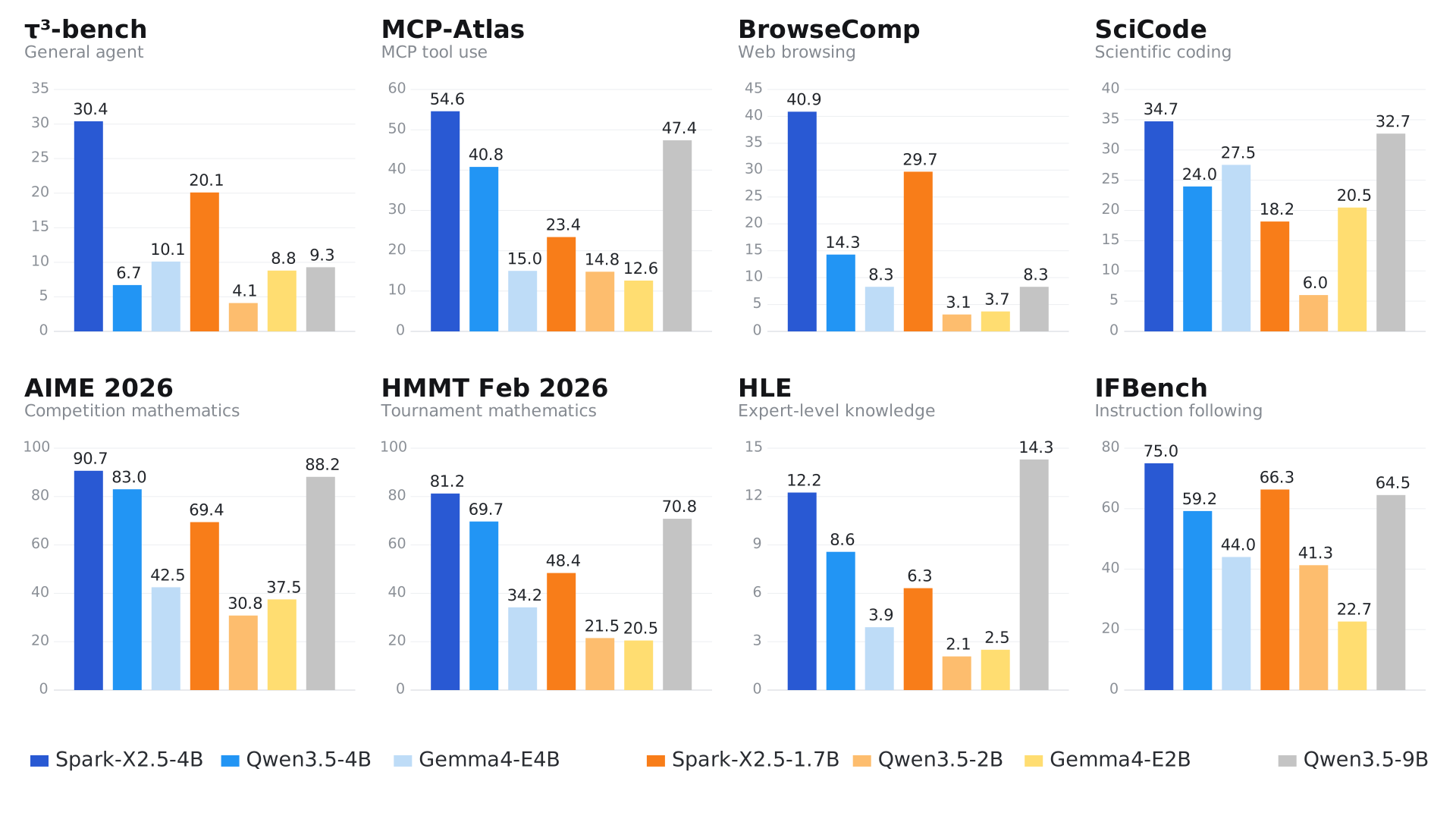
Today, we are introducing Spark-X2.5-4B and Spark-X2.5-1.7B, two compact, general-purpose language models designed to make capable AI more practical, efficient, and accessible. The models deliver strong performance across a broad range of everyday tasks—including conversation, writing, translation, reasoning, coding, tool use, and agentic workflows—achieving leading results among open-source models of comparable size. Spark-X2.5 combines an efficiency-oriented architecture with native context windows of up to 1M tokens, and support for more than 200 languages.
Technical Highlights:
- Efficient Architecture and Native 1M-token Context: The models use a hybrid attention architecture that combines one full-attention layer with three sliding-window attention layers. This design substantially reduces the computational overhead typically associated with long-context models while natively supporting a context window of up to 1M tokens.
- Strong Coding and Agent Capabilities: The models are deeply integrated with popular agent harnesses, including Codex, Claude Code, OpenClaw, and Hermes. They deliver state-of-the-art performance among models of comparable size across everyday coding, agentic workflows, reasoning, and instruction-following tasks.
- Broad Hardware and Software Compatibility: The models support a wide range of hardware platforms, including NVIDIA, Huawei, Hygon, HOUMO.AI, etc. It is compatible with leading inference frameworks such as vLLM, SGLang, llama.cpp, MLX, and can be deployed quickly through platforms including Ollama and LM Studio. The models can also be customized using popular fine-tuning frameworks such as LLaMA-Factory. Across multiple hardware platforms, they deliver superior TTFT, TOPT, and overall inference efficiency compared with similarly sized models.
- Advanced Training Algorithms: The models were trained on Huawei Ascend clusters. Large-scale reinforcement learning and post-training techniques such as MOPD significantly enhance its reasoning, coding, agentic, and instruction-following capabilities.
Release
- [2026/09/06] 🤝 Added native model architecture support for Spark‑X2.5 (Spark2_5ForCausalLM) in llama.cpp.
- [2026/09/04] 🚀 Released FP8 and INT8 quantized versions of Spark-X2.5-4B and Spark-X2.5-1.7B.
- [2026/09/03] 🤝 Added deployment support for vLLM and SGLang on Ascend NPU.
- [2026/09/02] 🚀 Added AtomGit as a new distribution channel.
- [2026/09/01] 🚀 Global launch of the Spark-X2.5 model series on Hugging Face, ModelScope, Ollama, Modelers, and SCNet.
Model Downloads
The Spark-X2.5-4B and Spark-X2.5-1.7B are available on the following platforms. Choose the most suitable download source for your region and environment:
If Hugging Face is slow or unavailable in your region, try ModelScope, Modelers, SCNet or AtomGit instead.
Benchmarks
| Benchmark |
Spark‑X2.5‑4B |
Spark‑X2.5‑1.7B |
Qwen3.5‑9B |
Qwen3.5‑4B |
Qwen3.5‑2B |
Gemma4‑12B |
Gemma4‑E4B |
Gemma4‑E2B |
| Agent |
|---|
| BFCL‑V4 | 65.1 | 46.9 | 66.1* | 50.3* | 43.6* | 37.4 | 36.9 | 30.2 |
| τ²‑bench | 75.1 | 65.3 | 79.1* | 79.9* | 48.8* | 69.0* | 42.2* | 24.5* |
| τ³‑bench | 30.4 | 20.1 | 9.3 | 6.7 | 4.1 | 13.3 | 10.1 | 8.8 |
| MCP‑Atlas | 54.6 | 23.4 | 47.4* | 40.8* | 14.8 | 30.5* | 15.0* | 12.6 |
| MCP‑Mark | 14.2 | 2.3 | 13.4 | 12.5 | – | – | – | – |
| Workspace Bench | 31.2 | 18.9 | 25.5 | 21.3 | 7.7 | – | – | – |
| VitaBench2.0 | 25.2 | 8.3 | 15.6 | 18.2 | 5.2 | 12.4 | 4.8 | 4.4 |
| BrowseComp | 40.9 | 29.7 | 8.3 | 14.3 | 3.1 | 10.0 | 8.3 | 3.7 |
| Code |
|---|
| SWE‑Bench Pro | 44.4 | 10.4 | 33.8* | 29.4* | 1.9 | 21.9* | 4.0* | – |
| SWE‑Bench Verified | 41.6 | 28.3 | 53.1* | 38.8* | 6.8 | 44.2* | 14.0* | – |
| SWE‑Bench Multilingual | 53.3 | 23.3 | 43.3 | 27.7 | 5.0 | 32.5* | – | – |
| SciCode | 34.7 | 18.2 | 32.7* | 24.0 | 6.0 | 39.8 | 27.5 | 20.5 |
| Math |
|---|
| Gaokao 2026 | 133.4 | 114.8 | 135.5 | 130.3 | 94.0 | 130.6 | 102.4 | 81.8 |
| AIME 2026 | 90.7 | 69.4 | 88.2 | 83.0 | 30.8 | 82.1* | 42.5* | 37.5* |
| HMMT Feb 2026 | 81.2 | 48.4 | 70.8 | 69.7 | 21.5 | 65.6 | 34.2 | 20.5 |
| IMO‑AnswerBench | 74.2 | 45.4 | 69.8 | 68.5 | – | 57.2 | 26.9 | 22.6 |
| General & Knowledge |
|---|
| IFEval | 93.0 | 89.5 | 91.5* | 89.8* | 78.6* | 94.8 | 45.3 | 34.8 |
| IFBench | 75.0 | 66.3 | 64.5 | 59.2 | 41.3* | 73.5* | 44.0* | 22.7 |
| AA‑LCR | 56.3 | 24.3 | 63.0* | 57.0* | 25.6* | 55.3* | 34.7 | 18.3 |
| HLE | 12.3 | 6.3 | 14.3 | 8.6 | 2.1 | 13.1 | 3.9 | 2.5 |
| GPQA | 67.4 | 43.8 | 77.2 | 67.2 | 44.6 | 72.8 | 54.5 | 43.8 |
- * denotes reported results from publicly‑released model cards / papers and - denotes scores not yet available.
- All evaluations are conducted in thinking mode. The recommended sampling parameters for Spark-X2.5 are temperature=1.0, top_p=0.95, and top_k=-1.
- Gaokao 2026 consists of the five 2026 Chinese GAOKAO examinations (National I,National II, Beijing, Shanghai, Tianjin), each graded out of 150 points.
Quickstart
The examples below serve a local Spark-X2.5-4B checkpoint. Set MODEL_PATH to its absolute path before starting a container:
export MODEL_PATH=/absolute/path/to/Spark-X2.5-4B
SGLang
Install SGLang
For NVIDIA GPUs:
Use the pre-built image that tracks the Spark-X2.5 runtime:
docker pull lmsysorg/sglang:nightly-dev-cu13-20260827-20621aa1
For Ascend NPUs:
# A3 daily build
export SGLANG_IMAGE=quay.io/ascend/sglang:main-cann9.0.0-a3

# A2 daily build (use this instead on A2 hardware)
export SGLANG_IMAGE=quay.io/ascend/sglang:main-cann9.0.0-910b

docker pull "$SGLANG_IMAGE"
Run Inference
The following commands start an OpenAI-compatible API server configured for a maximum context length of 1,048,576 tokens. This setting requires sufficient device memory; reduce --context-length when necessary.
Server
docker run --rm -it \
  --gpus '"device=0"' \
  --ipc=host \
  -p 30000:30000 \
  -v "$MODEL_PATH":/root/Spark-X2.5-4B:ro \
  lmsysorg/sglang:nightly-dev-cu13-20260827-20621aa1 \
  python -m sglang.launch_server \
    --model-path /root/Spark-X2.5-4B \
    --served-model-name spark2.5 \
    --tool-call-parser spark25 \
    --reasoning-parser qwen3 \
    --tp-size 1 \
    --mem-fraction-static 0.8 \
    --context-length 1048576 \
    --chat-template /root/Spark-X2.5-4B/chat_template.jinja \
    --host 0.0.0.0 \
    --port 30000
Ascend NPU:
docker run -it --rm -e ASCEND_USE_FIA=1 --network=host --ipc=host --shm-size=16g \
    --device=/dev/davinci0 --device=/dev/davinci1 --device=/dev/davinci2 --device=/dev/davinci3 \
    --device=/dev/davinci4 --device=/dev/davinci5 --device=/dev/davinci6 --device=/dev/davinci7 \
    --device=/dev/davinci8 --device=/dev/davinci9 --device=/dev/davinci10 --device=/dev/davinci11 \
    --device=/dev/davinci12 --device=/dev/davinci13 --device=/dev/davinci14 --device=/dev/davinci15 \
    --device=/dev/davinci_manager \
    --device=/dev/devmm_svm \
    --device=/dev/hisi_hdc \
    --volume /usr/local/sbin:/usr/local/sbin \
    --volume /usr/local/Ascend/driver:/usr/local/Ascend/driver \
    --volume /usr/local/Ascend/firmware:/usr/local/Ascend/firmware \
    --volume /etc/ascend_install.info:/etc/ascend_install.info \
    --volume /var/queue_schedule:/var/queue_schedule \
    --volume ~/.cache/:/root/.cache/ \
    --volume "$MODEL_PATH:/root/Spark-X2.5-4B:ro" \
    --entrypoint=python \
    "$SGLANG_IMAGE" \
    -m sglang.launch_server \
      --model-path /root/Spark-X2.5-4B \
      --served-model-name spark2.5 \
      --tool-call-parser spark25 \
      --reasoning-parser qwen3 \
      --tp-size 1 \
      --mem-fraction-static 0.8 \
      --context-length 1048576 \
      --chat-template /root/Spark-X2.5-4B/chat_template.jinja \
      --host 0.0.0.0 \
      --port 30000
Client
Thinking is enabled by default by both the chat template and the Qwen3 reasoning parser. To disable thinking for a specific request, set "chat_template_kwargs": {"enable_thinking": false}.
curl -s http://localhost:30000/v1/chat/completions \
  -H "Content-Type: application/json" \
  -d '{
    "model": "spark2.5",
    "messages": [
      {
        "role": "user",
        "content": "安徽的省会在哪里?"
      }
    ],
    "max_tokens": 131072,
    "temperature": 1,
    "top_k": -1,
    "top_p": 0.95,
    "repetition_penalty": 1,
    "presence_penalty": 0,
    "frequency_penalty": 0
  }'
vLLM
Deploy vLLM
vLLM provides an official Docker image for NVIDIA GPU deployment:
docker run --rm --gpus all \
  --ipc=host \
  -p 30000:30000 \
  -v "$MODEL_PATH:/models/Spark-X2.5-4B:ro" \
  vllm/vllm-openai:latest \
  --model /models/Spark-X2.5-4B \
  --port 30000 \
  --trust-remote-code \
  --served-model-name spark25 \
  --tensor-parallel-size 1 \
  --gpu-memory-utilization 0.7 \
  --enable-prefix-caching \
  --chat-template /models/Spark-X2.5-4B/chat_template.jinja
For Ascend NPUs, choose an official image for the fastest setup.
Ascend A2:
export IMAGE=quay.io/ascend/vllm-ascend:nightly-main
docker pull "$IMAGE"

export DEVICE=/dev/davinci0
export MODEL_CACHE="${HOME}/.cache"

mkdir -p "$MODEL_CACHE"

docker run --rm \
    --name vllm-ascend \
    --shm-size=1g \
    --device "$DEVICE" \
    --device /dev/davinci_manager \
    --device /dev/devmm_svm \
    --device /dev/hisi_hdc \
    -v /usr/local/dcmi:/usr/local/dcmi \
    -v /usr/local/bin/npu-smi:/usr/local/bin/npu-smi \
    -v /usr/local/Ascend/driver/lib64/:/usr/local/Ascend/driver/lib64/ \
    -v /usr/local/Ascend/driver/version.info:/usr/local/Ascend/driver/version.info \
    -v /etc/ascend_install.info:/etc/ascend_install.info \
    -v "$MODEL_CACHE:/root/.cache" \
    -p 8000:8000 \
    -it "$IMAGE" bash
Ascend A3:
export IMAGE=quay.io/ascend/vllm-ascend:nightly-main-a3
docker pull "$IMAGE"

export DEVICE0=/dev/davinci0
export DEVICE1=/dev/davinci1
export MODEL_CACHE="${HOME}/.cache"

mkdir -p "$MODEL_CACHE"

docker run --rm \
    --name vllm-ascend \
    --shm-size=1g \
    --device "$DEVICE0" \
    --device "$DEVICE1" \
    --device /dev/davinci_manager \
    --device /dev/devmm_svm \
    --device /dev/hisi_hdc \
    -v /usr/local/dcmi:/usr/local/dcmi \
    -v /usr/local/bin/npu-smi:/usr/local/bin/npu-smi \
    -v /usr/local/Ascend/driver/lib64/:/usr/local/Ascend/driver/lib64/ \
    -v /usr/local/Ascend/driver/version.info:/usr/local/Ascend/driver/version.info \
    -v /etc/ascend_install.info:/etc/ascend_install.info \
    -v "$MODEL_CACHE:/root/.cache" \
    -p 8000:8000 \
    -it "$IMAGE" bash
Ascend 950DT:
export IMAGE=quay.io/ascend/vllm-ascend:nightly-main-a5
docker pull "$IMAGE"

export MODEL_CACHE="${HOME}/.cache"

mkdir -p "$MODEL_CACHE"

docker run --rm \
    --name vllm-ascend \
    --net=host \
    --shm-size=1g \
    --device









 Spark-X2.5 是一系列两个开源语言模型(4B 和 1.7B 参数),面向日常对话、写作、翻译、编码、推理和代理式工具使用任务,力求在小体量下实现强大性能。