
- :boom: Updated online demo:
 . Here is the backup.
- :boom: Updated online demo:

- Colab Demo for GFPGAN
 ; (Another Colab Demo for the original paper model)
:rocket: Thanks for your interest in our work. You may also want to check our new updates on the tiny models for anime images and videos in Real-ESRGAN :blush:
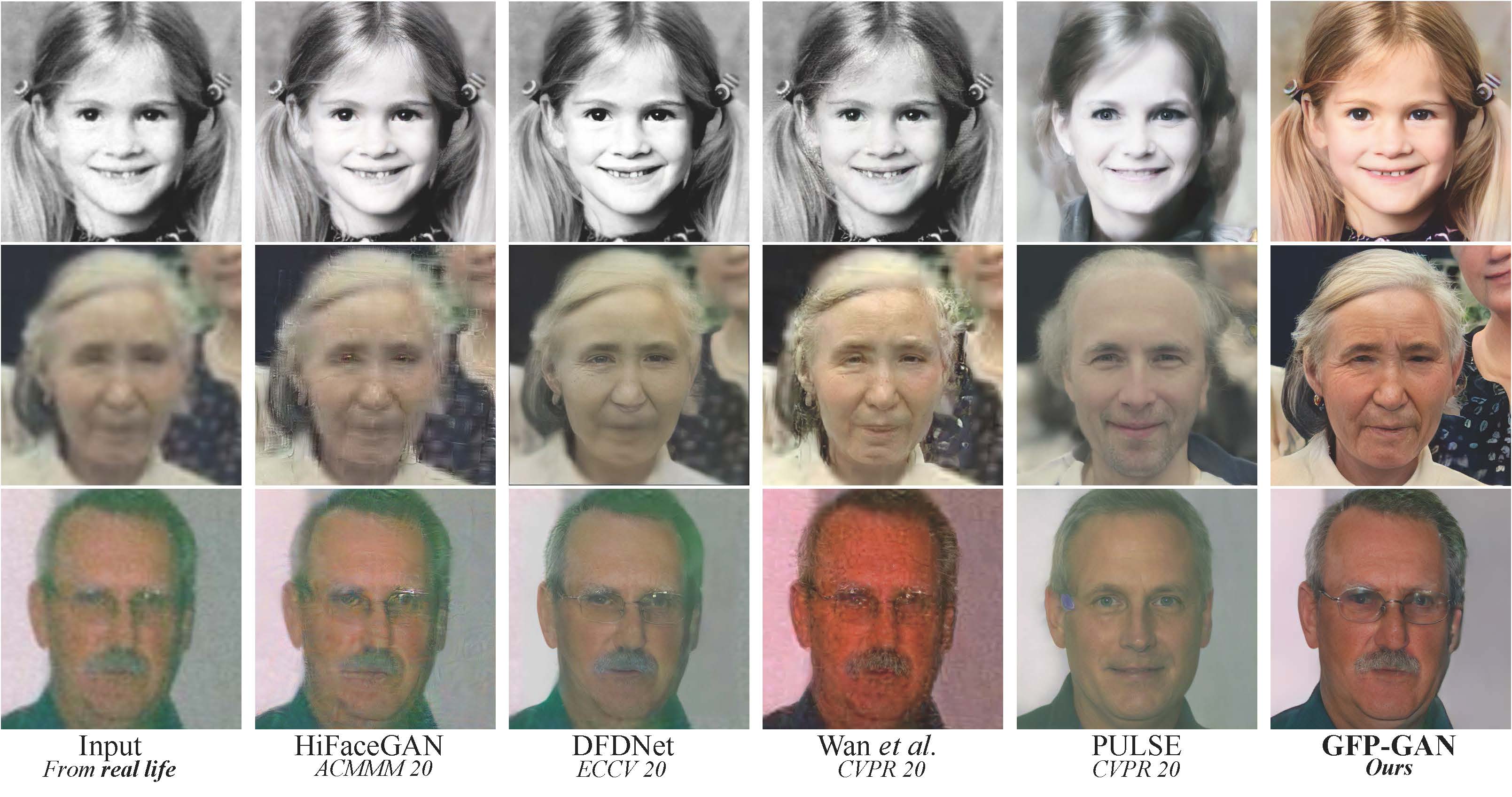
GFPGAN aims at developing a Practical Algorithm for Real-world Face Restoration.
It leverages rich and diverse priors encapsulated in a pretrained face GAN (e.g., StyleGAN2) for blind face restoration.
:question: Frequently Asked Questions can be found in FAQ.md.
:triangular_flag_on_post: Updates
- :white_check_mark: Add RestoreFormer inference codes.
- :white_check_mark: Add V1.4 model, which produces slightly more details and better identity than V1.3.
- :white_check_mark: Add V1.3 model, which produces more natural restoration results, and better results on very low-quality / high-quality inputs. See more in Model zoo, Comparisons.md
- :white_check_mark: Integrated to Huggingface Spaces with Gradio. See Gradio Web Demo.
- :white_check_mark: Support enhancing non-face regions (background) with Real-ESRGAN.
- :white_check_mark: We provide a clean version of GFPGAN, which does not require CUDA extensions.
- :white_check_mark: We provide an updated model without colorizing faces.
If GFPGAN is helpful in your photos/projects, please help to :star: this repo or recommend it to your friends. Thanks:blush:
Other recommended projects:
:arrow_forward: Real-ESRGAN: A practical algorithm for general image restoration
:arrow_forward: BasicSR: An open-source image and video restoration toolbox
:arrow_forward: facexlib: A collection that provides useful face-relation functions
:arrow_forward: HandyView: A PyQt5-based image viewer that is handy for view and comparison
:book: GFP-GAN: Towards Real-World Blind Face Restoration with Generative Facial Prior
[Paper] [Project Page] [Demo]
Xintao Wang, Yu Li, Honglun Zhang, Ying Shan
Applied Research Center (ARC), Tencent PCG
:wrench: Dependencies and Installation
Installation
We now provide a clean version of GFPGAN, which does not require customized CUDA extensions.
If you want to use the original model in our paper, please see PaperModel.md for installation.
Clone repo
git clone https://github.com/TencentARC/GFPGAN.git
cd GFPGAN
Install dependent packages
# Install basicsr - https://github.com/xinntao/BasicSR
# We use BasicSR for both training and inference
pip install basicsr

# Install facexlib - https://github.com/xinntao/facexlib
# We use face detection and face restoration helper in the facexlib package
pip install facexlib

pip install -r requirements.txt
python setup.py develop

# If you want to enhance the background (non-face) regions with Real-ESRGAN,
# you also need to install the realesrgan package
pip install realesrgan
:zap: Quick Inference
We take the v1.3 version for an example. More models can be found here.
Download pre-trained models: GFPGANv1.3.pth
wget https://github.com/TencentARC/GFPGAN/releases/download/v1.3.0/GFPGANv1.3.pth -P experiments/pretrained_models
Inference!
python inference_gfpgan.py -i inputs/whole_imgs -o results -v 1.3 -s 2
Usage: python inference_gfpgan.py -i inputs/whole_imgs -o results -v 1.3 -s 2 [options]...

  -h                   show this help
  -i input             Input image or folder. Default: inputs/whole_imgs
  -o output            Output folder. Default: results
  -v version           GFPGAN model version. Option: 1 | 1.2 | 1.3. Default: 1.3
  -s upscale           The final upsampling scale of the image. Default: 2
  -bg_upsampler        background upsampler. Default: realesrgan
  -bg_tile             Tile size for background sampler, 0 for no tile during testing. Default: 400
  -suffix              Suffix of the restored faces
  -only_center_face    Only restore the center face
  -aligned             Input are aligned faces
  -ext                 Image extension. Options: auto | jpg | png, auto means using the same extension as inputs. Default: auto
If you want to use the original model in our paper, please see PaperModel.md for installation and inference.
:european_castle: Model Zoo
| Version |
Model Name |
Description |
| V1.3 |
GFPGANv1.3.pth |
Based on V1.2; more natural restoration results; better results on very low-quality / high-quality inputs. |
| V1.2 |
GFPGANCleanv1-NoCE-C2.pth |
No colorization; no CUDA extensions are required. Trained with more data with pre-processing. |
| V1 |
GFPGANv1.pth |
The paper model, with colorization. |
The comparisons are in Comparisons.md.
Note that V1.3 is not always better than V1.2. You may need to select different models based on your purpose and inputs.
| Version |
Strengths |
Weaknesses |
| V1.3 |
✓ natural outputs
✓better results on very low-quality inputs
✓ work on relatively high-quality inputs
✓ can have repeated (twice) restorations |
✗ not very sharp
✗ have a slight change on identity |
| V1.2 |
✓ sharper output
✓ with beauty makeup |
✗ some outputs are unnatural |
You can find more models (such as the discriminators) here: [Google Drive], OR [Tencent Cloud 腾讯微云]
:computer: Training
We provide the training codes for GFPGAN (used in our paper).
You could improve it according to your own needs.
Tips
- More high quality faces can improve the restoration quality.
- You may need to perform some pre-processing, such as beauty makeup.
Procedures
(You can try a simple version ( options/train_gfpgan_v1_simple.yml) that does not require face component landmarks.)
Dataset preparation: FFHQ
Download pre-trained models and other data. Put them in the experiments/pretrained_models folder.
- Pre-trained StyleGAN2 model: StyleGAN2_512_Cmul1_FFHQ_B12G4_scratch_800k.pth
- Component locations of FFHQ: FFHQ_eye_mouth_landmarks_512.pth
- A simple ArcFace model: arcface_resnet18.pth
Modify the configuration file options/train_gfpgan_v1.yml accordingly.
Training
python -m torch.distributed.launch --nproc_per_node=4 --master_port=22021 gfpgan/train.py -opt options/train_gfpgan_v1.yml --launcher pytorch
GFPGAN is released under Apache License Version 2.0.
BibTeX
@InProceedings{wang2021gfpgan,
    author = {Xintao Wang and Yu Li and Honglun Zhang and Ying Shan},
    title = {Towards Real-World Blind Face Restoration with Generative Facial Prior},
    booktitle={The IEEE Conference on Computer Vision and Pattern Recognition (CVPR)},
    year = {2021}
}
If you have any question, please email [email protected] or [email protected].








 GFPGAN 是一个实用的真实场景盲人脸修复算法:它借助 StyleGAN2 这类预训练人脸 GAN 中丰富的先验知识,来重建照片中退化或低质量的人脸。