这是什么?
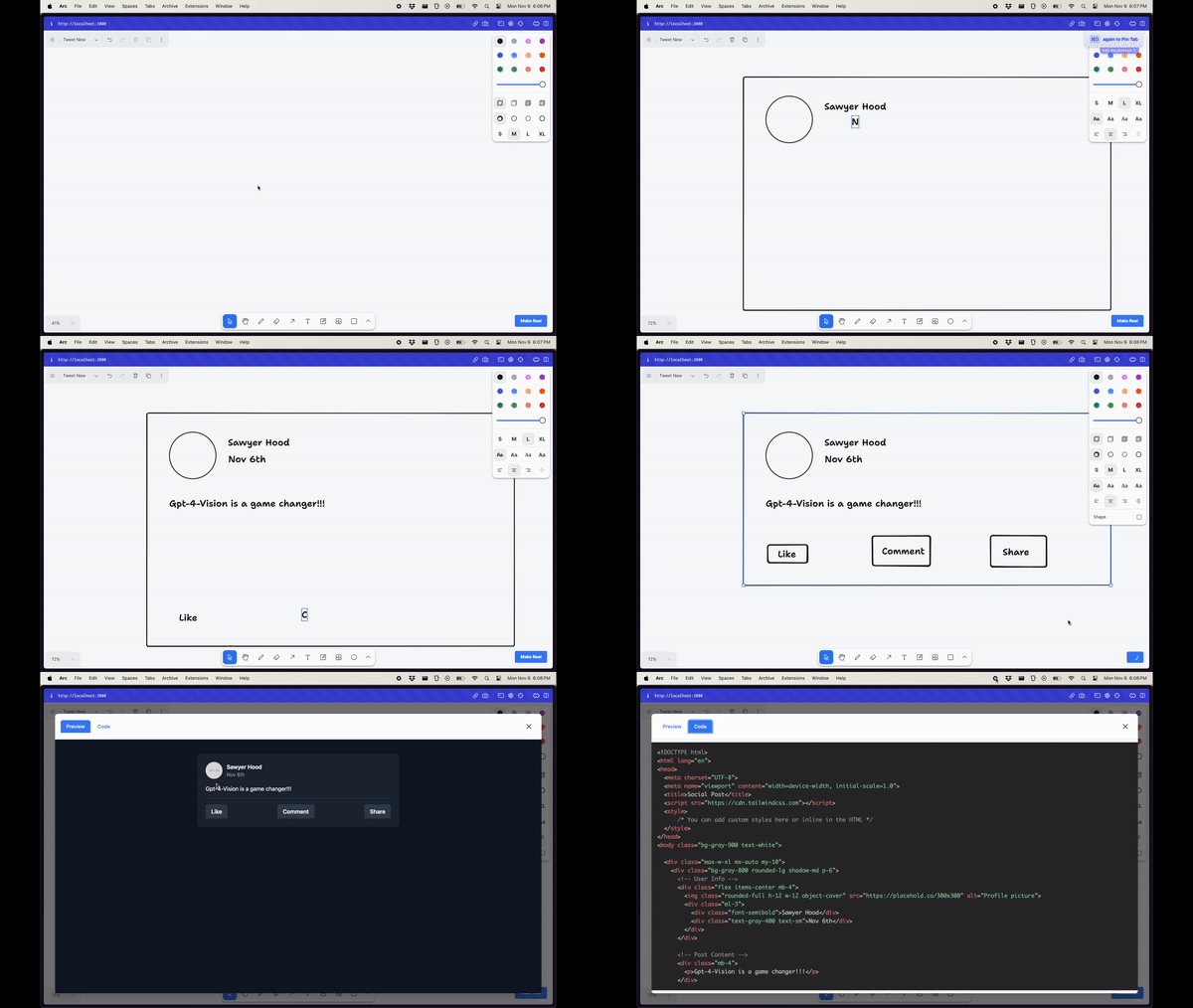
 一个可以在画布上绘制 UI 线框图的应用,它会借助 GPT-4 Vision,根据你的草图生成一个可用的 HTML 页面(使用 Tailwind 样式)。
一个可以在画布上绘制 UI 线框图的应用,它会借助 GPT-4 Vision,根据你的草图生成一个可用的 HTML 页面(使用 Tailwind 样式)。它到底是怎么把我的草图变成 HTML 的?它会把当前画布导出为 SVG,再转换成 PNG,然后把这张图片连同指令一起发送给 GPT-4 Vision,要求它返回一个使用 Tailwind 样式的单个 HTML 文件。
它会把当前画布导出为 SVG,再转换成 PNG,然后把这张图片连同指令一起发送给 GPT-4 Vision,要求它返回一个使用 Tailwind 样式的单个 HTML 文件。我该怎么运行它?这是一个 Next.js 应用:在项目根目录下安装依赖并运行开发命令,然后在浏览器中打开即可。
这是一个 Next.js 应用:在项目根目录下安装依赖并运行开发命令,然后在浏览器中打开即可。运行之前我需要准备什么?你需要一个可以调用 GPT-4 Vision API 的 OpenAI API 密钥。另外,由于项目使用 Next.js 14,需要 Node.js 18.17 以上版本。
你需要一个可以调用 GPT-4 Vision API 的 OpenAI API 密钥。另外,由于项目使用 Next.js 14,需要 Node.js 18.17 以上版本。我可以把它部署出去给别人用吗?不安全。它明确只是一个没有身份验证的演示项目,因此如果公开部署,任何人都可能用你的密钥消耗 OpenAI API 费用。
不安全。它明确只是一个没有身份验证的演示项目,因此如果公开部署,任何人都可能用你的密钥消耗 OpenAI API 费用。它在哪里运行?它以本地网页应用的形式在浏览器中运行,基于 Next.js 构建。
它以本地网页应用的形式在浏览器中运行,基于 Next.js 构建。画布用的是什么绘图工具?它使用 tldraw 作为绘制草图的画布,tldraw 是一个开源的无限画布库。
它使用 tldraw 作为绘制草图的画布,tldraw 是一个开源的无限画布库。有没有值得一看的后续项目?README 中提到,这个项目的精神续作是 Terragon Labs。
README 中提到,这个项目的精神续作是 Terragon Labs。画完一张草图后我会得到什么?你会得到一个使用 Tailwind CSS 样式的 HTML 文件,它大致还原你画的线框图。
你会得到一个使用 Tailwind CSS 样式的 HTML 文件,它大致还原你画的线框图。What are similar projects?screenshot-to-code, openui, onlook, open-lovable, boardui, ui, awesome-cursorrules, mitosis
screenshot-to-code, openui, onlook, open-lovable, boardui, ui, awesome-cursorrules, mitosisWhich topics is it in?prototype, sketch, design-to-code, gpt-4, vision-language-model, code-generation, gpt, tailwindcss, nextjs, generative-ai, ui, openai
prototype, sketch, design-to-code, gpt-4, vision-language-model, code-generation, gpt, tailwindcss, nextjs, generative-ai, ui, openai