Qwen3-Omni

💜 Qwen Chat | 🤗 Hugging Face | 🤖 ModelScope | 📑 Blog | 📚 Cookbooks | 📑 Paper
🖥️ Hugging Face Demo | 🖥️ ModelScope Demo | 💬 WeChat (微信) | 🫨 Discord | 📑 API
We release Qwen3-Omni, the natively end-to-end multilingual omni-modal foundation models. It is designed to process diverse inputs including text, images, audio, and video, while delivering real-time streaming responses in both text and natural speech. Click the video below for more information 😃
English Version

Chinese Version
News
- 2025.09.26: ⭐️⭐️⭐️ Qwen3-Omni reaches top-1 on Hugging Face Trending!
- 2025.09.22: 🎉🎉🎉 We have released Qwen3-Omni. For more details, please check our blog!
Contents
Overview
Introduction
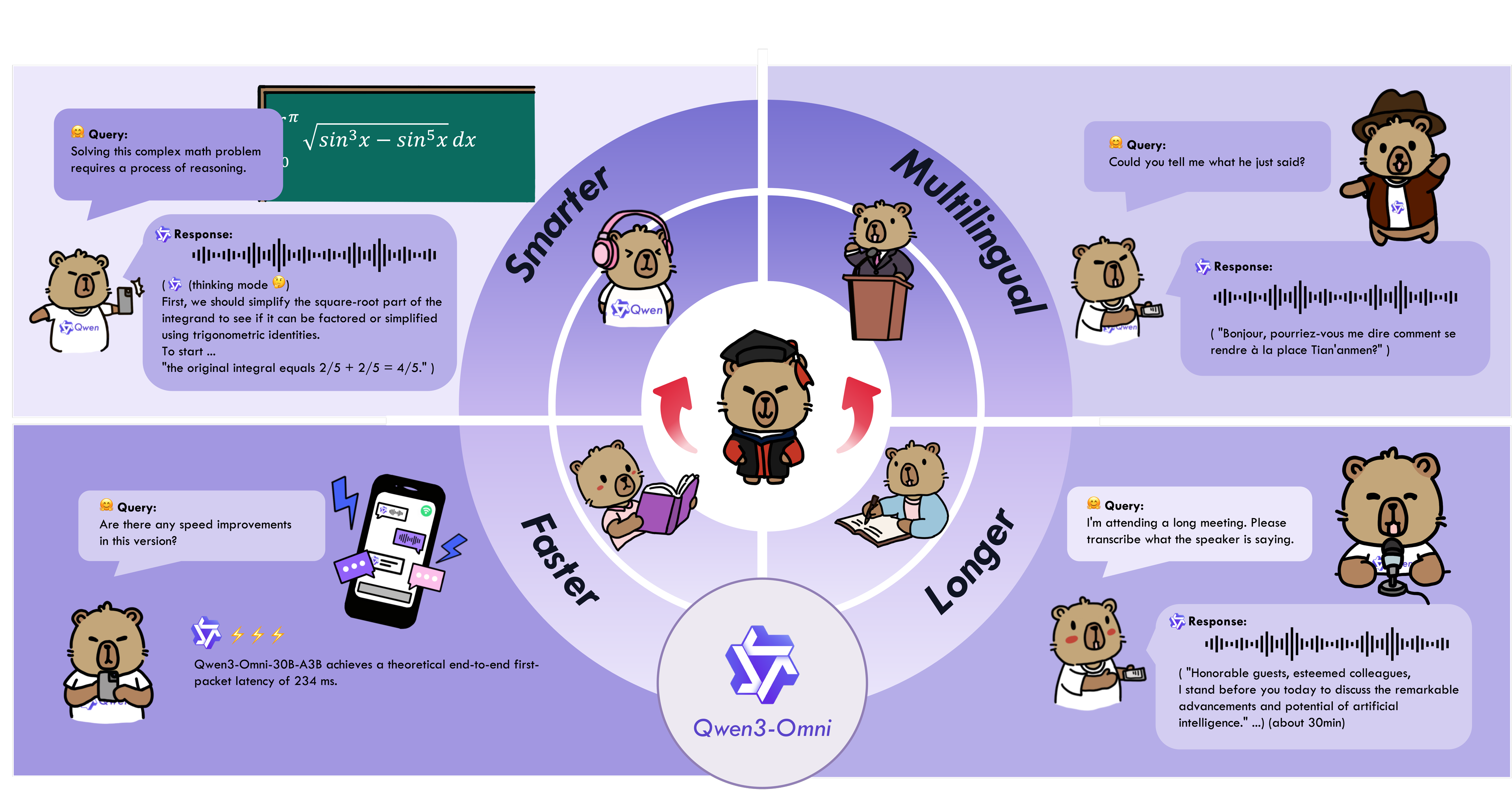
Qwen3-Omni is the natively end-to-end multilingual omni-modal foundation models. It processes text, images, audio, and video, and delivers real-time streaming responses in both text and natural speech. We introduce several architectural upgrades to improve performance and efficiency. Key features:
State-of-the-art across modalities: Early text-first pretraining and mixed multimodal training provide native multimodal support. While achieving strong audio and audio-video results, unimodal text and image performance does not regress. Reaches SOTA on 22 of 36 audio/video benchmarks and open-source SOTA on 32 of 36; ASR, audio understanding, and voice conversation performance is comparable to Gemini 2.5 Pro.
Multilingual: Supports 119 text languages, 19 speech input languages, and 10 speech output languages.
- Speech Input: English, Chinese, Korean, Japanese, German, Russian, Italian, French, Spanish, Portuguese, Malay, Dutch, Indonesian, Turkish, Vietnamese, Cantonese, Arabic, Urdu.
- Speech Output: English, Chinese, French, German, Russian, Italian, Spanish, Portuguese, Japanese, Korean.
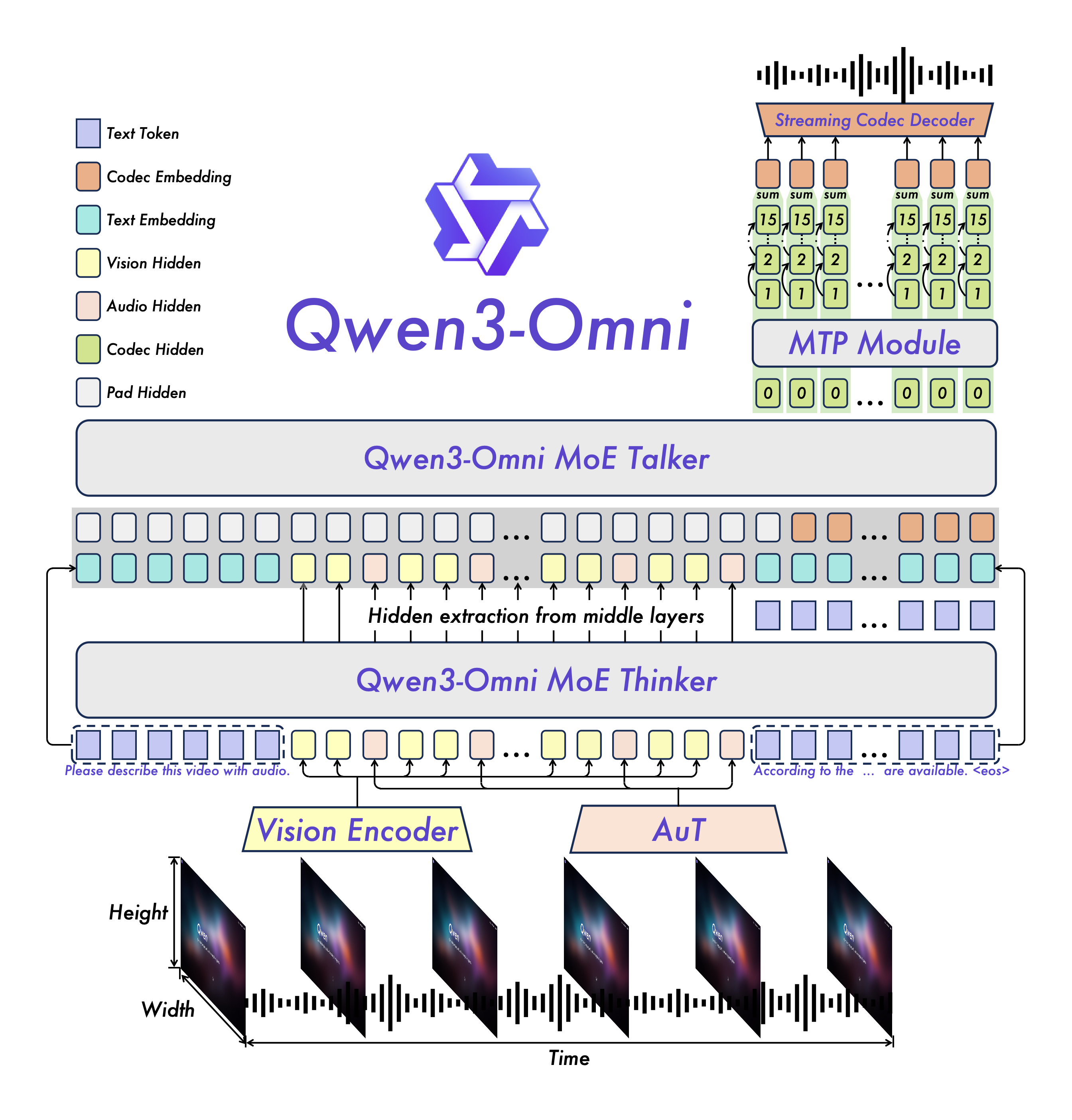
Novel Architecture: MoE-based Thinker–Talker design with AuT pretraining for strong general representations, plus a multi-codebook design that drives latency to a minimum.
Real-time Audio/Video Interaction: Low-latency streaming with natural turn-taking and immediate text or speech responses.
Flexible Control: Customize behavior via system prompts for fine-grained control and easy adaptation.
Detailed Audio Captioner: Qwen3-Omni-30B-A3B-Captioner is now open source: a general-purpose, highly detailed, low-hallucination audio captioning model that fills a critical gap in the open-source community.
Model Architecture
Cookbooks for Usage Cases
Qwen3-Omni supports a wide range of multimodal application scenarios, covering various domain tasks involving audio, image, video, and audio-visual modalities. Below are several cookbooks demonstrating the usage cases of Qwen3-Omni and these cookbooks include our actual execution logs. You can first follow the QuickStart guide to download the model and install the necessary inference environment dependencies, then run and experiment locally—try modifying prompts or switching model types, and enjoy exploring the capabilities of Qwen3-Omni!
| Category |
Cookbook |
Description |
Open |
| Audio |
Speech Recognition |
Speech recognition, supporting multiple languages and long audio. |
 |
| Speech Translation |
Speech-to-Text / Speech-to-Speech translation. |
|
| Music Analysis |
Detailed analysis and appreciation of any music, including style, genre, rhythm, etc. |
|
| Sound Analysis |
Description and analysis of various sound effects and audio signals. |
|
| Audio Caption |
Audio captioning, detailed description of any audio input. |
|
| Mixed Audio Analysis |
Analysis of mixed audio content, such as speech, music, and environmental sounds. |
|
| Visual |
OCR |
OCR for complex images. |
|
| Object Grounding |
Target detection and grounding. |
|
| Image Question |
Answering arbitrary questions about any image. |
|
| Image Math |
Solving complex mathematical problems in images, highlighting the capabilities of the Thinking model. |
|
| Video Description |
Detailed description of video content. |
|
| Video Navigation |
Generating navigation commands from first-person motion videos. |
|
| Video Scene Transition |
Analysis of scene transitions in videos. |
|
| Audio-Visual |
Audio Visual Question |
Answering arbitrary questions in audio-visual scenarios, demonstrating the model's ability to model temporal alignment between audio and video. |
|
| Audio Visual Interaction |
Interactive communication with the model using audio-visual inputs, including task specification via audio. |
|
| Audio Visual Dialogue |
Conversational interaction with the model using audio-visual inputs, showcasing its capabilities in casual chat and assistant-like behavior. |
|
| Agent |
Audio Function Call |
Using audio input to perform function calls, enabling agent-like behaviors. |
|
| Downstream Task Fine-tuning |
Omni Captioner |
Introduction and capability demonstration of Qwen3-Omni-30B-A3B-Captioner, a downstream fine-tuned model based on Qwen3-Omni-30B-A3B-Instruct, illustrating the strong generalization ability of the Qwen3-Omni foundation model. |
|
QuickStart
Here, we provide several methods to quickly get started with Qwen3-Omni. If you want complete experience of Qwen3-Omni, you can use Hugging Face Transformers. However, since Qwen3-Omni employs an MoE architecture, inference speed with Hugging Face Transformers on MoE models can be very slow. For large-scale invocation or low-latency requirements, we highly recommend using vLLM or performing inference via the DashScope API. We also strongly suggest using our provided Docker image, which includes a complete runtime environment for both Hugging Face Transformers and vLLM. In addition, our cookbooks offer some use cases to show Qwen3-Omni's capabilities. Welcome to learn more!
Model Description and Download
Below is the description of all Qwen3-Omni models. Please select and download the model that fits your needs.
| Model Name |
Description |
| Qwen3-Omni-30B-A3B-Instruct |
The Instruct model of Qwen3-Omni-30B-A3B, containing both thinker and talker, supporting audio, video, and text input, with audio and text output. For more information, please read the Qwen3-Omni Technical Report. |
| Qwen3-Omni-30B-A3B-Thinking |
The Thinking model of Qwen3-Omni-30B-A3B, containing the thinker component, equipped with chain-of-thought reasoning, supporting audio, video, and text input, with text output. For more information, please read the Qwen3-Omni Technical Report. |
| Qwen3-Omni-30B-A3B-Captioner |
A downstream audio fine-grained caption model fine-tuned from Qwen3-Omni-30B-A3B-Instruct, which produces detailed, low-hallucination captions for arbitrary audio inputs. It contains the thinker, supporting audio input and text output. For more information, you can refer to the model's cookbook or Hugging Face Demo and ModelScope Demo. |
During loading in Hugging Face Transformers or vLLM, model weights will be automatically downloaded based on the model name. However, if your runtime environment is not conducive to downloading weights during execution, you can refer to the following commands to manually download the model weights to a local directory:
# Download through ModelScope (recommended for users in Mainland China)
pip install -U modelscope
modelscope download --model Qwen/Qwen3-Omni-30B-A3B-Instruct --local_dir ./Qwen3-Omni-30B-A3B-Instruct
modelscope download --model Qwen/Qwen3-Omni-30B-A3B-Thinking --local_dir ./Qwen3-Omni-30B-A3B-Thinking
modelscope download --model Qwen/Qwen3-Omni-30B-A3B-Captioner --local_dir ./Qwen3-Omni-30B-A3B-Captioner

# Download through Hugging Face
pip install -U "huggingface_hub[cli]"
huggingface-cli download Qwen/Qwen3-Omni-30B-A3B-Instruct --local-dir ./Qwen3-Omni-30B-A3B-Instruct
huggingface-cli download Qwen/Qwen3-Omni-30B-A3B-Thinking --local-dir ./Qwen3-Omni-30B-A3B-Thinking
huggingface-cli download Qwen/Qwen3-Omni-30B-A3B-Captioner --local-dir ./Qwen3-Omni-30B-A3B-Captioner
Installation
We recommend using Transformers version 5.2.0 or later for the best performance and accuracy. Older versions, such as Transformers 4.57.x, not only deliver weaker performance, but also provide lower accuracy compared with versions 5.2.0 and above.
# If you already have transformers installed, please uninstall it first, or create a new Python environment
# pip uninstall transformers
pip install "transformers>=5.2.0"
pip install accelerate
We offer a toolkit to help you handle various types of audio and visual input more conveniently, providing an API-like experience. This includes support for base64, URLs, and interleaved audio, images, and videos. You can install it using the following command and make sure your system has ffmpeg installed:
pip install qwen-omni-utils -U
Additionally, we recommend using FlashAttention 2 when running with Hugging Face Transformers to reduce GPU memory usage. However, if you are primarily using vLLM for inference, this installation is not necessary, as vLLM includes FlashAttention 2 by default.
pip install -U flash-attn --no-build-isolation
Also, you should have hardware that is compatible with FlashAttention 2. Read more about it in the official documentation of the FlashAttention repository. FlashAttention 2 can only be used when a model is loaded in torch.float16 or torch.bfloat16.
Code Snippet
Here is a code snippet to show you how to use Qwen3-Omni with transformers and qwen_omni_utils:
import soundfile as sf

from transformers import Qwen3OmniMoeForConditionalGeneration, Qwen3OmniMoeProcessor
from qwen_omni_utils import process_mm_info

MODEL_PATH = "Qwen/Qwen3-Omni-30B-A3B-Instruct"
# MODEL_PATH = "Qwen/Qwen3-Omni-30B-A3B-Thinking"

 Qwen3-Omni 是阿里 Qwen 团队推出的开放式原生端到端全模态大语言模型系列:它可以接收文本、图片、音频和视频作为输入,并以文本或自然语音的形式实时流式输出回答。