Qwen3-ASR

🤗 Hugging Face | 🤖 ModelScope | 📑 Blog | 📑 Paper
🖥️ Hugging Face Demo | 🖥️ ModelScope Demo | 💬 WeChat (微信) | 🫨 Discord | 📑 API
We release Qwen3-ASR, a family that includes two powerful all-in-one speech recognition models that support language identification and ASR for 52 languages and dialects, as well as a novel non-autoregressive speech forced-alignment model that can align text–speech pairs in 11 languages.
News
- 2026.6.26: 🤗🤗🤗 Native Transformers support is now available! It includes
torch.compile support for faster inference. See the new model cards for example usage:
- 2026.1.29: 🎉🎉🎉 We have released the Qwen3-ASR series (0.6B/1.7B) and the Qwen3-ForcedAligner-0.6B model. Please check out our blog!
Contents
Overview
Introduction
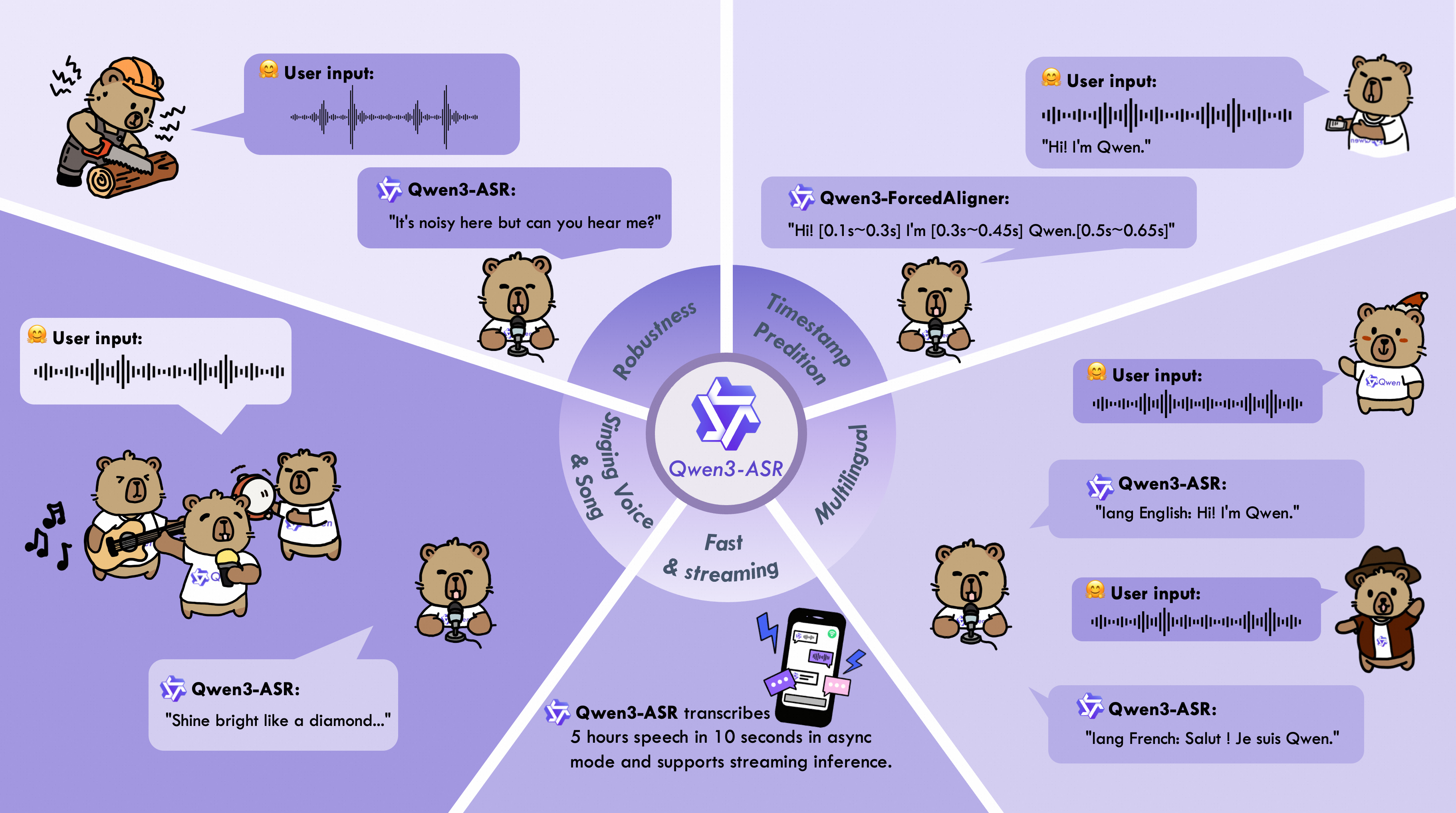
The Qwen3-ASR family includes Qwen3-ASR-1.7B and Qwen3-ASR-0.6B, which support language identification and ASR for 52 languages and dialects. Both leverage large-scale speech training data and the strong audio understanding capability of their foundation model, Qwen3-Omni. Experiments show that the 1.7B version achieves state-of-the-art performance among open-source ASR models and is competitive with the strongest proprietary commercial APIs. Here are the main features:
All-in-one: Qwen3-ASR-1.7B and Qwen3-ASR-0.6B support language identification and speech recognition for 30 languages and 22 Chinese dialects, so as to English accents from multiple countries and regions.
Excellent and Fast: The Qwen3-ASR family ASR models maintains high-quality and robust recognition under complex acoustic environments and challenging text patterns. Qwen3-ASR-1.7B achieves strong performance on both open-sourced and internal benchmarks. While the 0.6B version achieves accuracy-efficient trade-off, it reaches 2000 times throughput at a concurrency of 128. They both achieve streaming / offline unified inference with single model and support transcribe long audio.
Novel and strong forced alignment Solution: We introduce Qwen3-ForcedAligner-0.6B, which supports timestamp prediction for arbitrary units within up to 5 minutes of speech in 11 languages. Evaluations show its timestamp accuracy surpasses E2E based forced-alignment models.
Comprehensive inference toolkit: In addition to open-sourcing the architectures and weights of the Qwen3-ASR series, we also release a powerful, full-featured inference framework that supports vLLM-based batch inference, asynchronous serving, streaming inference, timestamp prediction, and more.
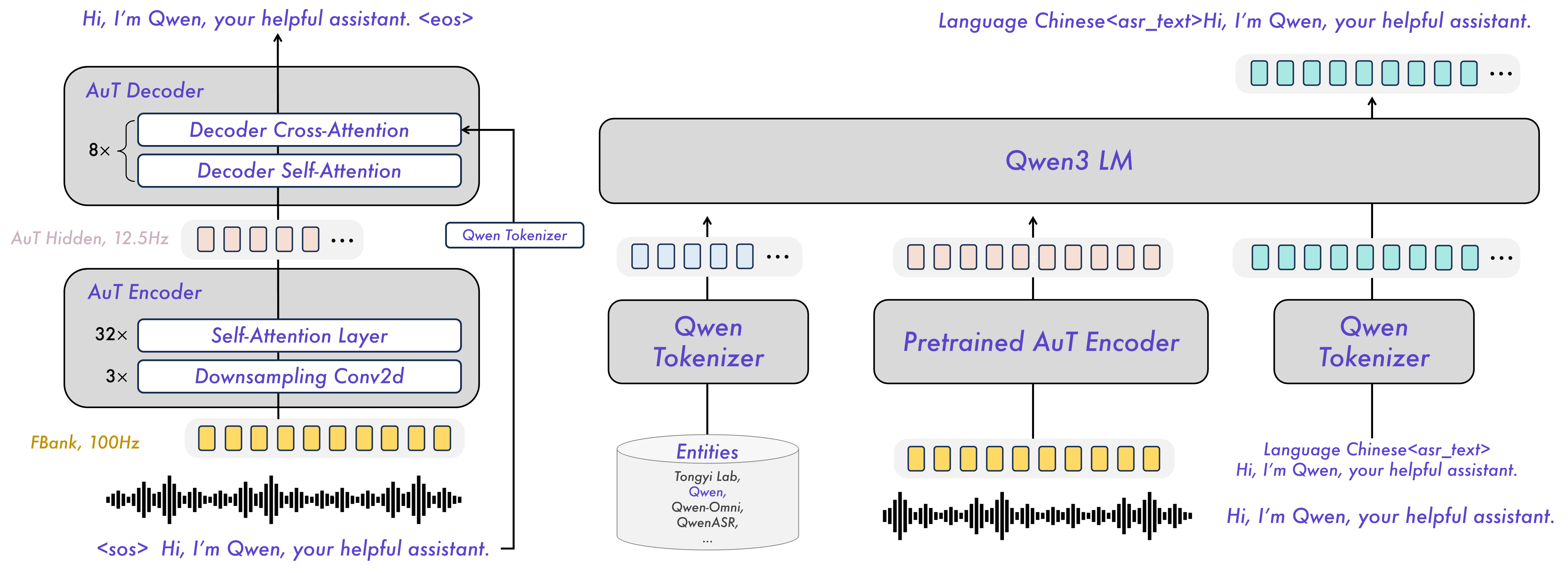
Model Architecture
Released Models Description and Download
Below is an introduction and download information for the Qwen3-ASR models. Please select and download the model that fits your needs.
| Model |
Supported Languages |
Supported Dialects |
Inference Mode |
Audio Types |
| Qwen3-ASR-1.7B & Qwen3-ASR-0.6B |
Chinese (zh), English (en), Cantonese (yue), Arabic (ar), German (de), French (fr), Spanish (es), Portuguese (pt), Indonesian (id), Italian (it), Korean (ko), Russian (ru), Thai (th), Vietnamese (vi), Japanese (ja), Turkish (tr), Hindi (hi), Malay (ms), Dutch (nl), Swedish (sv), Danish (da), Finnish (fi), Polish (pl), Czech (cs), Filipino (fil), Persian (fa), Greek (el), Hungarian (hu), Macedonian (mk), Romanian (ro) |
Anhui, Dongbei, Fujian, Gansu, Guizhou, Hebei, Henan, Hubei, Hunan, Jiangxi, Ningxia, Shandong, Shaanxi, Shanxi, Sichuan, Tianjin, Yunnan, Zhejiang, Cantonese (Hong Kong accent), Cantonese (Guangdong accent), Wu language, Minnan language. |
Offline / Streaming |
Speech, Singing Voice, Songs with BGM |
| Qwen3-ForcedAligner-0.6B |
Chinese, English, Cantonese, French, German, Italian, Japanese, Korean, Portuguese, Russian, Spanish |
-- |
NAR |
Speech |
During model loading in the qwen-asr package or vLLM, model weights will be downloaded automatically based on the model name. However, if your runtime environment does not allow downloading weights during execution, you can use the following commands to manually download the model weights to a local directory:
# Download through ModelScope (recommended for users in Mainland China)
pip install -U modelscope
modelscope download --model Qwen/Qwen3-ASR-1.7B  --local_dir ./Qwen3-ASR-1.7B
modelscope download --model Qwen/Qwen3-ASR-0.6B --local_dir ./Qwen3-ASR-0.6B
modelscope download --model Qwen/Qwen3-ForcedAligner-0.6B --local_dir ./Qwen3-ForcedAligner-0.6B
# Download through Hugging Face
pip install -U "huggingface_hub[cli]"
huggingface-cli download Qwen/Qwen3-ASR-1.7B --local-dir ./Qwen3-ASR-1.7B
huggingface-cli download Qwen/Qwen3-ASR-0.6B --local-dir ./Qwen3-ASR-0.6B
huggingface-cli download Qwen/Qwen3-ForcedAligner-0.6B --local-dir ./Qwen3-ForcedAligner-0.6B
Quickstart
Environment Setup
The easiest way to use Qwen3-ASR is to install the qwen-asr Python package from PyPI. This will pull in the required runtime dependencies and allow you to load any released Qwen3-ASR model. If you’d like to simplify environment setup further, you can also use our official Docker image. The qwen-asr package provides two backends: the transformers backend and the vLLM backend. For usage instructions for different backends, please refer to Python Package Usage. We recommend using a fresh, isolated environment to avoid dependency conflicts with existing packages. You can create a clean Python 3.12 environment like this:
conda create -n qwen3-asr python=3.12 -y
conda activate qwen3-asr
Run the following command to get the minimal installation with transformers-backend support:
pip install -U qwen-asr
To enable the vLLM backend for faster inference and streaming support, run:
pip install -U qwen-asr[vllm]
If you want to develop or modify the code locally, install from source in editable mode:
git clone https://github.com/QwenLM/Qwen3-ASR.git
cd Qwen3-ASR
pip install -e .
# support vLLM backend
# pip install -e ".[vllm]"
Additionally, we recommend using FlashAttention 2 to reduce GPU memory usage and accelerate inference speed, especially for long inputs and large batch sizes.
pip install -U flash-attn --no-build-isolation
If your machine has less than 96GB of RAM and lots of CPU cores, run:
MAX_JOBS=4 pip install -U flash-attn --no-build-isolation
Also, you should have hardware that is compatible with FlashAttention 2. Read more about it in the official documentation of the FlashAttention repository. FlashAttention 2 can only be used when a model is loaded in torch.float16 or torch.bfloat16.
Python Package Usage
Quick Inference
The qwen-asr package provides two backends: transformers backend and vLLM backend. You can pass audio inputs as a local path, a URL, base64 data, or a (np.ndarray, sr) tuple, and run batch inference. To quickly try Qwen3-ASR, you can use Qwen3ASRModel.from_pretrained(...) for the transformers backend with the following code:
import torch
from qwen_asr import Qwen3ASRModel

model = Qwen3ASRModel.from_pretrained(
    "Qwen/Qwen3-ASR-1.7B",
    dtype=torch.bfloat16,
    device_map="cuda:0",
    # attn_implementation="flash_attention_2",
    max_inference_batch_size=32, # Batch size limit for inference. -1 means unlimited. Smaller values can help avoid OOM.
    max_new_tokens=256, # Maximum number of tokens to generate. Set a larger value for long audio input.
)

results = model.transcribe(
    audio="https://qianwen-res.oss-cn-beijing.aliyuncs.com/Qwen3-ASR-Repo/asr_en.wav",
    language=None, # set "English" to force the language
)

print(results[0].language)
print(results[0].text)
If you want to return timestamps, pass forced_aligner and its init kwargs. Here is an example of batch inference with timestamps output:
import torch
from qwen_asr import Qwen3ASRModel

model = Qwen3ASRModel.from_pretrained(
    "Qwen/Qwen3-ASR-1.7B",
    dtype=torch.bfloat16,
    device_map="cuda:0",
    # attn_implementation="flash_attention_2",
    max_inference_batch_size=32, # Batch size limit for inference. -1 means unlimited. Smaller values can help avoid OOM.
    max_new_tokens=256, # Maximum number of tokens to generate. Set a larger value for long audio input.
    forced_aligner="Qwen/Qwen3-ForcedAligner-0.6B",
    forced_aligner_kwargs=dict(
        dtype=torch.bfloat16,
        device_map="cuda:0",
        # attn_implementation="flash_attention_2",
    ),
)

results = model.transcribe(
    audio=[
      "https://qianwen-res.oss-cn-beijing.aliyuncs.com/Qwen3-ASR-Repo/asr_zh.wav",
      "https://qianwen-res.oss-cn-beijing.aliyuncs.com/Qwen3-ASR-Repo/asr_en.wav",
    ],
    language=["Chinese", "English"], # can also be set to None for automatic language detection
    return_time_stamps=True,
)

for r in results:
    print(r.language, r.text, r.time_stamps[0])
For more detailed usage examples, please refer to the example code for the transformers backend.
vLLM Backend
If you want the fastest inference speed with Qwen3-ASR, we strongly recommend using the vLLM backend by initializing the model with Qwen3ASRModel.LLM(...). Example code is provided below. Note that you must install it via pip install -U qwen-asr[vllm]. If you want the model to output timestamps, it’s best to install FlashAttention via pip install -U flash-attn --no-build-isolation to speed up inference for the forced aligner model. Remember to wrap your code under if __name__ == '__main__': to avoid the spawn error described in vLLM Troubleshooting.
import torch
from qwen_asr import Qwen3ASRModel

if __name__ == '__main__':
    model = Qwen3ASRModel.LLM(
        model="Qwen/Qwen3-ASR-1.7B",
        gpu_memory_utilization=0.7,
        max_inference_batch_size=128, # Batch size limit for inference. -1 means unlimited. Smaller values can help avoid OOM.
        max_new_tokens=4096, # Maximum number of tokens to generate. Set a larger value for long audio input.
        forced_aligner="Qwen/Qwen3-ForcedAligner-0.6B",
        forced_aligner_kwargs=dict(
            dtype=torch.bfloat16,
            device_map="cuda:0",
            # attn_implementation="flash_attention_2",
        ),
    )

    results = model.transcribe(
        audio=[
        "https://qianwen-res.oss-cn-beijing.aliyuncs.com/Qwen3-ASR-Repo/asr_zh.wav",
        "https://qianwen-res.oss-cn-beijing.aliyuncs.com/Qwen3-ASR-Repo/asr_en.wav",
        ],
        language=["Chinese", "English"], # can also be set to None for automatic language detection
        return_time_stamps=True,
    )

    for r in results:
        print(r.language, r.text, r.time_stamps[0])
For more detailed usage examples, please refer to the example code for the vLLM backend. In addition, you can start a vLLM server via the qwen-asr-serve command, which is a wrapper around vllm serve. You can pass any arguments supported by vllm serve, for example:
qwen-asr-serve Qwen/Qwen3-ASR-1.7B --gpu-memory-utilization 0.8 --host 0.0.0.0 --port 8000
And send requests to the server via:
import requests

url = "http://localhost:8000/v1/chat/completions"
headers = {"Content-Type": "application/json"}

data = {
    "messages": [
        {
            "role": "user",
            "content": [
                {
                    "type": "audio_url",
                    "audio_url": {
                        "url": "https://qianwen-res.oss-cn-beijing.aliyuncs.com/Qwen3-ASR-Repo/asr_en.wav"
                    },
                }
            ],
        }
    ]
}

response = requests.post(url, headers=headers, json=data, timeout=300)
response.raise_for_status()
content = response.json()['choices'][0]['message']['content']
print(content)

# parse ASR output if you want
from qwen_asr import parse_asr_output
language, text = parse_asr_output(content)
print(language)
print(text)
Streaming Inference
Qwen3-ASR fully supports streaming inference. Currently, streaming inference is only available with the vLLM backend. Note that streaming inference does not support batch inference or returning timestamps. Please refer to the example code for details. You can also launch a streaming web demo through the guide to experience Qwen3-ASR’s streaming transcription capabilities.
ForcedAligner Usage
Qwen3-ForcedAligner-0.6B can align text–speech pairs and return word or character level timestamps. Here is an example of using the forced aligner directly:
import torch
from qwen_asr import Qwen3ForcedAligner

model = Qwen3ForcedAligner.from_pretrained(
    "Qwen/Qwen3-ForcedAligner-0.6B",
    dtype=torch.bfloat16,
    device_map="cuda:0",
    # attn_implementation="flash_attention_2",
)

results = model.align(
    audio="https://qianwen-res.oss-cn-beijing.aliyuncs.com/Qwen3-ASR-Repo/asr_zh.wav",
    text="甚至出现交易几乎停滞的情况。",
    language="Chinese",
)

print(results[0])
print(results[0][0].text, results[0][0].start_time, results[0][0].end_time)
In addition, the forced aligner supports local paths / URLs / base64 data / (np.ndarray, sr) inputs and batch inference. Please refer to the example code for details.
DashScope API Usage
To further explore Qwen3-ASR, we encourage you to try our DashScope API for a faster and more efficient experience. For detailed API information and documentation, please refer to the following:
Launch Local Web UI Demo
Gradio Demo
To launch the Qwen3-ASR web UI gradio demo, install the qwen-asr package and run qwen-asr-demo. Use the command below for help:
qwen-asr-demo --help
To launch the demo, you can use the following commands:
# Transformers backend
qwen-asr-demo \
  --asr-checkpoint Qwen/Qwen3-ASR-1.7B \
  --backend transformers \
  --cuda-visible-devices 0 \
  --ip 0.0.0.0 --port 8000

# Transformers backend + Forced Aligner (enable timestamps)
qwen-asr-demo \
  --asr-checkpoint Qwen/Qwen3-ASR-1.7B \
  --aligner-checkpoint Qwen/Qwen3-ForcedAligner-0.6B \
  --backend transformers \
  --cuda-visible-devices 0 \
  --backend-kwargs '{"device_map":"cuda:0","dtype":"bfloat16","max_inference_batch_size":8,"max_new_tokens":256}' \
  --aligner-kwargs '{"device_map":"cuda:0","dtype":"bfloat16"}' \
  --ip 0.0.0.0 --port 8000

# vLLM backend + Forced Aligner (enable timestamps)
qwen-asr-demo \
  --asr-checkpoint Qwen/Qwen3-ASR-1.7B \
  --aligner-checkpoint Qwen/Qwen3-ForcedAligner-0.6B \
  --backend vllm \
  --cuda-visible-devices 0 \
  --backend-kwargs '{"gpu_memory_utilization":0.7,"max_inference_batch_size":8,"max_new_tokens":2048}' \
  --aligner-kwargs '{"device_map":"cuda:0","dtype":"bfloat16"}' \
  --ip 0.0.0.0 --port 8000
Then open http://<your-ip>:8000, or access it via port forwarding in tools like VS Code.
Backend Notes
This demo supports two backends: transformers and vLLM. All backend-specific initialization parameters should be passed via --backend-kwargs as a JSON dict. If not provided, the demo will use sensible defaults.
# Example: override transformers init args with flash attention
--backend-kwargs '{"device_map":"cuda:0","dtype":"bfloat16","attn_implementation":"flash_attention_2"}'

# Example: override vLLM init args with 65% GPU memory
--backend-kwargs '{"gpu_memory_utilization":0.65}'
CUDA Device Notes
Because vLLM does not follow cuda:0 style device selection, this demo selects GPUs by setting CUDA_VISIBLE_DEVICES via --cuda-visible-devices.
# Use GPU 0
--cuda-visible-devices 0

# Use GPU 1
--cuda-visible-devices 1
Timestamps Notes
Timestamps are only available when --aligner-checkpoint is provided. If you launch the demo without a forced aligner, the timestamps UI will be hidden automatically.
# No forced aligner
qwen-asr-demo --asr-checkpoint Qwen/Qwen3-ASR-1.7B

# With forced aligner
qwen-asr-demo \
  --asr-checkpoint Qwen/Qwen3-ASR-1.7B \
  --aligner-checkpoint Qwen/Qwen3-ForcedAligner-0.6B
HTTPS Notes
To avoid browser microphone permission issues after deploying the server, it is recommended/required to run the gradio service over HTTPS (especially when accessed remotely or behind modern

 Qwen3-ASR is Alibaba's open-source family of speech recognition models: two all-in-one models (0.6B and 1.7B) that do language identification and transcription for 52 languages and dialects, plus a separate forced-alignment model that produces word-level timestamps.