


4.1K ·GitHub
Что это такое?
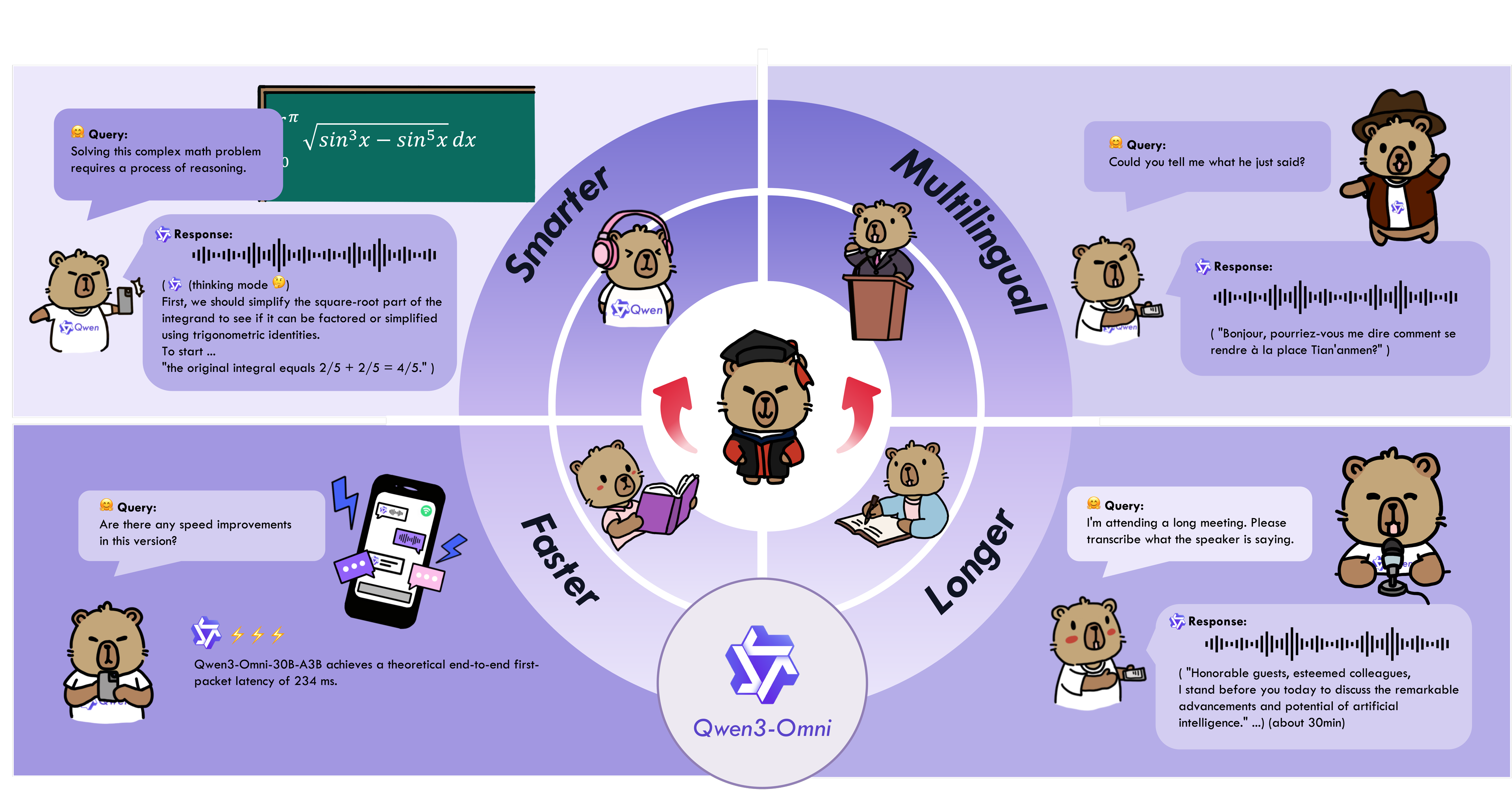
 Qwen3-Omni — это семейство открытых омнимодальных LLM от команды Qwen из Alibaba, изначально сквозных (end-to-end): они принимают на вход текст, изображения, аудио и видео и в реальном времени отдают ответ текстом или естественной речью.
Qwen3-Omni — это семейство открытых омнимодальных LLM от команды Qwen из Alibaba, изначально сквозных (end-to-end): они принимают на вход текст, изображения, аудио и видео и в реальном времени отдают ответ текстом или естественной речью.Это то, что я скачиваю и запускаю сам, или онлайн-сервис?И то и другое. Можно скачать открытые веса с Hugging Face и запустить модель самостоятельно через Transformers или vLLM, а можно обойтись без железа и обращаться к ней через API Alibaba DashScope.
И то и другое. Можно скачать открытые веса с Hugging Face и запустить модель самостоятельно через Transformers или vLLM, а можно обойтись без железа и обращаться к ней через API Alibaba DashScope.Как его запустить?Рекомендуемый путь — готовый Docker-образ, в который уже включена полная среда для Transformers и vLLM; после этого остаётся загрузить чекпоинт, например Qwen/Qwen3-Omni-30B-A3B-Instruct, и веса скачаются автоматически.
Рекомендуемый путь — готовый Docker-образ, в который уже включена полная среда для Transformers и vLLM; после этого остаётся загрузить чекпоинт, например Qwen/Qwen3-Omni-30B-A3B-Instruct, и веса скачаются автоматически.Что нужно установить заранее?Transformers 5.2.0 или новее — старые версии вроде 4.57.x работают хуже и менее точно — плюс набор инструментов qwen-omni-utils для обработки base64, URL и чередующихся аудио-, видео- и изображений-входов, а ему нужен установленный в системе ffmpeg.
Transformers 5.2.0 или новее — старые версии вроде 4.57.x работают хуже и менее точно — плюс набор инструментов qwen-omni-utils для обработки base64, URL и чередующихся аудио-, видео- и изображений-входов, а ему нужен установленный в системе ffmpeg.В чём подвох локального запуска?Скорость на пути через Transformers: поскольку модель построена на Mixture-of-Experts, обычный инференс через Hugging Face Transformers может быть очень медленным, поэтому авторы советуют vLLM для сценариев с низкой задержкой или большим масштабом.
Скорость на пути через Transformers: поскольку модель построена на Mixture-of-Experts, обычный инференс через Hugging Face Transformers может быть очень медленным, поэтому авторы советуют vLLM для сценариев с низкой задержкой или большим масштабом.А без видеокарты он заработает?По сути нет: это MoE-модель на 30B параметров, так что подразумевается инференс на GPU. В Transformers в README рекомендуется FlashAttention 2 (только fp16 или bf16), чтобы снизить потребление видеопамяти, а в vLLM FlashAttention 2 включён по умолчанию.
По сути нет: это MoE-модель на 30B параметров, так что подразумевается инференс на GPU. В Transformers в README рекомендуется FlashAttention 2 (только fp16 или bf16), чтобы снизить потребление видеопамяти, а в vLLM FlashAttention 2 включён по умолчанию.Какие языки он понимает и на каких говорит?Текст — на 119 языках. Речь на вход он принимает на 19 языках — английский, китайский, японский, корейский, немецкий, русский, французский, испанский, кантонский, арабский и другие — и отвечает голосом на 10, включая английский, китайский, французский, немецкий, русский, итальянский, испанский, португальский, японский и корейский.
Текст — на 119 языках. Речь на вход он принимает на 19 языках — английский, китайский, японский, корейский, немецкий, русский, французский, испанский, кантонский, арабский и другие — и отвечает голосом на 10, включая английский, китайский, французский, немецкий, русский, итальянский, испанский, португальский, японский и корейский.Насколько он хорош по сравнению с закрытыми моделями вроде Gemini?Он показывает лучший результат на 22 из 36 аудио- и видеобенчмарков и лучший среди open-source на 32 из 36, при этом по распознаванию речи, пониманию аудио и голосовому диалогу он сравним с Gemini 2.5 Pro. Через несколько дней после релиза он также поднялся на первое место в Hugging Face Trending.
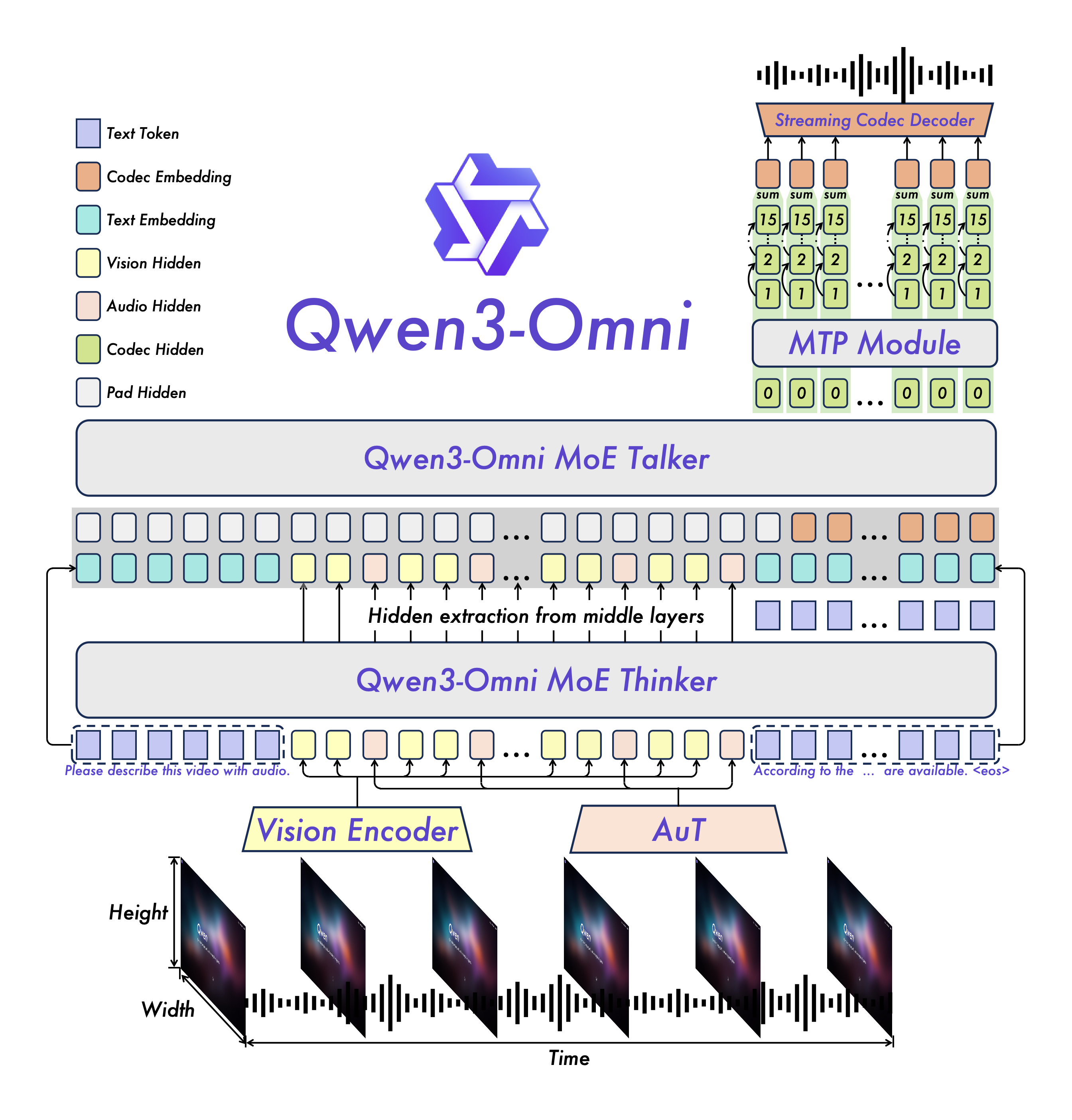
Он показывает лучший результат на 22 из 36 аудио- и видеобенчмарков и лучший среди open-source на 32 из 36, при этом по распознаванию речи, пониманию аудио и голосовому диалогу он сравним с Gemini 2.5 Pro. Через несколько дней после релиза он также поднялся на первое место в Hugging Face Trending.Чем отличаются варианты Instruct, Thinking и Captioner?Все три — MoE-модели 30B-A3B. В Instruct есть и блок thinker, и блок talker, и он отвечает и аудио, и текстом; Thinking добавляет цепочку рассуждений (chain-of-thought), но отвечает только текстом; Captioner дообучен выдавать подробные описания с низкой галлюцинацией для произвольного аудиовхода.
Все три — MoE-модели 30B-A3B. В Instruct есть и блок thinker, и блок talker, и он отвечает и аудио, и текстом; Thinking добавляет цепочку рассуждений (chain-of-thought), но отвечает только текстом; Captioner дообучен выдавать подробные описания с низкой галлюцинацией для произвольного аудиовхода.Какие задачи разобраны в cookbook-примерах?Распознавание речи и перевод речи в текст или речи в речь, анализ музыки и звуковых эффектов, описание аудио, OCR на изображениях и решение математических задач по картинкам, описание видео и навигация по съёмке от первого лица, аудиовизуальный чат и вызов функций голосом для поведения в духе агента — всё с реальными логами выполнения.
Распознавание речи и перевод речи в текст или речи в речь, анализ музыки и звуковых эффектов, описание аудио, OCR на изображениях и решение математических задач по картинкам, описание видео и навигация по съёмке от первого лица, аудиовизуальный чат и вызов функций голосом для поведения в духе агента — всё с реальными логами выполнения.What are similar projects?Qwen3-ASR, Speech, Hy-MT2, seamless_communication, WhisperLiveKit, verl, VibeVoice, airllm
Qwen3-ASR, Speech, Hy-MT2, seamless_communication, WhisperLiveKit, verl, VibeVoice, airllmWhich topics is it in?conversational-ai, moe, speech-to-text, transformers, speech-recognition, vllm, text-to-speech, translation, qwen, jupyter notebook, multimodal, large-language-models
conversational-ai, moe, speech-to-text, transformers, speech-recognition, vllm, text-to-speech, translation, qwen, jupyter notebook, multimodal, large-language-models