中文 | English | 日本語 | Français | Español

🤗 Hugging Face | 🤖 ModelScope | 📑 Paper | 🖥️ Demo
WeChat (微信) | Discord | API
[!Important]
Qwen2 is here! You are welcome to follow QwenLM/Qwen2 and share your experience there.
This repo (QwenLM/Qwen) is no longer actively maintained, due to substantial codebase differences.
We opensource our Qwen series, now including Qwen, the base language models, namely Qwen-1.8B, Qwen-7B, Qwen-14B, and Qwen-72B, as well as Qwen-Chat, the chat models, namely Qwen-1.8B-Chat, Qwen-7B-Chat, Qwen-14B-Chat, and Qwen-72B-Chat. Links are on the above table. Click them and check the model cards. Also, we release the technical report. Please click the paper link and check it out!
In brief, we have strong base language models, which have been stably pretrained for up to 3 trillion tokens of multilingual data with a wide coverage of domains, languages (with a focus on Chinese and English), etc. They are able to achieve competitive performance on benchmark datasets. Additionally, we have chat models that are aligned with human preference based on SFT and RLHF (not released yet), which are able to chat, create content, extract information, summarize, translate, code, solve math problems, and so on, and are able to use tools, play as agents, or even play as code interpreters, etc.
| Model |
Release Date |
Max Length |
System Prompt Enhancement |
# of Pretrained Tokens |
Minimum GPU Memory Usage of Finetuning (Q-Lora) |
Minimum GPU Usage of Generating 2048 Tokens (Int4) |
Tool Usage |
| Qwen-1.8B |
23.11.30 |
32K |
✅ |
2.2T |
5.8GB |
2.9GB |
✅ |
| Qwen-7B |
23.08.03 |
32K |
❎ |
2.4T |
11.5GB |
8.2GB |
✅ |
| Qwen-14B |
23.09.25 |
8K |
❎ |
3.0T |
18.7GB |
13.0GB |
✅ |
| Qwen-72B |
23.11.30 |
32K |
✅ |
3.0T |
61.4GB |
48.9GB |
✅ |
In this repo, you can figure out:
- Quickstart with Qwen, and enjoy the simple inference.
- Details about the quantization models, including GPTQ and KV cache quantization.
- Statistics of inference performance, including speed and memory.
- Tutorials on finetuning, including full-parameter tuning, LoRA, and Q-LoRA.
- Instructions on deployment, with the example of vLLM and FastChat.
- Instructions on building demos, including WebUI, CLI demo, etc.
- Introduction to DashScope API service, as well as the instructions on building an OpenAI-style API for your model.
- Information about Qwen for tool use, agent, and code interpreter
- Statistics of long-context understanding evaluation
- License agreement
- ...
Also, if you meet problems, turn to FAQ for help first. Still feeling struggled? Feel free to shoot us issues (better in English so that more people can understand you)! If you would like to help us, send us pull requests with no hesitation! We are always excited about PR!
Would like to chat with us or date us coffee time? Welcome to our Discord or WeChat!
News and Updates
- 2023.11.30 🔥 We release Qwen-72B and Qwen-72B-Chat, which are trained on 3T tokens and support 32k context, along with Qwen-1.8B, and Qwen-1.8B-Chat, on ModelScope and Hugging Face. We have also strengthened the System Prompt capabilities of the Qwen-72B-Chat and Qwen-1.8B-Chat, see example documentation. Additionally, support the inference on Ascend 910 and Hygon DCU. Check
ascend-support and dcu-support for more details.
- 2023.10.17 We release the Int8 quantized model Qwen-7B-Chat-Int8 and Qwen-14B-Chat-Int8.
- 2023.9.25 🔥 We release Qwen-14B and Qwen-14B-Chat on ModelScope and Hugging Face, along with qwen.cpp and Qwen-Agent. Codes and checkpoints of Qwen-7B and Qwen-7B-Chat are also updated. PLEASE PULL THE LATEST VERSION!
- Compared to Qwen-7B (original), Qwen-7B uses more training tokens, increasing from 2.2T tokens to 2.4T tokens, while the context length extends from 2048 to 8192. The Chinese knowledge and coding ability of Qwen-7B have been further improved.
- 2023.9.12 We now support finetuning on the Qwen-7B models, including full-parameter finetuning, LoRA and Q-LoRA.
- 2023.8.21 We release the Int4 quantized model for Qwen-7B-Chat, Qwen-7B-Chat-Int4, which requires low memory costs but achieves improved inference speed. Besides, there is no significant performance degradation on the benchmark evaluation.
- 2023.8.3 We release both Qwen-7B and Qwen-7B-Chat on ModelScope and Hugging Face. We also provide a technical memo for more details about the model, including training details and model performance.
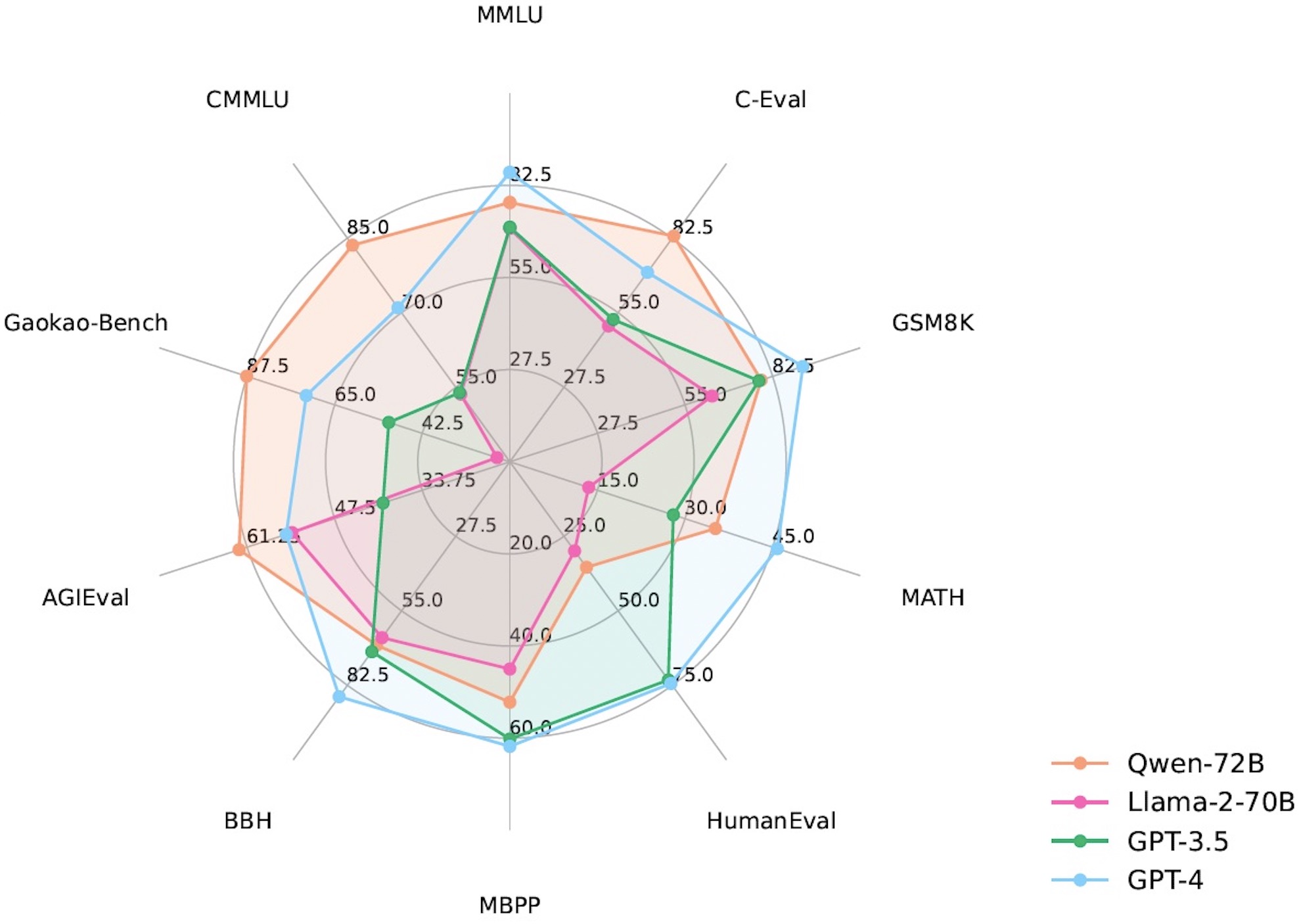
Qwen models outperform the baseline models of similar model sizes on a series of benchmark datasets, e.g., MMLU, C-Eval, GSM8K, MATH, HumanEval, MBPP, BBH, etc., which evaluate the models’ capabilities on natural language understanding, mathematic problem solving, coding, etc. Qwen-72B achieves better performance than LLaMA2-70B on all tasks and outperforms GPT-3.5 on 7 out of 10 tasks.
| Model |
MMLU |
C-Eval |
GSM8K |
MATH |
HumanEval |
MBPP |
BBH |
CMMLU |
|
5-shot |
5-shot |
8-shot |
4-shot |
0-shot |
3-shot |
3-shot |
5-shot |
| LLaMA2-7B |
46.8 |
32.5 |
16.7 |
3.3 |
12.8 |
20.8 |
38.2 |
31.8 |
| LLaMA2-13B |
55.0 |
41.4 |
29.6 |
5.0 |
18.9 |
30.3 |
45.6 |
38.4 |
| LLaMA2-34B |
62.6 |
- |
42.2 |
6.2 |
22.6 |
33.0 |
44.1 |
- |
| ChatGLM2-6B |
47.9 |
51.7 |
32.4 |
6.5 |
- |
- |
33.7 |
- |
| InternLM-7B |
51.0 |
53.4 |
31.2 |
6.3 |
10.4 |
14.0 |
37.0 |
51.8 |
| InternLM-20B |
62.1 |
58.8 |
52.6 |
7.9 |
25.6 |
35.6 |
52.5 |
59.0 |
| Baichuan2-7B |
54.7 |
56.3 |
24.6 |
5.6 |
18.3 |
24.2 |
41.6 |
57.1 |
| Baichuan2-13B |
59.5 |
59.0 |
52.8 |
10.1 |
17.1 |
30.2 |
49.0 |
62.0 |
| Yi-34B |
76.3 |
81.8 |
67.9 |
15.9 |
26.2 |
38.2 |
66.4 |
82.6 |
| XVERSE-65B |
70.8 |
68.6 |
60.3 |
- |
26.3 |
- |
- |
- |
| Qwen-1.8B |
45.3 |
56.1 |
32.3 |
2.3 |
15.2 |
14.2 |
22.3 |
52.1 |
| Qwen-7B |
58.2 |
63.5 |
51.7 |
11.6 |
29.9 |
31.6 |
45.0 |
62.2 |
| Qwen-14B |
66.3 |
72.1 |
61.3 |
24.8 |
32.3 |
40.8 |
53.4 |
71.0 |
| Qwen-72B |
77.4 |
83.3 |
78.9 |
35.2 |
35.4 |
52.2 |
67.7 |
83.6 |
For all compared models, we report the best scores between their official reported results and OpenCompass.
For more experimental results (detailed model performance on more benchmark datasets) and details, please refer to our technical report by clicking here.
Requirements
- python 3.8 and above
- pytorch 1.12 and above, 2.0 and above are recommended
- transformers 4.32 and above
- CUDA 11.4 and above are recommended (this is for GPU users, flash-attention users, etc.)
Quickstart
Below, we provide simple examples to show how to use Qwen-Chat with 🤖 ModelScope and 🤗 Transformers.
You can use our pre-built docker images to skip most of the environment setup steps, see Section "Using Pre-built Docker Images" for more details.
If not using docker, please make sure you have setup the environment and installed the required packages. Make sure you meet the above requirements, and then install the dependent libraries.
pip install -r requirements.txt
If your device supports fp16 or bf16, we recommend installing flash-attention (we support flash attention 2 now.) for higher efficiency and lower memory usage. (flash-attention is optional and the project can run normally without installing it)
git clone https://github.com/Dao-AILab/flash-attention
cd flash-attention && pip install .
# Below are optional. Installing them might be slow.
# pip install csrc/layer_norm
# If the version of flash-attn is higher than 2.1.1, the following is not needed.
# pip install csrc/rotary
Now you can start with ModelScope or Transformers.
To use Qwen-Chat for the inference, all you need to do is to input a few lines of codes as demonstrated below. Remember to pass in the correct model names or paths, such as "Qwen/Qwen-7B-Chat" and "Qwen/Qwen-14B-Chat". However, please make sure that you are using the latest code.
from transformers import AutoModelForCausalLM, AutoTokenizer
from transformers.generation import GenerationConfig

# Model names: "Qwen/Qwen-7B-Chat", "Qwen/Qwen-14B-Chat"
tokenizer = AutoTokenizer.from_pretrained("Qwen/Qwen-7B-Chat", trust_remote_code=True)

# use bf16
# model = AutoModelForCausalLM.from_pretrained("Qwen/Qwen-7B-Chat", device_map="auto", trust_remote_code=True, bf16=True).eval()
# use fp16
# model = AutoModelForCausalLM.from_pretrained("Qwen/Qwen-7B-Chat", device_map="auto", trust_remote_code=True, fp16=True).eval()
# use cpu only
# model = AutoModelForCausalLM.from_pretrained("Qwen/Qwen-7B-Chat", device_map="cpu", trust_remote_code=True).eval()
# use auto mode, automatically select precision based on the device.
model = AutoModelForCausalLM.from_pretrained(
    "Qwen/Qwen-7B-Chat",
    device_map="auto",
    trust_remote_code=True
).eval()

# Specify hyperparameters for generation. But if you use transformers>=4.32.0, there is no need to do this.
# model.generation_config = GenerationConfig.from_pretrained("Qwen/Qwen-7B-Chat", trust_remote_code=True)

# 1st dialogue turn
response, history = model.chat(tokenizer, "你好", history=None)
print(response)
# 你好!很高兴为你提供帮助。

# 2nd dialogue turn
response, history = model.chat(tokenizer, "给我讲一个年轻人奋斗创业最终取得成功的故事。", history=history)
print(response)
# 这是一个关于一个年轻人奋斗创业最终取得成功的故事。
# 故事的主人公叫李明,他来自一个普通的家庭,父母都是普通的工人。从小,李明就立下了一个目标:要成为一名成功的企业家。
# 为了实现这个目标,李明勤奋学习,考上了大学。在大学期间,他积极参加各种创业比赛,获得了不少奖项。他还利用课余时间去实习,积累了宝贵的经验。
# 毕业后,李明决定开始自己的创业之路。他开始寻找投资机会,但多次都被拒绝了。然而,他并没有放弃。他继续努力,不断改进自己的创业计划,并寻找新的投资机会。
# 最终,李明成功地获得了一笔投资,开始了自己的创业之路。他成立了一家科技公司,专注于开发新型软件。在他的领导下,公司迅速发展起来,成为了一家成功的科技企业。
# 李明的成功并不是偶然的。他勤奋、坚韧、勇于冒险,不断学习和改进自己。他的成功也证明了,只要努力奋斗,任何人都有可能取得成功。

# 3rd dialogue turn
response, history = model.chat(tokenizer, "给这个故事起一个标题", history=history)
print(response)
# 《奋斗创业:一个年轻人的成功之路》
Running Qwen, the base language model, is also simple.
Running Qwen
from transformers import AutoModelForCausalLM, AutoTokenizer
from transformers.generation import GenerationConfig

# Model names: "Qwen/Qwen-7B", "Qwen/Qwen-14B"
tokenizer = AutoTokenizer.from_pretrained("Qwen/Qwen-7B", trust_remote_code=True)
# use bf16
# model = AutoModelForCausalLM.from_pretrained("Qwen/Qwen-7B", device_map="auto", trust_remote_code=True, bf16=True).eval()
# use fp16
# model = AutoModelForCausalLM.from_pretrained("Qwen/Qwen-7B", device_map="auto", trust_remote_code=True, fp16=True).eval()
# use cpu only
# model = AutoModelForCausalLM.from_pretrained("Qwen/Qwen-7B", device_map="cpu", trust_remote_code=True).eval()
# use auto mode, automatically select precision based on the device.
model = AutoModelForCausalLM.from_pretrained(
    "Qwen/Qwen-7B",
    device_map="auto",
    trust_remote_code=True
).eval()

# Specify hyperparameters for generation. But if you use transformers>=4.32.0, there is no need to do this.
# model.generation_config = GenerationConfig.from_pretrained("Qwen/Qwen-7B", trust_remote_code=True)

inputs = tokenizer('蒙古国的首都是乌兰巴托(Ulaanbaatar)\n冰岛的首都是雷克雅未克(Reykjavik)\n埃塞俄比亚的首都是', return_tensors='pt')
inputs = inputs.to(model.device)
pred = model.generate(**inputs)
print(tokenizer.decode(pred.cpu()[0], skip_special_tokens=True))
# 蒙古国的首都是乌兰巴托(Ulaanbaatar)\n冰岛的首都是雷克雅未克(Reykjavik)\n埃塞俄比亚的首都是亚的斯亚贝巴(Addis Ababa)...
In the event of a network issue while attempting to download model checkpoints and codes from HuggingFace, an alternative approach is to initially fetch the checkpoint from ModelScope and then load it from the local directory as outlined below:
from modelscope import snapshot_download
from transformers import AutoModelForCausalLM, AutoTokenizer

# Downloading model checkpoint to a local dir model_dir
# model_dir = snapshot_download('qwen/Qwen-7B')
# model_dir = snapshot_download('qwen/Qwen-7B-Chat')
# model_dir = snapshot_download('qwen/Qwen-14B')
model_dir = snapshot_download('qwen/Qwen-14B-Chat')

# Loading local checkpoints
# trust_remote_code is still set as True since we still load codes from local dir instead of transformers
tokenizer = AutoTokenizer.from_pretrained(model_dir, trust_remote_code=True)
model = AutoModelForCausalLM.from_pretrained(
    model_dir,
    device_map="auto",
    trust_remote_code=True
).eval()
🤖 ModelScope
ModelScope is an open-source platform for Model-as-a-Service (MaaS), which provides flexible and cost-effective model service to AI developers. Similarly, you can run the models with ModelScope as shown below:
from modelscope import AutoModelForCausalLM, AutoTokenizer
from modelscope import GenerationConfig

# Model names: "qwen/Qwen-7B-Chat", "qwen/Qwen-14B-Chat"
tokenizer = AutoTokenizer.from_pretrained("qwen/Qwen-7B-Chat", trust_remote_code=True)
model = AutoModelForCausalLM.from_pretrained("qwen/Qwen-7B-Chat", device_map="auto", trust_remote_code=True, fp16=True).eval()
model.generation_config = GenerationConfig.from_pretrained("Qwen/Qwen-7B-Chat", trust_remote_code=True) # 可指定不同的生成长度、top_p等相关超参

response, history = model.chat(tokenizer, "你好", history=None)
print(response)
response, history = model.chat(tokenizer, "浙江的省会在哪里?", history=history)
print(response)
response, history = model.chat(tokenizer, "它有什么好玩的景点", history=history)
print(response)
Batch Inference
Qwen supports batch inference. With flash attention enabled, using batch inference can bring a 40% speedup. The example code is shown below:
import torch
from transformers import AutoModelForCausalLM, AutoTokenizer
from transformers import GenerationConfig
from qwen_generation_utils import make_context, decode_tokens, get_stop_words_ids

# To generate attention masks automatically, it is necessary to assign distinct
# token_ids to pad_token and eos_token, and set pad_token_id in the generation_config.
tokenizer = AutoTokenizer.from_pretrained(

 Qwen(通义千问)的官方仓库——阿里云推出的对话及预训练大语言模型系列,在 Hugging Face 和 ModelScope 上发布了从 1.8B 到 72B 参数的多个规模版本。