
QuickLook README

The project's README from github.com/QL-Win/QuickLook. As one markdown file: README.md.

QuickLook Logo

QuickLook

Instant File Previews, Just Press Space

The most powerful Quick Look implementation for Windows

Trending Featured|HelloGitHub

Official Website Release Downloads Stars License Build Status Platform


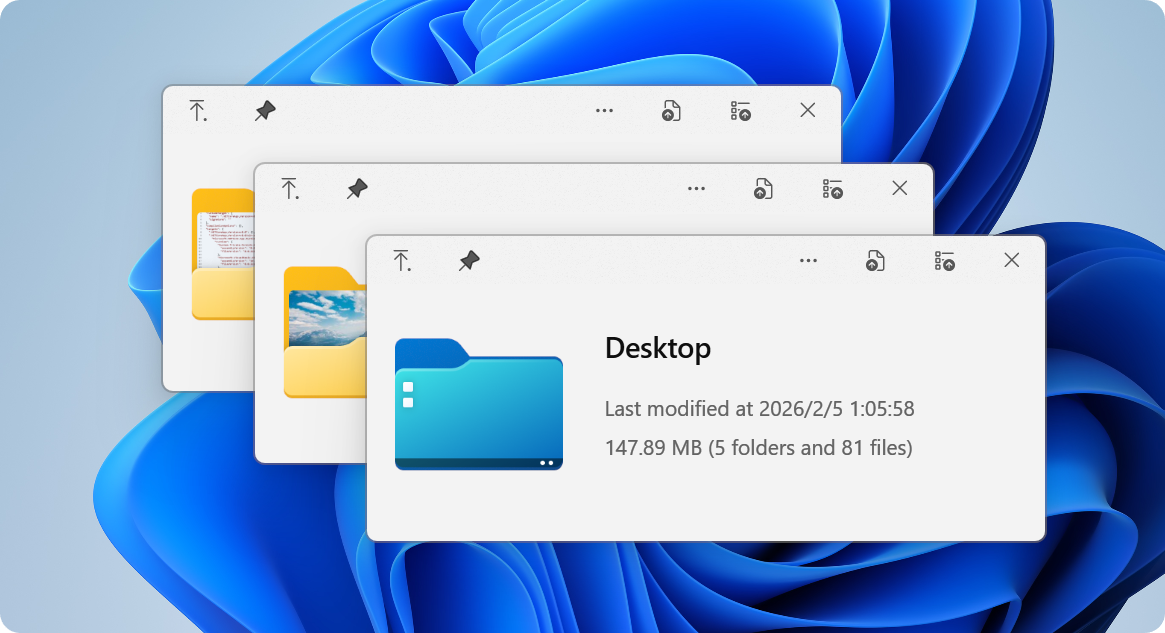
QuickLook Preview


The Problem

Superpowers

Get Started

Extend

Community


💡 The Problem

Ever wished Windows had macOS's Quick Look?

You know the drill: you want to peek at a file, so you double-click, wait for an app to launch, view the file, close the app... exhausting, right?

macOS users? They just press Space. Instant preview. Any file.

Now Windows has it too. 🎉

QuickLook brings that buttery-smooth, instant-preview experience to Windows. No more waiting. No more opening heavy applications just to peek at a document.

WITHOUT QuickLook:
┌─────────────────┐
│ 1. Double click │
│ 2. Wait...      │
│ 3. App loads    │
│ 4. View file    │
│ 5. Close app    │
└─────────────────┘
   ⏱️ ~10 seconds

WITH QuickLook:
┌─────────────────┐
│ 1. Press SPACE  │
│ 2. Done! ✨     │
└─────────────────┘
   ⚡ ~0.2 seconds


🚀 Superpowers

What Makes QuickLook Extraordinary

⚡️ Lightning Speed

Instant previews with zero lag

Native performance that feels like magic

Hardware-accelerated rendering

🎨 Gorgeous Design

Fluent Design System integration

Beautiful on 4K displays

Touch-optimized interface

🌈 100+ Formats

Images, videos, documents, code

3D models, archives, fonts

Extensible with plugins


📸 Visual Files

  • 🖼️ Images (JPEG, PNG, GIF, WebP, RAW)
  • 🎬 Videos (MP4, AVI, MKV, MOV)
  • 🎨 Photoshop (PSD), Illustrator (AI)
  • 📐 3D Models (OBJ, STL, FBX)
  • 🎭 Animated GIFs & APNGs

📄 Documents

  • 📝 PDF, Word, Excel, PowerPoint
  • 📋 Text files with syntax highlighting
  • 📊 Markdown with live rendering
  • 📜 E-books (EPUB, MOBI)
  • 📑 Comics (CBZ, CBR)

💻 Developer Files

  • 🐍 Python, JavaScript, C++, Rust
  • 🌐 HTML, CSS, JSON, XML
  • ⚙️ Config files (YAML, TOML, INI)
  • 📦 Archives (ZIP, RAR, 7Z, TAR)
  • 🔧 Binary files with hex view

🎵 Media

  • 🎵 Audio (MP3, FLAC, WAV, AAC)
  • 🎼 Sheet music
  • 🎨 Fonts (TTF, OTF, WOFF)
  • 🖌️ Vector graphics (SVG, EPS)
  • 📹 Subtitles (SRT, ASS)

🎯 Works Everywhere

File Explorer

Native integration

Open/Save Dialogs

System-wide support

3rd Party Managers

Total Commander, xplorer²

Cloud Storage

OneDrive, Dropbox ready


📦 Get Started

Choose Your Adventure


Microsoft Store

Recommended for most users

✅ Automatic updates ✅ Sandboxed security ✅ One-click install


Microsoft Store

⚠️ Limited Open/Save dialog support

Installer

Full-featured experience

✅ Complete functionality ✅ Open/Save dialog support ✅ Portable option available


Latest Release

💎 Get the full power

Scoop

For command-line lovers

✅ Easy updates ✅ Reproducible installs ✅ Version management


scoop bucket add extras
scoop install quicklook

🤓 Power user choice

Nightly

Live on the edge

✅ Latest features ✅ Bug fixes first ⚠️ May be unstable


Nightly Builds

🌙 Experimental builds


🤔 Not sure which version to choose?
Feature Store Installer Scoop Nightly
Auto-updates ✅ ⚠️ ✅ ⚠️
Open/Save dialogs ❌ ✅ ✅ ✅
Portable mode ❌ ✅ ❌ ✅
Stability ✅✅✅ ✅✅✅ ✅✅✅ ✅✅

📖 Read the full comparison


⚡ Quick Start in 10 Seconds

Step 1️⃣  Install QuickLook
         ↓
Step 2️⃣  It runs automatically
         ↓
Step 3️⃣  Select any file
         ↓
Step 4️⃣  Press SPACE
         ↓
Step 5️⃣  🎉 Magic happens!

💡 Pro Tips:

  • QuickLook lives in your system tray
  • Works with any file in File Explorer
  • Use arrow keys to preview multiple files
  • Press Esc or Space again to close

  • Drag files directly from the preview!


⌨️ Master the Shortcuts

Your New Superpowers


🎮 Basic Controls

Key Action
Space Toggle preview

Esc Space Close window

Enter Open file
↑ ↓ Next/Previous

🔍 Navigation

Key Action
← → Navigate files
Mouse Click Select file
Page Up Down Scroll content
Home End Jump to start/end

🎨 Advanced

Key Action
Wheel Zoom (images)
Ctrl+Wheel Zoom (PDFs)
L-Click Drag Rotate 3D
M-Click Drag Pan 3D

💡 Pro Tip: You can navigate files using arrow keys even when the preview window isn't focused!


🧩 Extend

Supercharge QuickLook with Plugins

Transform QuickLook into a universal file viewer


OfficeViewer

Preview Word, Excel & PowerPoint files

No Microsoft Office required!


✅ Native Office formats

✅ Standalone viewer
✅ Fast rendering
Download

PdfViewer-Native

Enhanced PDF viewing with WebView2

Modern, fast, feature-rich


✅ Smooth scrolling
✅ Search & annotations
✅ Hardware acceleration
Download

PostScriptViewer

Preview .ps and .eps files

Perfect for designers


✅ Vector rendering
✅ High quality output
✅ Professional formats
Download

CADImport

View CAD files natively

.dwg, .dxf, .plt, .cgm


✅ Engineering drawings
✅ Architecture files
✅ Technical diagrams
Download

📦 How to Install or Upgrade Plugins

1️⃣ Download

Get the .qlplugin file

2️⃣ Install

Ensure QuickLook is currently running, select the file and press Spacebar.

3️⃣ Restart

Click on the Install button, then restart QuickLook.

📦 How to Remove Plugins

1️⃣ Quit

Quit QuickLook.

2️⃣ Navigate

Navigate to the Data location.

3️⃣ Remove

You should find several folders. Remove the one you do not want to use.


Browse Plugins Installation Guide


💖 Community

Join Thousands of Happy Users


QQ Group

Join our Chinese community

371388501


QQ Group

Translate

Help QuickLook speak your language

Make it accessible


Translations

Star Us

Show your support

It means a lot!


Star us

👨‍💻 For Developers

Interested in contributing? Check out our development resources:

Wiki Code Style Issues


🙏 Credits

Built with Love by Amazing People


Design Team

@OiCkilL @QubitsDev @Donno @Shomnipotence

Fluent UI & Icons

Contributors

Our Amazing Team

Code, translations & ideas

Open Source

Libraries We Use

Standing on giants

You!

Every User Matters

Thank you for using QuickLook


📜 License


GPL v3


QuickLook is free and open source under GPL-3.0

*Free software, free f

QuickLook (QL-Win/QuickLook)

Searching Database…

25.4K ·GitHub
这是什么?QuickLook 把 macOS 的“Quick Look”(快速查看)功能带到了 Windows:在文件资源管理器中选中任意文件,按下空格键,即可无需打开完整应用程序,立即预览内容。
这是独立应用,还是只能通过插件使用?它是一个独立的 Windows 桌面工具,常驻系统托盘,并与文件资源管理器集成。还可以通过安装单独的 .qlplugin 文件,进一步扩展其支持的格式范围。
如何安装并开始使用?可通过 Microsoft Store、独立安装程序或 Scoop(`scoop install quicklook`)安装。运行后它会常驻系统托盘,在文件资源管理器中选中文件并按下空格键,即可打开预览。
预览文档是否需要安装 Microsoft Office 或其他软件?不需要。OfficeViewer 插件无需安装 Office 即可预览 Word、Excel 和 PowerPoint 文件;基础应用除 Windows 本身外,没有其他列出的依赖项。
各种安装方式的功能都一样吗?并不相同。Microsoft Store 版本运行在沙盒中并支持自动更新,但对“打开/保存”对话框的支持有限;安装程序版和 Scoop 版则对对话框提供完整支持。Nightly 版会最先获得修复,但可能不够稳定。
QuickLook 开箱即用可以预览哪些文件格式?支持 100 多种格式,包括图片(JPEG、PNG、WebP、RAW)、视频、PDF、Office 文档、Markdown、电子书、漫画、3D 模型(OBJ、STL、FBX)、带语法高亮的代码、音频、字体和压缩包。
有哪些官方插件可以扩展它的功能?OfficeViewer 无需 Office 即可预览 Word、Excel 和 PowerPoint 文件;PdfViewer-Native 基于 WebView2 提供增强的 PDF 查看;PostScriptViewer 可处理 .ps 和 .eps 文件;CADImport 可原生查看 .dwg、.dxf、.plt 和 .cgm 文件。
如何安装或卸载插件?下载 .qlplugin 文件,确保 QuickLook 正在运行,选中该文件并按下空格键,然后点击“安装”并重启 QuickLook。要卸载插件,先退出 QuickLook,进入数据位置,删除该插件的文件夹。
除了文件资源管理器,它还能配合其他文件管理器使用吗?可以。除了原生支持文件资源管理器和“打开/保存”对话框,它还能与 OneDrive、Dropbox 等云存储,以及 Total Commander、xplorer2 等第三方文件管理器配合使用。
Creator
QL-Win
Size
339.9 MB
Stars
25.4K
Age
9y
Commits · 90 Days