15.4K ·GitHub
What is this?
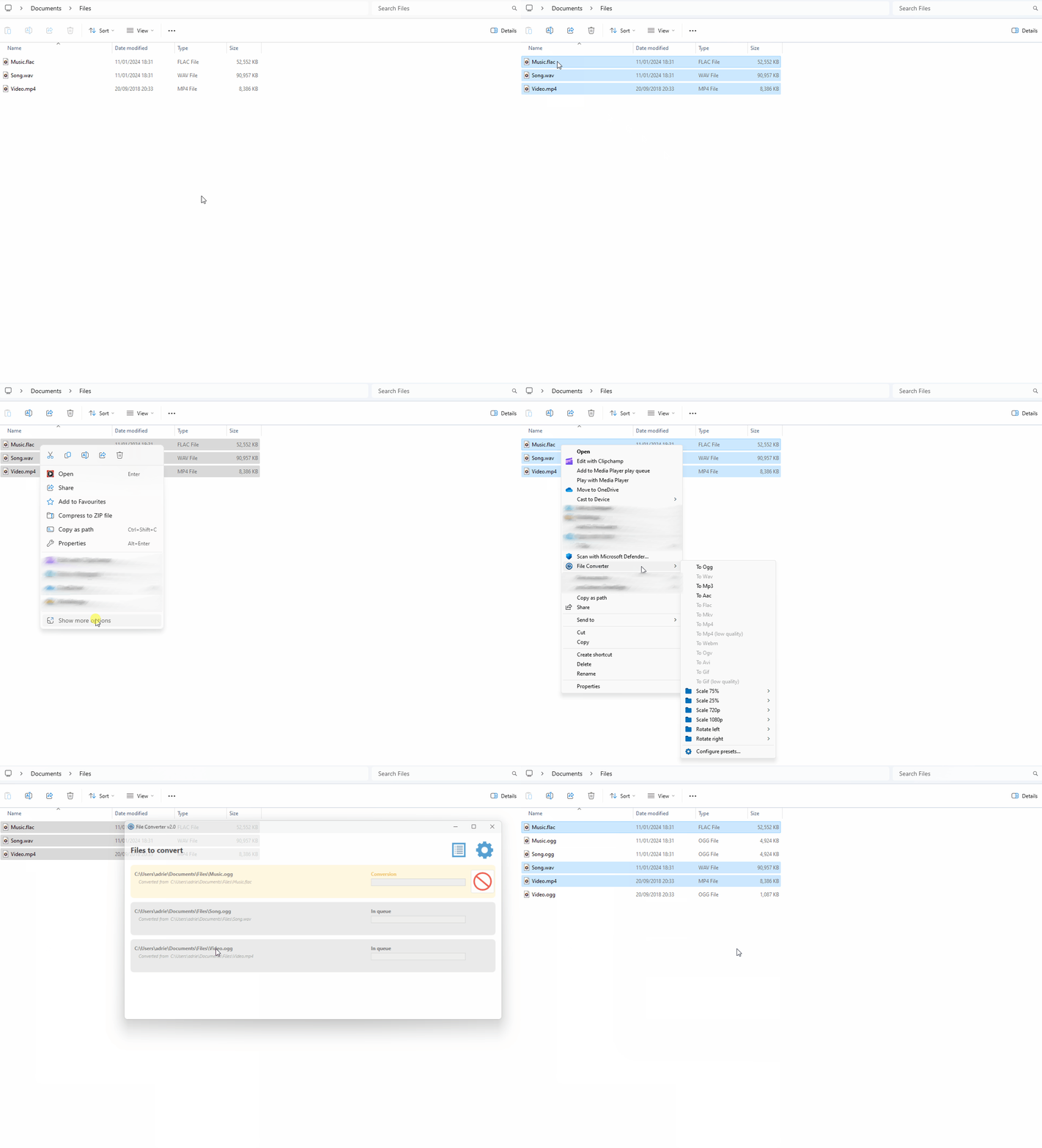
 File Converter is a Windows tool that lets you convert and compress files directly from the right-click context menu in Windows Explorer, without opening a separate app.
File Converter is a Windows tool that lets you convert and compress files directly from the right-click context menu in Windows Explorer, without opening a separate app.Is this a standalone app or a plugin for something else?It's a standalone Windows desktop application (built with WPF) paired with a Windows Explorer shell extension that adds the conversion options to the right-click menu.
It's a standalone Windows desktop application (built with WPF) paired with a Windows Explorer shell extension that adds the conversion options to the right-click menu.How do I install and use it?Download the installer from file-converter.io, install it, then right-click one or more files in Windows Explorer and pick a convert/compress option from the context menu; usage details are documented on the project wiki.
Download the installer from file-converter.io, install it, then right-click one or more files in Windows Explorer and pick a convert/compress option from the context menu; usage details are documented on the project wiki.Does it need other software like FFmpeg installed separately?No, it bundles its own conversion backends: FFmpeg, ImageMagick, and Ghostscript are shipped as middlewares, so you don't need to install them yourself.
No, it bundles its own conversion backends: FFmpeg, ImageMagick, and Ghostscript are shipped as middlewares, so you don't need to install them yourself.Is this available for Mac or Linux too?No, it's Windows-only since it relies on the Windows Explorer context menu and Visual Studio/WPF tooling.
No, it's Windows-only since it relies on the Windows Explorer context menu and Visual Studio/WPF tooling.What file types can it convert or compress?Thanks to its bundled FFmpeg, ImageMagick and Ghostscript backends, it can handle audio, video, image and PDF conversion/compression, plus CD audio extraction via its Ripper component.
Thanks to its bundled FFmpeg, ImageMagick and Ghostscript backends, it can handle audio, video, image and PDF conversion/compression, plus CD audio extraction via its Ripper component.Is it free to use?Yes, it's an open-source personal project released under GPL-3.0; the author only asks for optional donations.
Yes, it's an open-source personal project released under GPL-3.0; the author only asks for optional donations.Is it actively maintained or translated?Yes, it has an active community of contributors, with the interface translated into over 20 languages including Chinese, Japanese, Arabic, and Russian.
Yes, it has an active community of contributors, with the interface translated into over 20 languages including Chinese, Japanese, Arabic, and Russian.What are similar projects?iPhoneMirror, KillerPDF, VioletToolBox, Filee, flyingmouse-format, PersistentWindows, CefSharp, ContextMenuManager
iPhoneMirror, KillerPDF, VioletToolBox, Filee, flyingmouse-format, PersistentWindows, CefSharp, ContextMenuManagerWhich topics is it in?context-management, desktop-application, wpf, file-manager, c-sharp, compression, gpl, audio-processing, localization, video-processing, ffmpeg, c#
context-management, desktop-application, wpf, file-manager, c-sharp, compression, gpl, audio-processing, localization, video-processing, ffmpeg, c#