
 Instant File Previews, Just Press Space














































What is this?
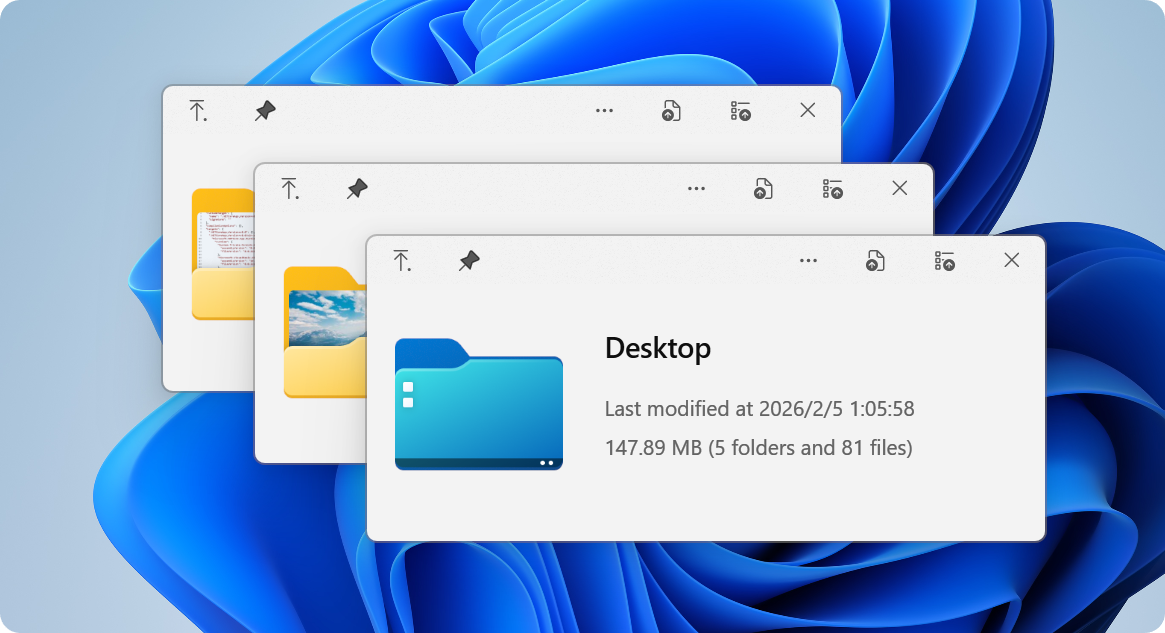
 QuickLook brings macOS's 'Quick Look' feature to Windows: select any file in File Explorer, press Space, and get an instant preview without opening a full application.
QuickLook brings macOS's 'Quick Look' feature to Windows: select any file in File Explorer, press Space, and get an instant preview without opening a full application.Is this a standalone app, or does it only work through plugins?It's a standalone Windows desktop utility that sits in the system tray and hooks into File Explorer; its format coverage can be extended further by installing separate .qlplugin files.
It's a standalone Windows desktop utility that sits in the system tray and hooks into File Explorer; its format coverage can be extended further by installing separate .qlplugin files.How do I install and start using it?Install via the Microsoft Store, the standalone Installer, or Scoop (`scoop install quicklook`); once running, it sits in the system tray, and pressing Space on a selected file in File Explorer opens the preview.
Install via the Microsoft Store, the standalone Installer, or Scoop (`scoop install quicklook`); once running, it sits in the system tray, and pressing Space on a selected file in File Explorer opens the preview.Do I need Microsoft Office or other software installed to preview documents?No - the OfficeViewer plugin previews Word, Excel, and PowerPoint files without Office installed, and the base app has no other listed dependencies beyond Windows itself.
No - the OfficeViewer plugin previews Word, Excel, and PowerPoint files without Office installed, and the base app has no other listed dependencies beyond Windows itself.Do all the install options work the same way?They differ: the Microsoft Store build is sandboxed with automatic updates but has limited Open/Save dialog support, while the Installer and Scoop builds have full dialog support; Nightly builds get fixes first but may be unstable.
They differ: the Microsoft Store build is sandboxed with automatic updates but has limited Open/Save dialog support, while the Installer and Scoop builds have full dialog support; Nightly builds get fixes first but may be unstable.What file formats can QuickLook preview out of the box?It covers 100+ formats including images (JPEG, PNG, WebP, RAW), videos, PDFs, Office documents, Markdown, e-books, comics, 3D models (OBJ, STL, FBX), syntax-highlighted code, audio, fonts, and archives.
It covers 100+ formats including images (JPEG, PNG, WebP, RAW), videos, PDFs, Office documents, Markdown, e-books, comics, 3D models (OBJ, STL, FBX), syntax-highlighted code, audio, fonts, and archives.What official plugins are available to extend it?OfficeViewer previews Word/Excel/PowerPoint without needing Office, PdfViewer-Native gives enhanced WebView2-based PDF viewing, PostScriptViewer handles .ps/.eps files, and CADImport natively views .dwg, .dxf, .plt, and .cgm files.
OfficeViewer previews Word/Excel/PowerPoint without needing Office, PdfViewer-Native gives enhanced WebView2-based PDF viewing, PostScriptViewer handles .ps/.eps files, and CADImport natively views .dwg, .dxf, .plt, and .cgm files.How do I install or remove a plugin?Download the .qlplugin file, make sure QuickLook is running, select the file and press Space, then click Install and restart QuickLook; to remove one, quit QuickLook, go to the Data location, and delete the plugin's folder.
Download the .qlplugin file, make sure QuickLook is running, select the file and press Space, then click Install and restart QuickLook; to remove one, quit QuickLook, go to the Data location, and delete the plugin's folder.Does it work with file managers other than Explorer?Yes - besides native File Explorer and Open/Save dialog integration, it works with cloud storage like OneDrive and Dropbox and third-party managers such as Total Commander and xplorer2.
Yes - besides native File Explorer and Open/Save dialog integration, it works with cloud storage like OneDrive and Dropbox and third-party managers such as Total Commander and xplorer2.What are similar projects?Flow.Launcher, DeskBox, BibaYanji, KillerPDF, FileConverter, forel, StarPie, netch
Flow.Launcher, DeskBox, BibaYanji, KillerPDF, FileConverter, forel, StarPie, netchWhich topics is it in?productivity-tools, file-manager, image, dotnet, plugin-system, c#, windows-app, video, pdf, utility, plugin, desktop
productivity-tools, file-manager, image, dotnet, plugin-system, c#, windows-app, video, pdf, utility, plugin, desktop