


Website ·
Discord ·
English · 简体中文 · 繁體中文 · Italiano · 日本語 · Bahasa Indonesia
Tiny engine, immense model. colibri runs very large open models on the
machine you already have. A mixture-of-experts model of hundreds of billions of
parameters uses only a small part of itself for each token, so colibri keeps
that part in RAM and reads the rest, the experts, from the disk when the model
asks for them. Pure C, one file per model family, no GPU required.
Thirteen engines run today. Ten are for language models: GLM-5.2/5.3,
GLM-5.3-Flash, Inkling, Kimi K3, DeepSeek V4 Flash,
DeepSeek V4.1 Flash, MiMo-V2.6 Flash (and Pro), Qwen3.8-Flash-Next,
Qwen3.6 (which also runs Qwen3-Coder and the dense Qwen3.8-27B) and
OLMoE. One draws pictures: Qwen-Image-2.1. Two answer decisions:
Laya and GLiNER2.5-Decide, with a third decision model, Clef, on the
Qwen3.6 engine. Which one for my machine
$ ./coli chat
  colibri v2.0.0 · GLM-5.2 · 744B MoE · int4 · streaming CPU
  ✓ ready in 32s · resident 9.9 GB
  › ciao!
  ◆ Ciao! Come posso aiutarti oggi?

colibri is free and open source. If it has earned a place on your machine, a coffee helps pay for the next engine and the next speedup.
Get started in one step
You need a computer with 8 GB of RAM at the very least (16 GB or more is
better), 22 GB free on the disk for the smallest model, and an internet
connection. A graphics card is optional.
Windows
- On this page click Code, then Download ZIP, and unzip it.
- Double-click
START-HERE.bat in the unzipped folder. If Python is
missing, it offers to install it for you.
Linux (Ubuntu and Debian; other distributions have the same packages under
their own names)
sudo apt install git python3 build-essential
git clone https://github.com/JustVugg/colibri
cd colibri
./start-here.sh
macOS (with Homebrew)
xcode-select --install
brew install libomp git python
git clone https://github.com/JustVugg/colibri
cd colibri
./start-here.sh
You answer one question, which model, and Enter takes the recommendation. Then
the setup:
- looks at your machine: RAM, free disk, CPU and GPUs;
- recommends a model that fits: the part of the model that always stays in
RAM, plus a minimum cache of experts, must fit in your RAM, and the download
on your disk;
- gets the engine: it builds it for your machine when a compiler is there,
otherwise it downloads the prebuilt one, which runs on the CPU and, on Linux
and Windows, on a Vulkan GPU too. It builds
for your GPU when that pays: CUDA for an NVIDIA card on Linux when the CUDA toolkit is installed,
otherwise Vulkan. On a discrete GPU it always does; on an integrated GPU,
which shares the CPU's RAM, only for the models measured faster there
(Qwen3.6, Qwen3-Coder and Qwen3.8-Flash-Next). If a package is missing it
prints the exact command to install it and carries on with the CPU; run the
setup again afterwards and it rebuilds for the GPU;
- downloads the model with progress and resume: stop it whenever you like,
run it again and it continues where it stopped;
- starts colibri and opens the dashboard in your browser, and prints the
addresses other apps can use:
Starting colibri
  Browser:             http://127.0.0.1:8000/
  OpenAI base URL:     http://127.0.0.1:8000/v1
  Anthropic base URL:  http://127.0.0.1:8000
  stop: press Ctrl+C here (or close this window)
Next time, run START-HERE.bat or ./start-here.sh again: colibri starts
straight away, with no download and no build. c/coli status shows what is
installed and whether it runs, c/coli stop stops it (c\coli.cmd status and
c\coli.cmd stop on Windows).
Options go after ./start-here.sh or START-HERE.bat:
| Option |
What it does |
--list |
every model against this machine, and why one does not fit |
--model ID |
install that model (the ids are in the tables below) |
--yes |
no questions: take the recommendation |
--dir DIR |
put the models on another disk (default ~/colibri-models) |
--backend vulkan, cuda or cpu |
choose the engine build yourself; --no-gpu is --backend cpu |
--model-dir DIR |
use a model you already downloaded |
--reconfigure |
choose another model |
What each step does, in detail: docs/quickstart.md.
If something goes wrong
| What you see |
What to do |
| it stopped during the download |
run the same command again: it resumes from the bytes already on disk |
to use the GPU through ..., first run: <command> |
run that command, then the setup again: it rebuilds for the GPU and does not download again |
the ... build failed, for example Unsupported gpu architecture when the installed CUDA toolkit no longer supports the card |
the setup checks the toolkit against the card first and picks Vulkan by itself, saying why; if a build still fails it offers the next one (Vulkan, then the CPU). ./start-here.sh --backend vulkan forces Vulkan; --no-gpu stays on the CPU |
needs N GB free for the download |
--dir with a folder on a bigger disk |
on WSL, the model folder is under /mnt/c |
keep it on the Linux disk (the default, ~/colibri-models): /mnt/c is many times slower |
you updated the checkout (git pull) |
run ./start-here.sh again: it rebuilds the engine when the sources changed, then starts it |
| anything else |
c/coli logs -n 50 shows the log of a server started in the background (one started in the foreground prints to its own terminal) and c/coli logs --install the setup's; open an issue with the last lines the setup printed |
Let your AI assistant set it up
If you use an AI coding assistant, it can do all of this for you. Ask it:
Set up colibri on this machine following docs/AI_SETUP.md from https://github.com/JustVugg/colibri
docs/AI_SETUP.md gives the assistant every step as a
command with a machine-readable result, and tells it to ask you before it
downloads a model or installs a system package. Assistants that speak the Model
Context Protocol can use colibri's MCP server instead: coli mcp offers tools
to detect the hardware, recommend a model, install, start, stop and check it
(docs/MCP_SERVER.md).
Or by hand
To choose each step yourself (a prebuilt release or a source build, any model
from the tables below, then coli chat, coli web or coli serve), see
Install by hand, or the
Quick Start guide for every platform step by step.
What colibri is, and why
A mixture-of-experts model is huge on disk and small per token. GLM-5.2 has
744B parameters, uses about 40B for each token, and only about 11 GB of those
change from one token to the next: the routed experts.
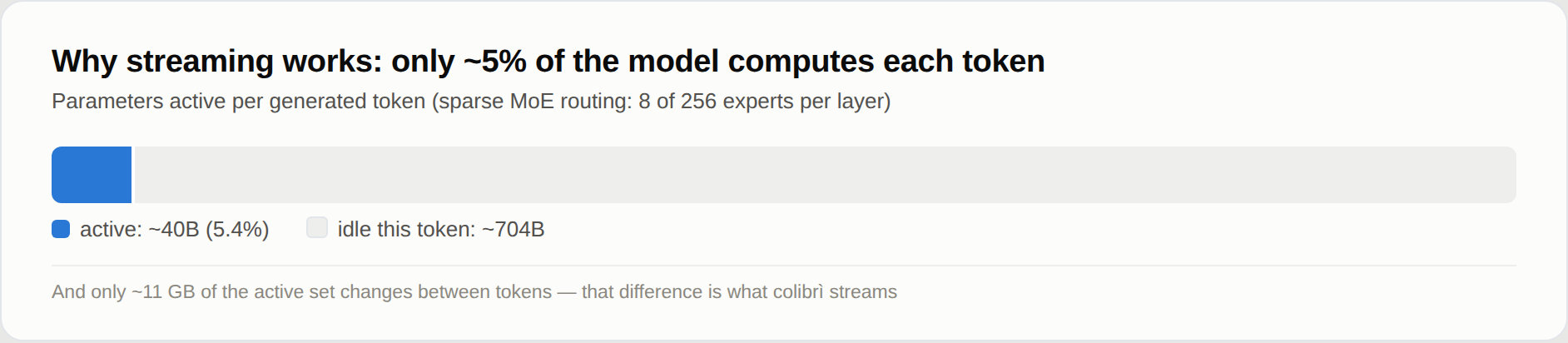
So the model does not have to fit in fast memory; it has to be placed. The
dense part (attention, shared experts, embeddings) stays in RAM. The routed
experts stay on the disk and are read when the router asks for them, through a
cache that learns which experts your work uses. A GPU, when there is one, holds
the hottest experts and the dense layers. Where a weight sits changes how fast
the answer comes, not which weights or which router decisions produce it.
Why: to run models of this size on hardware people already own, to watch them
work (the dashboard shows every expert as it fires), and to keep the engine
small enough that anyone can measure it and make it faster. colibri is also an
open research platform: an optimisation earns its place with a reproducible
end-to-end measurement, and the default policy never silently changes model
precision or router semantics. Less fast memory may cost speed; it must not
quietly redefine the model. How it works has the details.
Which model for my machine
The setup recommends the most capable model that runs from RAM on your
machine, and lists the larger ones that stream from the disk right below it.
./start-here.sh --list shows them all against your machine. The tables follow
the setup's own catalog (c/setup_catalog.py); the
downloads are the sizes Hugging Face lists for each repository.
- RAM is two numbers: below the first the model does not start, from the
second it runs as measured.
- GPU is what the setup can build for that engine (GPUs).
Integrated too means it also uses an integrated GPU, where these engines
were measured faster; the others use a discrete GPU only.
- Measured is what was timed on the machine named, decode speed for the
chat models. The letters are machines listed under the tables. A blank means
nobody has measured it yet.
Small models, which run from RAM
| Model |
--model |
Download |
RAM |
GPU |
Measured |
| Qwen3.6-35B-A3B: chat with thinking and tools |
qwen36-35b |
23 GB |
10 / 20 GB |
CUDA, Vulkan (integrated too) |
6.0 tok/s on the CPU, 9.9 with Vulkan on the integrated GPU (A); 30.0 with CUDA (C) |
| Qwen3-Coder-30B-A3B: code and tool calls, no thinking |
qwen3-coder-30b |
19 GB |
8 / 18 GB |
CUDA, Vulkan (integrated too) |
8.5-9.6 tok/s with every expert in RAM, 5.1 with 32 per layer (A, CPU) |
| Qwen-Image-2.1: text to picture, non-commercial licence |
qwen-image-2.1 |
33 GB |
12 / 18 GB |
Vulkan |
one 768x512 picture in 2 min 40 s (8 Zen 4 cores, CPU) |
Large models, whose experts stream from the disk (the disk sets the speed:
a fast NVMe drive helps most)
| Model |
--model |
Download |
RAM |
GPU |
Measured |
| DeepSeek V4 Flash REAP 150B: 132 of the 256 experts |
deepseek-v4-flash-reap |
85 GB |
16 / 32 GB |
CUDA, Vulkan |
|
| DeepSeek V4 Flash (284B): tools |
deepseek-v4-flash |
167 GB |
16 / 32 GB |
CUDA, Vulkan |
0.93 tok/s with 32 GB (Ryzen 7 5800X), 1.24 with 63 GB (Ryzen 9 5950X), CPU only; 1.5-1.6 with CUDA (RTX 5080, 32 GB, two NVMe) |
| MiMo-V2.6 Flash (309B): vision and tools |
mimo-v2.6-flash |
172 GB |
32 / 52 GB |
Vulkan |
2.34-3.37 tok/s (A, CPU) |
| Qwen3.8-Flash-Next (125B + 51B n-gram): vision and tools |
qwen38-flash-next |
186 GB |
24 / 32 GB |
CUDA, Vulkan (integrated too) |
1.91-2.56 tok/s with 32-96 experts per layer; 3.99 with the optional int4 experts (A, CPU) |
| GLM-5.2 (744B): the reference model, with the MTP head |
glm-5.2 |
429 GB |
16 / 24 GB |
CUDA, Vulkan |
0.05-0.1 tok/s cold on a 25 GB laptop; 1.83 on a 128 GB Ryzen AI Max+ 395; 9.0-9.2 on 6x RTX 5090 |
| GLM-5.3 (744B): the same engine, no MTP head |
glm-5.3 |
419 GB |
16 / 24 GB |
CUDA, Vulkan |
|
| Inkling (975B): int4 experts, bf16 dense weights |
inkling |
514 GB |
120 / 128 GB as downloaded; 25 GB after a dense conversion |
CUDA, Vulkan |
0.25 tok/s (Ryzen 9 7900, 187 GB, RTX A6000) |
| MiMo-V2.6 Pro (1.02T): vision and tools |
mimo-v2.6-pro |
564 GB |
54 / 64 GB |
Vulkan |
0.66-0.79 tok/s (A, CPU) |
| Kimi K3 (2.8T): the largest |
kimi-k3 |
1.56 TB |
32 / 64 GB |
CUDA, Vulkan |
about 9.4 s per token, experts read at 6.3 GB/s |
By hand: a conversion or preparation step after the download
| Model |
Download, then on disk |
RAM |
GPU |
Measured |
| OLMoE (7B): small, to learn the tools on |
14 GB, 7 GB after conversion to int8 |
8 GB |
Vulkan |
22-23 tok/s (A, CPU) |
| Qwen3.8-27B (dense): text and images |
56 GB, 51 GB after conversion |
20 GB in int4, 30 GB in int8 |
Vulkan |
3.45 tok/s in int4, 2.1 in int8 (16-thread CPU server) |
| GLM-5.3-Flash (321B): vision and tools |
328 GB, converted shard by shard to 195 GB |
25 GB |
CUDA, Vulkan |
about 20 s per token warm, 44 s cold (6 cores, 25 GB, ordinary disk) |
| DeepSeek V4.1 Flash (552B): vision and tools, no conversion but a one-off preparation |
510 GB |
about 18 GB plus the expert cache (24.8 GB peak with 8 per layer) |
Vulkan |
0.21-0.24 tok/s (16-thread CPU server holding 68% of the experts) |
Decision models (they answer System One questions, they do not chat)
| Model |
Download, then on disk |
RAM |
GPU |
Measured |
| Laya (Convai Innovations), English |
0.85 GB |
1.7 GB |
CPU |
219 ms for one question, 882 ms for three (B) |
| GLiNER2.5-Decide (fastino), English |
1.95 GB |
1.9 GB |
CPU |
294 ms for one question, 897 ms for three (B, under load) |
| Clef (Cloudflare): Qwen3.8-27B with a decision head, it also chats |
55 GB, 52 GB after conversion |
19 GB in int4 to 55 GB in f16 |
CPU |
20.4 s per request in int8 (A) |
The machines:
A a Ryzen 7 PRO 8700GE desktop (8 cores, 61-64 GB DDR5, NVMe, integrated
Radeon 780M);
B an i7-1355U laptop;
C an RTX 3070 8 GB in a Threadripper 3945WX box, with the dense layers and
the DeltaNet layers on the card (per-row int4 container).
Each number comes from its model's page in docs/ or from
the benchmark tables, with the exact settings.
Each family has its page: qwen36.md (Qwen3.6, Qwen3-Coder,
Qwen3.8-27B), qwen38.md, deepseek-v4.md,
deepseek-v41.md, mimo.md,
glm53-flash.md, inkling.md,
kimi_k3.md, qwen-image.md,
laya.md, gliner_decide.md,
clef.md, and GLM-5.2 in the Quick Start.
Checkpoints with the same architecture as a supported one, such as
KAT-Coder v2.5 on the Qwen3.6 engine, run unchanged.
GPUs
No GPU needed
Every engine runs on the CPU with nothing else installed. A GPU is a faster
place to keep weights, not a requirement: for the large models the disk sets
the speed, for the small ones the RAM.
Vulkan: any GPU
Every MoE engine can use any GPU with a Vulkan 1.2 driver (AMD, Intel, NVIDIA,
integrated or discrete) in two ways:
- the expert tier: a cache of routed experts in GPU memory, filled at
startup from the experts your past conversations used and adapting while you
chat. The GPU computes the experts it holds while the CPU computes the rest;
- the dense chain: a whole layer recorded as one GPU submission, with the
model's running state kept on the GPU from one layer to the next.
Measured on the integrated Radeon 780M of machine A, the model files dropped
from the page cache before each run, 100 tokens decoded
(vulkan.md):
|
CPU |
Vulkan, expert tier |
Vulkan, tier and dense chain |
| Qwen3.6-35B-A3B, decode |
6.0 tok/s |
8.0 tok/s |
9.9 tok/s |
| Qwen3.6-35B-A3B, a 512-token prompt |
35.7 s |
12.2 s |
9.5 s |
| Qwen3.8-Flash-Next (int4 experts), decode |
3.5 tok/s |
3.8 tok/s |
3.2 tok/s |
| Qwen3.8-Flash-Next, a 512-token prompt |
43.6 s |
38.7 s |
30.1 s |
| OLMoE, decode (warm) |
23.1 tok/s |
12.8 tok/s |
17.3 tok/s |
An integrated GPU shares the CPU's RAM. What it saves is the work and the disk
reads of the experts it holds, so it pays on a model like Qwen3.6, and a small
model whose experts already sit in RAM, like OLMoE, can lose. That is why the
setup turns Vulkan on for an integrated GPU only for Qwen3.6, Qwen3-Coder and
Qwen3.8-Flash-Next, and why each engine decides for itself whether to run the
dense chain there (Qwen3.6 yes, Qwen3.8 no). --backend vulkan asks for Vulkan
anyway.
Turning the GPU on or off. coli setup --backend vulkan uses the GPU for any
model, and coli setup --backend cpu (or --no-gpu) keeps everything on the
CPU. An engine built with Vulkan uses the GPU only with COLI_VULKAN=1 in the
environment of coli chat, serve or web (the setup sets it when it chose
Vulkan); without it, the engine runs on the CPU. With the GPU on, COLI_VK_CHAIN=0
keeps the expert tier and runs the dense layers on the CPU. On an integrated GPU,
try both: on a laptop with an Intel Iris Xe (Core i7-1355U), Qwen3.6 decoded
2.1 tok/s on the CPU, 1.7 to 1.9 with Vulkan, and 2.1 with the dense chain off.
On a discrete GPU the setup builds Vulkan for every engine (CUDA first, where
the engine has it and the toolkit is installed), with the dense layers on the
card. That is the case the design is for. We have not measured a discrete
GPU ourselves yet. The first number comes from a user: Qwen3.6 at 17 to 19
tok/s on a Tesla V100 16 GB, with the expert tier and the dense chain
(#1852). (Before them,
GLM-5.2's earlier Vulkan path decoded 1.7-1.8 tok/s on a discrete RX 9070.)
Numbers from your card are welcome.
Cards without Resizable BAR now work. Such a card (every Turing card,
Ampere cards on their launch firmware, older AMD cards with the option off)
lets the CPU write only about 256 MB of its memory directly; colibri now copies
the weights in through a staging buffer, on its own. The path is tested by
forcing it and by emulating the small window on three devices, and it costs
nothing measurable on the 780M; it has not been measured on a card without
Resizable BAR (vulkan.md).
CI checks every engine's Vulkan path against the CPU's tokens on a software
driver. The GPU adds numbers in a different order, and keeps some activations
in f32 where the CPU rounds them, so a long answer can drift from the CPU's by
a word (vulkan.md).
CUDA: NVIDIA cards
The setup builds CUDA on Linux when the CUDA toolkit is installed, for the
engines that have a CUDA path: GLM-5.2/5.3, GLM-5.3-Flash, Inkling, Kimi K3,
DeepSeek V4 Flash, Qwen3.8-Flash-Next, and Qwen3.6 with Qwen3-Coder. On
Windows the CUDA engine is a separate DLL (windows.md), and
every release ships it built: colibri-<version>-windows-x86_64-cuda.zip has
coli_cuda.dll (cards of compute capability 8.0 and newer) and the colibri,
qwen36 and kimi_k3 engines that load it. Unpack it over the main archive and the
setup picks CUDA.
- The VRAM expert tier keeps the hottest experts on the card, chosen from
measured routing; misses compute on the CPU at the same time. Qwen3.6 on two
8 GB cards (RTX 3070 and Quadro RTX 4000) decoded 11.3 tok/s with a warm
history (qwen36-cuda-tier.md); GLM-5.2 on six
RTX 5090 with every expert resident, 9.0-9.2 tok/s
(benchmarks.md); DeepSeek V4 Flash on an RTX 5080,
1.5-1.6 tok/s and a 3,324-token prompt in 90 s
(deepseek-v4.md).
- New for Qwen3.6: the DeltaNet layers on the card (
Q36_DN_GPU=1,
opt-in). Each of Qwen3.6's 30 DeltaNet layers used to copy its data between
the card and the CPU four times per token; now a decode token runs the whole layer
on the card, with its recurrent state kept in VRAM. On an RTX 3070 with the
dense layers in VRAM: 25.4 to 30.0 tok/s
(qwen36-cuda-tier.md).
- Older cards. If the CUDA toolkit no longer compiles for your card (CUDA
13 and a V100, in #1852),
the setup sees it before building and uses the card through Vulkan, saying
why; a CUDA 12.x toolkit brings the CUDA path back.
DeepSeek V4's CUDA tier also builds for Pascal and Turing
(
CUDA_ARCH=portable-pre-ampere NO_TC=1).
All of it: docs/cuda.md.
Apple Silicon
A Metal backend does the expert math on the unified-memory GPU for several
engines (docs/metal.md). The release's macOS archive has
colibri, inkling and kimi_k3 built with it: COLI_METAL=1 (K3_METAL=1
for Kimi K3) turns it on, and without it they run on the CPU. From source,
build with METAL=1; the one-step setup builds for the CPU.
System One: a decision with a probability
Most of what people ask a model for is a choice, not a paragraph: which queue,
which verdict, yes or no. POST /v1/systemone takes a state (text or JSON) and
typed questions, and answers each one with the probability of every allowed
option and a confidence. Nothing is generated, so no answer can fall outside
your list, and "the model is not sure" is a number you can put a threshold on.
curl -s http://127.0.0.1:8000/v1/systemone -H 'Content-Type: application/json' -d '{
  "state": "340 lines, 8 files, no tests. CI is green but nothing covers that path.",
  "questions": {
    "review": {"type": "choice", "instructions": "What should the reviewer do?",
               "criteria": {"merge": null, "request changes": null, "close": null}},
    "risky":  {"type": "noul", "instructions": "Is this change risky?"}}}'
A choice comes back with the chosen label, a probability for every label and a
confidence from 0 (flat) to 1 (certain); a noul with the probability of yes;
a score with the expected level.
Who answers:
- Any chat model colibri runs, by scoring: it reads the probability of each
option instead of writing an answer. Many questions about one document read
the document once: on Qwen3.6, four questions about one document came back
5.7x faster than generating the same answers on the same CPU box.
- Three decision models, natively, in one forward pass with the calibration
their authors fitted: Laya (Convai Innovations),
GLiNER2.5-Decide (fastino) and Clef
(Cloudflare; it also chats). Their sizes and speeds are in
the decision models table.
Switching from Jev. The request and the reply are those of TypeSafe's Jev
API, so a Jev client switches to colibri by changing its base URL and nothing
else: TYPESAFE_BASE_URL=http://127.0.0.1:8000 (the key it already sends is
accepted by a server started without COLI_API_KEY). The two official SDKs,
unmodified, are tested against coli serve.
The same mode is in the terminal (/decide merge | request changes | close in
coli chat) and on the dashboard's System One page. The request and reply in
full, the scoring rules and where it does not help:
docs/systemone.md.
The dashboard
coli web opens it, and so does the one-step setup: the chat, the System One
page, the Brain and the Profiling page, in a light or a dark theme.
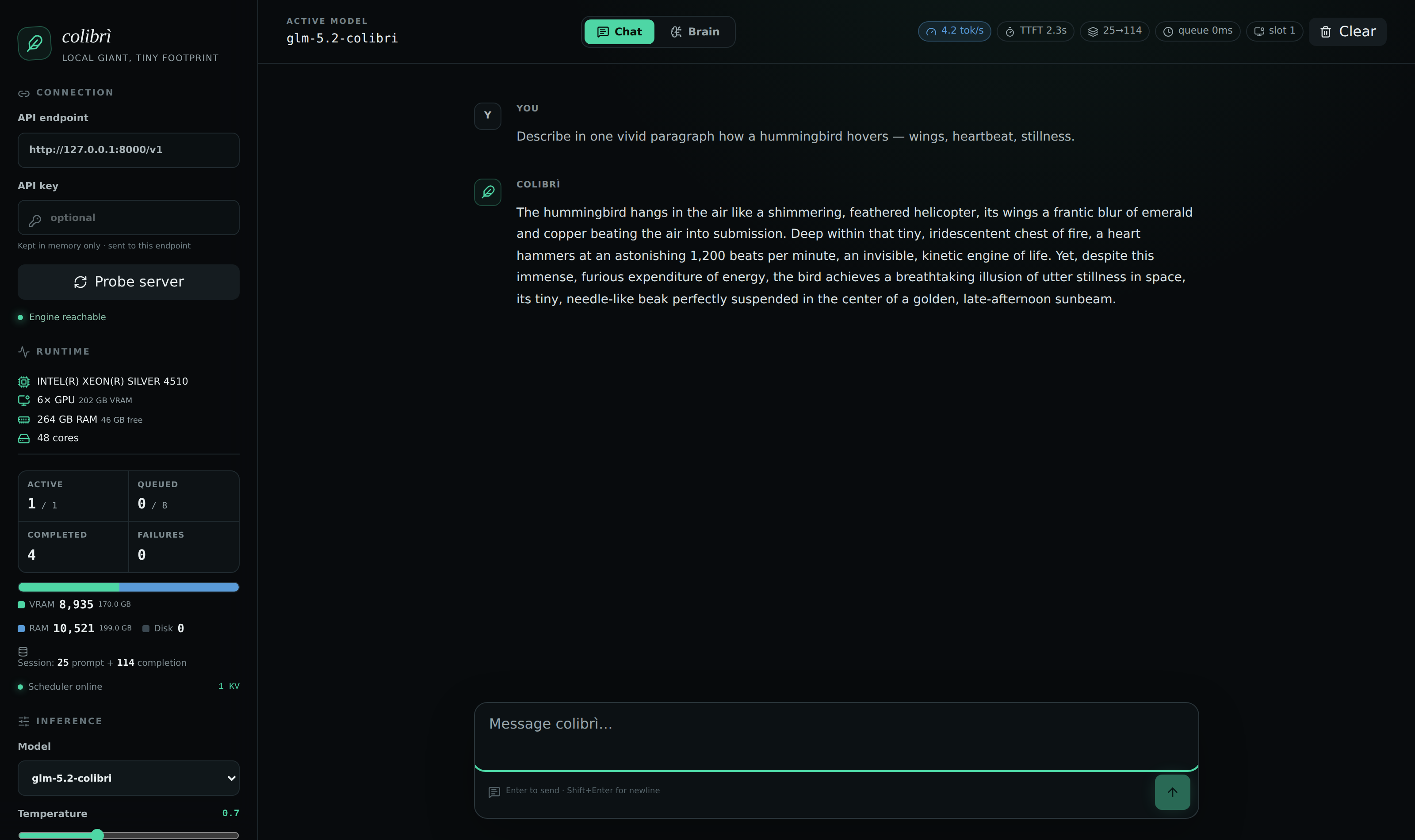
Qwen3.6 answering on a CPU box, experts streamed from disk.
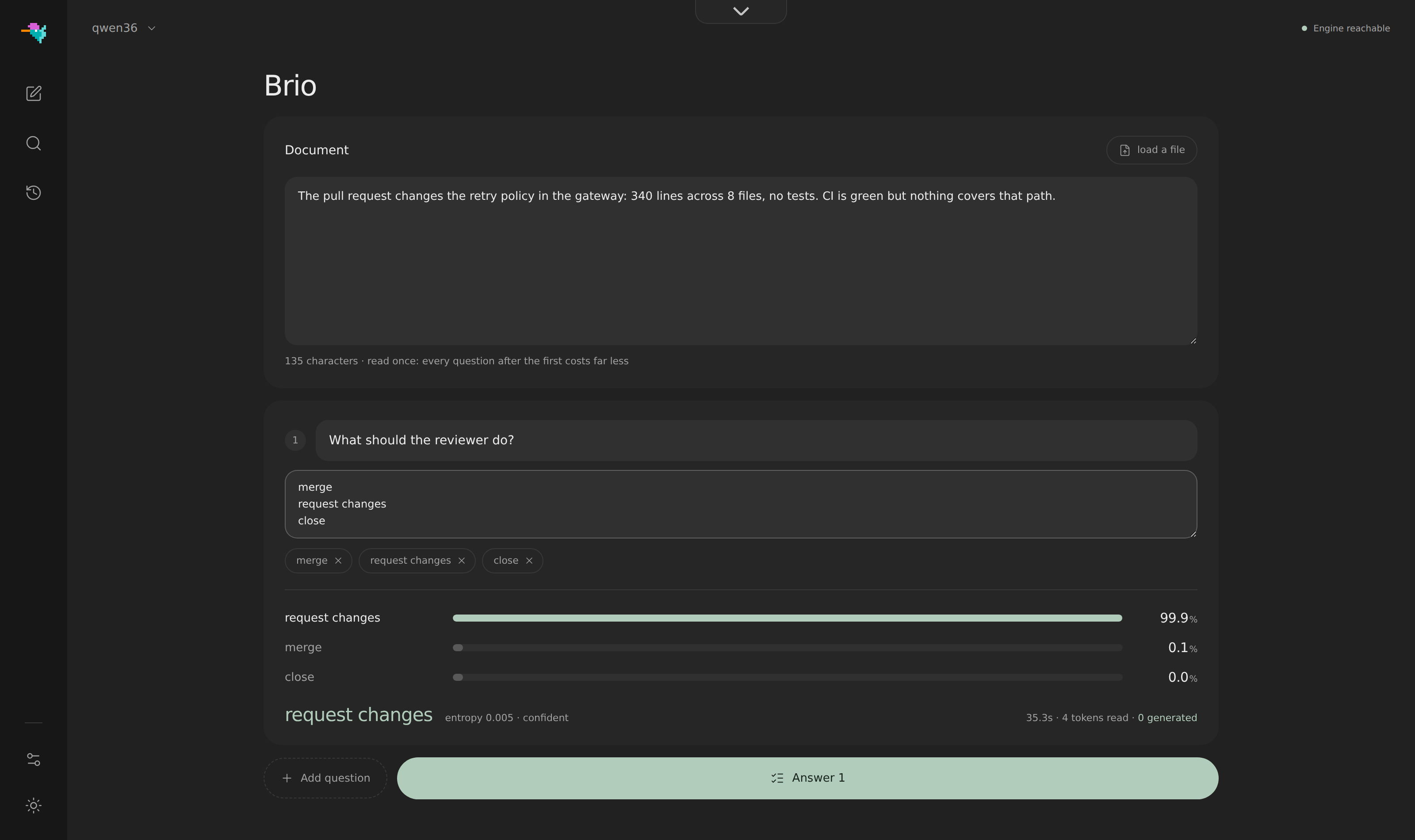
System One: give the model a document and the only answers it may pick. Here:
request changes at 99.9%, entropy 0.005, 4 tokens read, 0 generated.
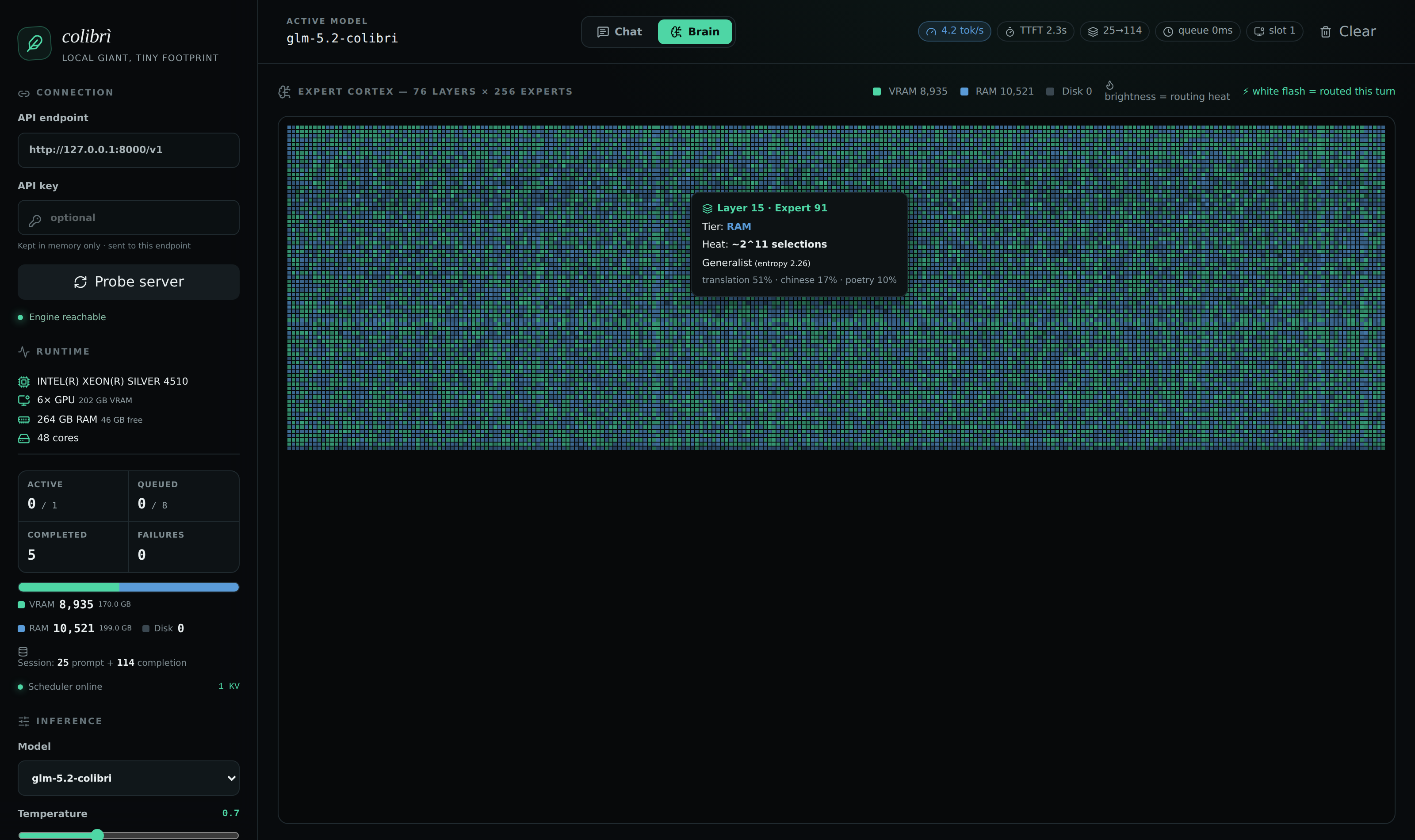
The Brain: the measured expert atlas of GLM-5.2,
13,260 characterised experts in ten regions (Python, SQL, mathematics, poetry, law, Chinese...), placed by measured
routing affinity. Live routing shows the model that is running: one cell per expert, coloured by
storage tier, and every expert routed in a turn flashes.
The Profiling page shows where each turn spends its time, phase by phase,
with the last 30 turns as a trend.
Use it from other apps
coli serve (which the setup starts for you) is one server with several APIs:
- OpenAI-compatible:
/v1/chat/completions, /v1/completions and
/v1/models, with streaming, JSON replies, stop sequences and logprobs;
- Anthropic-compatible:
/v1/messages, so Claude Code and the Anthropic
SDKs work against it;
- tool calling on every chat engine except Inkling and OLMoE, each in its
model's native format (the per-engine table);
- images in on GLM-5.3-Flash, DeepSeek V4.1 Flash, MiMo-V2.6,
Qwen3.8-Flash-Next and Qwen3.8-27B: a path in a
coli chat message, an
attachment in coli web, or an image_url part;
- pictures out with Qwen-Image-2.1 on
POST /v1/images/generations,
and drawn inside the terminal by coli chat
(qwen-image.md);
- decisions on
POST /v1/systemone (above);
- several conversations at once on every text engine:
coli serve --kv-slots N keeps up to 16, each with its own cache, and decodes their next
tokens together (api.md).
Coding CLIs and editors connect as to any OpenAI-compatible provider: base URL
http://127.0.0.1:8000/v1, the model id coli status prints, any non-empty key
(docs/api.md).
How it works
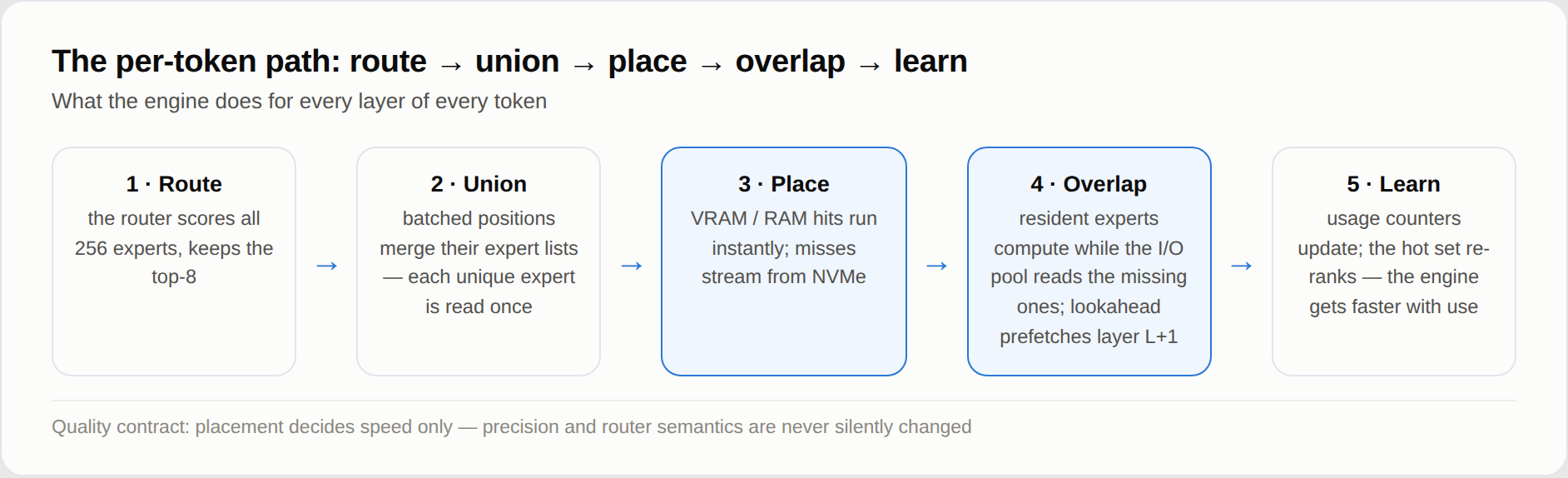
Every layer of every token walks the same five steps: route, union, place,
overlap, learn. The design goal is that placement only ever decides speed:
the router's decisions and the weights' precision are the same whether an
expert answered from VRAM, from RAM or from disk.
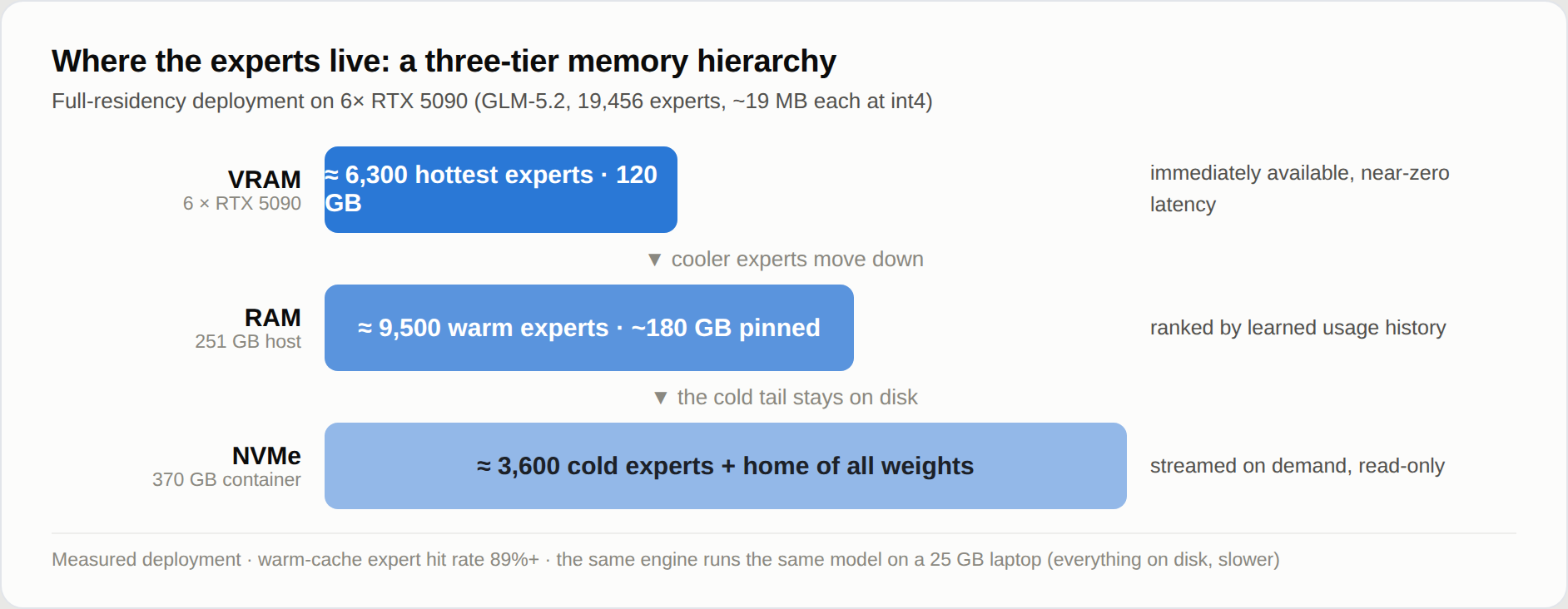
- A JIT for weights. A compiler JIT never compiles the whole program: it
watches what runs and compiles the hot paths. colibri makes the same bet
about weights. Measured routing heat decides which experts earn VRAM, RAM or
disk: a per-layer LRU cache, plus a pinned hot set learned from your own
conversations (
.coli_usage, updated every turn). colibri gets faster the
more you use it. It works because routing has measurable structure (the
expert atlas).
- Never wait for the disk twice. An expert's three matrices are read in one
pread; a pool of loaders reads the missing experts while the resident ones
compute; a batch of positions reads each expert once; a router-lookahead
thread can prefetch the next layer (GLM-5.2's routing is 71.6% predictable
one layer ahead). DIRECT=1 (O_DIRECT) is often a large win on fast NVMe drives and
neutral or worse on others: measure it on yours (tuning.md).
- More than one SSD.
COLI_MODEL_MIRROR=/second/glm52_i4 ./coli chat --model /fast/glm52_i4
reads from a copy on a second drive. Two NVMe drives on independent
controllers measured +37.5% decode; a partial mirror on a smaller drive works
too (multidisk.md).
- From a laptop to a rack. On a 25 GB laptop every expert streams from
disk, slowly and correctly; on a large host every expert is resident
(
CUDA_EXPERT_GB=auto PIN_GB=all) and the disk drops out of decoding.
COLI_NUMA=1 spreads the resident weights over the memory controllers of a
multi-socket host, and a local cluster mode runs routed experts on other
machines (cluster.md).
- A faithful model. Every engine is checked in CI against its model's
reference implementation on a tiny fixture. GLM-5.2's MLA attention keeps a
compressed KV state (576 floats per token instead of 32,768, 57x smaller)
that survives restarts, so a conversation reopens with no prompt to read
again.
- Speculation that earns its keep. GLM-5.2's int8 MTP head drafts 2.2-2.8
tokens per forward when it pays; Qwen3.8-Flash-Next's MTP head, on by default, adds
16-20% with the same output, and prompt lookup 6-7% on code edits. Where drafting costs more than it saves (DeepSeek V4)
it stays off (tuning.md).
The engine is one C file per model family (c/colibri.c for GLM-5.2) over
shared headers, with no BLAS and no Python at runtime: Python runs only the
setup, the launcher, the converters and the API gateway.
Benchmarks
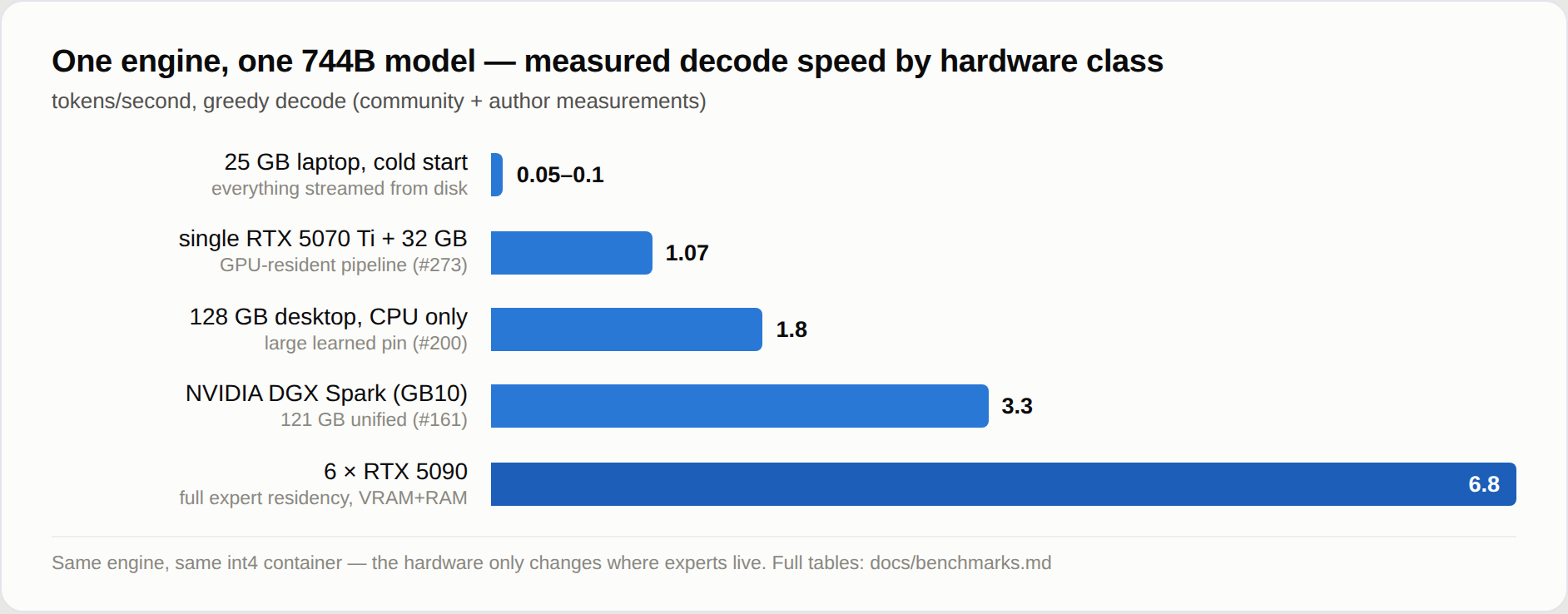
The same engine and the same int4 container: the hardware only changes where
the experts live. GLM-5.2 decode, from the full tables:
- 6x RTX 5090, every expert resident: 5.8-6.8 tok/s, 9.0-9.2 with selective
NUMA interleave (experiment log);
- 128 GB, CPU only (Ryzen AI Max+ 395): 1.83 tok/s warm
(#200);
- a single RTX 5070 Ti laptop-class box: 1.07 tok/s
(#273);
- the 25 GB laptop where this started: 0.05-0.1 tok/s cold, the honest
floor.
Quality is measured, not assumed: the int4 container's cost and the
quantization ablations are in
benchmarks.md. To add your machine,
follow the benchmark protocol and open an issue with
the numbers.
Install by hand
1. The program. Take the archive for your platform from
Releases (Linux x86_64, macOS,
Windows; no compiler needed, only Python 3
for the launcher and the API) and unpack it, then python3 coli info. The Linux
and Windows engines have Vulkan built in, with their shaders/ beside them, and
the macOS ones Metal; for an NVIDIA card on Windows add the CUDA archive. Or build
from source with gcc (or clang) and OpenMP:
git clone https://github.com/JustVugg/colibri && cd colibri/c
./setup.sh                                # checks gcc/OpenMP, builds, self-tests
make qwen36 VK=1                          # one engine, here with Vulkan (CUDA=1 for CUDA)
2. A model. Any download in the tables above:
the setup's ids map to Hugging Face repositories, and each model's page has the
download and conversion command. For GLM-5.2 use the group-scaled (gs64)
container with the int8 MTP head,
mastouri/GLM-5.2-colibri-int4-g64-with-int8-mtp
(429 GB), or Justvugg/GLM-5.3-colibri-int4-g64
for GLM-5.3 (419 GB, no MTP head). Not the older per-row int4 mirrors: they
measure about 9 points worse on quality and caused the looping answers of
#455. ./coli convert --model /nvme/glm52_i4 builds the same container from the FP8 release, shard by shard,
without ever needing its 756 GB on disk at once. How to check the MTP head and
the rest: quickstart.md.
3. Run it. From c/ in a source checkout, or from the unpacked release.
The launcher reads the model's config.json and picks the engine and its chat
template, so the commands are the same for every model:
./coli chat  --model /nvme/qwen36          # chat in the terminal
./coli web   --model /nvme/qwen36          # API + dashboard, opens a browser
./coli serve --model /nvme/qwen36          # API + dashboard, no browser
./coli plan  --model /nvme/qwen36          # where the model will live: VRAM, RAM, disk
./coli doctor --model /nvme/qwen36         # read-only check: is everything ready?
./coli tune  --model /nvme/qwen36          # measure and save this machine's fastest safe settings
On Windows a release archive ships coli.cmd (coli.cmd chat --model D:\qwen36); from a source checkout use py -3 c\coli. The .exe files are
the engines, not the launcher. Every option and variable:
SETTINGS.md, ENVIRONMENT.md.
Research, and how to help
colibri wants frontier models to depend less on scarce hardware and to cost
less to run. That means changing how weights are stored and moved, deciding
what lives in VRAM, RAM or storage, overlapping CPU and GPU work, and testing
new ways to decode. Nothing is kept because it is conventional, and nothing is
adopted because a microbenchmark looks fast: the deciding result is end-to-end
inference on real machines, with quality measured alongside speed. The open
questions:
| hypothesis |
evidence so far |
experiment still needed |
| Routing history can place experts better than plain LRU |
learned pins improve repeated workloads, but can overfit a prompt |
held-out, cross-session A/Bs across coding, chat, multilingual, and long-context workloads |
| Multiple SSDs can turn independent bandwidth into decode speed |
two independent NVMe drives measured +37.5% decode; a slower third drive was neutral after weighted striping (measurements) |
reproduce across drive speeds, controller layouts, and cache states |
| A hardware-aware planner can approach each machine's best configuration automatically |
RAM/VRAM budgets and several backends are detected today, and the setup picks the build |
compare the generated plan with a controlled parameter sweep across laptops, workstations, NUMA hosts, and multi-GPU systems |
| Lossless or quality-bounded representations can reduce weight movement enough to matter |
format and quantization ablations exist, with correctness/quality gates |
reproduce quality, bytes moved, latency, and cost per useful token together, not compression ratio alone |
| Routing-aware speculation can pay before near-full residency |
MTP and grammar drafts work, but MTP has also measured a 32% loss around 85% expert hit |
map the break-even surface across acceptance, expert hit rate, batch union, and draft depth |
| CPU/GPU overlap can hide transfer and synchronization rather than merely move the bottleneck |
CUDA, Metal and Vulkan wins exist, but fast CPUs, integrated GPUs and low residency can erase them |
per-stage profiles and one-variable A/Bs across PCIe, unified-memory, and full-resident machines, and the first discrete-GPU numbers for the Vulkan tier and chain |
Want to help? Pick a row and publish the negative results too. Record the
hardware, commit, model, exact command, prompt, cache state, throughput, time
to first token, expert hit rate, bytes read and a quality check; change one
variable, repeat, and attach the raw logs. Start with
CONTRIBUTING.md and the benchmark protocol,
then open an issue. A
well-controlled failure is worth more here than an unexplained fast number.
Documentation
| topic |
doc |
| The one-step setup and the manual install, every platform |
quickstart.md |
| Setting up through an AI assistant, and the MCP server |
AI_SETUP.md, MCP_SERVER.md |
| The API: OpenAI, Anthropic, tools, KV slots, dashboard |
api.md |
| System One and the decision models |
systemone.md, laya.md, gliner_decide.md, clef.md |
| Vulkan: the expert tier, the dense chain, cards without Resizable BAR |
vulkan.md |
| CUDA, and Qwen3.6's CUDA tier |
cuda.md, qwen36-cuda-tier.md |
| Apple Silicon, Windows |
metal.md, windows.md |
| Tuning, the learning cache, prefetch, speculation |
tuning.md |
| Several SSDs, several machines |
multidisk.md, cluster.md |
| Benchmarks and how to measure |
benchmarks.md, benchmarking.md |
| Every option and environment variable |
SETTINGS.md, ENVIRONMENT.md |
| Grammar-forced drafts, and the experimental embedding ABIs |
grammar-draft.md, segment-runtime.md, edge-runtime.md |
Repo layout
start-here.sh, START-HERE.bat   the one-step setup (Linux and macOS, Windows)
Makefile                        root build/check entry point
c/
├── colibri.c             GLM-5.2/5.3 engine  (make glm)
├── glm53.c               GLM-5.3-Flash  (make glm53)
├── inkling.c             Inkling  (make inkling)
├── kimi_k3.c             Kimi K3  (make kimi_k3)
├── deepseek_v4.c         DeepSeek V4 Flash  (make deepseek-v4)
├── deepseek_v41.c        DeepSeek V4.1 Flash  (make deepseek_v41)
├── mimo.c                MiMo-V2.6 Flash and Pro  (make mimo)
├── qwen38.c              Qwen3.8-Flash-Next  (make qwen38)
├── qwen36.c              Qwen3.6, Qwen3-Coder, Qwen3.8-27B, Clef  (make qwen36)
├── olmoe.c               OLMoE  (make olmoe)
├── qwenimage.c           Qwen-Image-2.1  (make qwenimage)
├── laya.c                Laya  (make laya)
├── gliner_decide.c       GLiNER2.5-Decide  (make gliner_decide)
│
├── st.h, quant.h, idot.h        safetensors reads, container decoders, integer kernels
├── expert_ffn.h, expert_store.h routed-expert kernel and streaming expert cache
├── tok.h, json.h, compat.h      tokenizer, JSON, Windows/macOS shims
├── route_trace.h, kv_prefix.h   routing telemetry (.coli_usage), KV prefix reuse
├── decide_serve.h               the decision engines' side of System One
│
├── backend_cuda.*        optional CUDA tier   (CUDA=1)
├── backend_metal.*       optional Metal tier  (METAL=1)
├── backend_vulkan.*, vk_tier.c, vk_chain.c   optional Vulkan tier and dense chain (VK=1)
│
├── coli                  user-facing CLI
├── setup_*.py            the one-step setup: hardware, catalog, downloads, flow
├── mcp_server.py         the MCP server (coli mcp)
├── openai_server.py      OpenAI- and Anthropic-compatible HTTP gateway
├── resource_plan.py      RAM/VRAM planner behind coli plan and coli doctor
├── tools/                conversion, fixtures and benchmarks
└── tests/                dependency-free C and Python tests
web/                      the dashboard (a pure API client)
desktop/                  Tauri desktop shell around the dashboard
docker/                   container images
docs/                     reference docs, experiments, media
site/                     the website
One .c per model family, over shared single headers. An engine owns its
architecture and nothing else; anything two engines both need lives in a header
they both include, so a fix reaches all of them at once. From the repository
root, make, make check and make clean delegate to the engine Makefile.
Supporting the project
colibri started as a one-person project on a 12-core laptop with 25 GB of RAM;
today its numbers come from a community of real machines. If it is useful to
you:
- star the repository and share it;
- open issues with benchmark numbers from your hardware: datapoints move this
project more than anything else;
- join the Discord community to discuss
experiments, hardware results and research directions;
- reach out through GitHub issues to sponsor development or donate hardware.
Why "colibrì"
The hummingbird weighs a few grams, hovers in place, and visits a thousand
flowers a day. This engine keeps a 744-billion-parameter giant alive on
hummingbird rations: 25 GB of RAM, twelve CPU cores, and a lot of disk patience.
Acknowledgements
colibri is an engine; the minds it runs are a gift. Thank you to the teams who
release their weights in the open: Z.ai (GLM), Moonshot AI (Kimi),
Alibaba Qwen, DeepSeek, Xiaomi (MiMo), Thinking Machines
(Inkling), Allen AI (OLMoE), Convai Innovations (Laya), fastino
(GLiNER2.5-Decide) and Cloudflare (Clef); to the people who publish
converted containers; and to every contributor who benchmarked, bisected,
replicated an atlas run or sent a patch. Third-party code in this repository
and its licences: THIRD_PARTY_NOTICES.md.
The project's expert placement, compression, and routing experiments also build
on ideas and evidence from the following open research and systems work:
- REAP and
EASY-EP for output-aware and
domain-specific expert importance.
- SERE for similarity-based expert
re-routing, and ReMoE for
cache-locality-aware router fine-tuning.
- MC-SMoE for routing-guided expert
merging and compression.
- MoBE and
D²-MoE for shared expert bases and
low-rank expert deltas.
- HybriMoE for hybrid CPU/GPU expert
scheduling, ScMoE for overlapping expert
communication with computation, and
OD-MoE for distributed on-demand expert
loading.
- vLLM,
llama.cpp, and
kTransformers for the open
inference systems and expert-offload work that make comparisons reproducible.
The engine also stands on concrete engineering work, not only ideas. Each of
these is used or reimplemented in the tree today:
- safetensors: the container
every engine reads (
c/st.h), including its fp8 and I64 dtypes.
- tiktoken:
c/tok.h reimplements its
byte_pair_encode exactly, merging the adjacent pair whose concatenation has
the lowest vocab id, so a tiktoken-derived vocabulary needs no merges list.
- llama.cpp: the GBNF grammar subset
in
c/grammar.h follows its syntax and its set-of-stacks PDA, and the Metal
path borrows its newBufferWithBytesNoCopy residency trick.
- vLLM: the reference for output
semantics the engine matches position by position (e.g. where the final norm
lands relative to the LM head).
- transformers: the oracle:
CI reproduces a random-init model token for token against it.
- DietGPU: the GPU ANS codec
behind the experimental compressed expert tier (
COLI_ANS).
- rocWMMA: the HIP backend maps CUDA's
nvcuda::wmma fragment/mma_sync API onto it (c/backend_gpu_compat.h), which
is what lets one .cu source compile for both vendors.
License
Apache 2.0, Copyright 2026 Vincenzo Fornaro. See LICENSE and NOTICE. Each model keeps the licence its authors gave it (GLM-5.2 weights are released by Z.ai under MIT; Qwen-Image-2.1 is for non-commercial use only).

 Colibri is an open-source engine for running frontier mixture-of-experts (MoE) language models on hardware you already own — written in pure C with zero dependencies.