
Hebbian Robotics (YC S26)
HFlow
Open source SDK for scalable multimodal data pipelines in robotics and physical AI



Hebbian Robotics (YC S26) is building HFlow, an open source SDK for scalable
multimodal data pipelines in robotics and physical AI. It makes data tooling and
practices typically developed inside large robotics teams accessible to teams of
any size.
We believe processing data is a major bottleneck in robotics. A corpus can combine
video, state, actions, timestamps, and metadata from many recording systems. Teams
often feel the problem first in quality control: determining whether cameras froze,
streams drifted out of sync, required topics disappeared, or duplicate recordings
entered the corpus. As the corpus grows, fragmented scripts make it difficult to
know what ran, audit the results, or reproduce a dataset.
Teams can start with HFlow's built-in checks, write new transformations, checks,
labels, and enrichments, or connect processing code they already use. HFlow handles
the orchestration, storage, versioning, and curation around those steps.
HFlow stamps each processed episode with its provenance, renders the pipeline
as a graph, and records metadata and quality evidence in a queryable catalog.
You can trace how outputs were produced, monitor every stage, and
investigate a corpus without loading the underlying recordings.
MCAP is HFlow's v1 input and output boundary because it efficiently stores
and serves synchronized video, state, action, and other time-series streams.
That format requirement does not define where the data comes from: human-worn
cameras, teleoperated robots, autonomous policies, and other collection systems
can all feed the pipeline once their data is represented as a supported MCAP
episode.
Status: pre-v1, with the core lifecycle working end to end. HFlow is ready to try locally. See what is implemented and open issues for current details and remaining work.
Help grow the open robotics community. Star the repository, share it with your network, or contribute. Our goal is an open source community where anyone can participate in building the future of robotics. No robot hardware is required to contribute.
|
HFlow's boundary |
| Input |
Supported standard MCAP episodes directly; LeRobot Dataset v3 repositories through hflow import lerobot |
| Processing |
Your Python transforms, checks, labels, and enrichments |
| Execution |
In-process for development; generated Airflow 3 DAGs for scheduled runs |
| Durable output |
Canonical MCAP episodes, provenance, artifacts, and a Parquet catalog |
| Curation |
DuckDB SQL that writes a version-pinned manifest |
What you get
Human and robot data move through a four-stage lifecycle:
collection --> ingestion ---------------> curation ------> delivery
(landing       (transform -> QC gate ->  (SQL over        (curated MCAP +
 bucket)        enrich, as an             episode          manifest; convert
                Airflow DAG)              catalog)         for training)
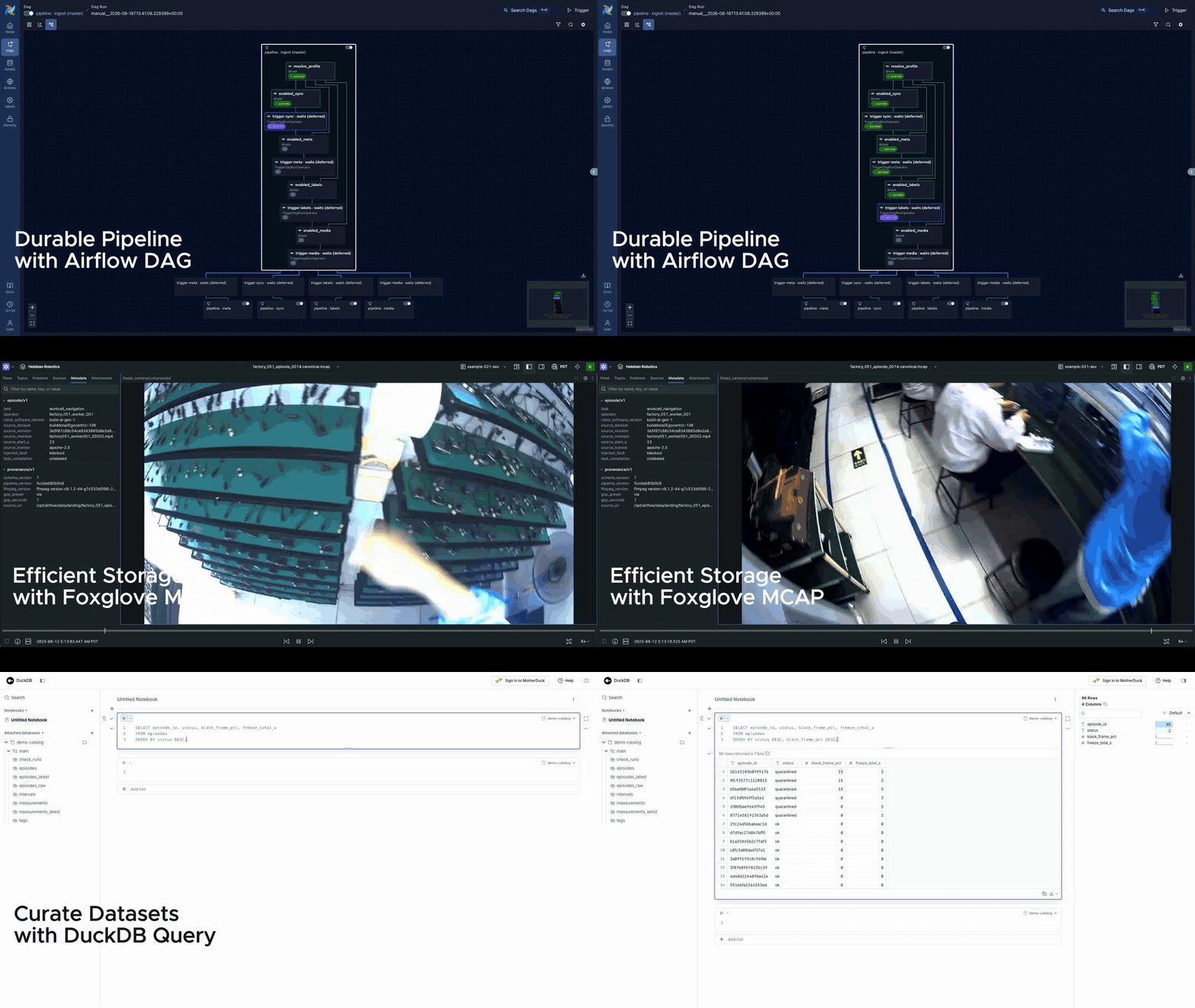
- Your processing code stays yours. Transformations, quality checks, labels, and enrichments are plain Python functions in your own environment. Existing code plugs in through small adapters instead of being rewritten for a proprietary framework.
- Episodes are MCAP, the container that ROS 2 records natively and Foxglove/Rerun open directly, written with in-band H.264 whose GOP length matches how the data is read and topic-group chunking (camera streams and state streams never share a chunk, so a training sample costs one read per group instead of one per topic).
- Processed episodes carry their provenance. The file itself records the schema, pipeline, and tool versions that produced it, plus its source URI when available. Catalog records connect measurements and outcomes to step versions, making it easier to trace a bad result back to its origin.
- The pipeline is visible as a graph. HFlow renders Airflow DAGs so you can see how stages connect and monitor task status, logs, retries, and reruns.
- Quality checks produce reusable evidence. Accessors extract the inputs existing processing code expects (numpy arrays, MP4 paths, JPEG frames), and results land as queryable measurements rather than hardcoded verdicts. Different datasets can apply different thresholds without processing the media again.
- Query the corpus without loading the recordings. Metadata, quality measurements, tags, version stamps, and artifact locations live in the Parquet catalog. DuckDB can answer corpus-wide questions and build manifests without opening the underlying MCAP files.
Open DuckDB's browser over the catalog at any time, including before the first
run starts:
hflow catalog ui
Hosting and scale
The open-source deployment is built to be easy to own: run one single-tenant
workspace with the included Docker Compose runtime, or deploy its generated DAG
bundle into an Airflow 3 environment you already operate. It has no user
accounts, RBAC, or multi-tenant control plane.
The data plane is kept separate from account and control-plane concerns so the
same engine can be scaled as multiple isolated workspaces (for example, one
per team or customer) behind an external control plane. That is the intended
path to a future hosted version, but the hosted control plane is not
implemented in this repository and is not a pre-v1 release commitment.
docs/HOSTING.md
documents the data-plane contract that makes such a control plane an
addition rather than a rearchitecture: the workspace unit, the seams a
service drives (manifests, remote runtime addressing, credential injection),
the trust model, and the current limits.
Community and hosted interest
For reproducible bugs and scoped feature requests, use
GitHub issues.
Install and try it
Install the SDK from PyPI with uv:
uv add hflow
The Hebbian Robotics project starts at version 0.2.0. Earlier 0.1.x releases
under the same PyPI name belonged to an unrelated, inactive project before
the name was transferred.
To run the repository's bundled quickstart:
git clone https://github.com/Hebbian-Robotics/hflow.git
cd hflow
uv sync --locked
uv run python examples/quickstart.py
The quickstart synthesizes a small multimodal episode with camera and state
streams when no input file is given, runs the pipeline in-process, and writes
its outputs under the gitignored data/ directory. It needs no Docker or
Airflow. To use your own recording:
uv run python examples/quickstart.py path/to/episode.mcap
For the recommended first run on real egocentric footage, follow
Evaluate your first egocentric episode.
It runs HFlow's local deterministic quality baseline and two hosted semantic
checks together, without requiring an account, API key, or model server.
Use uv run hflow --help to see the CLI. When you are ready to schedule the
same pipeline, continue with the runtime guide. Developers
and contributors should start with CONTRIBUTING.md. Browse
the examples catalog for the egocentric-corpus and
OpenAI vision paths.
To import a LeRobot Dataset v3 episode into the same canonical MCAP boundary:
uv run hflow import lerobot \
  --repo lerobot/pusht --revision main \
  --camera observation.image --episode-index 0 \
  --output-dir ./data/lerobot_pusht
The importer resolves main to an immutable source commit and records it as
episode provenance. See the LeRobot import guide
for the supported feature subset and a multi-camera example.
What it looks like
Get started in six lines of code. This fuller example uses a robot
teleoperation episode, but the same step interface applies to egocentric video
and other physical-AI recordings.
import hflow
from hflow.checks import camera_frame_stats
from your_existing_qc import check_joint_smoothness  # use your existing checks

app = hflow.App("kitchen-pipeline")  # data root: $HFLOW_DATA_ROOT, hflow.toml, else ./data


@app.check(version="1")
def joint_smoothness(ep: hflow.Episode) -> hflow.CheckResult:
    joints = ep.channel("/joint_states").to_numpy()  # our line: extract
    result = check_joint_smoothness(joints, rate_hz=100)  # your line: unchanged
    return hflow.CheckResult(measurements=result)  # our line: record


@app.check(version="1", critical=True)
def camera_blackout(ep: hflow.Episode) -> hflow.CheckResult:
    camera_topic = next(topic for topic in ep.cameras if "wrist_cam" in topic)
    evidence = camera_frame_stats(ep, cameras=[camera_topic])
    black_frame_percent = evidence.measurements[f"{camera_topic}/black_frame_pct"]
    assert isinstance(black_frame_percent, float)
    return hflow.CheckResult(
        measurements={"black_pct": black_frame_percent},
        verdict=black_frame_percent < 50.0,  # percent; your threshold
    )


if __name__ == "__main__":
    app.test("episode_0001.mcap")  # whole pipeline, in-process, no infra
    # Or call app.run() here to start the Compose runtime, then use `hflow ingest`.
Every check, enrichment, and derived channel declares a version. HFlow stores
that value exactly as written: keep it for behavior-preserving refactors, and
bump it when old and new results should no longer be treated as comparable.
Curation comes afterwards, via hflow.curate(data_root / "catalog", sql, output="manifest.parquet")
or hflow curate "<sql>" on the command line, either way reporting coverage
denominators alongside the manifest:
SELECT episode_id, uri FROM episodes
WHERE task = 'fold_napkin'
  AND status = 'ok'
  AND black_pct < 1.0                      -- percent, user-owned threshold
  AND pipeline_version = 'a41c9f27b3d8'    -- pin one reprocessing generation
Design principles
- Democratize the architecture, defer the optimizations. Preserve the useful workflow and standard interfaces at small scale, and label each production-scale mechanism honestly as implemented, simplified, deferred, or out of scope.
- Evidence, not verdicts. Checks record measurements with coverage; pass/fail policy belongs to the consumer, at curation time. Quality tags route episodes; they never delete data.
- Standard formats at every boundary. MCAP episodes, Parquet catalogs, Airflow DAGs. Our code exists only where the format forces bridging or a pitfall is genuinely non-obvious.
- Your code stays your code. Existing transforms, checks, and enrichments plug in through small adapters instead of being rewritten.
Requirements
- Python ≥ 3.11
- Docker (for the pipeline runtime;
app.test() needs none), or bring your own Airflow deployment (Astronomer, MWAA, Cloud Composer, self-managed)
- The first
hflow up downloads ~2 GB of container images and builds the task venv (one-time; app.test() needs none of this)
- Native
s3://, gs://, and Azure data roots use the optional bucket backend (uv sync --extra bucket); local paths do not import it
- On Linux x86_64/aarch64, the first video operation downloads a checksum-verified, pinned ffmpeg/ffprobe build into the user cache. Set
HFLOW_FFMPEG and HFLOW_FFPROBE to use binaries you manage instead.
- Windows is supported via WSL2 (Airflow does not run natively on Windows)
Documentation
- Documentation home: start by task, then choose a tutorial, how-to guide, reference, or explanation
- Frequently asked questions: formats, infrastructure, scale, project scope, and current release status
- How HFlow fits the robotics data stack: MCAP, Airflow, Foxglove, Rerun, DuckDB, object storage, and training formats
- Runnable examples: exact commands, prerequisites, expected output, and links to the relevant guides
- Architecture and implementation status: the implemented, simplified, deferred, and out-of-scope matrix
- Call OpenAI vision from a step: a focused guide linked to a complete executable pipeline
- Contributing: development setup, validation commands, test gates, and pull-request expectations
- Security policy: supported versions and private vulnerability reporting
References
Contributing
Thank you to all our contributors for making HFlow awesome! See CONTRIBUTING.md to join our community.
License
Apache-2.0.
The license covers the code, not the names: see the
trademark policy.

 HFlow is an open source SDK from Hebbian Robotics (YC S26) for building scalable multimodal data pipelines for robotics and physical AI, letting teams verify the quality of the data they use to train AI models.