RSI-Anything
Unlocking Recursive Self-Improvement with World Models
Predict outcomes. Learn from interaction. Improve the next decision.
Framework ·
Domains ·
Results ·
Quick Start ·
Citation ·
简体中文





Overview
RSI-Anything is a domain-general framework that turns world-model predictions and interaction feedback into recursive self-improvement. Built on JEPA-Anything, it connects candidate generation, prediction-guided selection, external evaluation and learning in a shared process.
The paper applies this process to code repair, GUI interaction, laboratory planning, reaction optimization and immune science. Each domain supplies its own state, actions, prediction targets and feedback, while using the same cycle of proposing candidates, anticipating consequences, evaluating selected actions and retaining improvements for subsequent rounds.
Framework
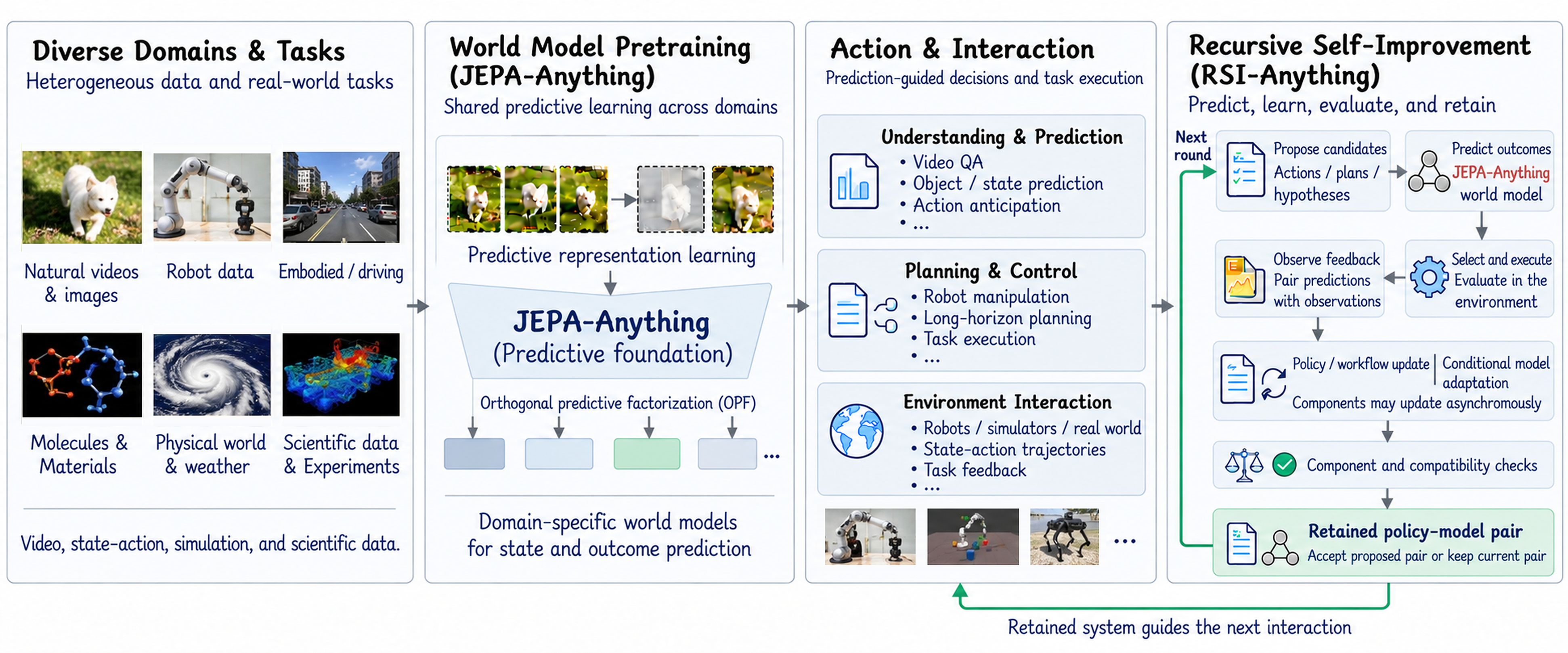
From the predictive foundation of JEPA-Anything to recursive self-improvement across domains.
Propose → Predict → Select → Evaluate → Learn → Retain. A policy or workflow proposes actions; the world model predicts their consequences; selected actions receive external feedback. The resulting experience supports learning and evaluation, and the retained system guides the next round.
Explore the full framework and domain applications
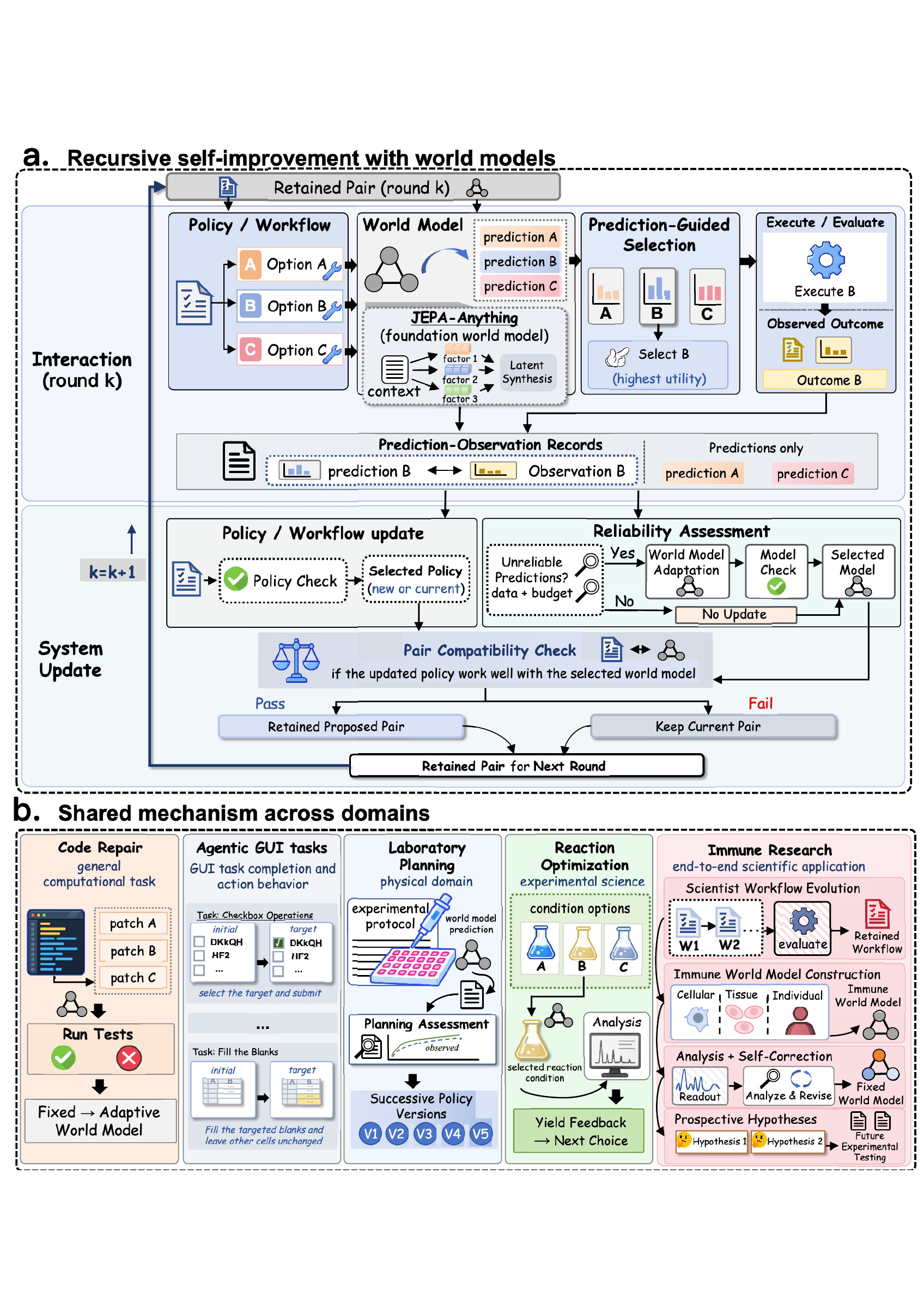
The framework connects prediction-guided interaction with persistent improvements in policies and scientific workflows. View the framework PDF.
Domains
| Domain |
Tasks and environments |
Role of RSI-Anything |
Hugging Face resources |
| Code repair |
CodeContests, APPS Introductory, LiveCodeBench |
Rank candidate programs using predicted execution outcomes and refine solutions with test feedback. |
Resources |
| GUI interaction |
MiniWoB++ and OSWorld |
Connect observations, action proposals and interaction feedback to improve task completion. |
Resources |
| Laboratory planning |
LabHorizon F200 |
Predict candidate plan quality and risk to select protocol-aligned laboratory action sequences. |
Resources |
| Reaction optimization |
Suzuki–Miyaura reaction screens |
Rank catalyst, ligand, base and solvent choices using yield predictions, then use measured yields to guide subsequent experiments. |
Resources |
| Immune science |
Scientific-agent workflows and intervention analysis |
Connect workflow evolution, immune-state forecasting and self-correction to intervention ranking and prospective hypothesis generation. |
Resources |
Domain adapters connect the shared workflow to each task's states, action space and external feedback.
Results
Results across domains. See benchmark settings for task definitions, comparison protocols and metric interpretation:
| Domain |
Evaluation |
RSI-Anything result |
| Code repair |
200 CodeContests tasks, three seeds |
31.2% final hidden-test success |
| Code repair |
APPS Introductory, 1,000 problems |
46.37% final full-test success |
| Code repair |
LiveCodeBench v6, 1,055 problems |
33.05% final full-test success |
| GUI interaction |
MiniWoB++ click-checkboxes |
99% task success; 39.4% fewer actions than the baseline |
| GUI interaction |
OSWorld |
18.4% relative success-rate gain over the initial agent |
| Laboratory planning |
LabHorizon F200, Level 2 |
46.01% planning score |
| Reaction optimization |
Suzuki flow LC–MS, 100 runs |
96.15% mean best observed yield; all runs find the pool optimum by observation 10 |
| Immune science |
End-to-end scientific application |
Prospective nomination combining SIRPα inhibition and IL-36γ-axis modulation for experimental testing |
Code repair
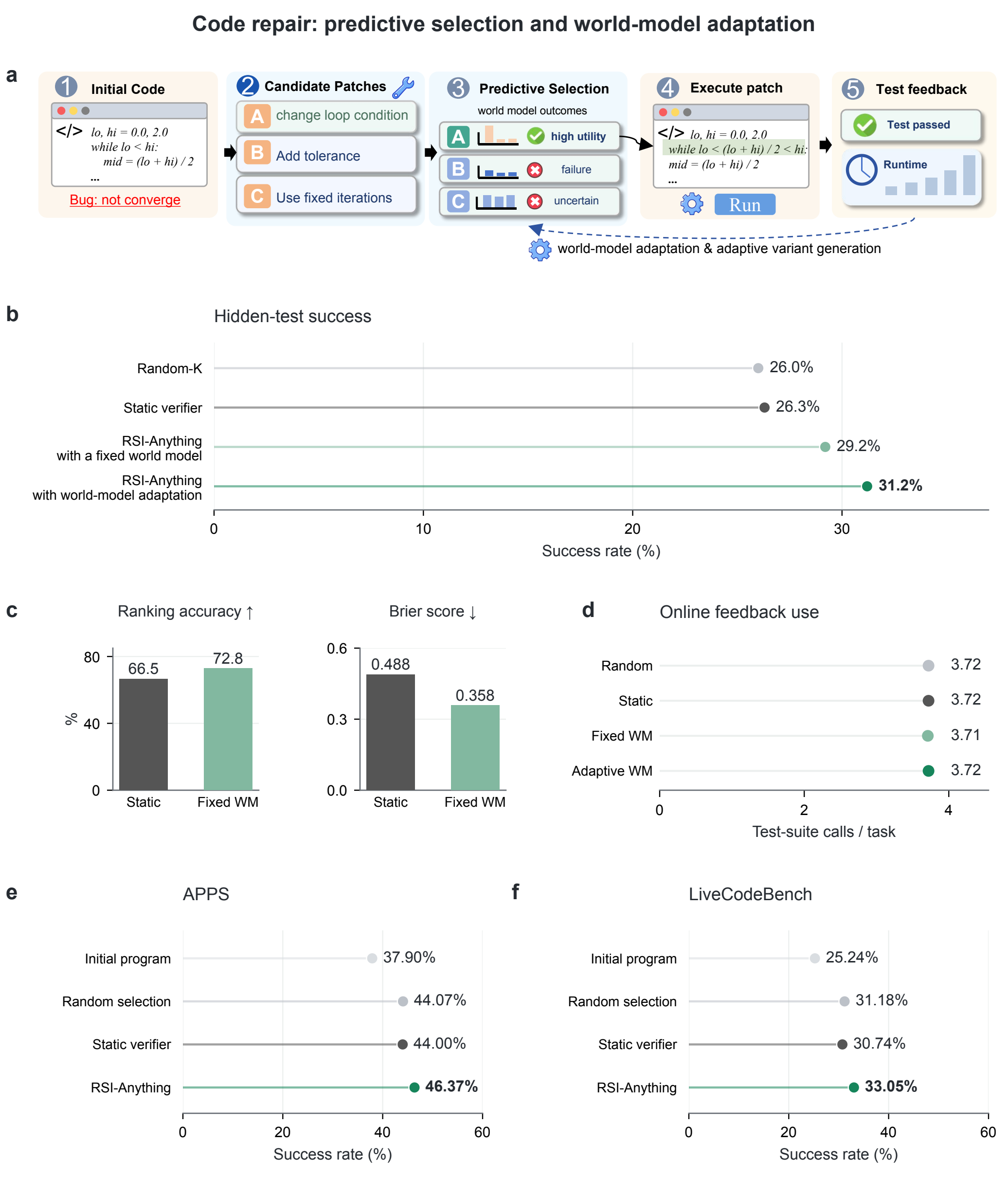
Figure 2. Prediction-guided code repair and benchmark comparisons.
The figure connects the repair workflow (a) with CodeContests success, prediction quality and feedback use (b–d), and results on APPS Introductory and LiveCodeBench (e–f). The policy proposes four revisions per round, with up to three feedback rounds. Online tests provide repair feedback; final success is measured on the benchmark's evaluation tests. Results are averaged over three seeds.
APPS Introductory and LiveCodeBench v6 extend the repair evaluation to 1,000 and 1,055 problems. Methods share the initial program and ReasonFlux-Coder-7B policy for each problem and seed; public tests guide repair and the complete official suite determines final success. Mean full-test success across three seeds reaches 46.37% and 33.05%, respectively.
View the vector figure · Benchmark settings · Code-repair guide
GUI interaction
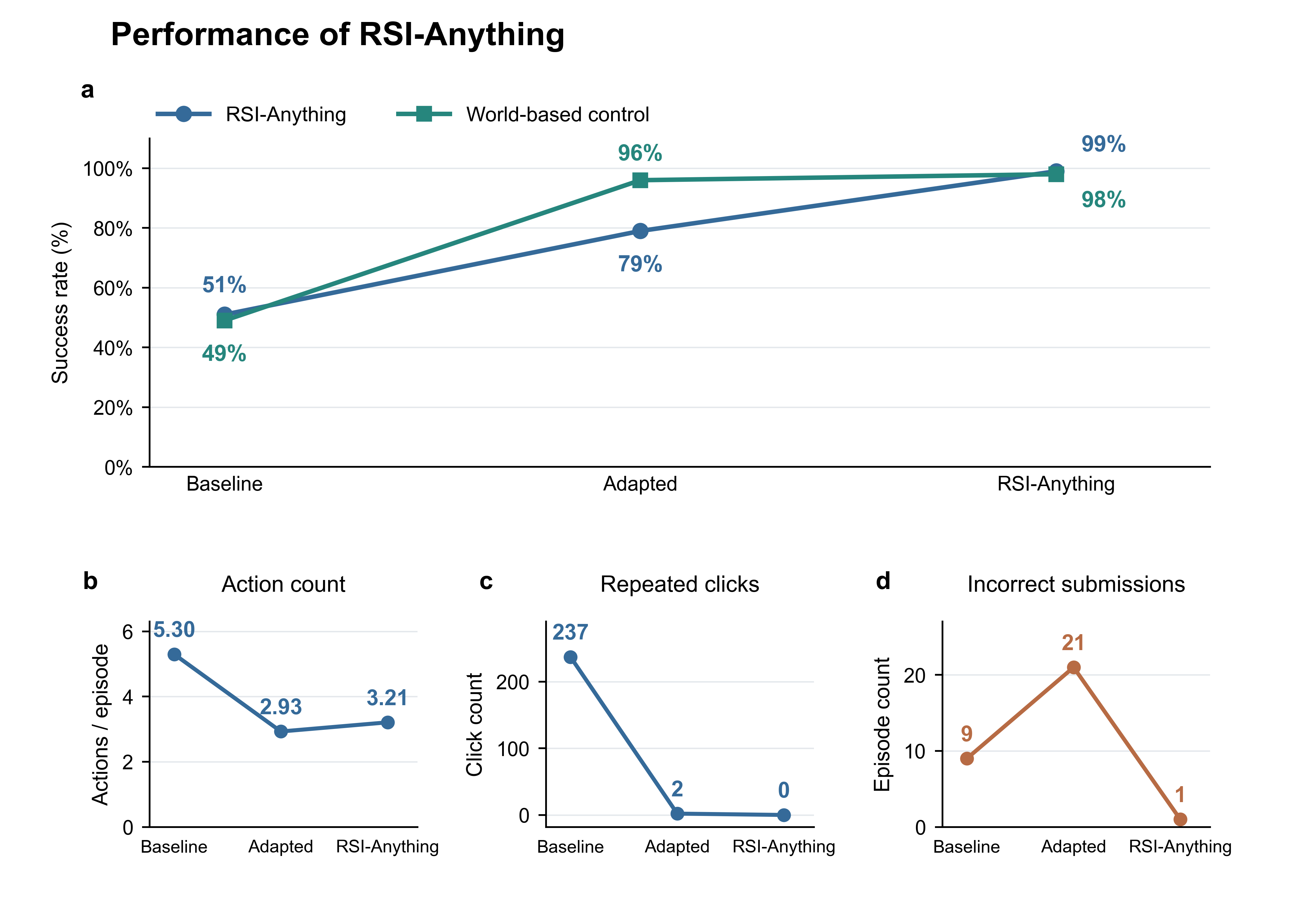
On the same 100 checkbox test instances, the selected controller completes 51 → 79 → 99 tasks across three retained versions. Mean actions decrease from 5.30 to 3.21, and repeated clicks fall from 237 to 0. Success requires all checkbox states to match the instruction and the form to be submitted, within 120 seconds and eight actions.
OSWorld extends the GUI evaluation to desktop tasks. RSI-Anything improves task success by 18.4% relative to the initial agent and 5.5% relative to RLAnything; RLAnything improves by 12.3% relative to the initial agent.
See GUI results for controller definitions, evaluation cohorts and complete tables, and OSWorld settings for the desktop comparison.
Quick Start
Install the shared workflow
Clone the repository and install the shared command-line workflow with Python 3.10 or newer:
git clone https://github.com/Gen-Verse/RSI-Anything.git
cd RSI-Anything
python3.10 -m venv .venv
source .venv/bin/activate
python -m pip install -e .
rsi tasks
Choose an implementation
For laboratory planning, follow the inference guide for JEPA-guided candidate generation and plan selection.
On Linux, follow the task guide to prepare .venv-code-repair or .venv-gui, and set runtime paths and GPU assignments in the recipe. Then launch the corresponding workflow:
# Code repair
rsi assets code_repair --profile full --output assets
rsi plan --config configs/code_repair/default.json
rsi run --config configs/code_repair/default.json

# GUI interaction
rsi plan --config configs/gui/default.json
rsi run --config configs/gui/default.json
See assets for downloads and offline preparation, and workflow design for stage interfaces.
Browser smoke check and run management
Check the browser environment:
python3.10 -m venv .venv-gui
.venv-gui/bin/python -m pip install -e 'tasks/gui[browser]'
.venv-gui/bin/python -m playwright install chromium
.venv/bin/rsi run --config configs/gui/smoke.json
.venv/bin/rsi report --run runs/gui-smoke
Follow, resume and summarize a complete run:
rsi status --run runs/gui
rsi run --config configs/gui/default.json --resume
rsi report --run runs/gui
Repository
├── src/rsi_anything/      # Shared CLI, workflow runner and task adapters
├── tasks/
│   ├── code_repair/       # Program execution, training and evaluation
│   ├── gui/               # Browser interaction, training and evaluation
│   ├── laboratory_planning/ # Planning-policy and JEPA world-model inference
│   └── reaction_optimization/ # Calibrated JEPA-guided Suzuki condition selection
├── configs/              # Task recipes
├── tests/                # Shared workflow checks
├── scripts/              # Asset packaging and repository verification
└── docs/                 # Figures and workflow guides
Citation
If you use RSI-Anything in your research, please cite:
@misc{cui2026rsianything,
  title={RSI-Anything: Unlocking Recursive Self-Improvement with World Models},
  author={Cui, Taoyong and Zeng, Pinxian and Xu, Wanghan and Xiao, Hao and Xue, Shuhan and Gao, Qiang and Ouyang, Wanli and Heng, Pheng Ann and Yin, Zhenfei and Wu, Yingcheng and Yang, Ling},
  year={2026},
  eprint={2610.13912},
  archivePrefix={arXiv},
  url={https://arxiv.org/abs/2610.13912}
}
Acknowledgements
Built on JEPA-Anything, with Qwen2.5-Coder and ReasonFlux-Coder backbones and MiniWoB++ browser tasks. See third-party notices for component, model and data terms.
License
Project-owned code is licensed under Apache-2.0.


 RSI-Anything 是一个通用领域的框架,它把世界模型的预测和交互反馈转化为递归自我改进,构建在 JEPA-Anything 之上。