

RSI-Anything README

The project's README from github.com/Gen-Verse/RSI-Anything. As one markdown file: README.md.

RSI-Anything

Unlocking Recursive Self-Improvement with World Models

Predict outcomes. Learn from interaction. Improve the next decision.

Framework · Domains · Results · Quick Start · Citation · 简体中文

Python 3.10 and newer Built with JEPA-Anything Apache-2.0 license

arXiv · RSI-Anything Hugging Face · RSI-Anything

Overview

RSI-Anything is a domain-general framework that turns world-model predictions and interaction feedback into recursive self-improvement. Built on JEPA-Anything, it connects candidate generation, prediction-guided selection, external evaluation and learning in a shared process.

The paper applies this process to code repair, GUI interaction, laboratory planning, reaction optimization and immune science. Each domain supplies its own state, actions, prediction targets and feedback, while using the same cycle of proposing candidates, anticipating consequences, evaluating selected actions and retaining improvements for subsequent rounds.

Framework

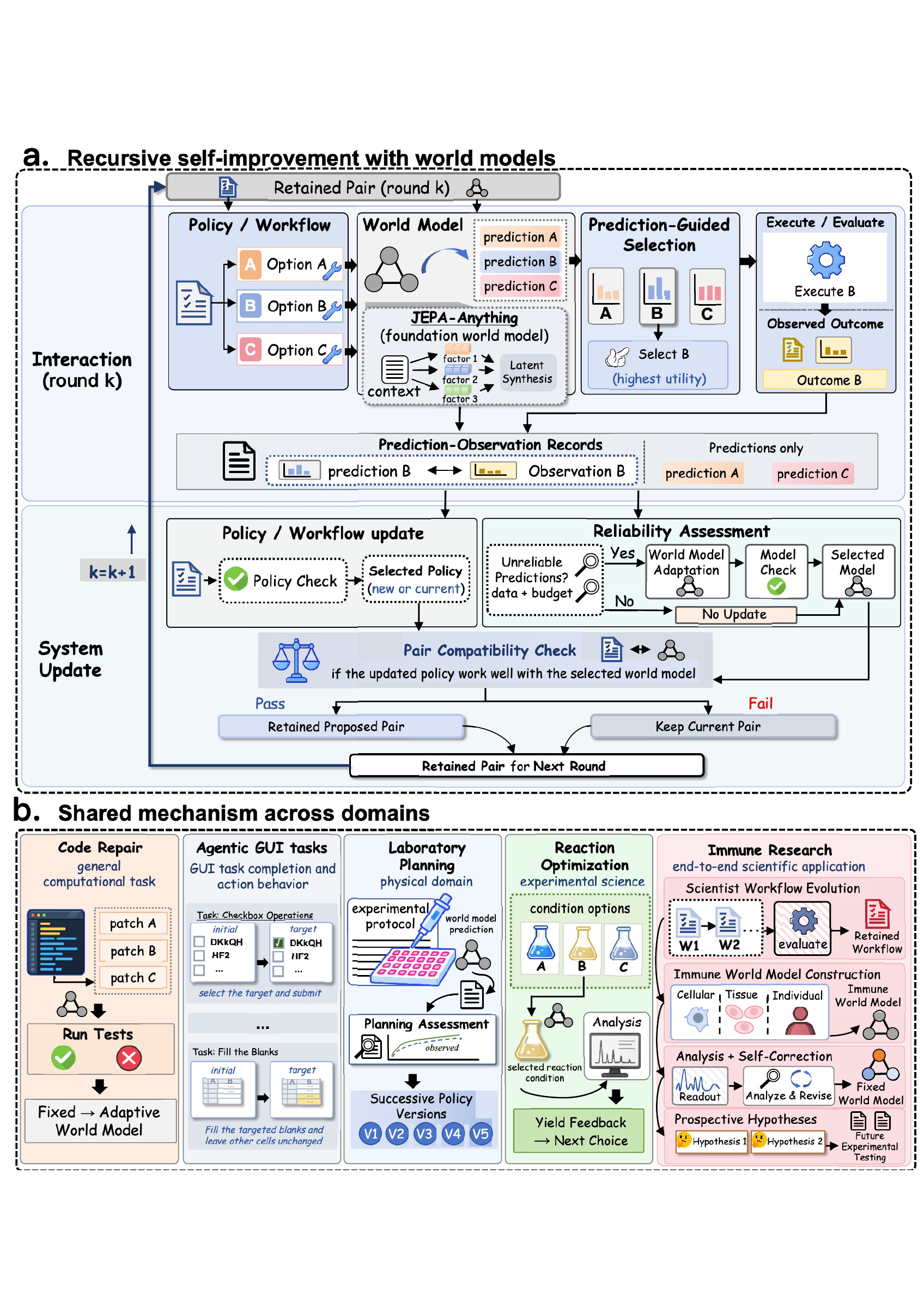
RSI-Anything overview: diverse domains, JEPA-Anything predictive foundation, action and interaction, and recursive self-improvement

From the predictive foundation of JEPA-Anything to recursive self-improvement across domains.

Propose → Predict → Select → Evaluate → Learn → Retain. A policy or workflow proposes actions; the world model predicts their consequences; selected actions receive external feedback. The resulting experience supports learning and evaluation, and the retained system guides the next round.

Explore the full framework and domain applications

RSI-Anything detailed framework and applications in code repair, GUI tasks, laboratory planning, reaction optimization and immune research

The framework connects prediction-guided interaction with persistent improvements in policies and scientific workflows. View the framework PDF.

Domains

Domain Tasks and environments Role of RSI-Anything Hugging Face resources
Code repair CodeContests, APPS Introductory, LiveCodeBench Rank candidate programs using predicted execution outcomes and refine solutions with test feedback. Resources
GUI interaction MiniWoB++ and OSWorld Connect observations, action proposals and interaction feedback to improve task completion. Resources
Laboratory planning LabHorizon F200 Predict candidate plan quality and risk to select protocol-aligned laboratory action sequences. Resources
Reaction optimization Suzuki–Miyaura reaction screens Rank catalyst, ligand, base and solvent choices using yield predictions, then use measured yields to guide subsequent experiments. Resources
Immune science Scientific-agent workflows and intervention analysis Connect workflow evolution, immune-state forecasting and self-correction to intervention ranking and prospective hypothesis generation. Resources

Domain adapters connect the shared workflow to each task's states, action space and external feedback.

Results

Results across domains. See benchmark settings for task definitions, comparison protocols and metric interpretation:

Domain Evaluation RSI-Anything result
Code repair 200 CodeContests tasks, three seeds 31.2% final hidden-test success
Code repair APPS Introductory, 1,000 problems 46.37% final full-test success
Code repair LiveCodeBench v6, 1,055 problems 33.05% final full-test success
GUI interaction MiniWoB++ click-checkboxes 99% task success; 39.4% fewer actions than the baseline
GUI interaction OSWorld 18.4% relative success-rate gain over the initial agent
Laboratory planning LabHorizon F200, Level 2 46.01% planning score
Reaction optimization Suzuki flow LC–MS, 100 runs 96.15% mean best observed yield; all runs find the pool optimum by observation 10
Immune science End-to-end scientific application Prospective nomination combining SIRPα inhibition and IL-36γ-axis modulation for experimental testing

Code repair

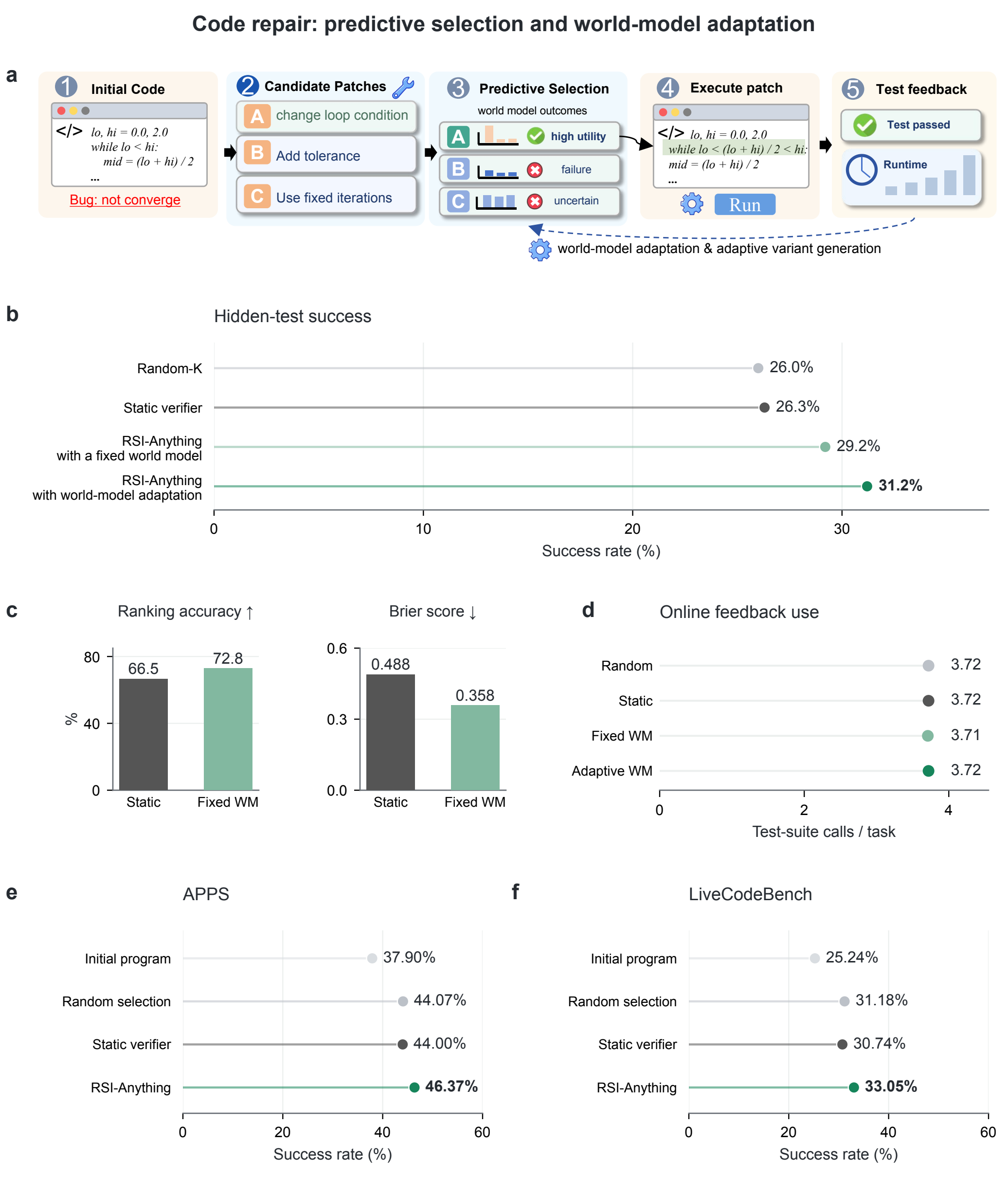
Paper Figure 2: code-repair workflow, CodeContests success and prediction metrics, feedback use, and APPS and LiveCodeBench comparisons

Figure 2. Prediction-guided code repair and benchmark comparisons.

The figure connects the repair workflow (a) with CodeContests success, prediction quality and feedback use (b–d), and results on APPS Introductory and LiveCodeBench (e–f). The policy proposes four revisions per round, with up to three feedback rounds. Online tests provide repair feedback; final success is measured on the benchmark's evaluation tests. Results are averaged over three seeds.

APPS Introductory and LiveCodeBench v6 extend the repair evaluation to 1,000 and 1,055 problems. Methods share the initial program and ReasonFlux-Coder-7B policy for each problem and seed; public tests guide repair and the complete official suite determines final success. Mean full-test success across three seeds reaches 46.37% and 33.05%, respectively.

View the vector figure · Benchmark settings · Code-repair guide

GUI interaction

GUI task success, action counts, repeated clicks and incorrect submissions

On the same 100 checkbox test instances, the selected controller completes 51 → 79 → 99 tasks across three retained versions. Mean actions decrease from 5.30 to 3.21, and repeated clicks fall from 237 to 0. Success requires all checkbox states to match the instruction and the form to be submitted, within 120 seconds and eight actions.

OSWorld extends the GUI evaluation to desktop tasks. RSI-Anything improves task success by 18.4% relative to the initial agent and 5.5% relative to RLAnything; RLAnything improves by 12.3% relative to the initial agent.

See GUI results for controller definitions, evaluation cohorts and complete tables, and OSWorld settings for the desktop comparison.

Quick Start

Install the shared workflow

Clone the repository and install the shared command-line workflow with Python 3.10 or newer:

git clone https://github.com/Gen-Verse/RSI-Anything.git
cd RSI-Anything
python3.10 -m venv .venv
source .venv/bin/activate
python -m pip install -e .
rsi tasks

Choose an implementation

Implementation Guide Workflow recipe
Code repair Environment, assets and reproduction configs/code_repair/default.json
GUI interaction Complete browser-agent experiment configs/gui/default.json
Reaction optimization Suzuki condition selection and results tasks/reaction_optimization/infer.py

For laboratory planning, follow the inference guide for JEPA-guided candidate generation and plan selection.

On Linux, follow the task guide to prepare .venv-code-repair or .venv-gui, and set runtime paths and GPU assignments in the recipe. Then launch the corresponding workflow:

# Code repair
rsi assets code_repair --profile full --output assets
rsi plan --config configs/code_repair/default.json
rsi run --config configs/code_repair/default.json

# GUI interaction
rsi plan --config configs/gui/default.json
rsi run --config configs/gui/default.json

See assets for downloads and offline preparation, and workflow design for stage interfaces.

Browser smoke check and run management

Check the browser environment:

python3.10 -m venv .venv-gui
.venv-gui/bin/python -m pip install -e 'tasks/gui[browser]'
.venv-gui/bin/python -m playwright install chromium
.venv/bin/rsi run --config configs/gui/smoke.json
.venv/bin/rsi report --run runs/gui-smoke

Follow, resume and summarize a complete run:

rsi status --run runs/gui
rsi run --config configs/gui/default.json --resume
rsi report --run runs/gui

Repository

├── src/rsi_anything/      # Shared CLI, workflow runner and task adapters
├── tasks/
│   ├── code_repair/       # Program execution, training and evaluation
│   ├── gui/               # Browser interaction, training and evaluation
│   ├── laboratory_planning/ # Planning-policy and JEPA world-model inference
│   └── reaction_optimization/ # Calibrated JEPA-guided Suzuki condition selection
├── configs/              # Task recipes
├── tests/                # Shared workflow checks
├── scripts/              # Asset packaging and repository verification
└── docs/                 # Figures and workflow guides

Citation

If you use RSI-Anything in your research, please cite:

@misc{cui2026rsianything,
  title={RSI-Anything: Unlocking Recursive Self-Improvement with World Models},
  author={Cui, Taoyong and Zeng, Pinxian and Xu, Wanghan and Xiao, Hao and Xue, Shuhan and Gao, Qiang and Ouyang, Wanli and Heng, Pheng Ann and Yin, Zhenfei and Wu, Yingcheng and Yang, Ling},
  year={2026},
  eprint={2610.13912},
  archivePrefix={arXiv},
  url={https://arxiv.org/abs/2610.13912}
}

Acknowledgements

Built on JEPA-Anything, with Qwen2.5-Coder and ReasonFlux-Coder backbones and MiniWoB++ browser tasks. See third-party notices for component, model and data terms.

License

Project-owned code is licensed under Apache-2.0.

RSI-Anything (Gen-Verse/RSI-Anything)

Searching Database…

Что это такое?RSI-Anything — это универсальный фреймворк, который превращает предсказания модели мира и обратную связь от взаимодействия в рекурсивное самоулучшение; он построен на JEPA-Anything.
Это готовое приложение или исследовательский фреймворк?Это исследовательский фреймворк с общим воркфлоу Propose-Predict-Select-Evaluate-Learn-Retain, который применяется через отдельные адаптеры для разных доменов: починка кода, взаимодействие с GUI, планирование лабораторных работ, оптимизация реакций и иммунная наука. Это не одно приложение в стиле «поставил и пользуйся».
Как его запустить?Клонируйте репозиторий и установите общий консольный воркфлоу на Python 3.10 или новее, затем выберите рецепт для нужного домена, например configs/coderepair/default.json или configs/gui/default.json, чтобы запустить конкретный эксперимент.
Что нужно перед запуском эксперимента?Python 3.10+, Linux с отдельными виртуальными окружениями для каждой задачи (например .venv-code-repair или .venv-gui) и настроенные в файлах рецептов привязки к GPU; для задач починки кода также нужны модели-бэкбоны вроде Qwen2.5-Coder и ReasonFlux-Coder.
Одна и та же настройка подходит для всех пяти доменов?Нет, каждому домену нужны свой адаптер, своё окружение и свой источник обратной связи (например, онлайн-тесты для починки кода, браузерные симуляторы для GUI, показания LC-MS для реакций), поэтому единой универсальной команды запуска на все случаи нет.
Что такое JEPA-Anything?Это основа в виде предсказательной модели мира, на которой построен RSI-Anything: она прогнозирует последствия предлагаемых действий до того, как они будут отобраны и оценены.
Что означает рекурсивное самоулучшение в этом фреймворке?В каждом раунде предлагаются варианты действий, модель мира предсказывает их исходы, лучшие отбираются и оцениваются по внешней обратной связи, а накопленный опыт сохраняется, чтобы следующий раунд начинался уже с улучшенной политики.
Насколько хорошо RSI-Anything реально справляется?На CodeContests он достигает 31.2% успешных прохождений финальных скрытых тестов, на GUI-задачах OSWorld даёт прирост доли успешных решений на 18.4% относительно исходного агента, а в скрининге реакций Судзуки достигает среднего лучшего наблюдаемого выхода 96.15% в пределах 10 запусков.
Какие бэкбоны используются в домене починки кода?Используются модели-бэкбоны Qwen2.5-Coder и ReasonFlux-Coder вместе с общим воркфлоу RSI-Anything.
Creator
Gen-Verse
Size
11.5 MB
Stars
774
Age
9d
Commits · 90 Days
