









15K ·GitHub
Что это такое?
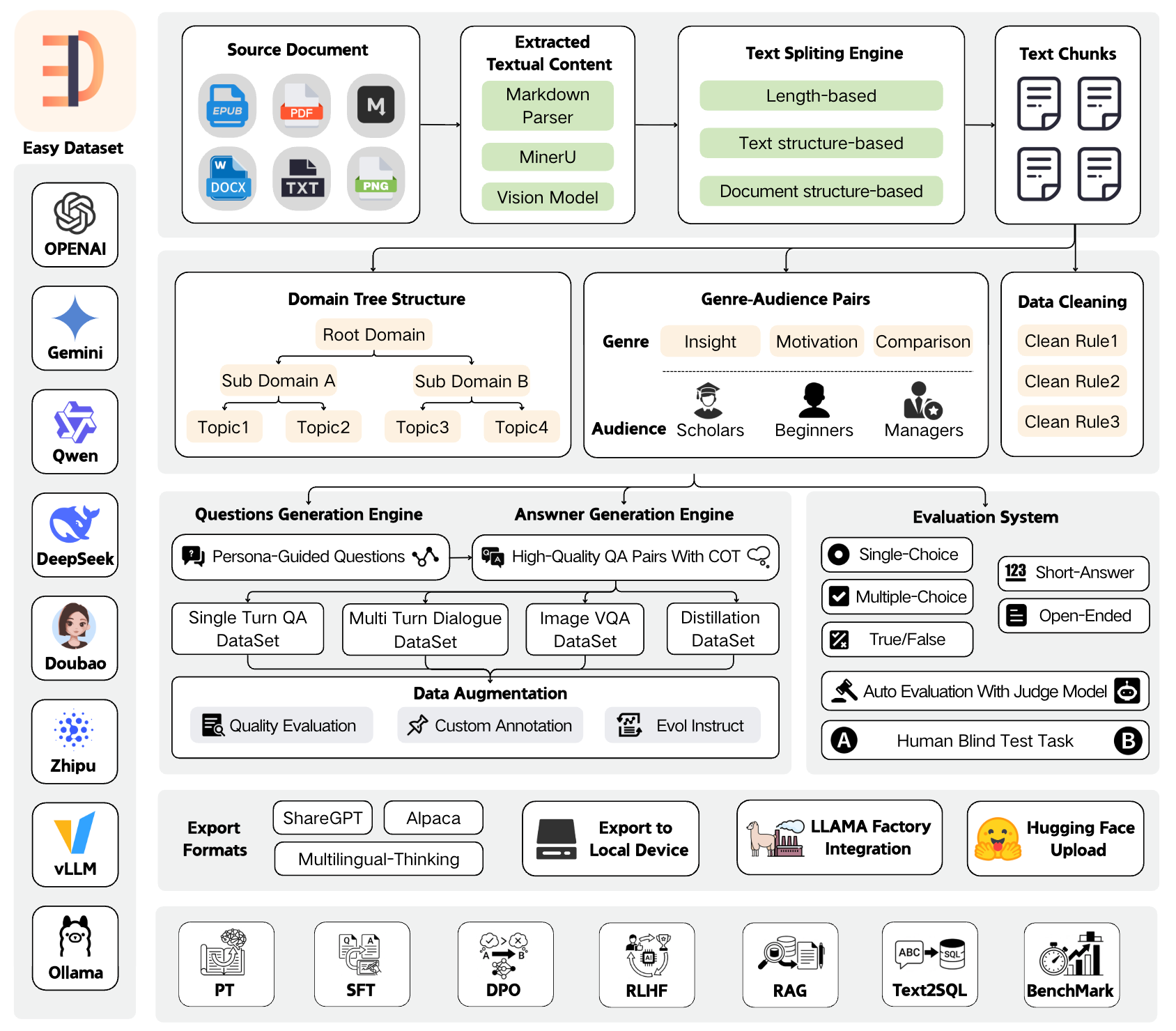
 Easy Dataset — приложение, которое превращает документы по предметной области (PDF, Markdown, DOCX, TXT, EPUB) в структурированные датасеты для дообучения LLM, RAG и оценки моделей. Оно извлекает вопросы из вашего текста, генерирует ответы с помощью LLM и экспортирует готовые к использованию обучающие данные.
Easy Dataset — приложение, которое превращает документы по предметной области (PDF, Markdown, DOCX, TXT, EPUB) в структурированные датасеты для дообучения LLM, RAG и оценки моделей. Оно извлекает вопросы из вашего текста, генерирует ответы с помощью LLM и экспортирует готовые к использованию обучающие данные.Это десктопное приложение или то, что запускается на сервере?И то, и другое: его можно запустить как локальное веб-приложение через npm или официальный Docker-образ, а также просто скачать готовый десктопный клиент для Windows, macOS или Linux.
И то, и другое: его можно запустить как локальное веб-приложение через npm или официальный Docker-образ, а также просто скачать готовый десктопный клиент для Windows, macOS или Linux.Как это запустить?Клонируйте репозиторий, выполните npm install, затем npm run dev, чтобы запустить его на порту 1717, или используйте docker-compose up с официальным Docker-образом. Также можно собрать свой образ из прилагаемого Dockerfile.
Клонируйте репозиторий, выполните npm install, затем npm run dev, чтобы запустить его на порту 1717, или используйте docker-compose up с официальным Docker-образом. Также можно собрать свой образ из прилагаемого Dockerfile.Нужен ли мне API-ключ LLM, чтобы генерировать данные?Да, нужен доступ к LLM API, совместимому с форматом OpenAI; поддерживаются OpenAI, MiniMax, Ollama (локальные модели), Zhipu AI, Alibaba Bailian, OpenRouter и другие провайдеры.
Да, нужен доступ к LLM API, совместимому с форматом OpenAI; поддерживаются OpenAI, MiniMax, Ollama (локальные модели), Zhipu AI, Alibaba Bailian, OpenRouter и другие провайдеры.В каких форматах можно экспортировать датасеты?Экспорт идёт в форматах Alpaca, ShareGPT и Multilingual-Thinking в JSON или JSONL; датасеты также можно сразу загрузить в Hugging Face Hub.
Экспорт идёт в форматах Alpaca, ShareGPT и Multilingual-Thinking в JSON или JSONL; датасеты также можно сразу загрузить в Hugging Face Hub.Умеет ли оно что-то помимо генерации обучающих данных?Да, оно также создаёт оценочные датасеты (вопросы «верно/неверно», с выбором ответа и открытые вопросы) с автоматической оценкой через Judge Model и слепым тестированием людьми на арене для сравнения ответов двух моделей.
Да, оно также создаёт оценочные датасеты (вопросы «верно/неверно», с выбором ответа и открытые вопросы) с автоматической оценкой через Judge Model и слепым тестированием людьми на арене для сравнения ответов двух моделей.Есть ли интеграция с другими инструментами для дообучения?Есть генерация конфигурации LLaMA Factory в один клик и прямая загрузка в Hugging Face Hub, так что можно перейти от датасета сразу к обучению.
Есть генерация конфигурации LLaMA Factory в один клик и прямая загрузка в Hugging Face Hub, так что можно перейти от датасета сразу к обучению.Можно ли создать датасет без загрузки документов?Да, режим «Data Distillation» генерирует деревья меток и вопросы напрямую по указанной вами теме предметной области, исходные документы не нужны.
Да, режим «Data Distillation» генерирует деревья меток и вопросы напрямую по указанной вами теме предметной области, исходные документы не нужны.What are similar projects?sim, mike, kotaemon, Prism-Legal-OS, get-it, karakeep, ParseBench, blinko
sim, mike, kotaemon, Prism-Legal-OS, get-it, karakeep, ParseBench, blinkoWhich topics is it in?document-parsing, agplv3, dataset, evaluation, fine-tuning, ollama, nextjs, electron, pdf, rag, huggingface, docker-compose
document-parsing, agplv3, dataset, evaluation, fine-tuning, ollama, nextjs, electron, pdf, rag, huggingface, docker-compose