









15K ·GitHub
What is this?
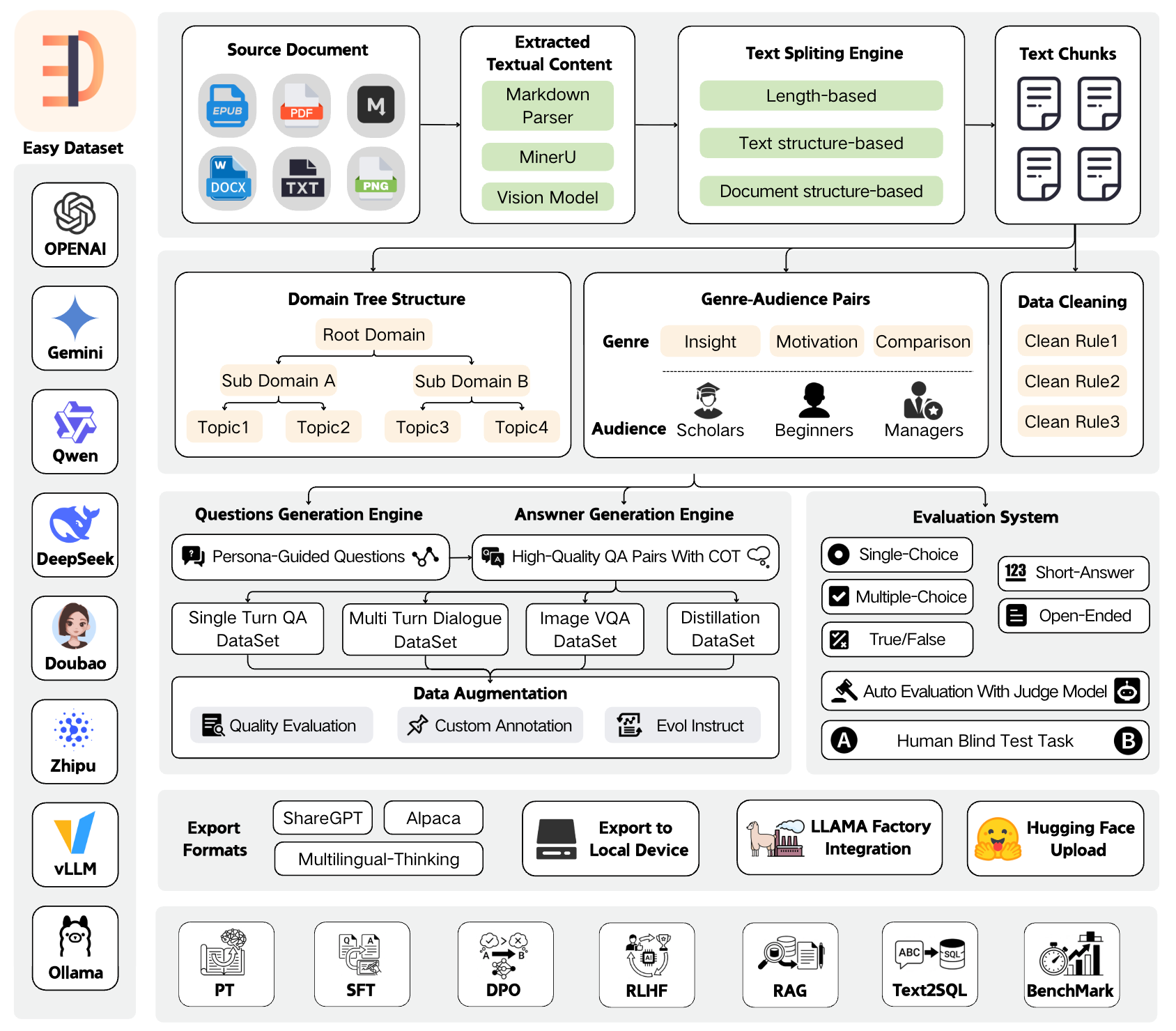
 Easy Dataset is an app that turns domain documents (PDF, Markdown, DOCX, TXT, EPUB) into structured datasets for LLM fine-tuning, RAG, and model evaluation. It extracts questions from your text, generates answers with an LLM, and exports ready-to-use training data.
Easy Dataset is an app that turns domain documents (PDF, Markdown, DOCX, TXT, EPUB) into structured datasets for LLM fine-tuning, RAG, and model evaluation. It extracts questions from your text, generates answers with an LLM, and exports ready-to-use training data.Is this a desktop app or something I run on a server?Both — you can run it as a local web app via npm or the official Docker image, or just download a prebuilt desktop client for Windows, macOS, or Linux.
Both — you can run it as a local web app via npm or the official Docker image, or just download a prebuilt desktop client for Windows, macOS, or Linux.How do I get it running?Clone the repo, run npm install, then npm run dev to start it on port 1717, or use docker-compose up with the official Docker image. You can also build your own image from the included Dockerfile.
Clone the repo, run npm install, then npm run dev to start it on port 1717, or use docker-compose up with the official Docker image. You can also build your own image from the included Dockerfile.Do I need an LLM API key to generate data?Yes, you need access to an LLM API that follows the OpenAI format; it supports OpenAI, MiniMax, Ollama (local models), Zhipu AI, Alibaba Bailian, OpenRouter and more providers.
Yes, you need access to an LLM API that follows the OpenAI format; it supports OpenAI, MiniMax, Ollama (local models), Zhipu AI, Alibaba Bailian, OpenRouter and more providers.What dataset export formats does it support?It exports to Alpaca, ShareGPT, and Multilingual-Thinking formats in JSON or JSONL, and can push datasets straight to Hugging Face Hub.
It exports to Alpaca, ShareGPT, and Multilingual-Thinking formats in JSON or JSONL, and can push datasets straight to Hugging Face Hub.Can it do more than generate training data?Yes, it also builds evaluation datasets (true/false, choice, open-ended questions) with automated Judge Model scoring and a human blind-test arena to compare two models' answers.
Yes, it also builds evaluation datasets (true/false, choice, open-ended questions) with automated Judge Model scoring and a human blind-test arena to compare two models' answers.Does it integrate with other fine-tuning tools?It has one-click LLaMA Factory configuration generation and direct upload to Hugging Face Hub, so you can go straight from dataset to training.
It has one-click LLaMA Factory configuration generation and direct upload to Hugging Face Hub, so you can go straight from dataset to training.Can I build a dataset without uploading any documents?Yes, its 'Data Distillation' mode generates label trees and questions directly from a domain topic you specify, no source documents required.
Yes, its 'Data Distillation' mode generates label trees and questions directly from a domain topic you specify, no source documents required.What are similar projects?sim, mike, kotaemon, Prism-Legal-OS, get-it, karakeep, ParseBench, PaperRead
sim, mike, kotaemon, Prism-Legal-OS, get-it, karakeep, ParseBench, PaperReadWhich topics is it in?document-parsing, agplv3, dataset, evaluation, fine-tuning, ollama, nextjs, electron, pdf, rag, huggingface, docker-compose
document-parsing, agplv3, dataset, evaluation, fine-tuning, ollama, nextjs, electron, pdf, rag, huggingface, docker-compose