



kotaemon README

The project's README from github.com/Cinnamon/kotaemon. As one markdown file: README.md.

kotaemon

An open-source clean & customizable RAG UI for chatting with your documents. Built with both end users and developers in mind.

Preview

Cinnamon%2Fkotaemon | Trendshift

Live Demo #1 | Live Demo #2 | Online Install | Colab Notebook (Local RAG)

User Guide | Developer Guide | Feedback | Contact

Python 3.10+ Code style: black docker pull ghcr.io/cinnamon/kotaemon:latest download Featured|HelloGitHub

Introduction

This project serves as a functional RAG UI for both end users who want to do QA on their documents and developers who want to build their own RAG pipeline.

+----------------------------------------------------------------------------+
| End users: Those who use apps built with `kotaemon`.                       |
| (You use an app like the one in the demo above)                            |
|     +----------------------------------------------------------------+     |
|     | Developers: Those who built with `kotaemon`.                   |     |
|     | (You have `import kotaemon` somewhere in your project)         |     |
|     |     +----------------------------------------------------+     |     |
|     |     | Contributors: Those who make `kotaemon` better.    |     |     |
|     |     | (You make PR to this repo)                         |     |     |
|     |     +----------------------------------------------------+     |     |
|     +----------------------------------------------------------------+     |
+----------------------------------------------------------------------------+

For end users

For developers

Key Features

Preview

Installation

If you are not a developer and just want to use the app, please check out our easy-to-follow User Guide. Download the .zip file from the latest release to get all the newest features and bug fixes.

System requirements

  1. Python >= 3.10
  2. Docker: optional, if you install with Docker
  3. Unstructured if you want to process files other than .pdf, .html, .mhtml, and .xlsx documents. Installation steps differ depending on your operating system. Please visit the link and follow the specific instructions provided there.
  1. We support both lite & full version of Docker images. With full version, the extra packages of unstructured will be installed, which can support additional file types (.doc, .docx, ...) but the cost is larger docker image size. For most users, the lite image should work well in most cases.

    • To use the full version.

      docker run \
      -e GRADIO_SERVER_NAME=0.0.0.0 \
      -e GRADIO_SERVER_PORT=7860 \
      -v ./ktem_app_data:/app/ktem_app_data \
      -p 7860:7860 -it --rm \
      ghcr.io/cinnamon/kotaemon:main-full
      
    • To use the full version with bundled Ollama for local / private RAG.

      # change image name to
      docker run <...> ghcr.io/cinnamon/kotaemon:main-ollama
      
    • To use the lite version.

     # change image name to
     docker run <...> ghcr.io/cinnamon/kotaemon:main-lite
    
  2. We currently support and test two platforms: linux/amd64 and linux/arm64 (for newer Mac). You can specify the platform by passing --platform in the docker run command. For example:

    # To run docker with platform linux/arm64
    docker run \
    -e GRADIO_SERVER_NAME=0.0.0.0 \
    -e GRADIO_SERVER_PORT=7860 \
    -v ./ktem_app_data:/app/ktem_app_data \
    -p 7860:7860 -it --rm \
    --platform linux/arm64 \
    ghcr.io/cinnamon/kotaemon:main-lite
    
  3. Once everything is set up correctly, you can go to http://localhost:7860/ to access the WebUI.

  4. We use GHCR to store docker images, all images can be found here.

Without Docker

  1. Clone the repository:

    git clone https://github.com/Cinnamon/kotaemon
    cd kotaemon
    
  2. Setup the environment:

  1. Create a .env file in the root of this project. Use .env.example as a template.

    The .env file is there to serve use cases where users want to pre-config the models before starting up the app (e.g. deploy the app on HF hub). The file will only be used to populate the db once upon the first run, it will no longer be used in consequent runs.

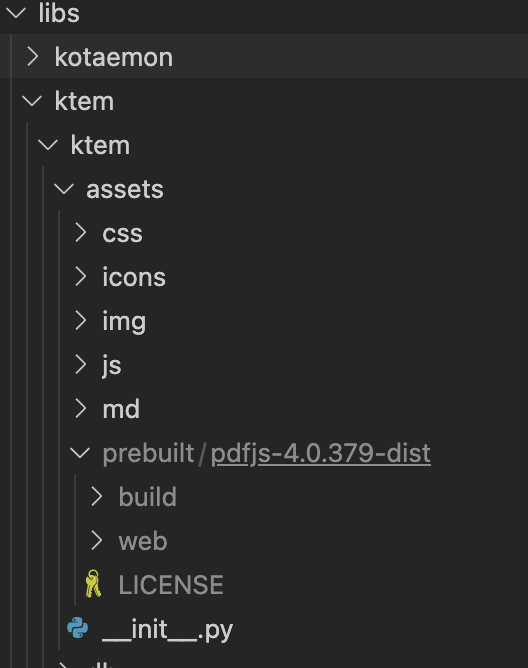
  2. (Optional) To enable in-browser PDF_JS viewer, download PDF_JS_DIST then extract it to libs/ktem/ktem/assets/prebuilt.

    pdf-setup
  3. Start the web server:

    python app.py
    
    • The app will be automatically launched in your browser.
    • Default username and password are both admin. You can set up additional users directly through the UI.

    Chat tab

  4. Check the Resources tab and LLMs and Embeddings and ensure that your api_key value is set correctly from your .env file. If it is not set, you can set it there.

Setup GraphRAG

[!NOTE] Official MS GraphRAG indexing only works with OpenAI or Ollama API. We recommend most users to use NanoGraphRAG implementation for straightforward integration with Kotaemon.

Setup Nano GRAPHRAG
  • Install nano-GraphRAG: pip install nano-graphrag
  • nano-graphrag install might introduce version conflicts, see this issue
    • To quickly fix: pip uninstall hnswlib chroma-hnswlib && pip install chroma-hnswlib
  • Launch Kotaemon with USE_NANO_GRAPHRAG=true environment variable.
  • Set your default LLM & Embedding models in Resources setting and it will be recognized automatically from NanoGraphRAG.
Setup LIGHTRAG
  • Install LightRAG: pip install git+https://github.com/HKUDS/LightRAG.git
  • LightRAG install might introduce version conflicts, see this issue
    • To quickly fix: pip uninstall hnswlib chroma-hnswlib && pip install chroma-hnswlib
  • Launch Kotaemon with USE_LIGHTRAG=true environment variable.
  • Set your default LLM & Embedding models in Resources setting and it will be recognized automatically from LightRAG.
Setup MS GRAPHRAG
  • Non-Docker Installation: If you are not using Docker, install GraphRAG with the following command:

    pip install "graphrag<=0.3.6" future
    
  • Setting Up API KEY: To use the GraphRAG retriever feature, ensure you set the GRAPHRAG_API_KEY environment variable. You can do this directly in your environment or by adding it to a .env file.

  • Using Local Models and Custom Settings: If you want to use GraphRAG with local models (like Ollama) or customize the default LLM and other configurations, set the USE_CUSTOMIZED_GRAPHRAG_SETTING environment variable to true. Then, adjust your settings in the settings.yaml.example file.

Setup Local Models (for local/private RAG)

See Local model setup.

Setup multimodal document parsing (OCR, table parsing, figure extraction)

These options are available:

Select corresponding loaders in Settings -> Retrieval Settings -> File loader

Customize your application

flowsettings.py

This file contains the configuration of your application. You can use the example here as the starting point.

Notable settings
# setup your preferred document store (with full-text search capabilities)
KH_DOCSTORE=(Elasticsearch | LanceDB | SimpleFileDocumentStore)

# setup your preferred vectorstore (for vector-based search)
KH_VECTORSTORE=(ChromaDB | LanceDB | InMemory | Milvus | Qdrant)

# Enable / disable multimodal QA
KH_REASONINGS_USE_MULTIMODAL=True

# Setup your new reasoning pipeline or modify existing one.
KH_REASONINGS = [
    "ktem.reasoning.simple.FullQAPipeline",
    "ktem.reasoning.simple.FullDecomposeQAPipeline",
    "ktem.reasoning.react.ReactAgentPipeline",
    "ktem.reasoning.rewoo.RewooAgentPipeline",
]

.env

This file provides another way to configure your models and credentials.

Configure model via the .env file
  • Alternatively, you can configure the models via the .env file with the information needed to connect to the LLMs. This file is located in the folder of the application. If you don't see it, you can create one.

  • Currently, the following providers are supported:

    • OpenAI

      In the .env file, set the OPENAI_API_KEY variable with your OpenAI API key in order to enable access to OpenAI's models. There are other variables that can be modified, please feel free to edit them to fit your case. Otherwise, the default parameter should work for most people.

      OPENAI_API_BASE=https://api.openai.com/v1
      OPENAI_API_KEY=<your OpenAI API key here>
      OPENAI_CHAT_MODEL=gpt-3.5-turbo
      OPENAI_EMBEDDINGS_MODEL=text-embedding-ada-002
      
    • Azure OpenAI

      For OpenAI models via Azure platform, you need to provide your Azure endpoint and API key. You might also need to provide your developments' name for the chat model and the embedding model depending on how you set up Azure development.

      AZURE_OPENAI_ENDPOINT=
      AZURE_OPENAI_API_KEY=
      OPENAI_API_VERSION=2024-02-15-preview
      AZURE_OPENAI_CHAT_DEPLOYMENT=gpt-35-turbo
      AZURE_OPENAI_EMBEDDINGS_DEPLOYMENT=text-embedding-ada-002
      
    • Local Models

      • Using ollama OpenAI compatible server:

        • Install ollama and start the application.

        • Pull your model, for example:

          ollama pull llama3.1:8b
          ollama pull nomic-embed-text
          
        • Set the model names on web UI and make it as default:

          Models

      • Using GGUF with llama-cpp-python

        You can search and download a LLM to be ran locally from the Hugging Face Hub. Currently, these model formats are supported:

        • GGUF

          You should choose a model whose size is less than your device's memory and should leave about 2 GB. For example, if you have 16 GB of RAM in total, of which 12 GB is available, then you should choose a model that takes up at most 10 GB of RAM. Bigger models tend to give better generation but also take more processing time.

          Here are some recommendations and their size in memory:

        • Qwen1.5-1.8B-Chat-GGUF: around 2 GB

          Add a new LlamaCpp model with the provided model name on the web UI.

Adding your own RAG pipeline

Custom Reasoning Pipeline

  1. Check the default pipeline implementation in here. You can make quick adjustment to how the default QA pipeline work.
  2. Add new .py implementation in libs/ktem/ktem/reasoning/ and later include it in flowssettings to enable it on the UI.

Custom Indexing Pipeline

(more instruction WIP).

Citation

Please cite this project as

@misc{kotaemon2024,
    title = {Kotaemon - An open-source RAG-based tool for chatting with any content.},
    author = {The Kotaemon Team},
    year = {2024},
    howpublished = {\url{https://github.com/Cinnamon/kotaemon}},
}

Star History

Star History Chart

Contribution

Since our project is actively being developed, we greatly value your feedback and contributions. Please see our Contributing Guide to get started. Thank you to all our contributors!

kotaemon (Cinnamon/kotaemon)

Searching Database…

25.8K ·GitHub
Что это такое?Kotaemon — опенсорсный инструмент RAG для общения с вашими документами: аккуратный веб-интерфейс, в котором вы задаёте вопросы по своим файлам. Подходит и обычным пользователям, и разработчикам.
Это приложение, которое я устанавливаю и запускаю, или библиотека для программирования?И то и другое сразу: обычные пользователи получают готовое приложение с простым интерфейсом вопрос-ответ, а разработчики — фреймворк для сборки собственных RAG-пайплайнов с возможностью наблюдать за их работой в прилагающемся UI.
Как его запустить?Возьмите рекомендованный Docker-образ (версии lite хватит большинству) и откройте WebUI, либо обойдитесь без Docker: склонируйте репозиторий, установите Python 3.10+ через uv или conda, создайте .env и запустите веб-сервер. Логин по умолчанию — admin/admin.
Мне нужен API-ключ OpenAI или можно запускать модели локально?Ни то ни другое не обязательно: инструмент подключается к API-провайдерам (OpenAI, Azure OpenAI, Cohere) или запускает модели полностью локально через ollama и llama-cpp-python с GGUF-файлами из Hugging Face Hub.
Какие форматы документов он принимает?Из коробки читает .pdf, .html, .mhtml и .xlsx; для остальных форматов, например .doc или .docx, нужен дополнительный пакет Unstructured — в Docker это означает более тяжёлый полный образ вместо lite.
Он запустится на моём Mac с Apple Silicon или только на x86-машинах?Да: Docker-образы собираются для linux/amd64 и linux/arm64 (новые Mac), выбор делается через --platform. Установка без Docker требует только Python 3.10+, инструкции есть отдельно для каждой операционной системы.
Могут ли мои документы и запросы полностью оставаться на моём компьютере?Да: полный Docker-образ включает Ollama для локального/приватного RAG, а локальные GGUF-модели вместе с локальными парсерами (Docling, PaddleOCR) не выпускают данные за пределы вашего компьютера. Облачные API подключаются только по вашему желанию.
Что такое настройка GraphRAG?Вы можете заменить поисковик по умолчанию на графовый RAG: Microsoft GraphRAG (его индексация работает только с OpenAI или Ollama API) либо более простые сборки NanoGraphRAG и LightRAG — каждая включается переменной окружения.
Какой должна быть локальная модель по размеру для моего компьютера?Выбирайте GGUF-модель меньше, чем доступная память минус примерно 2 ГБ — на машине с 16 ГБ это максимум около 10 ГБ. Чем больше модель, тем лучше ответы, но тем медленнее работа; Qwen1.5-1.8B-Chat-GGUF (около 2 ГБ) — вариант для начала.
Он справится со сканированными PDF и таблицами?Да, через опциональный мультимодальный парсинг: облачные API Azure Document Intelligence и Adobe PDF Extract либо локальные опенсорсные Docling и PaddleOCR — выбирается в Settings, Retrieval Settings, File loader.
Насколько сложно подключить свой RAG-пайплайн?Довольно просто: положите .py-файл в libs/ktem/ktem/reasoning/ и зарегистрируйте его в flowsettings.py, чтобы он появился в UI; примеры пользовательских пайплайнов индексации лежат в libs/ktem/ktem/index/file/graph.
Creator
Cinnamon
Size
44.7 MB
Stars
25.8K
Age
2y
Commits · 90 Days