








What is this?
 A local knowledge base question-answering system: load your own documents into it and ask questions — you get accurate answers drawn from your files instead of the open web.
A local knowledge base question-answering system: load your own documents into it and ask questions — you get accurate answers drawn from your files instead of the open web.Is it a self-hosted app I run myself, or a library I code against?A self-hosted app, not a library: one Docker Compose command starts a service you use through a web front end. An API is included if you want to integrate it into your own code.
A self-hosted app, not a library: one Docker Compose command starts a service you use through a web front end. An API is included if you want to integrate it into your own code.How do I get it running?Pull the qanything repository, enter the project root, and run the startup command — v2.0.0 boots the whole stack with a single Docker Compose line. There is also an online demo to try first.
Pull the qanything repository, enter the project root, and run the startup command — v2.0.0 boots the whole stack with a single Docker Compose line. There is also an online demo to try first.What do I need installed before starting?Just Docker. Everything else — PDF parsing, OCR, embedding, rerank — ships inside the stack, and each component is independent and freely replaceable.
Just Docker. Everything else — PDF parsing, OCR, embedding, rerank — ships inside the stack, and each component is independent and freely replaceable.What can't it handle right now?Audio file support was removed in 2.0 because whisper-based parsing was slow and resource-hungry, and multi-GPU inference is gone too. The web search feature requires a VPN.
Audio file support was removed in 2.0 because whisper-based parsing was slow and resource-hungry, and multi-GPU inference is gone too. The web search feature requires a VPN.Which systems does it run on?Windows, macOS (including M-series Macs), and Linux. Version 2.0.0 is the first to start directly on Windows without WSL.
Windows, macOS (including M-series Macs), and Linux. Version 2.0.0 is the first to start directly on Windows without WSL.Can I use it without an internet connection?Yes — offline use is a supported mode in v2.0.0 (the older Python variant lacked it). Only the optional web search feature needs internet access.
Yes — offline use is a supported mode in v2.0.0 (the older Python variant lacked it). Only the optional web search feature needs internet access.Does my data stay on my machine?Yes — data security is a headline feature: the whole system is designed to be installed and used with the network cable unplugged, so your documents never leave your machine.
Yes — data security is a headline feature: the whole system is designed to be installed and used with the network cable unplugged, so your documents never leave your machine.Is there a catch in the license for commercial use?The code is AGPL-3.0. Also note the open-source version was built on a fine-tuned QwenLM model — commercial use of that model should follow QwenLM's own license.
The code is AGPL-3.0. Also note the open-source version was built on a fine-tuned QwenLM model — commercial use of that model should follow QwenLM's own license.What file types can I ask questions about?PDF, Word (docx), PPT (pptx), Excel (xlsx), Markdown, email (eml), TXT, images (jpg/jpeg/png), CSV, and web links (html), with more coming. Q&A is also cross-language: you can ask in English about Chinese files and vice versa, regardless of the file's language.
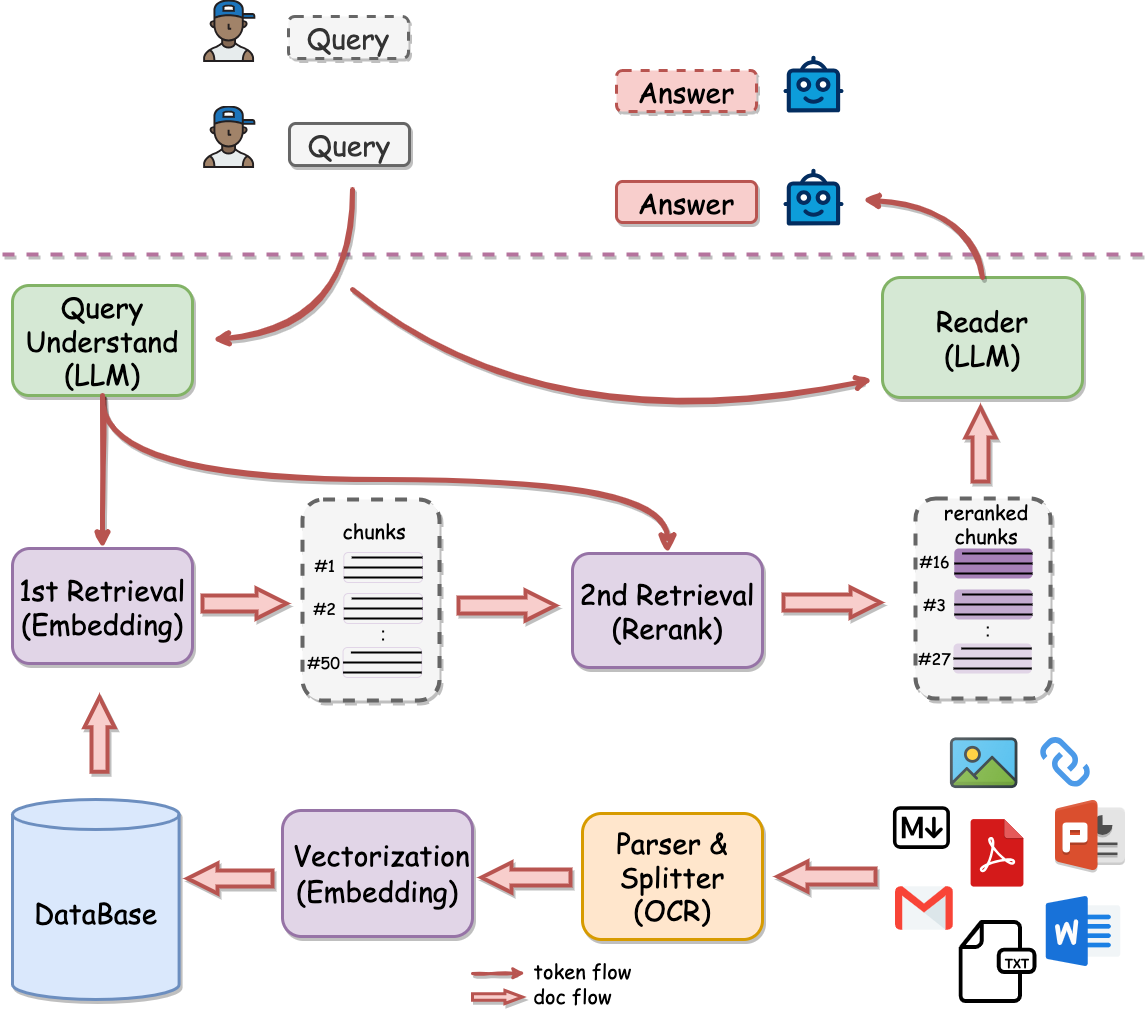
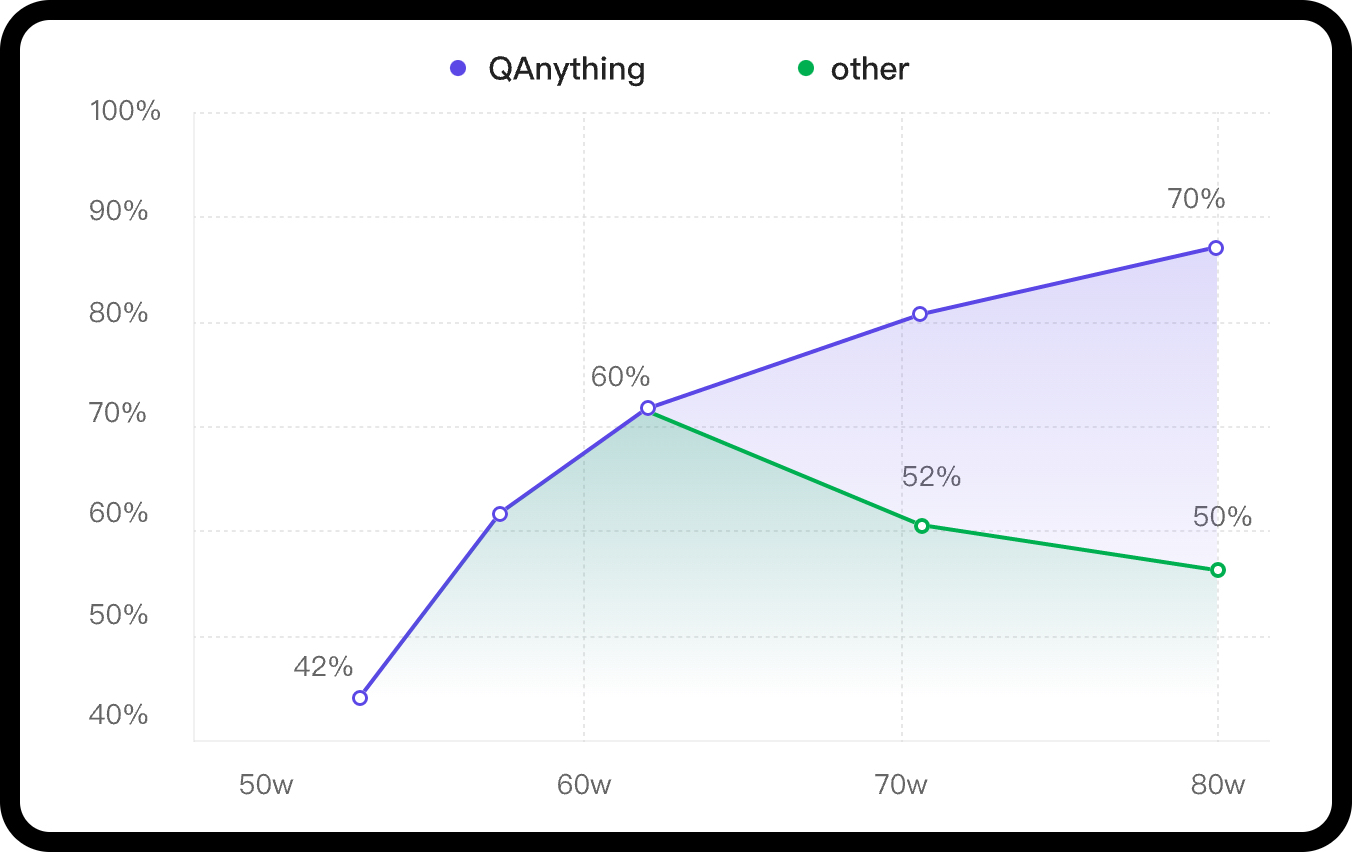
PDF, Word (docx), PPT (pptx), Excel (xlsx), Markdown, email (eml), TXT, images (jpg/jpeg/png), CSV, and web links (html), with more coming. Q&A is also cross-language: you can ask in English about Chinese files and vice versa, regardless of the file's language.Will answers stay accurate as my knowledge base grows to thousands of files?Yes — that's the core design problem it solves. A two-stage pipeline (embedding retrieval plus a reranker) keeps accuracy climbing as data grows, where single-stage embedding search degrades. There is no limit on the number of uploaded files, and retrieval stays fast thanks to the team's BCEmbedding models.
Yes — that's the core design problem it solves. A two-stage pipeline (embedding retrieval plus a reranker) keeps accuracy climbing as data grows, where single-stage embedding search degrades. There is no limit on the number of uploaded files, and retrieval stays fast thanks to the team's BCEmbedding models.Does it come with its own AI model?Not anymore. Version 2.0.0 dropped the default local LLM: everything connects through the OpenAI-compatible interface configured in the front-end settings, so you can plug in any OpenAI-compatible service or run a local model via tools like ollama.
Not anymore. Version 2.0.0 dropped the default local LLM: everything connects through the OpenAI-compatible interface configured in the front-end settings, so you can plug in any OpenAI-compatible service or run a local model via tools like ollama.What can it do out of the box besides chatting with my files?A Kimi-style quick-start chat with no files attached, a retrieval-only mode, and custom Bots. Version 2.0 added FAQ entries, hybrid BM25+embedding search, online preview and editing of chunk blocks, file traceability preview, and log retrieval.
A Kimi-style quick-start chat with no files attached, a retrieval-only mode, and custom Bots. Version 2.0 added FAQ entries, hybrid BM25+embedding search, online preview and editing of chunk blocks, file traceability preview, and log retrieval.What are similar projects?LightRAG, WeKnora, vault-ai, utopia, kotaemon, production-agentic-rag-course, m_flow, khoj
LightRAG, WeKnora, vault-ai, utopia, kotaemon, production-agentic-rag-course, m_flow, khojWhich topics is it in?question-answering, vector-search, offline-first, semantic-search, embeddings, document-processing, openai-compatible, local-llm, knowledge-base, agpl, chatbot, rag
question-answering, vector-search, offline-first, semantic-search, embeddings, document-processing, openai-compatible, local-llm, knowledge-base, agpl, chatbot, rag