



What is this?
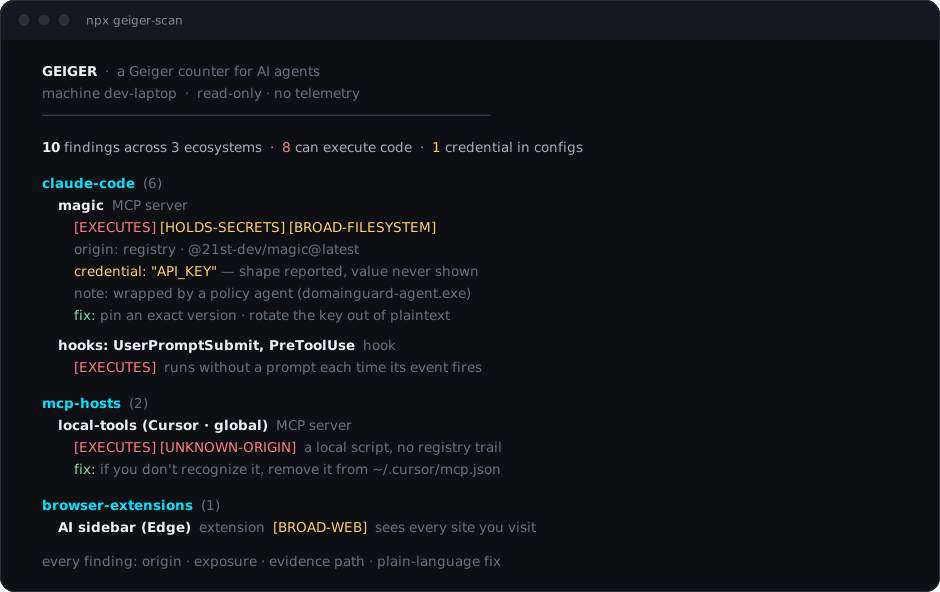
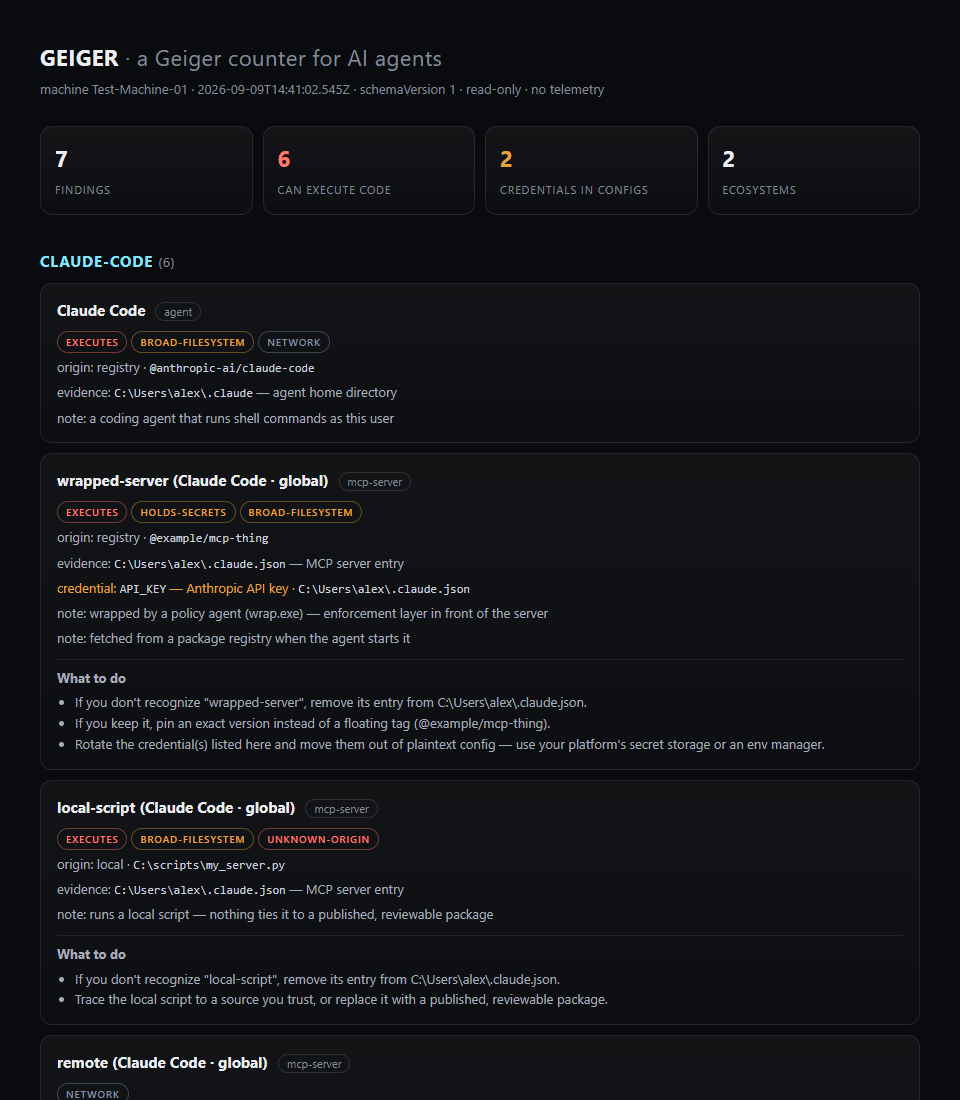
 Geiger is a read-only scanner for AI tooling: one command inventories every AI agent, harness, MCP server, plugin and AI extension on a machine and says in plain language what each one can touch.
Geiger is a read-only scanner for AI tooling: one command inventories every AI agent, harness, MCP server, plugin and AI extension on a machine and says in plain language what each one can touch.Is this a cloud service I sign up for, or a program that runs on my own machine?It's a local command-line tool, not a service. It reads configs and directories and writes nothing, unless you ask it to save a --json file.
It's a local command-line tool, not a service. It reads configs and directories and writes nothing, unless you ask it to save a --json file.How do I run it, and what does my machine need?Run it with npx — no global install, no admin rights, no account. The only requirement is Node.js 18 or newer; if the registry is blocked, npx github:Atomburstofficial/geiger runs straight from this repo.
Run it with npx — no global install, no admin rights, no account. The only requirement is Node.js 18 or newer; if the registry is blocked, npx github:Atomburstofficial/geiger runs straight from this repo.What are its blind spots?It reads known config locations, so agents in nonstandard paths, other user accounts, containers or WSL are invisible. It also reads configuration, not runtime behavior, and can't judge whether a package is malicious — only where it came from.
It reads known config locations, so agents in nonstandard paths, other user accounts, containers or WSL are invisible. It also reads configuration, not runtime behavior, and can't judge whether a package is malicious — only where it came from.What kinds of things does it actually find?MCP servers in Claude Desktop, Cursor, Windsurf, VS Code, Cline and Zed; Claude Code plugins, hooks and skills; git hooks; JetBrains AI settings; AI browsers like Comet and Dia; and AI browser extensions with their granted permissions.
MCP servers in Claude Desktop, Cursor, Windsurf, VS Code, Cline and Zed; Claude Code plugins, hooks and skills; git hooks; JetBrains AI settings; AI browsers like Comet and Dia; and AI browser extensions with their granted permissions.What does it tell me about each thing it finds?Each finding gets an origin (registry, store, git, local script, remote server, or UNKNOWN-ORIGIN), a capability label such as EXECUTES or HOLDS-SECRETS, and the evidence path so you can verify everything by hand.
Each finding gets an origin (registry, store, git, local script, remote server, or UNKNOWN-ORIGIN), a capability label such as EXECUTES or HOLDS-SECRETS, and the evidence path so you can verify everything by hand.Does any information leave my machine when I scan?Nothing. There is no telemetry and no endpoint to send anything to — the author accepts not even knowing how many people use the tool in exchange.
Nothing. There is no telemetry and no endpoint to send anything to — the author accepts not even knowing how many people use the tool in exchange.I keep API keys in agent configs — will they show up in the report?No — geiger reports only the key name, the file, and what kind of secret it looks like, never any part of the value. A redaction pass runs on all output as defense-in-depth, enforced by the test suite.
No — geiger reports only the key name, the file, and what kind of secret it looks like, never any part of the value. A redaction pass runs on all output as defense-in-depth, enforced by the test suite.Why should I trust a free scanner from a security company?Read it: it's a few hundred lines of dependency-free JavaScript, and releases are published from GitHub Actions with npm provenance, so the npm page carries a signed link to the exact public commit each version was built from. Nothing geiger reads is ever executed.
Read it: it's a few hundred lines of dependency-free JavaScript, and releases are published from GitHub Actions with npm provenance, so the npm page carries a signed link to the exact public commit each version was built from. Nothing geiger reads is ever executed.Is this a security audit — and what should I do about what it finds?No — the FAQ calls it an inventory with honest exposure labels, the thing you need before any audit means anything. In practice: remove what you don't recognize and rotate credentials that shouldn't be sitting in configs; org-wide policy enforcement is a different product (DomainGuard), while geiger stays free and standalone.
No — the FAQ calls it an inventory with honest exposure labels, the thing you need before any audit means anything. In practice: remove what you don't recognize and rotate credentials that shouldn't be sitting in configs; org-wide policy enforcement is a different product (DomainGuard), while geiger stays free and standalone.Can IT teams roll this out across many machines?Yes — run with --json per machine on a schedule (an RMM task or login script writing %COMPUTERNAME%.json to a share), keep each machine's baseline, and let --diff report per-machine drift. The schema is versioned and stable, and the files travel only where you put them.
Yes — run with --json per machine on a schedule (an RMM task or login script writing %COMPUTERNAME%.json to a share), keep each machine's baseline, and let --diff report per-machine drift. The schema is versioned and stable, and the files travel only where you put them.What are similar projects?SkillSpector, AI-Infra-Guard, rea, defender, nono, strix, awesome-agent-skills-security, agent-beacon
SkillSpector, AI-Infra-Guard, rea, defender, nono, strix, awesome-agent-skills-security, agent-beaconWhich topics is it in?security-scanner, ai-governance, npx, agent-security, governance, scanner, ai-safety, ai-security, cybersecurity, security-tools, mcp-server, privacy
security-scanner, ai-governance, npx, agent-security, governance, scanner, ai-safety, ai-security, cybersecurity, security-tools, mcp-server, privacy