




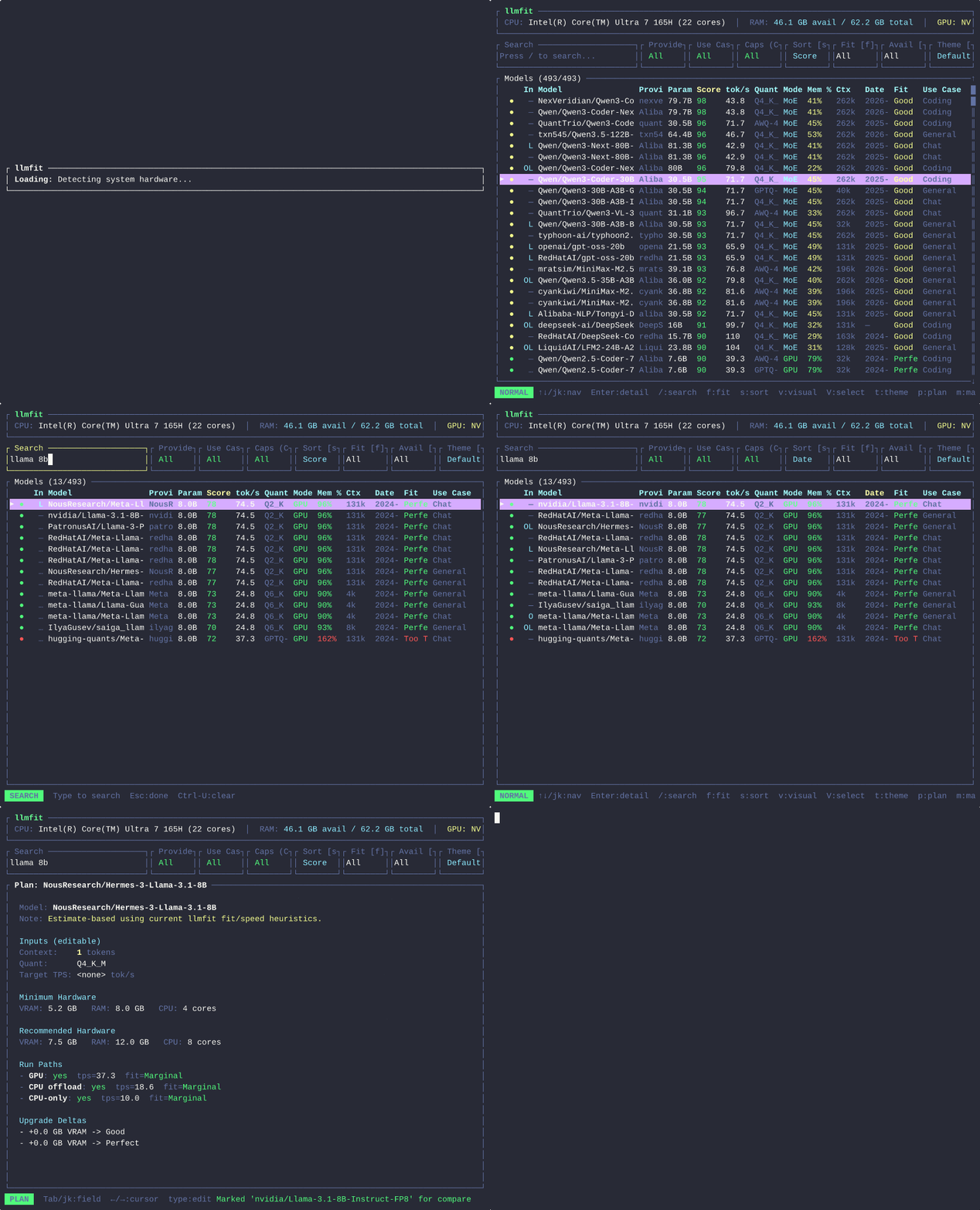
Что это такое?
 llmfit проверяет ваш процессор (CPU), оперативную память (RAM), видеокарты (GPU), видеопамять (VRAM) и настройку ускорителей, а затем сообщает, какие открытые LLM-модели и варианты их квантизации реально хорошо заработают на вашем компьютере.
llmfit проверяет ваш процессор (CPU), оперативную память (RAM), видеокарты (GPU), видеопамять (VRAM) и настройку ускорителей, а затем сообщает, какие открытые LLM-модели и варианты их квантизации реально хорошо заработают на вашем компьютере.Это CLI-утилита или есть ещё и GUI?По умолчанию это интерактивный TUI с классическим CLI-режимом, а также необязательная веб-панель и REST API (/api/v1/system, /api/v1/models) для скриптов и дашбордов.
По умолчанию это интерактивный TUI с классическим CLI-режимом, а также необязательная веб-панель и REST API (/api/v1/system, /api/v1/models) для скриптов и дашбордов.Как установить и запустить?Установка через Homebrew или MacPorts на macOS/Linux, Scoop на Windows, uv/pip как Python-пакет, подписанный бинарный файл из GitHub Releases или Docker-образ ghcr.io/alexsjones/llmfit. Запуск llmfit без флагов открывает интерактивный TUI.
Установка через Homebrew или MacPorts на macOS/Linux, Scoop на Windows, uv/pip как Python-пакет, подписанный бинарный файл из GitHub Releases или Docker-образ ghcr.io/alexsjones/llmfit. Запуск llmfit без флагов открывает интерактивный TUI.Нужно ли мне заранее установить Ollama или llama.cpp, чтобы пользоваться этим?Нет, llmfit работает автономно: он определяет ваше железо и оценивает модели. При желании он подключается к локальным провайдерам среды выполнения, таким как Ollama, llama.cpp, MLX, Docker Model Runner и LM Studio, если они у вас есть.
Нет, llmfit работает автономно: он определяет ваше железо и оценивает модели. При желании он подключается к локальным провайдерам среды выполнения, таким как Ollama, llama.cpp, MLX, Docker Model Runner и LM Studio, если они у вас есть.Точны ли показанные цифры о том, подойдёт ли модель и насколько быстро она будет работать?Нет, сначала это оценки на основе модели пропускной способности памяти. Вы можете запустить встроенный бенчмарк на своём компьютере и отправить реальные результаты в tok/s через PR. Измеренные значения заменяют оценки для всех, у кого такое же железо.
Нет, сначала это оценки на основе модели пропускной способности памяти. Вы можете запустить встроенный бенчмарк на своём компьютере и отправить реальные результаты в tok/s через PR. Измеренные значения заменяют оценки для всех, у кого такое же железо.Нужна ли мне видеокарта NVIDIA или он работает и на компьютерах только с процессором, и на Apple Silicon?Он сам определяет всё, что у вас есть: NVIDIA CUDA, Apple Silicon, AMD ROCm или Intel OneAPI, на macOS, Linux (x86_64/ARM64) и Windows (x86_64).
Он сам определяет всё, что у вас есть: NVIDIA CUDA, Apple Silicon, AMD ROCm или Intel OneAPI, на macOS, Linux (x86_64/ARM64) и Windows (x86_64).Отправляет ли он данные о моём железе куда-нибудь?Нет, данные остаются на вашем компьютере, если вы сами не запустите сетевую функцию: загрузку модели, запрос к провайдеру среды выполнения или отправку результатов бенчмарка в публичный рейтинг сообщества.
Нет, данные остаются на вашем компьютере, если вы сами не запустите сетевую функцию: загрузку модели, запрос к провайдеру среды выполнения или отправку результатов бенчмарка в публичный рейтинг сообщества.Какие форматы моделей и архитектуры он понимает?Он анализирует количество параметров, длину контекста и форматы квантизации, включая GGUF, AWQ, GPTQ и EXL2. Кроме того, он явно поддерживает конфигурации с несколькими GPU и архитектуры MoE (Mixture-of-Experts).
Он анализирует количество параметров, длину контекста и форматы квантизации, включая GGUF, AWQ, GPTQ и EXL2. Кроме того, он явно поддерживает конфигурации с несколькими GPU и архитектуры MoE (Mixture-of-Experts).Что такое llmfit-gui?Это отдельный родственный проект: нативное графическое приложение для Windows, написанное на PowerShell и WinForms. Оно позволяет просматривать рекомендации llmfit, загружать модели в LM Studio или Ollama и запускать бенчмарк кликами мыши, а не через терминал.
Это отдельный родственный проект: нативное графическое приложение для Windows, написанное на PowerShell и WinForms. Оно позволяет просматривать рекомендации llmfit, загружать модели в LM Studio или Ollama и запускать бенчмарк кликами мыши, а не через терминал.Чем это отличается от llm-checker?llm-checker реально скачивает и запускает модели через Ollama, чтобы измерить настоящую производительность, но считает все модели плотными (без поддержки MoE). llmfit же оценивает подходимость и скорость по характеристикам железа и не требует предварительной установки среды выполнения.
llm-checker реально скачивает и запускает модели через Ollama, чтобы измерить настоящую производительность, но считает все модели плотными (без поддержки MoE). llmfit же оценивает подходимость и скорость по характеристикам железа и не требует предварительной установки среды выполнения.Есть ли другие связанные инструменты от того же автора?Да: sympozium для управления агентами в Kubernetes, llmserve как TUI для выбора и запуска локальной модели или бэкенда, и llama-panel, нативное приложение для macOS для управления локальными экземплярами llama-server.
Да: sympozium для управления агентами в Kubernetes, llmserve как TUI для выбора и запуска локальной модели или бэкенда, и llama-panel, нативное приложение для macOS для управления локальными экземплярами llama-server.What are similar projects?unsloth, rizzo-flow, qwen38-uncensored, jev, whichllm, SemIf-OpenJev, decider, mlx-serve
unsloth, rizzo-flow, qwen38-uncensored, jev, whichllm, SemIf-OpenJev, decider, mlx-serve