whichllm




Find the best local LLM that actually runs on your hardware.
Auto-detects your GPU/CPU/RAM and ranks the top models from HuggingFace that fit your system.
日本語版はこちら
Quick start
Run the recommendation command once, with no project setup.
uvx whichllm@latest
Simulate a GPU before you buy hardware.
uvx whichllm@latest --gpu "RTX 4090"
Install it when you use it often.
uv tool install whichllm
uv tool upgrade whichllm  # update an existing install
Other install paths.
brew install andyyyy64/whichllm/whichllm
pip install whichllm
Want a safer pick?
By default, whichllm is ambitious. It ranks the best model that looks runnable
on your machine, including partial RAM offload and near-edge VRAM fits when
they seem usable.
If you want a more comfortable LM Studio-style recommendation, start with:
uvx whichllm@latest --gpu-only --speed usable --vram-headroom 1GB
This keeps only models that fit fully in GPU VRAM, filters out slow estimates,
and leaves extra VRAM for runtime overhead.
If LM Studio still says the model is slightly too large, increase the headroom:
uvx whichllm@latest --gpu-only --speed usable --vram-headroom 1.5GB
Common workflows
After install, run whichllm directly. For one-off runs, replace whichllm
with uvx whichllm@latest.
# Best models for this machine
whichllm

# Pretend you have a specific GPU
whichllm --gpu "RTX 4090"

# Override detected iGPU/unified-memory limits
whichllm --vram 8 --ram-bandwidth 68

# Only show models that fit fully in GPU VRAM
whichllm --gpu-only
whichllm --fit gpu

# Simulate a multi-GPU workstation
whichllm --gpu "2x RTX 4090"

# Hide models that are technically runnable but too slow
whichllm --speed usable
whichllm --speed fast

# Pasteable GitHub / Slack / Discord output
whichllm --markdown

# Compare upgrade candidates
whichllm upgrade "RTX 4090" "RTX 5090" "H100"

# Find the GPU needed for a model
whichllm plan "llama 3 70b"

# Start a chat with a model
whichllm run "qwen 2.5 1.5b gguf"

# Print copy-paste Python
whichllm snippet "qwen 7b"

# Return JSON for scripts
whichllm --top 1 --json
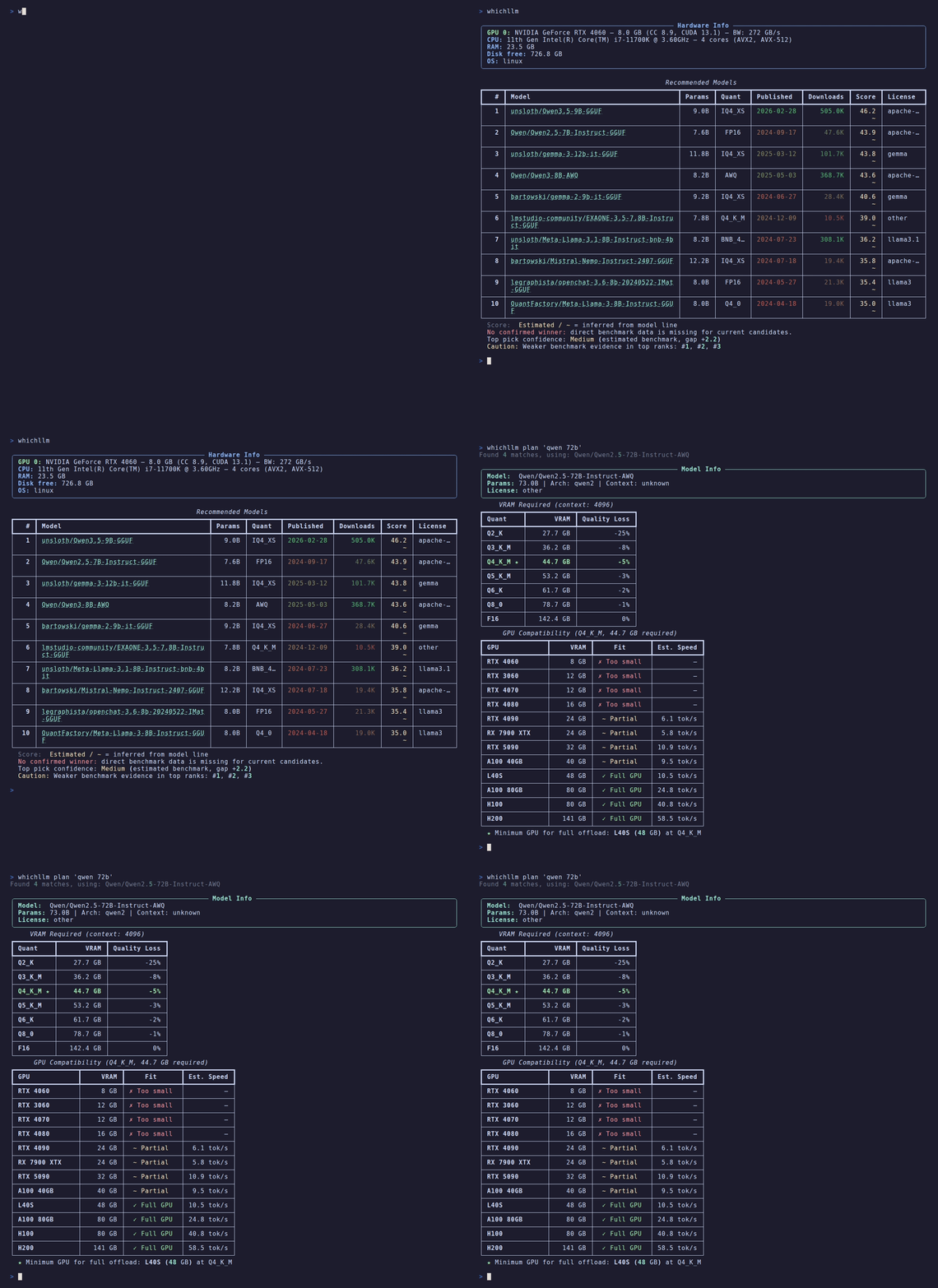
See it
$ whichllm --gpu "RTX 4090"

#1  Qwen/Qwen3.6-27B     27.8B  Q5_K_M   score 92.8    27 t/s
#2  Qwen/Qwen3-32B       32.0B  Q4_K_M   score 83.0    31 t/s
#3  Qwen/Qwen3-30B-A3B   30.0B  Q5_K_M   score 82.7   102 t/s
The 32B model fits your card fine — whichllm still ranks the 27B #1,
because it scores higher on real benchmarks and is a newer generation.
A size-only "what fits?" tool would hand you the bigger one. That gap is
the whole point of whichllm. (Note #3: a MoE model at 102 t/s — speed is
ranked on active params, quality on total.)
What can I run?
Real top picks (snapshot 2026-05 — your results track live HuggingFace
data, this is not a static list):
| Hardware |
VRAM |
Top pick |
Speed |
| RTX 5090 |
32 GB |
Qwen3.6-27B · Q6_K · score 94.7 |
~40 t/s |
| RTX 4090 / 3090 |
24 GB |
Qwen3.6-27B · Q5_K_M · score 92.8 |
~27 t/s |
| RTX 4060 |
8 GB |
Qwen3-14B · Q3_K_M · score 71.0 |
~22 t/s |
| Apple M3 Max |
36 GB |
Qwen3.6-27B · Q5_K_M · score 89.4 |
~9 t/s |
| CPU only |
— |
gpt-oss-20b (MoE) · Q4_K_M · score 45.2 |
~6 t/s |
whichllm --gpu "<your card>" simulates any of these before you buy.
By default, rankings include full-GPU, partial-offload, and CPU-only
candidates when they are usable. Use --gpu-only or --fit full-gpu when
you only want models that fit entirely in GPU VRAM.
The default table shows memory, estimated generation speed, fit type, and
published date. Speed is colored by practical usability: under 4 tok/s is red,
4-10 is yellow, 10-30 is green, and 30+ is bright green. ~ / ? still mark
estimate confidence.
Why whichllm?
Fitting a model into your VRAM is the easy part. The hard part is knowing
which of the models that fit is actually the best — and that is what
whichllm is built to get right.
- Evidence-based ranking, not a size heuristic — The top pick is
chosen from merged real benchmarks (LiveBench, Artificial Analysis,
Aider, multimodal/vision, Chatbot Arena ELO, Open LLM Leaderboard) —
never "the biggest model that happens to fit."
- Recency-aware — Stale leaderboards are demoted along each model's
lineage, so a 2024 model can't outrank a current-generation one on an
outdated score. The benchmark snapshot date is printed under every
ranking, so a stale recommendation is self-evident instead of silently
trusted.
- Evidence-graded and guarded — Every score is tagged
direct / variant / base / interpolated / self-reported and
discounted by confidence. Fabricated uploader claims and cross-family
inheritance (a small fork borrowing its much larger base's score) are
actively rejected.
- Architecture-aware estimates — VRAM = weights + GQA KV cache +
activation + overhead; speed is bandwidth-bound with per-quant
efficiency, per-backend factors, MoE active-vs-total split, and
unified-memory vs discrete-PCIe partial-offload modeling.
- One command, scriptable —
whichllm prints the answer; add
--json | jq for pipelines. No TUI, no keybindings to memorize.
- Live data — Models fetched directly from the HuggingFace API, with
curated frozen fallbacks for offline or rate-limited use.
Features
- Auto-detect hardware — NVIDIA, AMD, Intel, Apple Silicon, CPU-only
- Smart ranking — Scores models by VRAM fit, speed, and benchmark quality
- One-command chat —
whichllm run downloads and starts a chat session instantly
- Code snippets —
whichllm snippet prints ready-to-run Python for any model
- Live data — Fetches models directly from HuggingFace (cached for performance)
- Benchmark-aware — Integrates real eval scores with confidence-based dampening
- Task profiles — Filter by general, coding, vision, or math use cases
- GPU simulation — Test with any GPU:
whichllm --gpu "RTX 4090"
- Multi-GPU simulation — Repeat
--gpu, use commas, or write 2x RTX 4090
- Full-GPU filter —
--gpu-only / --fit full-gpu hides offload candidates
- Speed-aware filtering —
--speed usable|fast hides slow rows by threshold
- Markdown output —
--markdown / -m prints pasteable GFM tables
- Runtime memory budgets —
--vram-headroom and --ram-budget avoid edge fits
- Hardware planning — Reverse lookup:
whichllm plan "llama 3 70b"
- Upgrade planning — Compare your current machine with candidate GPUs
- JSON output — Pipe-friendly:
whichllm --json
Run & Snippet
Try any model with a single command. No manual installs needed — whichllm
creates an isolated environment via uv, installs dependencies, downloads the
model, and starts an interactive chat.
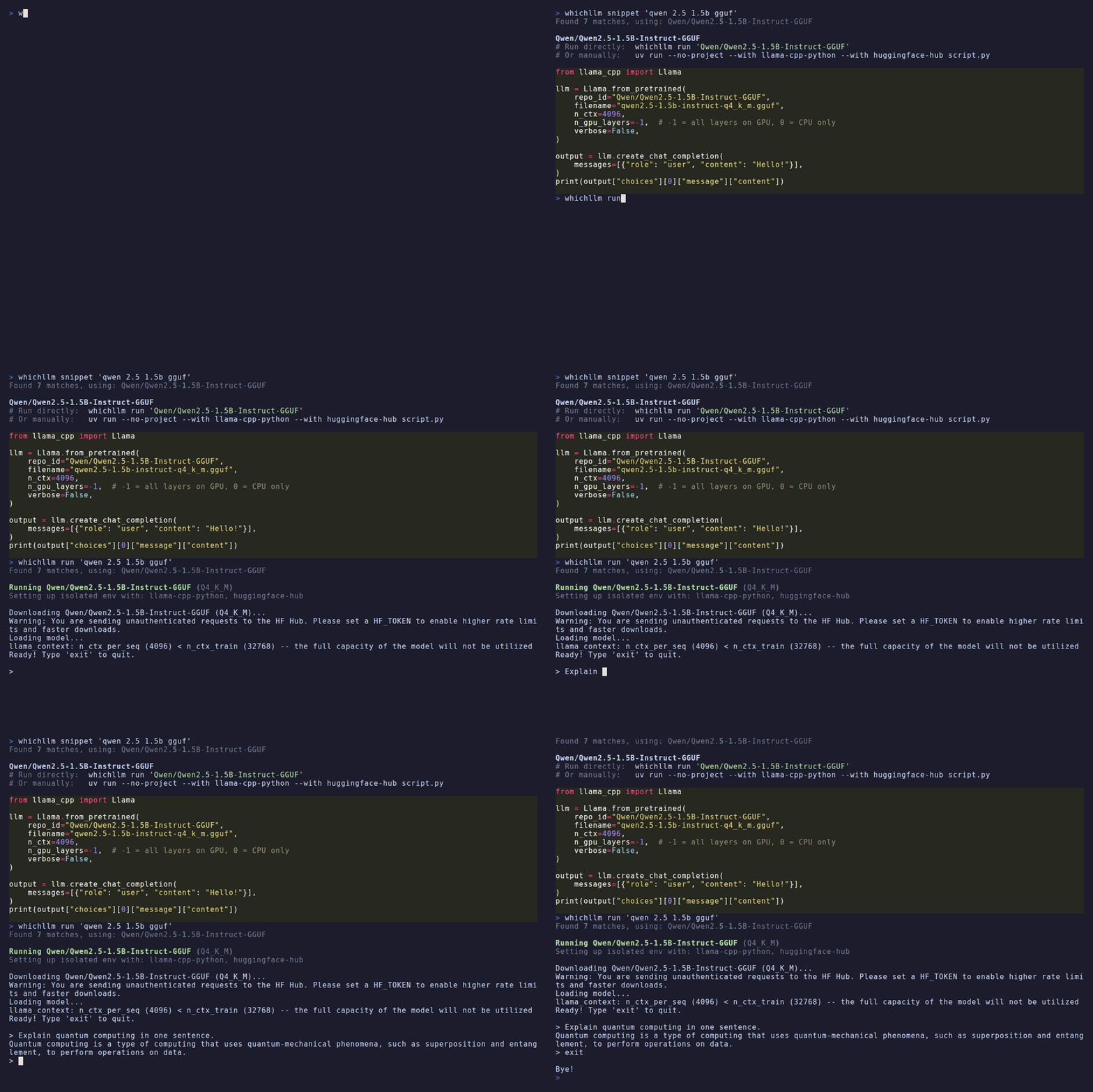
# Chat with a model (auto-picks the best GGUF variant)
whichllm run "qwen 2.5 1.5b gguf"

# Auto-pick the best model for your hardware and chat
whichllm run

# CPU-only mode
whichllm run "phi 3 mini gguf" --cpu-only
Works with all model formats:
- GGUF — via
llama-cpp-python (lightweight, fast)
- AWQ / GPTQ — via
transformers + autoawq / auto-gptq
- FP16 / BF16 — via
transformers
Get a copy-paste Python snippet instead:
whichllm snippet "qwen 7b"
from llama_cpp import Llama

llm = Llama.from_pretrained(
    repo_id="Qwen/Qwen2.5-7B-Instruct-GGUF",
    filename="qwen2.5-7b-instruct-q4_k_m.gguf",
    n_ctx=4096,
    n_gpu_layers=-1,
    verbose=False,
)

output = llm.create_chat_completion(
    messages=[{"role": "user", "content": "Hello!"}],
)
print(output["choices"][0]["message"]["content"])
Usage
# Auto-detect hardware and show best models
whichllm

# Simulate a GPU (e.g. planning a purchase)
whichllm --gpu "RTX 4090"
whichllm --gpu "RTX 5090"
# Specify variant
whichllm --gpu "RTX 5060 16"
# Override detected iGPU/unified-memory limits
whichllm --vram 8 --ram-bandwidth 68
# Simulate multiple GPUs
whichllm --gpu "2x RTX 4090"
whichllm --gpu "RTX 4090" --gpu "RTX 3090"
whichllm --gpu "RTX 4090, RTX 3090"

# Only show models that fit entirely in GPU VRAM
whichllm --gpu-only
whichllm --fit gpu
whichllm --fit full-gpu

# Avoid edge fits and background-RAM surprises
whichllm --vram-headroom 1.5GB
whichllm --ram-budget available
whichllm --ram-budget 8GB

# CPU-only mode
whichllm --cpu-only

# More results / filters
whichllm --top 20
whichllm --details          # show Downloads metadata instead of runtime columns
whichllm --speed usable     # minimum 10 tok/s
whichllm --speed fast       # minimum 30 tok/s
whichllm --min-speed 4      # exact tok/s floor
whichllm --markdown         # pasteable GitHub-Flavored Markdown table
whichllm --profile coding
whichllm --context-length 64k
whichllm --quant Q4_K_M
whichllm --min-speed 30     # exact tok/s floor
whichllm --evidence base   # allow id/base-model matches
whichllm --evidence strict # id-exact only (same as --direct)
whichllm --direct

# JSON output
whichllm --json

# Force refresh (ignore cache)
whichllm --refresh

# Show hardware info only
whichllm hardware

# Plan: what GPU do I need for a specific model?
whichllm plan "llama 3 70b"
whichllm plan "Qwen2.5-72B" --quant Q8_0
whichllm plan "mistral 7b" --context-length 32768

# Upgrade: compare your current machine against candidate GPUs
whichllm upgrade "RTX 4090" "RTX 5090" "H100"
whichllm upgrade "Apple M4 Max" --top 5

# Run: download and chat with a model instantly
whichllm run "qwen 2.5 1.5b gguf"
whichllm run                       # auto-pick best for your hardware

# Snippet: print ready-to-run Python code
whichllm snippet "qwen 7b"
whichllm snippet "llama 3 8b gguf" --quant Q5_K_M
Markdown output is intended for GitHub issues, READMEs, Slack, Discord, and
blog posts:
whichllm --markdown
whichllm -m --top 5 --gpu "RTX 4090"
JSON model rows include fit_type, vram_required_bytes,
vram_available_bytes, uses_multi_gpu, multi_gpu_effective_vram_bytes,
estimated_tok_per_sec, speed_confidence, speed_range_tok_per_sec,
speed_notes, benchmark_source, and benchmark_confidence. The speed range
is a planning range, not a live benchmark.
Integrations
Ollama
Use JSON output to feed scripts that map HuggingFace IDs to your local Ollama
model names:
# Pick the top HuggingFace model ID
whichllm --top 1 --json | jq -r '.models[0].model_id'

# Find the best coding model ID
whichllm --profile coding --top 1 --json | jq -r '.models[0].model_id'
Ollama model names do not always match HuggingFace repo IDs, so a small mapping
step is usually needed before ollama run.
Shell alias
Add to your .bashrc / .zshrc:
alias bestllm='whichllm --top 1 --json | jq -r ".models[0].model_id"'
# Usage: ollama run $(bestllm)
Scoring
Each model gets a 0-100 score. Benchmark quality and size form the core;
evidence confidence and runtime fit then scale it, with speed, source
trust, and popularity as adjustments.
| Factor |
Effect |
Description |
| Benchmark quality |
core |
Merged LiveBench / Artificial Analysis / Aider / Vision / Arena ELO / Open LLM Leaderboard, weighted by source confidence |
| Model size |
up to 35 |
log2-scaled world-knowledge proxy (MoE uses total params) |
| Quantization |
× penalty |
Lower-bit quants discounted multiplicatively |
| Evidence confidence |
×0.55–1.0 |
none / self-reported ×0.55, inherited ×0.78, direct full |
| Runtime fit |
×0.50–1.0 |
partial-offload ×0.72, CPU-only ×0.50 |
| Speed |
-8 to +8 |
Usability gate vs a fit-dependent tok/s floor; reported with confidence and range metadata |
| Source trust |
-5 to +5 |
Official-org bonus, known-repackager penalty |
| Popularity |
tie-breaker |
Downloads/likes; weight shrinks as evidence strengthens |
Score markers:
~ (yellow) — No direct benchmark; score inherited/interpolated from the model family!sr (bright yellow) — Uploader-reported benchmark only, not independently verified? (red) — No benchmark data available
Speed display:
- red — Slow generation speed (
<4 tok/s)
- yellow — Marginal generation speed (
4-10 tok/s)
- green — Usable generation speed (
10-30 tok/s)
- bright green — Fast local generation speed (
>=30 tok/s)
~ (yellow) — Estimated tok/s range is available? (red) — Low-confidence speed estimate; backend/runtime sensitivity is high
Documentation
How it works
Data pipeline
Model fetching — Fetches popular models from HuggingFace API:
- Text-generation (downloads + recently updated)
- GGUF-filtered (separate query for coverage)
- Vision models (
image-text-to-text) when --profile vision or any
Benchmark sources — Current tier (LiveBench, Artificial Analysis
Index, Aider) merged live when reachable, plus a curated multimodal /
vision index; frozen tier (Open LLM Leaderboard v2, Chatbot Arena
ELO). Tiers have separate caps and lineage-aware recency demotion so
stale leaderboards stop over-rewarding older generations.
Benchmark evidence — Five resolution levels, increasingly discounted:
direct — Exact model ID matchvariant — Suffix-stripped or -Instruct variantbase_model — Base model from cardDataline_interp — Size-aware interpolation within model familyself_reported — Uploader-claimed eval (heavily discounted)
Inheritance is rejected when a model's params diverge more than 2× from
its family's dominant member, catching draft / MTP / abliterated forks
that share a family_id with a much larger base.
Cache — normally ~/.cache/whichllm/, or $XDG_CACHE_HOME/whichllm/
when XDG_CACHE_HOME is set to an absolute path:
models.json — 6h TTLbenchmark.json — 24h TTL
Ranking engine
- Hardware detection — NVIDIA (nvidia-ml-py), AMD (ROCm/dbgpu), Intel, Apple Silicon (Metal), CPU cores, RAM, disk
- VRAM estimation — Weights + KV cache + activation + framework overhead (~500MB)
- Compatibility — Full GPU / Partial Offload / CPU-only; compute capability and OS checks
- Speed — tok/s from GPU memory bandwidth, quantization, backend, fit type, and MoE active parameters
- Scoring — Benchmark (with confidence dampening), size, quantization penalty, fit type, speed, popularity, source trust (official vs repackager)
- Backend filter — Apple Silicon and CPU-only restrict to GGUF for stability; Linux+NVIDIA allows AWQ/GPTQ
Project structure
src/whichllm/
├── cli.py              # Typer CLI: main, plan, run, snippet, hardware
├── constants.py        # Backward-compatible exports for registry data
├── data/               # GPU, quantization, framework, and lineage registries
├── hardware/
│   ├── detector.py     # Orchestrates GPU/CPU/RAM detection
│   ├── nvidia.py       # NVIDIA GPU via nvidia-ml-py
│   ├── amd.py          # AMD GPU (Linux)
│   ├── apple.py        # Apple Silicon (Metal)
│   ├── cpu.py          # CPU name, cores, AVX support
│   ├── memory.py       # RAM and disk free
│   ├── gpu_simulator.py # --gpu flag: synthetic GPU from name
│   └── types.py        # GPUInfo, HardwareInfo
├── models/
│   ├── fetcher.py      # HuggingFace API, model parsing, evalResults
│   ├── benchmark.py    # Arena ELO, Leaderboard (parquet/rows API)
│   ├── grouper.py      # Family grouping by base_model and name
│   ├── cache.py        # JSON cache with TTL
│   └── types.py        # ModelInfo, GGUFVariant, ModelFamily
├── engine/
│   ├── vram.py         # VRAM = weights + KV cache + activation + overhead
│   ├── compatibility.py# Fit type, disk check, compute/OS warnings
│   ├── performance.py  # tok/s from bandwidth
│   ├── quantization.py # Bytes per weight, quality penalty, non-GGUF inference
│   ├── ranker.py       # Scoring, evidence filter, profile/match
│   └── types.py        # CompatibilityResult
└── output/
    ├── ranking.py      # Rich hardware and recommendation tables
    ├── json_output.py  # Ranking, plan, and upgrade JSON
    ├── plan.py         # plan command display
    ├── upgrade.py      # upgrade comparison display
    └── display.py      # Compatibility re-export shim
Development
git clone https://github.com/Andyyyy64/whichllm.git
cd whichllm
uv sync --dev
uv run whichllm
uv run pytest
Contributing
Contributions are welcome! See CONTRIBUTING.md for guidelines.
Support
If whichllm helped you find a model or avoid a bad hardware guess,
sponsoring is appreciated. It helps keep the project maintained: hardware
reports, packaging, test fixtures, benchmark updates, and support for more
machines.
whichllm will stay open-source either way. Issues and PRs are always welcome.
Useful? A GitHub star helps other people find it, and I'd genuinely like to
know what it picked for your rig. Drop it in Issues.
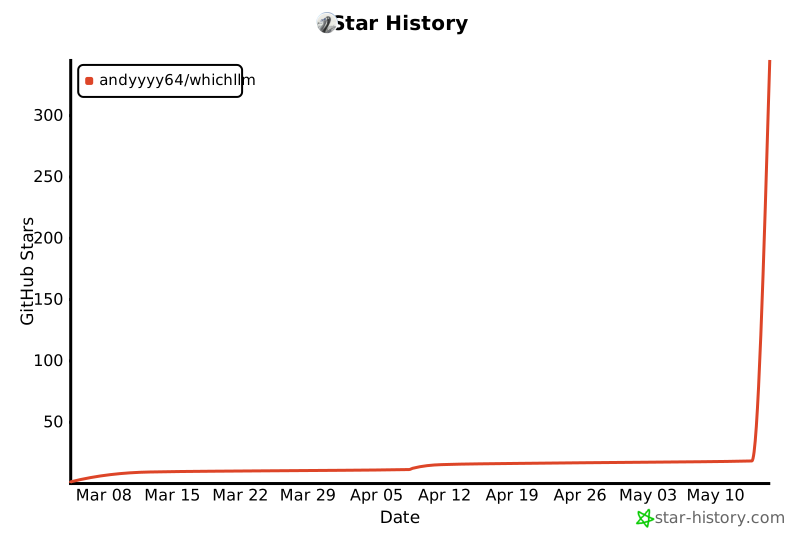
Star History
Requirements
- Python 3.11+
- NVIDIA GPU detection via
nvidia-ml-py (included by default)
- AMD / Apple Silicon detected automatically
License
MIT

 A CLI tool that finds the best local LLM for your machine: it auto-detects your GPU/CPU/RAM and ranks HuggingFace models that fit, scored by real benchmarks rather than parameter count.