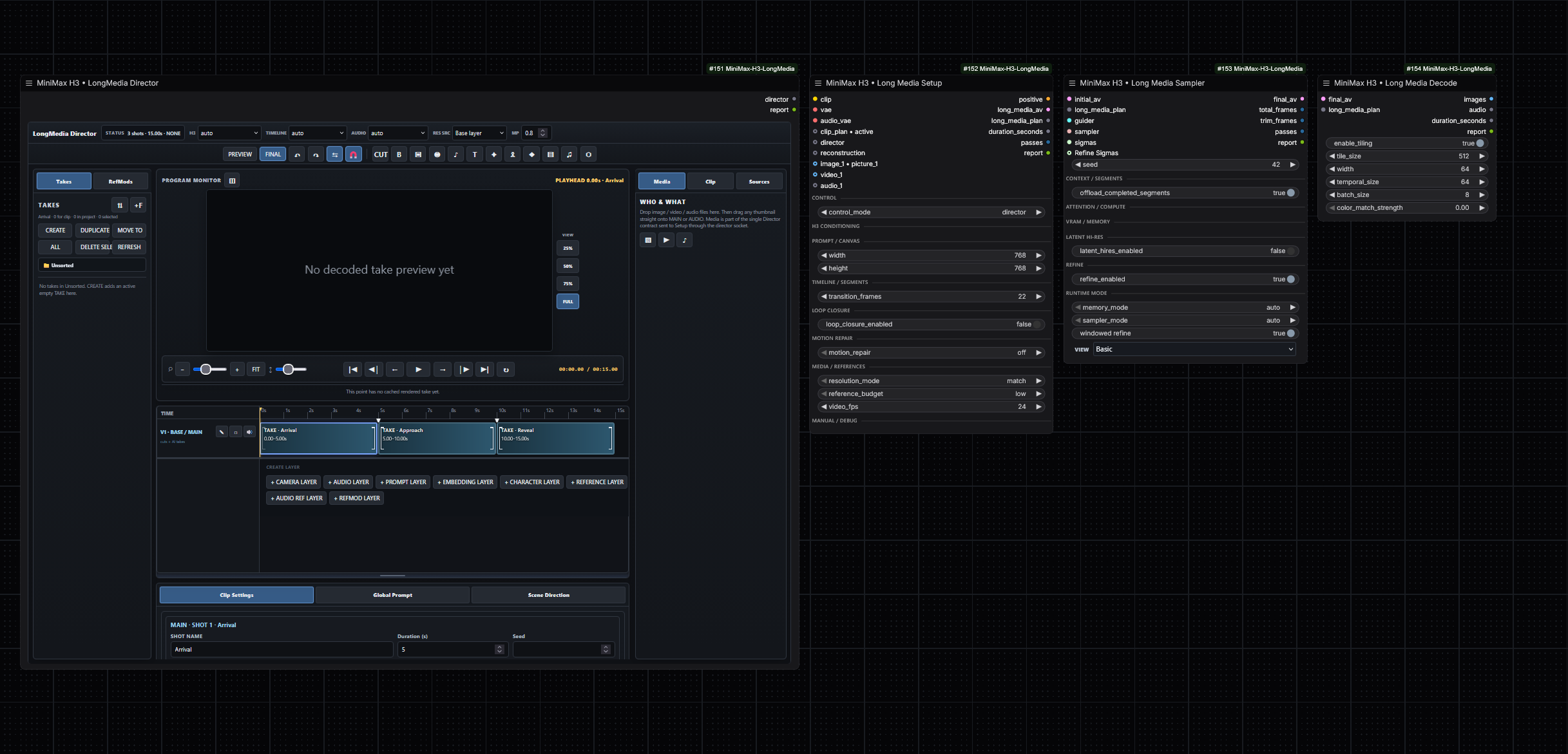
这是什么东西?
 一套面向生产环境的 ComfyUI 自定义节点,用于运行 MiniMax H3 进行长视频和音频生成:参考编辑、MultiClip 规划、镜头调度、固定分段、口型同步和重新配音、潜空间高分辨率精修,以及对低显存友好的安全运行。
一套面向生产环境的 ComfyUI 自定义节点,用于运行 MiniMax H3 进行长视频和音频生成:参考编辑、MultiClip 规划、镜头调度、固定分段、口型同步和重新配音、潜空间高分辨率精修,以及对低显存友好的安全运行。它是一个独立应用,还是要装到 ComfyUI 里的东西?它是一个插件,不是独立应用:节点安装到现有的 ComfyUI 环境(custom_nodes 文件夹,或通过 Comfy Registry 安装包)后,会作为节点出现在你的工作流中。
它是一个插件,不是独立应用:节点安装到现有的 ComfyUI 环境(custom_nodes 文件夹,或通过 Comfy Registry 安装包)后,会作为节点出现在你的工作流中。怎么把它装进 ComfyUI?安装到 ComfyUI 的 custom_nodes 目录,或从 Comfy Registry 获取该包;安装或更新后需要重启 ComfyUI。
安装到 ComfyUI 的 custom_nodes 目录,或从 Comfy Registry 获取该包;安装或更新后需要重启 ComfyUI。除了插件本身,我还需要准备什么?需要一个能正常运行的 ComfyUI 环境,并有一个可供采样的 H3 模型;README 把保持启用 ComfyUI 的 Dynamic VRAM 选项作为生产环境的起点。
需要一个能正常运行的 ComfyUI 环境,并有一个可供采样的 H3 模型;README 把保持启用 ComfyUI 的 Dynamic VRAM 选项作为生产环境的起点。以前的 0.4.40 教程还适用吗?部分适用:0.5.x 是在公开的 0.4.40 之后做的整合,新工作流采用独立的语义控制节点(Setup、Planner、Cameras、Sampler、Decode),而旧资料可能还在用 workflowmode 这套旧术语。
部分适用:0.5.x 是在公开的 0.4.40 之后做的整合,新工作流采用独立的语义控制节点(Setup、Planner、Cameras、Sampler、Decode),而旧资料可能还在用 workflowmode 这套旧术语。我需要显存很大的高端显卡吗?不需要——低配置显卡是明确支持的目标:针对装不下的 fused-QKV 负载提供查询流式处理、重复运行的内存隔离、带保护的 INT8 VBAR 预取,以及能感知内存压力的锁页主机内存。
不需要——低配置显卡是明确支持的目标:针对装不下的 fused-QKV 负载提供查询流式处理、重复运行的内存隔离、带保护的 INT8 VBAR 预取,以及能感知内存压力的锁页主机内存。用这些节点我实际能生成什么?带配乐的长视频:可以把一部连续的影片按固定时长的内部单元切分(以保证显存占用和稳定性),也可以做 MultiClip 序列——由 Planner 节点负责场景提示词、时长、命名和种子,由 Cameras 节点处理构图、镜头、运镜和转场。Loop Closure 会把生成的结尾拉回到开头的宏观状态。
带配乐的长视频:可以把一部连续的影片按固定时长的内部单元切分(以保证显存占用和稳定性),也可以做 MultiClip 序列——由 Planner 节点负责场景提示词、时长、命名和种子,由 Cameras 节点处理构图、镜头、运镜和转场。Loop Closure 会把生成的结尾拉回到开头的宏观状态。角色替换的口型同步模式是怎么工作的?在 videorefedit 模式下,Video1 和 Audio1 可以作为一对配套的源表演参考,同时 Audio1 仍然负责目标时间轴和输出波形。在 lipsync 模式下,Audio1 刻意与原始面部表演解耦,因此全新的台词或歌声都可以驱动替换后的角色。
在 videorefedit 模式下,Video1 和 Audio1 可以作为一对配套的源表演参考,同时 Audio1 仍然负责目标时间轴和输出波形。在 lipsync 模式下,Audio1 刻意与原始面部表演解耦,因此全新的台词或歌声都可以驱动替换后的角色。Latent Hi-Res 的两阶段采样是做什么的?Long Media Sampler 先对低分辨率的 Stage-1 x0 做去噪,在保留音频潜空间的同时对视频潜空间进行学习式上采样,重建目标网格的条件输入,并可选地以相同种子用全新噪声独立跑一次高分辨率采样;不开启的话,Refiner 只是一个零噪声、低 sigma 的收尾阶段。
Long Media Sampler 先对低分辨率的 Stage-1 x0 做去噪,在保留音频潜空间的同时对视频潜空间进行学习式上采样,重建目标网格的条件输入,并可选地以相同种子用全新噪声独立跑一次高分辨率采样;不开启的话,Refiner 只是一个零噪声、低 sigma 的收尾阶段。有现成的工作流可以上手吗?有——发行版自带示例 JSON 工作流,比如 'MiniMax-H3-LongMedia-SAFE-1080p-15s.json'(生产环境的起点)和 'MiniMax-H3-LongMedia-LatentUpscale-Detailer.json',里面用的是中性的媒体占位符,而不是用户媒体或本地预览路径。
有——发行版自带示例 JSON 工作流,比如 'MiniMax-H3-LongMedia-SAFE-1080p-15s.json'(生产环境的起点)和 'MiniMax-H3-LongMedia-LatentUpscale-Detailer.json',里面用的是中性的媒体占位符,而不是用户媒体或本地预览路径。What are similar projects?ComfyUI-MiniMaxH3-TimelineDirector, ComfyUI-ALLinONE-MinimaxH3, ComfyUI_MiniMax_H3_Extender, FreeVideo, Comfyui-MMH3-UltimateUpscale, lanshu-create-ai-presenter-video, DiffSynth-Studio, LTX-2
ComfyUI-MiniMaxH3-TimelineDirector, ComfyUI-ALLinONE-MinimaxH3, ComfyUI_MiniMax_H3_Extender, FreeVideo, Comfyui-MMH3-UltimateUpscale, lanshu-create-ai-presenter-video, DiffSynth-Studio, LTX-2Which topics is it in?lipsync, kv-cache, minimax, memory-management, upscaling, ai-video, diffusion, comfyui, audio-generation, video-editing, text-to-video, content-creation
lipsync, kv-cache, minimax, memory-management, upscaling, ai-video, diffusion, comfyui, audio-generation, video-editing, text-to-video, content-creation