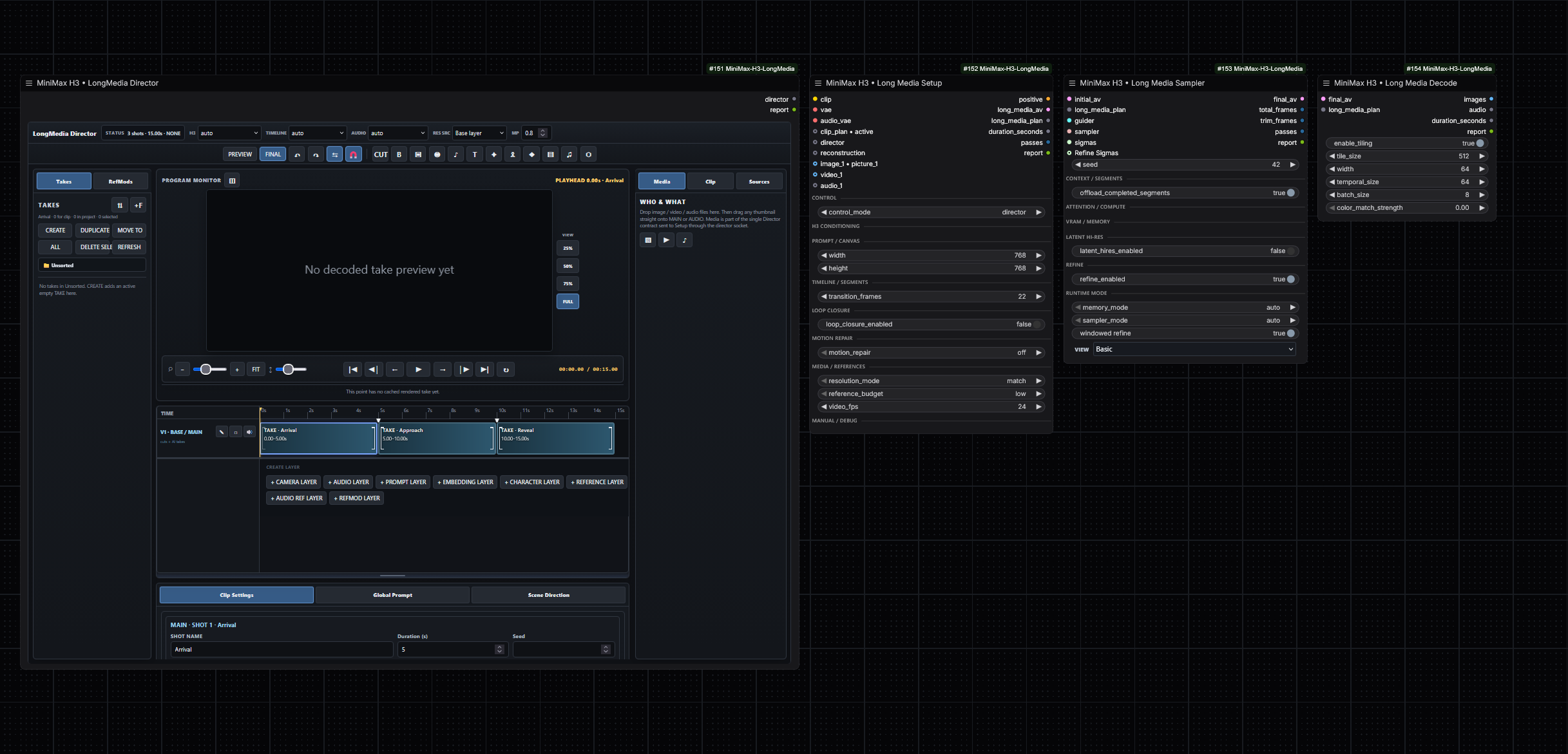
Что это такое?
 Набор кастомных нод для ComfyUI, ориентированных на продакшен, которые запускают MiniMax H3 для генерации длинного видео и аудио: редактирование по референсу, планирование MultiClip, управление камерой, фиксированная нарезка на сегменты, lip-sync и переозвучка, уточнение в высоком разрешении через латент, а также работа с безопасным расходом видеопамяти при её нехватке.
Набор кастомных нод для ComfyUI, ориентированных на продакшен, которые запускают MiniMax H3 для генерации длинного видео и аудио: редактирование по референсу, планирование MultiClip, управление камерой, фиксированная нарезка на сегменты, lip-sync и переозвучка, уточнение в высоком разрешении через латент, а также работа с безопасным расходом видеопамяти при её нехватке.Это отдельное приложение или что-то, что я добавляю в ComfyUI?Это плагин, а не приложение: ноды устанавливаются в уже настроенный ComfyUI (в папку custom_nodes или как пакет из Comfy Registry) и после этого появляются как ноды в ваших воркфлоу.
Это плагин, а не приложение: ноды устанавливаются в уже настроенный ComfyUI (в папку custom_nodes или как пакет из Comfy Registry) и после этого появляются как ноды в ваших воркфлоу.Как добавить это в ComfyUI?Установите его в папку custom_nodes ComfyUI или скачайте пакет из Comfy Registry, а после установки или обновления перезапустите ComfyUI.
Установите его в папку custom_nodes ComfyUI или скачайте пакет из Comfy Registry, а после установки или обновления перезапустите ComfyUI.Что мне нужно, кроме самого плагина?Рабочая установка ComfyUI с чекпоинтом H3, из которого можно делать сэмплирование; в README за отправную точку для продакшена принята включённая опция Dynamic VRAM в ComfyUI.
Рабочая установка ComfyUI с чекпоинтом H3, из которого можно делать сэмплирование; в README за отправную точку для продакшена принята включённая опция Dynamic VRAM в ComfyUI.Подойдут ли старые туториалы для версии 0.4.40?Частично: 0.5.x — это консолидация после публичной версии 0.4.40, и в новых воркфлоу используются независимые семантические контролы (ноды Setup, Planner, Cameras, Sampler, Decode), тогда как в старых заметках может встречаться прежняя терминология workflowmode.
Частично: 0.5.x — это консолидация после публичной версии 0.4.40, и в новых воркфлоу используются независимые семантические контролы (ноды Setup, Planner, Cameras, Sampler, Decode), тогда как в старых заметках может встречаться прежняя терминология workflowmode.Нужна ли мощная видеокарта с большим объёмом VRAM?Нет — слабые видеокарты — это явно поддерживаемый сценарий: стриминг запросов для fused-QKV-нагрузок, которые не помещаются в память, изоляция памяти между повторными запусками, защищённая предзагрузка INT8 VBAR и pinned host memory с учётом давления на RAM.
Нет — слабые видеокарты — это явно поддерживаемый сценарий: стриминг запросов для fused-QKV-нагрузок, которые не помещаются в память, изоляция памяти между повторными запусками, защищённая предзагрузка INT8 VBAR и pinned host memory с учётом давления на RAM.Что конкретно можно генерировать с этими нодами?Длинное видео со звуковой дорожкой: один непрерывный фильм, разбитый на внутренние блоки фиксированной длительности ради VRAM и стабильности, либо последовательности MultiClip, где Planner управляет промптами сцен, длительностями, названиями и сидами, а нода Cameras отвечает за кадрирование, объектив, движение камеры и переходы. Loop Closure подтягивает сгенерированный хвост обратно к стартовому макросостоянию.
Длинное видео со звуковой дорожкой: один непрерывный фильм, разбитый на внутренние блоки фиксированной длительности ради VRAM и стабильности, либо последовательности MultiClip, где Planner управляет промптами сцен, длительностями, названиями и сидами, а нода Cameras отвечает за кадрирование, объектив, движение камеры и переходы. Loop Closure подтягивает сгенерированный хвост обратно к стартовому макросостоянию.Как работает режим lip-sync с заменой персонажа?В режимах videorefedit потоки Video1 и Audio1 могут выступать как парный референс исходного выступления, при этом Audio1 по-прежнему управляет целевым таймингом и выходной звуковой дорожкой. В режиме lipsync Audio1 намеренно не зависит от исходной мимики, поэтому полностью новые реплики или пение могут управлять замещённым персонажем.
В режимах videorefedit потоки Video1 и Audio1 могут выступать как парный референс исходного выступления, при этом Audio1 по-прежнему управляет целевым таймингом и выходной звуковой дорожкой. В режиме lipsync Audio1 намеренно не зависит от исходной мимики, поэтому полностью новые реплики или пение могут управлять замещённым персонажем.Что делает двухэтапное сэмплирование Latent Hi-Res?Long Media Sampler сначала делает денойз низкоразрешённого Stage-1 x0, обученным апскейлом увеличивает видеолатент, сохраняя аудиолатент, заново строит кондиционирование по целевой сетке и опционально может запустить независимый высокоразрешённый проход со свежим шумом и тем же сидом; без этого Refiner остаётся хвостом с нулевым шумом и низким sigma.
Long Media Sampler сначала делает денойз низкоразрешённого Stage-1 x0, обученным апскейлом увеличивает видеолатент, сохраняя аудиолатент, заново строит кондиционирование по целевой сетке и опционально может запустить независимый высокоразрешённый проход со свежим шумом и тем же сидом; без этого Refiner остаётся хвостом с нулевым шумом и низким sigma.Есть ли готовый воркфлоу, с которого можно начать?Да — в релизы входят примеры JSON-воркфлоу, например 'MiniMax-H3-LongMedia-SAFE-1080p-15s.json' (отправная точка для продакшена) и 'MiniMax-H3-LongMedia-LatentUpscale-Detailer.json', содержащие нейтральные заглушки для медиафайлов вместо пользовательских медиа или локальных путей к превью.
Да — в релизы входят примеры JSON-воркфлоу, например 'MiniMax-H3-LongMedia-SAFE-1080p-15s.json' (отправная точка для продакшена) и 'MiniMax-H3-LongMedia-LatentUpscale-Detailer.json', содержащие нейтральные заглушки для медиафайлов вместо пользовательских медиа или локальных путей к превью.What are similar projects?ComfyUI-MiniMaxH3-TimelineDirector, ComfyUI-ALLinONE-MinimaxH3, ComfyUI_MiniMax_H3_Extender, FreeVideo, Comfyui-MMH3-UltimateUpscale, lanshu-create-ai-presenter-video, DiffSynth-Studio, LTX-2
ComfyUI-MiniMaxH3-TimelineDirector, ComfyUI-ALLinONE-MinimaxH3, ComfyUI_MiniMax_H3_Extender, FreeVideo, Comfyui-MMH3-UltimateUpscale, lanshu-create-ai-presenter-video, DiffSynth-Studio, LTX-2Which topics is it in?lipsync, kv-cache, minimax, memory-management, upscaling, diffusion, ai-video, comfyui, audio-generation, video-editing, text-to-video, content-creation
lipsync, kv-cache, minimax, memory-management, upscaling, diffusion, ai-video, comfyui, audio-generation, video-editing, text-to-video, content-creation