
Stanford Alpaca: An Instruction-following LLaMA Model





This is the repo for the Stanford Alpaca project, which aims to build and share an instruction-following LLaMA model. The repo contains:
Note: We thank the community for feedback on Stanford-Alpaca and supporting our research. Our live demo is suspended until further notice.
Usage and License Notices: Alpaca is intended and licensed for research use only. The dataset is CC BY NC 4.0 (allowing only non-commercial use) and models trained using the dataset should not be used outside of research purposes.
The weight diff is also CC BY NC 4.0 (allowing only non-commercial use).
Overview
The current Alpaca model is fine-tuned from a 7B LLaMA model [1] on 52K instruction-following data generated by the techniques in the Self-Instruct [2] paper, with some modifications that we discuss in the next section.
In a preliminary human evaluation, we found that the Alpaca 7B model behaves similarly to the text-davinci-003 model on the Self-Instruct instruction-following evaluation suite [2].
Alpaca is still under development, and there are many limitations that have to be addressed.
Importantly, we have not yet fine-tuned the Alpaca model to be safe and harmless.
We thus encourage users to be cautious when interacting with Alpaca, and to report any concerning behavior to help improve the safety and ethical considerations of the model.
Our initial release contains the data generation procedure, dataset, and training recipe. We intend to release the model weights if we are given permission to do so by the creators of LLaMA. For now, we have chosen to host a live demo to help readers better understand the capabilities and limits of Alpaca, as well as a way to help us better evaluate Alpaca's performance on a broader audience.
Please read our release blog post for more details about the model, our discussion of the potential harm and limitations of Alpaca models, and our thought process for releasing a reproducible model.
[1]: LLaMA: Open and Efficient Foundation Language Models. Hugo Touvron, Thibaut Lavril, Gautier Izacard, Xavier Martinet, Marie-Anne Lachaux, Timothée Lacroix, Baptiste Rozière, Naman Goyal, Eric Hambro, Faisal Azhar, Aurelien Rodriguez, Armand Joulin, Edouard Grave, Guillaume Lample. https://arxiv.org/abs/2302.13971v1
[2]: Self-Instruct: Aligning Language Model with Self Generated Instructions. Yizhong Wang, Yeganeh Kordi, Swaroop Mishra, Alisa Liu, Noah A. Smith, Daniel Khashabi, Hannaneh Hajishirzi. https://arxiv.org/abs/2212.10560
Data Release
alpaca_data.json contains 52K instruction-following data we used for fine-tuning the Alpaca model.
This JSON file is a list of dictionaries, each dictionary contains the following fields:
instruction: str, describes the task the model should perform. Each of the 52K instructions is unique.input: str, optional context or input for the task. For example, when the instruction is "Summarize the following article", the input is the article. Around 40% of the examples have an input.output: str, the answer to the instruction as generated by text-davinci-003.
We used the following prompts for fine-tuning the Alpaca model:
- for examples with a non-empty input field:
Below is an instruction that describes a task, paired with an input that provides further context. Write a response that appropriately completes the request.

### Instruction:
{instruction}

### Input:
{input}

### Response:
- for examples with an empty input field:
Below is an instruction that describes a task. Write a response that appropriately completes the request.

### Instruction:
{instruction}

### Response:
During inference (eg for the web demo), we use the user instruction with an empty input field (second option).
Data Generation Process
Running the code
- Set environment variables
OPENAI_API_KEY to your OpenAI API key.
- Install the dependencies with
pip install -r requirements.txt.
- Run
python -m generate_instruction generate_instruction_following_data to generate the data.
We built on the data generation pipeline from self-instruct and made the following modifications:
- We used
text-davinci-003 to generate the instruction data instead of davinci.
- We wrote a new prompt (
prompt.txt) that explicitly gave the requirement of instruction generation to text-davinci-003. Note: there is a slight error in the prompt we used, and future users should incorporate the edit in https://github.com/tatsu-lab/stanford_alpaca/pull/24
- We adopted much more aggressive batch decoding, i.e., generating 20 instructions at once, which significantly reduced the cost of data generation.
- We simplified the data generation pipeline by discarding the difference between classification and non-classification instructions.
- We only generated a single instance for each instruction, instead of 2 to 3 instances as in [1].
This produced an instruction-following dataset with 52K examples obtained at a much lower cost (less than $500).
In a preliminary study, we also find our 52K generated data to be much more diverse than the data released by self-instruct.
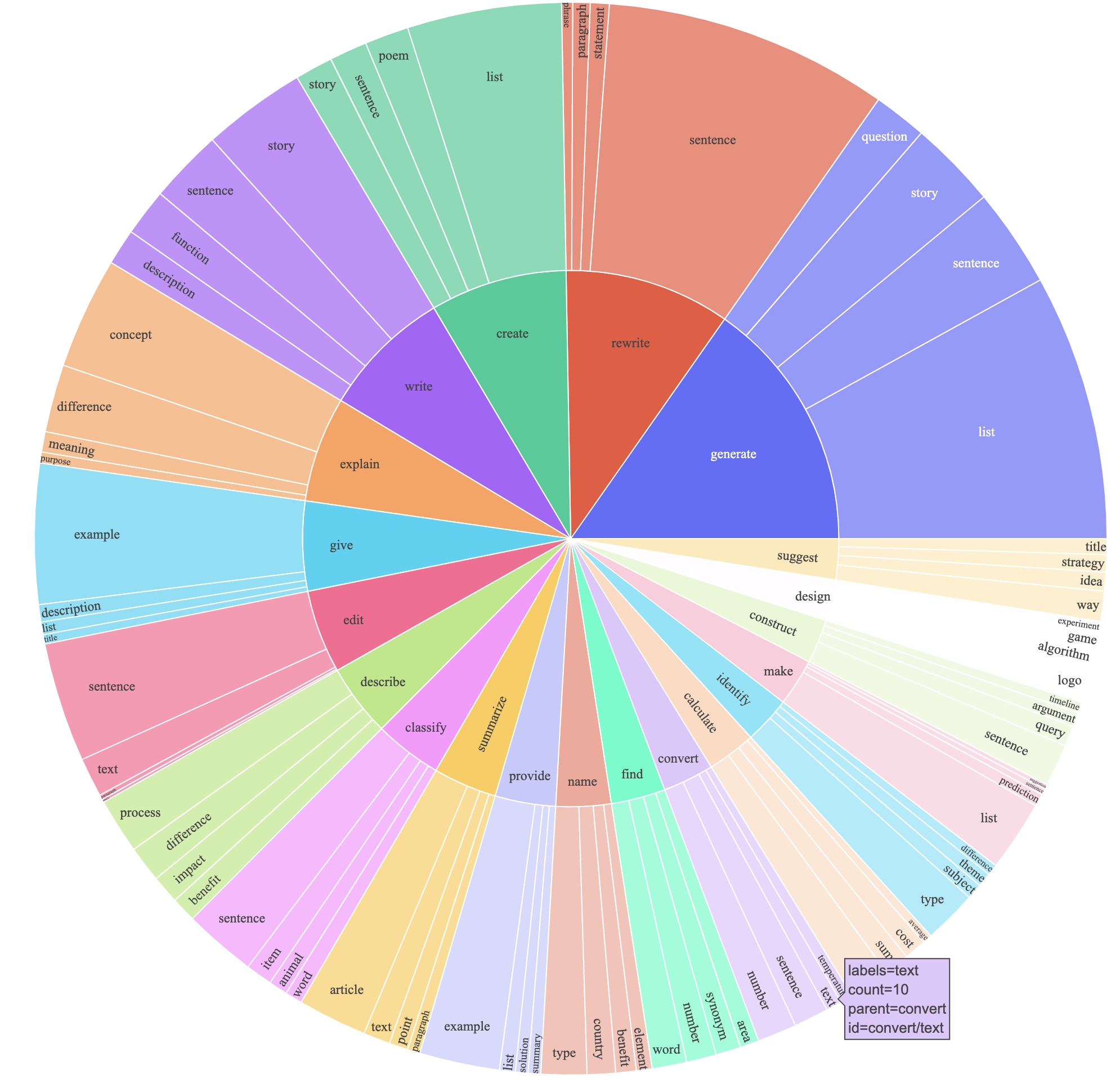
We plot the below figure (in the style of Figure 2 in the self-instruct paper to demonstrate the diversity of our data.
The inner circle of the plot represents the root verb of the instructions, and the outer circle represents the direct objects.
Fine-tuning
We fine-tune our models using standard Hugging Face training code.
We fine-tune LLaMA-7B and LLaMA-13B with the following hyperparameters:
| Hyperparameter |
LLaMA-7B |
LLaMA-13B |
| Batch size |
128 |
128 |
| Learning rate |
2e-5 |
1e-5 |
| Epochs |
3 |
5 |
| Max length |
512 |
512 |
| Weight decay |
0 |
0 |
To reproduce our fine-tuning runs for LLaMA, first install the requirements
pip install -r requirements.txt
Below is a command that fine-tunes LLaMA-7B with our dataset on a machine with 4 A100 80G GPUs in FSDP full_shard mode.
We were able to reproduce a model of similar quality as the one we hosted in our demo with the following command using Python 3.10.
Replace <your_random_port> with a port of your own, <your_path_to_hf_converted_llama_ckpt_and_tokenizer> with the
path to your converted checkpoint and tokenizer (following instructions in the PR), and <your_output_dir> with where you want to store your outputs.
torchrun --nproc_per_node=4 --master_port=<your_random_port> train.py \
    --model_name_or_path <your_path_to_hf_converted_llama_ckpt_and_tokenizer> \
    --data_path ./alpaca_data.json \
    --bf16 True \
    --output_dir <your_output_dir> \
    --num_train_epochs 3 \
    --per_device_train_batch_size 4 \
    --per_device_eval_batch_size 4 \
    --gradient_accumulation_steps 8 \
    --evaluation_strategy "no" \
    --save_strategy "steps" \
    --save_steps 2000 \
    --save_total_limit 1 \
    --learning_rate 2e-5 \
    --weight_decay 0. \
    --warmup_ratio 0.03 \
    --lr_scheduler_type "cosine" \
    --logging_steps 1 \
    --fsdp "full_shard auto_wrap" \
    --fsdp_transformer_layer_cls_to_wrap 'LlamaDecoderLayer' \
    --tf32 True
The same script also works for OPT fine-tuning. Here's an example for fine-tuning OPT-6.7B
torchrun --nproc_per_node=4 --master_port=<your_random_port> train.py \
    --model_name_or_path "facebook/opt-6.7b" \
    --data_path ./alpaca_data.json \
    --bf16 True \
    --output_dir <your_output_dir> \
    --num_train_epochs 3 \
    --per_device_train_batch_size 4 \
    --per_device_eval_batch_size 4 \
    --gradient_accumulation_steps 8 \
    --evaluation_strategy "no" \
    --save_strategy "steps" \
    --save_steps 2000 \
    --save_total_limit 1 \
    --learning_rate 2e-5 \
    --weight_decay 0. \
    --warmup_ratio 0.03 \
    --lr_scheduler_type "cosine" \
    --logging_steps 1 \
    --fsdp "full_shard auto_wrap" \
    --fsdp_transformer_layer_cls_to_wrap 'OPTDecoderLayer' \
    --tf32 True
Note the given training script is meant to be simple and easy to use, and is not particularly optimized.
To run on more gpus, you may prefer to turn down gradient_accumulation_steps to keep a global batch size of 128. Global batch size has not been tested for optimality.
Addressing OOM
Naively, fine-tuning a 7B model requires about 7 x 4 x 4 = 112 GB of VRAM. Commands given above enable parameter sharding, so no redundant model copy is stored on any GPU.
If you'd like to further reduce the memory footprint, here are some options:
Recovering Alpaca Weights
The weight diff between Alpaca-7B and LLaMA-7B is located here.
To recover the original Alpaca-7B weights, follow these steps:
1. Convert Meta's released weights into huggingface format. Follow this guide:
    https://huggingface.co/docs/transformers/main/model_doc/llama
2. Make sure you cloned the released weight diff into your local machine. The weight diff is located at:
    https://huggingface.co/tatsu-lab/alpaca-7b/tree/main
3. Run this function with the correct paths. E.g.,
    python weight_diff.py recover --path_raw <path_to_step_1_dir> --path_diff <path_to_step_2_dir> --path_tuned <path_to_store_recovered_weights>
Once step 3 completes, you should have a directory with the recovered weights, from which you can load the model like the following
import transformers
alpaca_model = transformers.AutoModelForCausalLM.from_pretrained("<path_to_store_recovered_weights>")
alpaca_tokenizer = transformers.AutoTokenizer.from_pretrained("<path_to_store_recovered_weights>")
Authors
All grad students below contributed equally and the order is determined by random draw.
All advised by Tatsunori B. Hashimoto. Yann is also advised by Percy Liang and Xuechen is also advised by Carlos Guestrin.
Citation
Please cite the repo if you use the data or code in this repo.
@misc{alpaca,
  author = {Rohan Taori and Ishaan Gulrajani and Tianyi Zhang and Yann Dubois and Xuechen Li and Carlos Guestrin and Percy Liang and Tatsunori B. Hashimoto },
  title = {Stanford Alpaca: An Instruction-following LLaMA model},
  year = {2023},
  publisher = {GitHub},
  journal = {GitHub repository},
  howpublished = {\url{https://github.com/tatsu-lab/stanford_alpaca}},
}
Naturally, you should also cite the original LLaMA paper [1] and the Self-Instruct paper [2].
Acknowledgements
We thank Yizhong Wang for his help in explaining the data generation pipeline in Self-Instruct and providing the code for the parse analysis plot.
We thank Yifan Mai for helpful support, and members of the Stanford NLP Group as well as the Center for Research on Foundation Models (CRFM) for their helpful feedback.


 斯坦福官方的 Alpaca 仓库:包含训练一个遵循指令的 LLaMA 模型的代码和文档,以及生成其 52K 指令数据集的方法。在初步的人工评估中,7B 模型的表现与 text-davinci-003 相近。