
Scenario for Blender








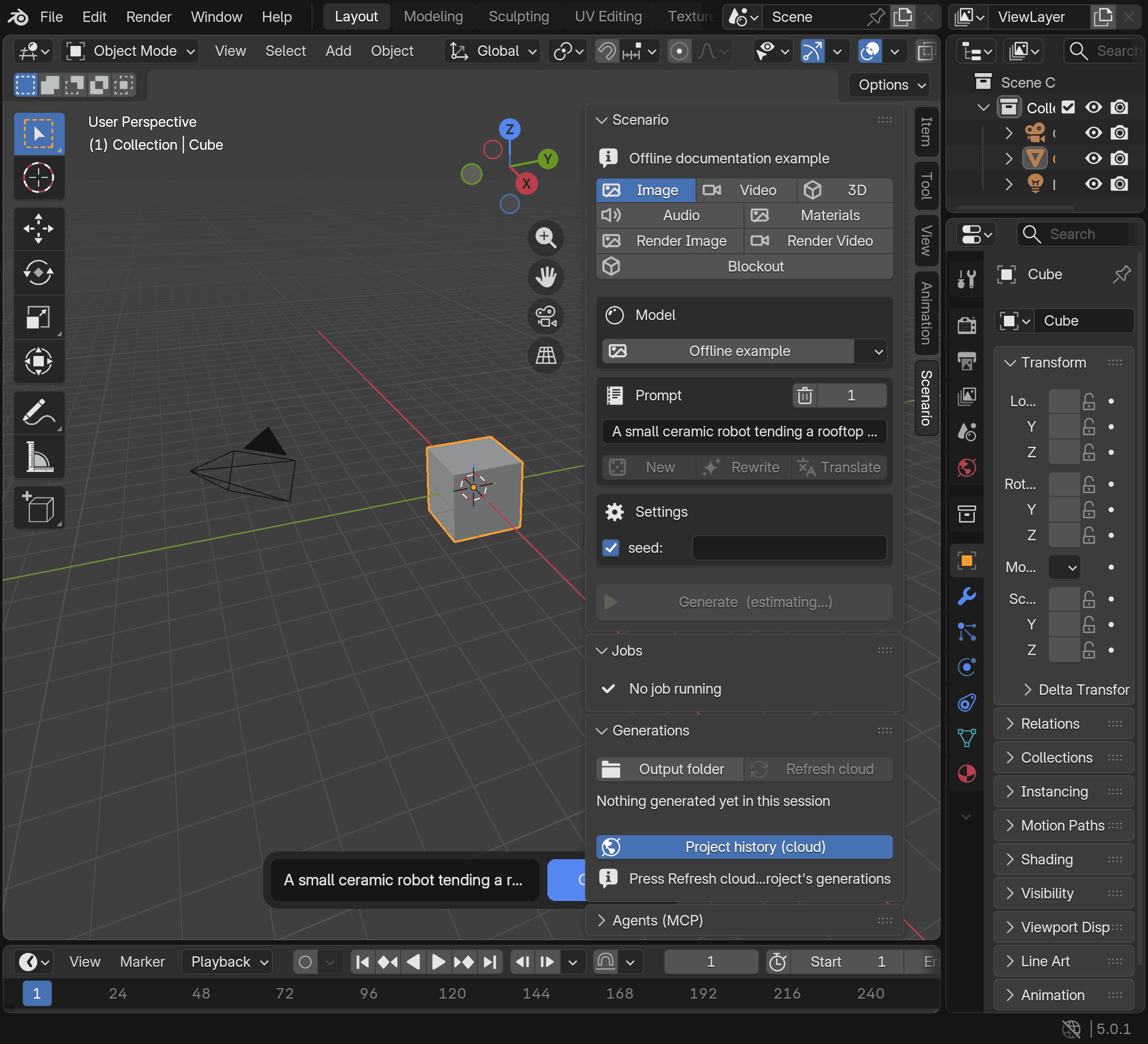
Experimental. Bring Scenario image, video, 3D, PBR material, audio and 360
environment generation into Blender. Use scene captures and selected meshes as
inputs, explore camera moves, and turn a written scene description into a greybox
layout with Blockout. A compact composer, sidebar, expanded Studio view and local
MCP server provide access from your scene. This is a Python extension with pinned
SDK dependency wheels, licensed GPL-3.0-or-later. Read the
known limitations before relying on a workflow.
Requirements
- Blender 5.0 or later, as declared in the extension manifest.
- A Scenario account with API access, an API key and its secret. See
Obtain your API key
and Scenario help for current account requirements.
- An internet connection and Blender's Allow Online Access setting enabled
under Edit > Preferences > System > Network before contacting Scenario.
- Scenario generations and prompt helpers consume Creative Units (CU). Review
the displayed estimate before Generate; models, parameters and references
affect the cost. See costs and the limitations above.
Install
Install from the official extension repository so that Blender can offer updates:
- Turn on Allow Online Access under Edit > Preferences > System > Network.
- Open Edit > Preferences > Get Extensions > Repositories, choose Add Remote
Repository and enter
https://blender.scenario.com/repo/index.json.
- Find Scenario in Get Extensions and install it. It appears as "Scenario" in
Blender's Add-ons list.
- In Scenario, open Organization settings > API Keys > Add API Key and follow
the instructions to obtain the key and secret.
- Open Edit > Preferences > Add-ons > Scenario. Leave Credentials set to
Saved in Blender, paste the key and secret, then press Test connection.
Choose an Output Folder for generated files.
To install from a ZIP instead, download scenario-<version>.zip from the
releases page and keep
it zipped. Verify your download: for releases that include SHA256SUMS, save the
ZIP, scenario-handbook-<version>.html and SHA256SUMS together, check them with
sha256sum -c SHA256SUMS (macOS: shasum -a 256 -c SHA256SUMS) and, with the
GitHub CLI, run gh attestation verify scenario-<version>.zip -R scenario-labs/blender-plugin
(details). Historical v* releases have
neither. Drag the ZIP onto a Blender window, or use Edit > Preferences > Get
Extensions > Install from Disk, then continue with step 4. A ZIP copy does not
update itself; see Updates.
Updates
A copy installed from the official repository updates through Blender. Open
Preferences > Add-ons > Scenario > Updates for update checks and Blender's
native Get Extensions manager. Enable Allow Online Access before checking.
Updates are installed only when you choose them in Blender. The repository offers
releases from 0.10.0 on.
A ZIP copy lives in Blender's local repository and does not update itself. Keep
updating it with Install from Disk, followed by a restart, or switch to the
repository: uninstall the ZIP copy first, install Scenario from the repository,
then enter your key and secret again. Uninstalling deletes the ZIP copy's storage,
including its stored jobs and the media that the video, sound and Film review
strips Scenario added play from; past generations remain available under
Project history (cloud) in Generations. Never keep both copies installed. Read
Switch from a ZIP to the repository
before switching, and the update guide for
compatibility and manual fallback.
Why not extensions.blender.org
The Blender Extensions terms
restrict extensions whose functionality depends on external registration, keys
or payments, including access to external services. Scenario requires an account
and API credentials, so this extension is distributed through its own repository
at https://blender.scenario.com/repo/index.json, with each release's ZIP also
attached to its GitHub release.
Its manifest declares the permissions it uses and their reasons.
Quick start
In the 3D viewport, press N and open Scenario, or use the Scenario button
in the viewport header. Pick a lane and model, enter a prompt, add any required
reference and inspect the estimate before Generate. Results appear in Generations
and your Output Folder, with actions for viewing or importing supported media.
The user guide describes each lane and its controls.
To rate the extension or tell Scenario what to improve, use the heart in the
Scenario panel or Feedback in Studio. Share anonymous usage data, in the
extension's preferences, stays off unless you turn it on.
Features
- Image: generate from text or reference images and
use results as textures or references.
- Video: generate from prompts, images or scene playblasts.
- 3D: generate meshes, run provider edit tasks on a
selected mesh and
apply a saved edit back to it.
- Materials: generate saved PBR texture sets and
apply them explicitly to a chosen mesh material slot.
- Audio: generate speech, music or sound effects and
add results to the sequencer.
- Render Image: use a scene capture and look
references to produce a still.
- Render Video: work with timeline captures,
a camera path planner and style references.
- Blockout: turn a scene description into a
greybox layout, then refine or rebuild it.
- Environment: generate 360 panoramas, HDRIs
and upscales, then apply them to the scene World.
- Prompt tools and model picker: browse models
and prepare prompts; prompt helpers can spend credits.
- Floating composer: access the
current lane from the viewport.
- Generations: inspect local results and
available project history.
- Expanded Studio view: run workflows
and browse or organize Library assets.
- Film tasks: turn a JSON recipe into shots, a
timeline, a review scene and an exported video.
Agents (MCP)
The local scenario-blender server connects an authorized agent to the open
scene and generation into it. The hosted mcp.scenario.com
server provides platform-wide collections, training, workflows and usage without
requiring Blender; connect both when needed.
The default local endpoint is http://127.0.0.1:9876/mcp. Agents (MCP) shows
its status, and its Connect buttons add it as scenario-blender to Claude
Code, Codex, Cursor or Claude Desktop. It needs no credential, so any program on
this computer can connect. Connected agents can read the scene and request paid
work; arbitrary Python execution is a separate opt-in permission, disabled by default.
Use the MCP reference for complete client setup, tool contracts,
security controls and headless configuration. The headless entry point is:
blender --background scene.blend --command scenario_blender
Authentication
Scenario API requests use an API key and secret. Saved Blender credentials are
the default; Credentials > Environment explicitly selects an environment
pair instead. The extension does not provide browser OAuth sign-in. The hosted
Scenario MCP service has its own authentication, described in its linked docs.
Blender stores saved credentials in its preferences, not an OS keychain.
What leaves your machine
Cost previews send prompts and parameters to https://api.cloud.scenario.com
while you edit, before Generate. Upload reference sends files, scene captures or
exported meshes; generation and prompt tools spend credits. Catalogs, thumbnails
and result previews load from Scenario; cloud history and Library assets load
when requested. Anonymous usage data, off by default, and feedback you send go
to blender.scenario.com. Saved keys, prompts, job state and media remain in
Blender preferences, extension storage or output files. Connected local agents
can read your scene and request paid work using your account. Read
Privacy and data handling for destinations, storage, clipboard
use and current limits.
Documentation
Start with the user guide, known limitations
and changelog. The documentation index links
architecture, integration status and developer references. The public HTML
handbook address is blender.scenario.com. Build
HTML from the maintained Markdown with make docs; see
documentation builds for website and
single-file outputs.
Staying up to date
Follow releases, or
choose Watch > Custom > Releases on GitHub for release notifications.
Support
Use Support for bug reports, feature requests and the information
to include. Account, billing and API-key questions go to [email protected]
or Scenario's in-app support. Never post credentials or signed asset URLs in a
public issue.
Report vulnerabilities privately through Security > Report a vulnerability
or the contact in Security; do not open a public issue.
Development
Read Contributing for the pinned environment, local checks,
portable tools and isolated Blender test loop. AGENTS.md is the
canonical conventions contract for humans and agents; agent tools
describes the shared commands. Follow the Code of Conduct.
Optional local hooks are installed with make hooks; see installation and scope.
Offline tests need no Scenario account. Live smoke tests spend credits and
require explicit authorization; they are outside the default checks.
Discover repository maintenance commands with
uv run --locked --no-env-file python -m tools --help from the repository root.
The assets check and assets optimize commands share the
documentation image policy with the unit suite.
Native CI covers Blender 5.0.1, 5.1.2 and 5.2.2 on Linux and Windows for pull
requests. A separate informational workflow schedules Blender 5.1.2 checks on
macOS Apple silicon and Windows x64 weekly; see matrix maintenance
for failure tracking.
Sibling integrations
Scenario for Blender is one of several Scenario integrations. The plugins share
the Scenario name, the id scenario inside each host's namespace and the support
channel ([email protected]), not necessarily the same licence.
- Scenario for Unity, Unity
package
com.scenarioinc.scenario. Scenario for Unity is MIT-licensed; this
extension is GPL-3.0-or-later because Blender add-ons that import bpy must be
GPL-compatible.
- Scenario skills for agents (MIT).
- The Scenario MCP server provides Scenario tools
outside Blender. The MCP guide
explains how it relates to this extension's local server.
Licence
Copyright 2026 Scenario Inc. First-party extension code is free software: you
can redistribute it and/or modify it under the terms of the GNU General Public
License as published by the Free Software Foundation, either version 3 of the
License, or (at your option) any later version. It is distributed WITHOUT ANY
WARRANTY; see LICENSE for the full text. First-party source headers
and the extension manifest declare GPL-3.0-or-later, and the extension ZIP
includes the same GPL text. Bundled dependencies, adopted sources and assets
retain their original licences and notices; see the
SDK bundle and source adoption.
The bundled icon notice records the generator, the
font option and the icons' first-party design origin. Scenario Inc. made the
exploration gallery covers (docs/images/exploration-*.png) and also publishes
them at www.scenario.com/explorations.
Blender's licence guidance requires a
GPL-compatible licence for published add-ons using its Python API. The
Blender Extensions Platform
requires GPL-3.0-or-later for add-ons it hosts. This project distributes outside
that platform and uses GPL-3.0-or-later for its first-party extension code.
The GPL grants no trademark rights: "Scenario" and the Scenario logo belong to
Scenario Inc., and Blender is a registered trademark of the Blender Foundation;
this extension is not affiliated with or endorsed by the Blender Foundation. See
TRADEMARKS.md.
Acknowledgements
The local MCP design acknowledges
Blender Lab's blender_mcp project
(GPL-3.0-or-later, Blender Authors) as a design reference.
Its project page describes
the upstream implementation, which uses a separate stdio MCP server and TCP
connection to its Blender add-on. This extension implements loopback HTTP,
main-thread tool dispatch and an opt-in Python gate.
The SPZ reader reads
Niantic's SPZ Gaussian splat format.
The MCP protocol module supports protocol revisions
2025-06-18, 2025-03-26 and 2024-11-05.

 Scenario for Blender is a Blender extension that brings AI-powered image, video, 3D mesh, PBR material, audio and 360 environment generation directly into the viewport, plus a local MCP server that lets coding agents work with the open scene.