








blender-plugin README

README проекта с github.com/scenario-labs/blender-plugin. Одним файлом markdown: README.md.

Scenario

Scenario for Blender

Latest release CI Licence GPL-3.0-or-later Blender 5.0 and later API documentation App documentation MCP documentation OpenSSF Scorecard OpenSSF Best Practices

Experimental. Bring Scenario image, video, 3D, PBR material, audio and 360 environment generation into Blender. Use scene captures and selected meshes as inputs, explore camera moves, and turn a written scene description into a greybox layout with Blockout. A compact composer, sidebar, expanded Studio view and local MCP server provide access from your scene. This is a Python extension with pinned SDK dependency wheels, licensed GPL-3.0-or-later. Read the known limitations before relying on a workflow.

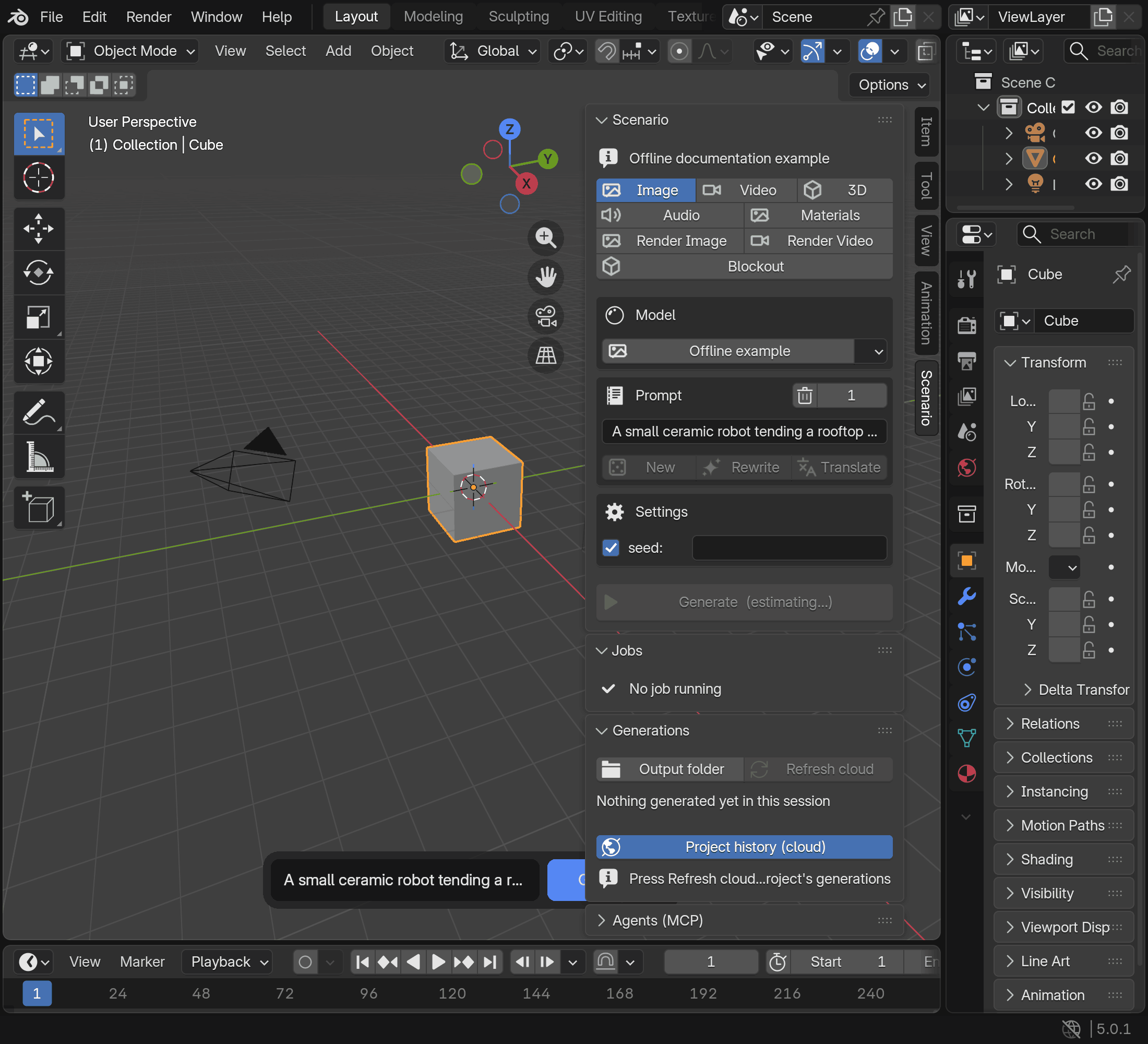
The Scenario sidebar with all creation tabs and a clearly labelled offline Image example

Requirements

Install

Install from the official extension repository so that Blender can offer updates:

  1. Turn on Allow Online Access under Edit > Preferences > System > Network.
  2. Open Edit > Preferences > Get Extensions > Repositories, choose Add Remote Repository and enter https://blender.scenario.com/repo/index.json.
  3. Find Scenario in Get Extensions and install it. It appears as "Scenario" in Blender's Add-ons list.
  4. In Scenario, open Organization settings > API Keys > Add API Key and follow the instructions to obtain the key and secret.
  5. Open Edit > Preferences > Add-ons > Scenario. Leave Credentials set to Saved in Blender, paste the key and secret, then press Test connection. Choose an Output Folder for generated files.

To install from a ZIP instead, download scenario-<version>.zip from the releases page and keep it zipped. Verify your download: for releases that include SHA256SUMS, save the ZIP, scenario-handbook-<version>.html and SHA256SUMS together, check them with sha256sum -c SHA256SUMS (macOS: shasum -a 256 -c SHA256SUMS) and, with the GitHub CLI, run gh attestation verify scenario-<version>.zip -R scenario-labs/blender-plugin (details). Historical v* releases have neither. Drag the ZIP onto a Blender window, or use Edit > Preferences > Get Extensions > Install from Disk, then continue with step 4. A ZIP copy does not update itself; see Updates.

Updates

A copy installed from the official repository updates through Blender. Open Preferences > Add-ons > Scenario > Updates for update checks and Blender's native Get Extensions manager. Enable Allow Online Access before checking. Updates are installed only when you choose them in Blender. The repository offers releases from 0.10.0 on.

A ZIP copy lives in Blender's local repository and does not update itself. Keep updating it with Install from Disk, followed by a restart, or switch to the repository: uninstall the ZIP copy first, install Scenario from the repository, then enter your key and secret again. Uninstalling deletes the ZIP copy's storage, including its stored jobs and the media that the video, sound and Film review strips Scenario added play from; past generations remain available under Project history (cloud) in Generations. Never keep both copies installed. Read Switch from a ZIP to the repository before switching, and the update guide for compatibility and manual fallback.

Why not extensions.blender.org

The Blender Extensions terms restrict extensions whose functionality depends on external registration, keys or payments, including access to external services. Scenario requires an account and API credentials, so this extension is distributed through its own repository at https://blender.scenario.com/repo/index.json, with each release's ZIP also attached to its GitHub release. Its manifest declares the permissions it uses and their reasons.

Quick start

In the 3D viewport, press N and open Scenario, or use the Scenario button in the viewport header. Pick a lane and model, enter a prompt, add any required reference and inspect the estimate before Generate. Results appear in Generations and your Output Folder, with actions for viewing or importing supported media. The user guide describes each lane and its controls.

To rate the extension or tell Scenario what to improve, use the heart in the Scenario panel or Feedback in Studio. Share anonymous usage data, in the extension's preferences, stays off unless you turn it on.

Features

Agents (MCP)

The local scenario-blender server connects an authorized agent to the open scene and generation into it. The hosted mcp.scenario.com server provides platform-wide collections, training, workflows and usage without requiring Blender; connect both when needed.

The default local endpoint is http://127.0.0.1:9876/mcp. Agents (MCP) shows its status, and its Connect buttons add it as scenario-blender to Claude Code, Codex, Cursor or Claude Desktop. It needs no credential, so any program on this computer can connect. Connected agents can read the scene and request paid work; arbitrary Python execution is a separate opt-in permission, disabled by default.

Use the MCP reference for complete client setup, tool contracts, security controls and headless configuration. The headless entry point is:

blender --background scene.blend --command scenario_blender

Authentication

Credentials > Sign in with Scenario opens your web browser on Scenario's sign-in page and keeps the resulting session in the extension's private state folder, refreshed in the background, never in userpref.blend or a .blend file, then asks which team and project the work goes to. Saved in Blender uses an API key and secret from the preferences, and Credentials > Environment explicitly selects an environment pair instead. The hosted Scenario MCP service has its own authentication, described in its linked docs. Blender stores saved API keys in its preferences, not an OS keychain.

What leaves your machine

Cost previews send prompts and parameters to https://api.cloud.scenario.com while you edit, before Generate. Upload reference sends files, scene captures or exported meshes; generation and prompt tools spend credits. Catalogs, thumbnails and result previews load from Scenario; cloud history and Library assets load when requested. Anonymous usage data, off by default, and feedback you send go to blender.scenario.com; browser sign-in exchanges and refreshes its tokens with clerk.scenario.com. Saved keys, prompts, job state and media remain in Blender preferences, extension storage or output files. Connected local agents can read your scene and request paid work using your account. Read Privacy and data handling for destinations, storage, clipboard use and current limits.

Documentation

Start with the user guide, known limitations and changelog. The documentation index links architecture, integration status and developer references. The public HTML handbook address is blender.scenario.com. Build HTML from the maintained Markdown with make docs; see documentation builds for website and single-file outputs.

Staying up to date

Follow releases, or choose Watch > Custom > Releases on GitHub for release notifications.

Support

Use Support for bug reports, feature requests and the information to include. Account, billing and API-key questions go to [email protected] or Scenario's in-app support. Never post credentials or signed asset URLs in a public issue.

Report vulnerabilities privately through Security > Report a vulnerability or the contact in Security; do not open a public issue.

Development

Read Contributing for the pinned environment, local checks, portable tools and isolated Blender test loop. AGENTS.md is the canonical conventions contract for humans and agents; agent tools describes the shared commands. Follow the Code of Conduct. Optional local hooks are installed with make hooks; see installation and scope. Offline tests need no Scenario account. Live smoke tests spend credits and require explicit authorization; they are outside the default checks.

Discover repository maintenance commands with uv run --locked --no-env-file python -m tools --help from the repository root. The assets check and assets optimize commands share the documentation image policy with the unit suite.

Native CI covers Blender 5.0.1, 5.1.2 and 5.2.3 on Linux and Windows for pull requests. A separate informational workflow schedules Blender 5.1.2 checks on macOS Apple silicon and Windows x64 weekly; see matrix maintenance for failure tracking.

Sibling integrations

Scenario for Blender is one of several Scenario integrations. The plugins share the Scenario name, the id scenario inside each host's namespace and the support channel ([email protected]), not necessarily the same licence.

Licence

Copyright 2026 Scenario Inc. First-party extension code is free software: you can redistribute it and/or modify it under the terms of the GNU General Public License as published by the Free Software Foundation, either version 3 of the License, or (at your option) any later version. It is distributed WITHOUT ANY WARRANTY; see LICENSE for the full text. First-party source headers and the extension manifest declare GPL-3.0-or-later, and the extension ZIP includes the same GPL text. Bundled dependencies, adopted sources and assets retain their original licences and notices; see the SDK bundle and source adoption. The bundled icon notice records the generator, the font option and the icons' first-party design origin. Scenario Inc. made the exploration gallery covers (docs/images/exploration-*.png) and also publishes them at www.scenario.com/explorations.

Blender's licence guidance requires a GPL-compatible licence for published add-ons using its Python API. The Blender Extensions Platform requires GPL-3.0-or-later for add-ons it hosts. This project distributes outside that platform and uses GPL-3.0-or-later for its first-party extension code.

The GPL grants no trademark rights: "Scenario" and the Scenario logo belong to Scenario Inc., and Blender is a registered trademark of the Blender Foundation; this extension is not affiliated with or endorsed by the Blender Foundation. See TRADEMARKS.md.

Acknowledgements

The local MCP design acknowledges Blender Lab's blender_mcp project (GPL-3.0-or-later, Blender Authors) as a design reference. Its project page describes the upstream implementation, which uses a separate stdio MCP server and TCP connection to its Blender add-on. This extension implements loopback HTTP, main-thread tool dispatch and an opt-in Python gate.

The SPZ reader reads Niantic's SPZ Gaussian splat format. The MCP protocol module supports protocol revisions 2025-06-18, 2025-03-26 and 2024-11-05.

blender-plugin (scenario-labs/blender-plugin)

Ищем в базе…

Что это такое?Scenario for Blender — это расширение для Blender, которое напрямую в 3D-вьюпорте добавляет генерацию с помощью ИИ: изображений, видео, 3D-сеток, PBR-материалов, аудио и 360-градусных окружений. Также оно включает локальный MCP-сервер, с помощью которого агенты для программирования могут работать с открытой сценой.
Это отдельное приложение или оно работает внутри Blender?Это аддон на Python, который устанавливается в Blender 5.0 или новее, а не отдельная программа. Вся генерация выполняется из панелей, окна ввода запроса и режима Studio внутри 3D-вьюпорта.
Как установить это в Blender?Включите 'Allow Online Access' в Edit > Preferences > System > Network, добавьте официальный репозиторий расширений Scenario в Get Extensions > Repositories, затем установите 'Scenario' и введите свой API-ключ и секрет в настройках аддона. Также можно перетащить ZIP-архив релиза в Blender, но копия из ZIP не будет обновляться автоматически.
Нужна ли учетная запись Scenario, чтобы пользоваться этим?Да, нужны Blender 5.0+, подключение к интернету и учетная запись Scenario с API-ключом и секретом. Генерации и некоторые инструменты для работы с промптами расходуют платные Creative Units (CU).
Почему этого нет на extensions.blender.org?Официальная платформа расширений Blender запрещает расширения, функциональность которых зависит от внешней учетной записи, ключей или платного доступа. Это расширение требует всего перечисленного, поэтому оно распространяется из собственного репозитория Scenario и как ZIP-архив релиза на GitHub.
Какие данные покидают мой компьютер при использовании этого?Предварительные расчеты стоимости отправляют ваши промпты и параметры в Scenario во время редактирования. Загрузки отправляют референсные файлы, снимки сцены или сетки. Необязательные отзывы и анонимные данные об использовании (по умолчанию отключены) тоже передаются на серверы Scenario. Сохраненные ключи, промпты и медиафайлы остаются в локальных настройках Blender и в папке вывода.
Что агенты могут делать через локальный MCP-сервер?Встроенный MCP-сервер scenario-blender позволяет авторизованным агентам, таким как Claude Code, Codex, Cursor или Claude Desktop, читать открытую сцену и запрашивать платные генерации без каких-либо учетных данных. Выполнение произвольного Python — отдельное разрешение, которое пользователь включает сам и которое по умолчанию отключено.
Есть ли версия для других 3D-инструментов, кроме Blender?Да, у Scenario также есть пакет для Unity под лицензией MIT (Scenario for Unity). Это же расширение для Blender распространяется под GPL-3.0-or-later, потому что аддоны Blender, которые импортируют bpy, должны использовать лицензию, совместимую с GPL.
Какой контент можно генерировать прямо в Blender?Изображения, видео, 3D-сетки с задачами редактирования от провайдера, сохраненные наборы PBR-текстур, речь, музыку и звуковые эффекты, 360-градусные HDRI-карты окружения, а также грейбокс-макеты 'Blockout', созданные по письменному описанию сцены.
Автор
scenario-labs
Размер
94.5 MB
Звёзды
1K
Возраст
2 мес
Коммиты · 90 дней