
MacPacker
The archive manager for macOS that should have existed all along.
Browse archives like folders, preview files without extracting, and drag out only the ones you need.




Website ·
Install ·
Formats ·
Docs ·
Support ·
Contribute
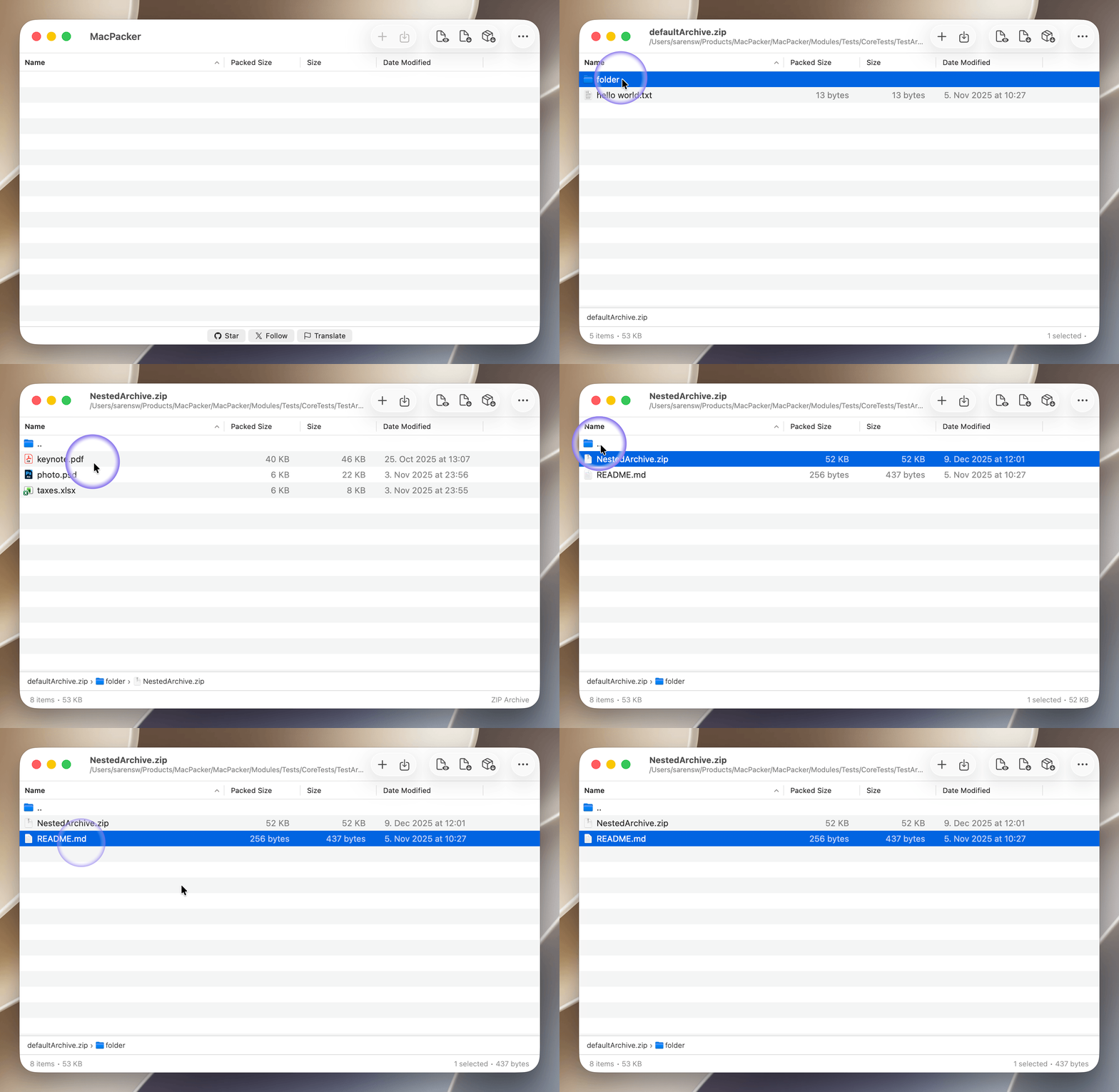
MacPacker is a free and open source archive manager for macOS. It opens 40+ archive, disk image, and compression formats, lets you peek inside without extracting, drills into nested archives, and hands you exactly the files you want via drag & drop. Open source, because essential tools should be free. Inspired by 7-Zip, but built natively for the Mac.
Features
- Peek inside — Browse the full contents of any archive without extracting a single byte.
- Nested archives — Archives inside archives? Drill in seamlessly, with no intermediate extractions.
- Selective extraction — Drag out exactly the files you need. No more 2 GB extractions for one config file.
- Edit & save — Modify and re-save ZIP archives in place. Editing for more formats is on the way.
- Quick Look — Preview archive contents straight from Finder with the spacebar.
- Finder integration — Right-click any archive to extract here or to a folder, without opening the app.
- Encrypted archives — Open password-protected and encrypted archives.
- Built for the keyboard — Navigate archives with the same keys you use in Finder, with breadcrumbs and sortable columns.
- Smart detection — Recognizes formats by their magic number, not just the file extension.
- Speaks your language — Available in 13 languages.
MacPacker reads and extracts 40+ formats across archives, disk images, and compression containers. ZIP archives can also be edited and re-saved.
| Category |
Formats |
| Archives |
7z · ar · arj · cab · chm · cpio · deb · exe · lha · lzh · lzx · msi · pkg · rar · rpm · sea · sit · sitx · tar · xar · zip · zipx |
| Disk images |
dmg · fat · iso · ntfs · qcow2 · squashfs · vdi · vhd · vhdx · vmdk · wim |
| Compression |
bz2 · gz · lz4 · xz · z |
| Tarballs |
tar.gz (tgz) · tar.bz2 (tbz2) · tar.xz (txz) · tar.lz4 · tar.z (taz) |
See the full format reference and per-format guides on the website.
Installation
Requirements: macOS 14.6 or later. (macOS 13 was supported through v0.14.1.)
Pick whichever you prefer — all builds are sandboxed, signed, and notarized by Apple.
[!NOTE]
App Store releases land a few days after the GitHub and direct downloads, because every build goes through Apple's App Store review. For the newest version, use Homebrew or the direct download.
Support the Project
MacPacker is free and built in the open. If it saves you time, here are a few ways to give back:
Sponsor the work
Free ways to help
More apps by the maker
MacPacker is built by Stephan Arenswald. If you like it, take a look at the other apps:
Contributing
Contributions are welcome. Please read CONTRIBUTING.md first.
[!IMPORTANT]
Using AI to write code? Pull requests where AI is the primary author must follow the AI Contribution Guidelines: disclose AI involvement, open the PR from a human account, and include verification evidence (before/after screenshots for UI changes, terminal or test output otherwise). Minor AI-assisted edits where you're clearly the author don't need anything special.
Translation
Translations are managed on POEditor. To improve an existing language or add a new one, sign up and start editing:
https://poeditor.com/join/project/J2Qq2SUzYr
Pull Requests
MacPacker is still in early development and a few breaking changes are ahead, so pull requests may need rework or some wait time before they can be merged. Opening an issue first to discuss larger changes is appreciated.
Building from Source
Prerequisites
- macOS 14.6 or later
- Xcode 16 or later
Steps
Clone the repository (it uses submodules for vendored dependencies and test archives):
git clone --recurse-submodules https://github.com/sarensw/MacPacker.git
cd MacPacker
Already cloned without submodules? Run git submodule update --init --recursive.
Open the project in Xcode:
open MacPacker.xcodeproj
Build and run — click Run or press Cmd + R.
Use your own signing team (optional). If you have a different Apple Developer account, create a local override:
cp Config/SigningOverride.xcconfig.template Config/SigningOverride.xcconfig
Then edit Config/SigningOverride.xcconfig and set your Team ID (find it in Xcode under Settings → Accounts). This file is gitignored and never committed.
Roadmap
- Browse and navigate nested archives
- Breadcrumb and Finder-style keyboard navigation
- Extract selected files via drag & drop to any target
- Extract the full archive at once
- Preview files without extraction (via the system previewer)
- Quick Look and Finder extensions for quick access
- Open password-protected and encrypted archives
- Wide format coverage (40+ formats)
- Edit and re-save ZIP archives
- Delete files and folders inside archives (coming next)
- Create archives and edit more formats
License
MacPacker is licensed under the GNU General Public License v3.0.

 MacPacker 是一款免费开源的 macOS 压缩包管理器,让你像浏览文件夹一样浏览压缩包、无需解压即可预览文件、只拖出需要的文件。它的定位是 Mac 上的原生 7-Zip 替代品。