Что это такое?
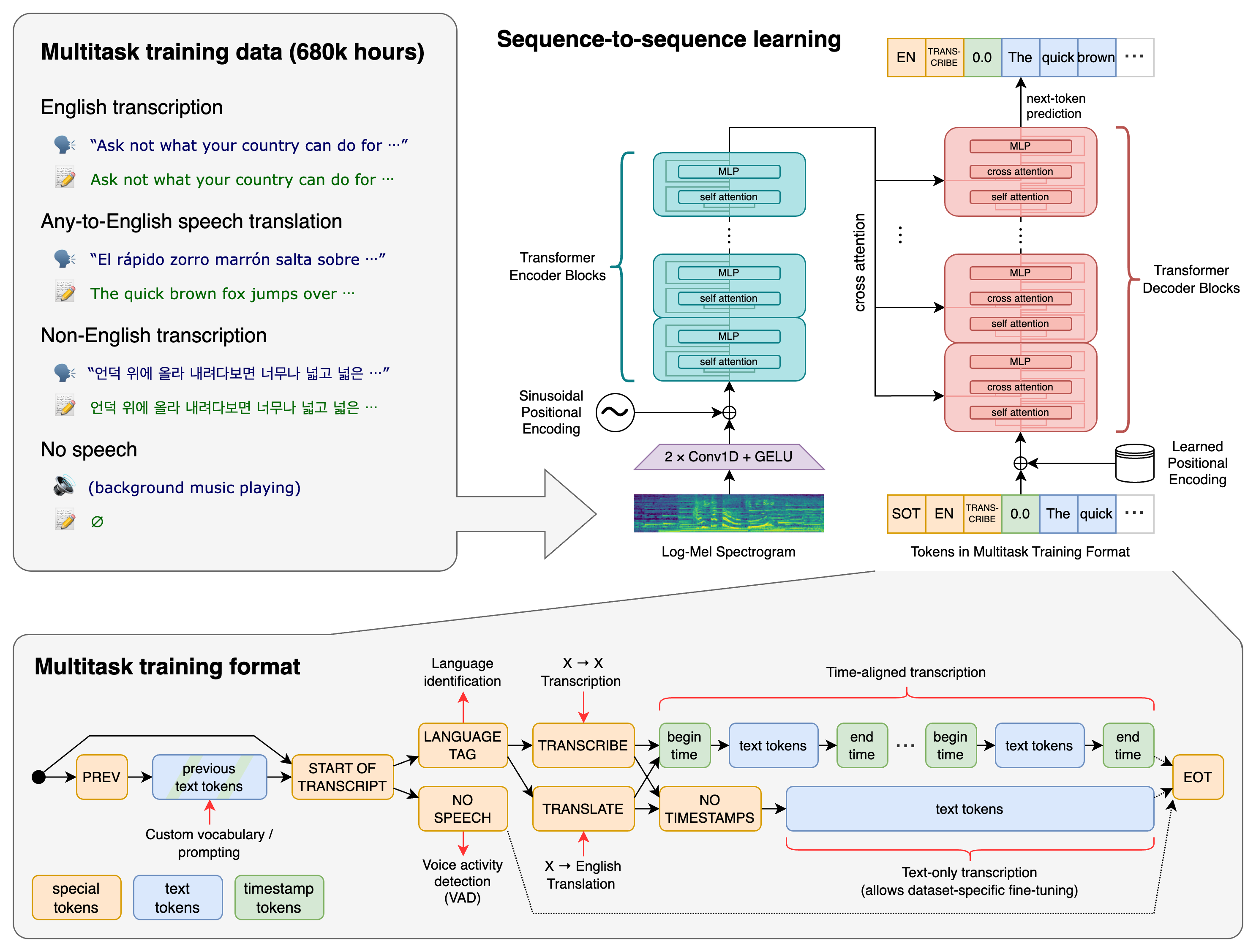
 Whisper — это модель распознавания речи общего назначения, обученная на большом и разнообразном наборе данных с неточной разметкой. Она умеет выполнять многоязычную транскрибацию, переводить речь на английский и определять язык, на котором говорят.
Whisper — это модель распознавания речи общего назначения, обученная на большом и разнообразном наборе данных с неточной разметкой. Она умеет выполнять многоязычную транскрибацию, переводить речь на английский и определять язык, на котором говорят.Это самостоятельное приложение или библиотека, которую я использую в коде?Это библиотека на Python со встроенной утилитой командной строки: её устанавливают через pip, а затем либо запускают команду 'whisper' для аудиофайла, либо вызывают из своего Python-кода.
Это библиотека на Python со встроенной утилитой командной строки: её устанавливают через pip, а затем либо запускают команду 'whisper' для аудиофайла, либо вызывают из своего Python-кода.Как установить и запустить?Установите командой 'pip install -U openai-whisper' (или 'pip install git+...' для последнего коммита), затем расшифруйте файл, выполнив 'whisper audio.mp3' в командной строке; по умолчанию используется модель turbo.
Установите командой 'pip install -U openai-whisper' (или 'pip install git+...' для последнего коммита), затем расшифруйте файл, выполнив 'whisper audio.mp3' в командной строке; по умолчанию используется модель turbo.Что нужно установить до запуска?Нужны Python 3.8-3.11 и PyTorch, а также утилита командной строки ffmpeg, установленная в системе. Если для tiktoken нет готовой сборки (wheel) под вашу платформу, может понадобиться набор инструментов Rust.
Нужны Python 3.8-3.11 и PyTorch, а также утилита командной строки ffmpeg, установленная в системе. Если для tiktoken нет готовой сборки (wheel) под вашу платформу, может понадобиться набор инструментов Rust.Самая быстрая модель умеет и переводить?Нет — модель turbo по умолчанию оптимизирована для скорости, но не обучена переводу и будет возвращать текст на исходном языке, даже если вы запросите задачу перевода; для перевода используйте многоязычные модели medium или large.
Нет — модель turbo по умолчанию оптимизирована для скорости, но не обучена переводу и будет возвращать текст на исходном языке, даже если вы запросите задачу перевода; для перевода используйте многоязычные модели medium или large.Сколько видеопамяти (VRAM) мне нужно, чтобы запустить модель?Всё зависит от размера модели: примерно 1 ГБ для tiny и base, 2 ГБ для small, 5 ГБ для medium, до 10 ГБ для large и 6 ГБ для turbo; скорость измерялась на GPU A100.
Всё зависит от размера модели: примерно 1 ГБ для tiny и base, 2 ГБ для small, 5 ГБ для medium, до 10 ГБ для large и 6 ГБ для turbo; скорость измерялась на GPU A100.Какие размеры моделей доступны?Есть шесть размеров: tiny (39 млн параметров), base (74 млн), small (244 млн), medium (769 млн), large (1550 млн) и turbo (809 млн); каждый из них даёт свой баланс между скоростью и точностью. Модели от tiny до medium также есть в вариантах только для английского, с суффиксом '.en'.
Есть шесть размеров: tiny (39 млн параметров), base (74 млн), small (244 млн), medium (769 млн), large (1550 млн) и turbo (809 млн); каждый из них даёт свой баланс между скоростью и точностью. Модели от tiny до medium также есть в вариантах только для английского, с суффиксом '.en'.Зачем выбирать модель только для английского (.en)?Модели .en обычно работают лучше своих многоязычных аналогов при использовании только английского языка, а самый заметный выигрыш виден у размеров tiny.en и base.en.
Модели .en обычно работают лучше своих многоязычных аналогов при использовании только английского языка, а самый заметный выигрыш виден у размеров tiny.en и base.en.Чем отличается модель turbo?Turbo — это оптимизированная версия large-v3: она расшифровывает быстрее при незначительном падении точности, но не поддерживает перевод, который есть у других многоязычных моделей.
Turbo — это оптимизированная версия large-v3: она расшифровывает быстрее при незначительном падении точности, но не поддерживает перевод, который есть у других многоязычных моделей.Как обрабатываются длинные аудиофайлы?Метод transcribe() читает весь файл и обрабатывает его скользящим окном в 30 секунд, выполняя авторегрессионные предсказания «последовательность в последовательность» для каждого окна.
Метод transcribe() читает весь файл и обрабатывает его скользящим окном в 30 секунд, выполняя авторегрессионные предсказания «последовательность в последовательность» для каждого окна.What are similar projects?faster-whisper, WhisperLiveKit, buzz, pyvideotrans, whisperX, FunASR, DeepSpeech, VibeVoice
faster-whisper, WhisperLiveKit, buzz, pyvideotrans, whisperX, FunASR, DeepSpeech, VibeVoiceWhich topics is it in?asr, transcription, whisper, pretrained-models, speech-to-text, speech-recognition, translation, transformer, audio, artificial-intelligence, pytorch, openai
asr, transcription, whisper, pretrained-models, speech-to-text, speech-recognition, translation, transformer, audio, artificial-intelligence, pytorch, openai