Table of Contents
🚀 Important Updates
Important things should be said three times.
[2024-08-23: QAnything updated to version 2.0.]
[2024-08-23: QAnything updated to version 2.0.]
[2024-08-23: QAnything updated to version 2.0.]
- This update brings improvements in various aspects such as usability, resource consumption, search results, question and answer results, parsing results, front-end effects, service architecture, and usage methods.
- At the same time, the old Docker version and Python version have been merged into a new unified version, using a single-line command with Docker Compose for one-click startup, ready to use out of the box.
Contributing
We appreciate your interest in contributing to our project. Whether you're fixing a bug, improving an existing feature, or adding something completely new, your contributions are welcome!
Thanks to all contributors for their efforts

Special thanks!
Please note: Our list of contributors is automatically updated, so your contributions may not appear immediately on this list.
Special thanks!:@ikun-moxiaofei
Special thanks!:@Ianarua
010-82558901

For business cooperation, please contact us by phone or email:
What is QAnything?
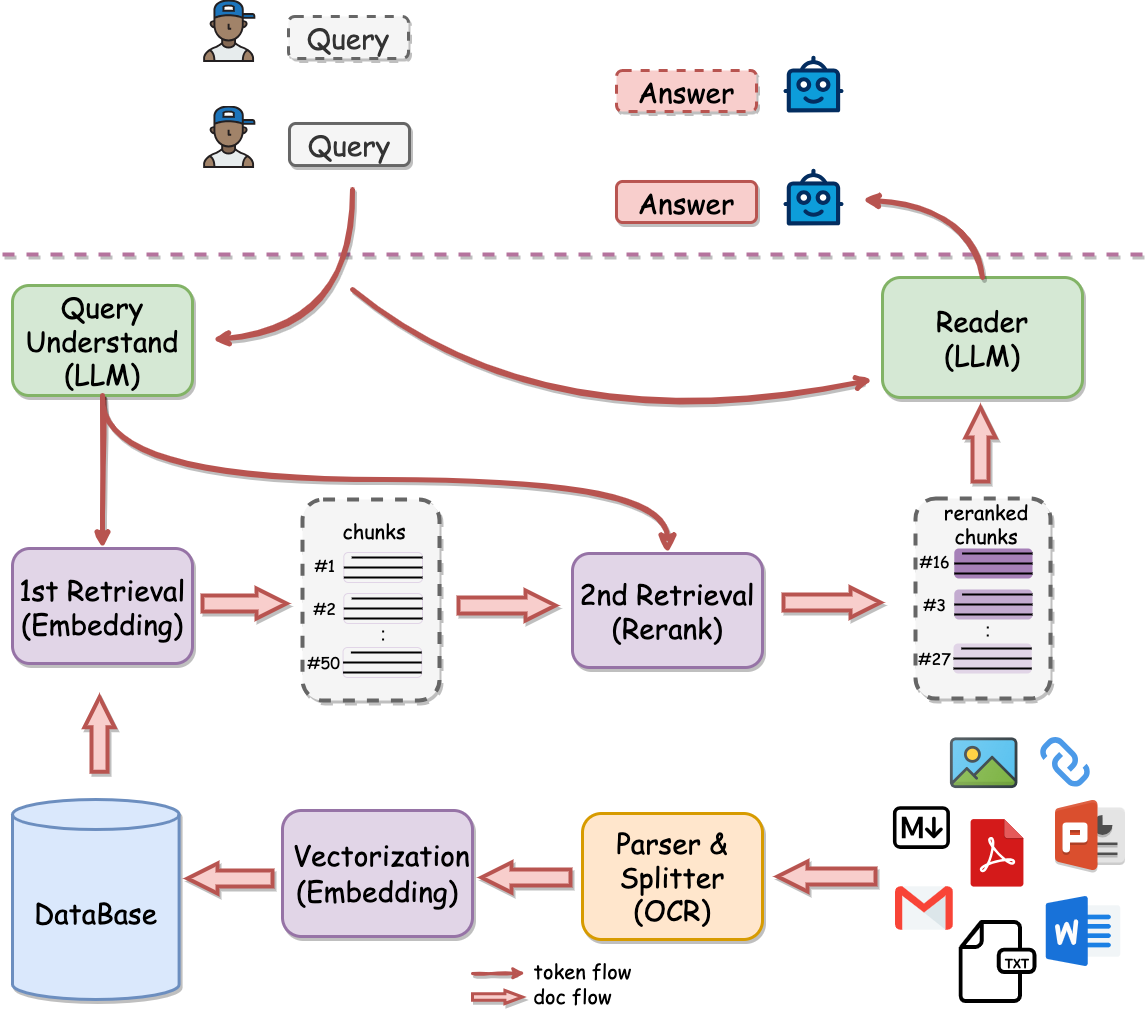
QAnything(Question and Answer based on Anything) is a local knowledge base question-answering system designed to support a wide range of file formats and databases, allowing for offline installation and use.
With QAnything, you can simply drop any locally stored file of any format and receive accurate, fast, and reliable answers.
Currently supported formats include: PDF(pdf),Word(docx),PPT(pptx),XLS(xlsx),Markdown(md),Email(eml),TXT(txt),Image(jpg,jpeg,png),CSV(csv),Web links(html) and more formats coming soon…
Key features
- Data security, supports installation and use by unplugging the network cable throughout the process.
- Supports multiple file types, high parsing success rate, supports cross-language question and answer, freely switches between Chinese and English question and answer, regardless of the language of the file.
- Supports massive data question and answer, two-stage vector sorting, solves the problem of degradation of large-scale data retrieval, the more data, the better the effect, no limit on the number of uploaded files, fast retrieval speed.
- Hardware friendly, defaults to running in a pure CPU environment, and supports multiple platforms such as Windows, Mac, and Linux, with no dependencies other than Docker.
- User-friendly, no need for cumbersome configuration, one-click installation and deployment, ready to use, each dependent component (PDF parsing, OCR, embed, rerank, etc.) is completely independent, supports free replacement.
- Supports a quick start mode similar to Kimi, fileless chat mode, retrieval mode only, custom Bot mode.
Architecture
Why 2 stage retrieval?
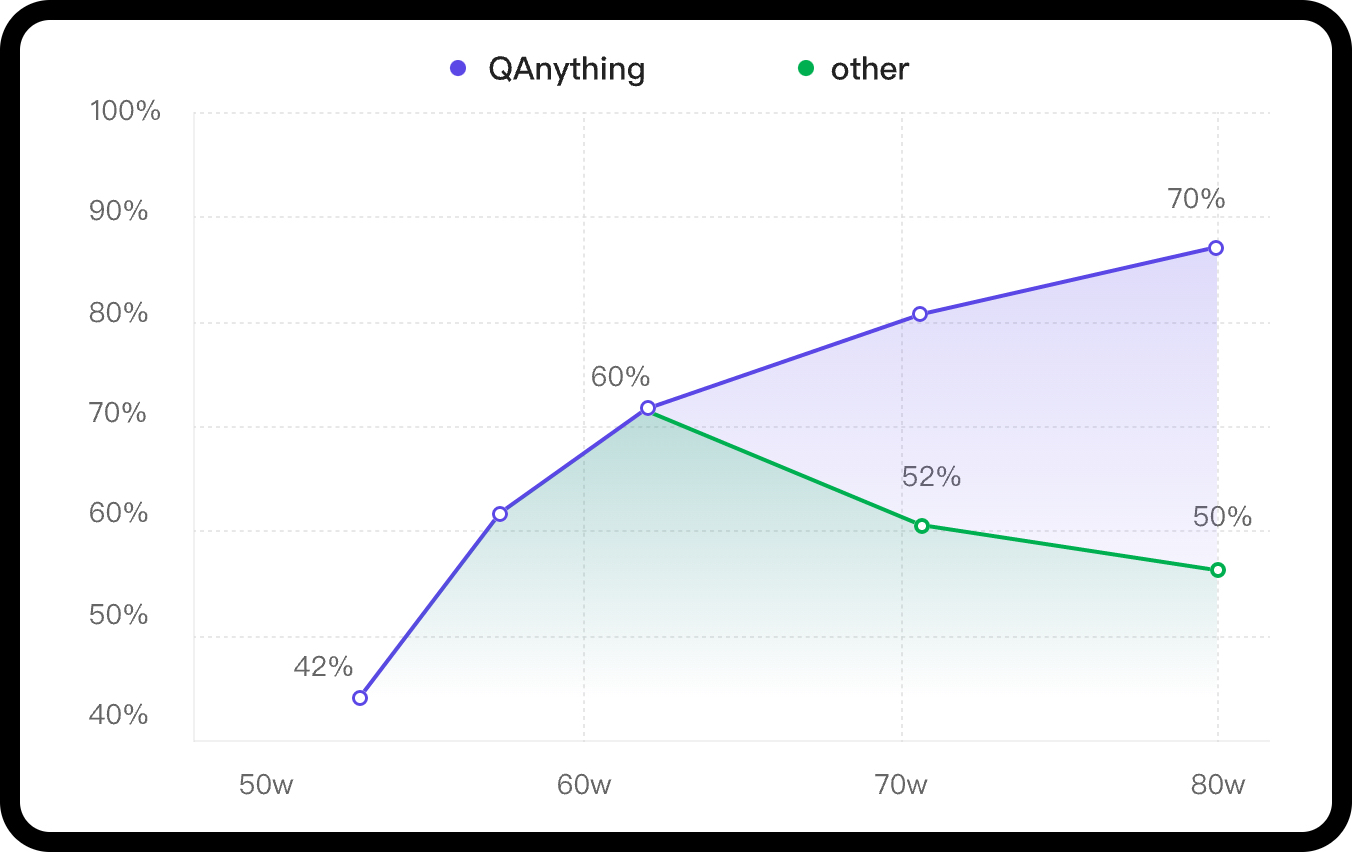
In scenarios with a large volume of knowledge base data, the advantages of a two-stage approach are very clear. If only a first-stage embedding retrieval is used, there will be a problem of retrieval degradation as the data volume increases, as indicated by the green line in the following graph. However, after the second-stage reranking, there can be a stable increase in accuracy, the more data, the better the performance.
QAnything uses the retrieval component BCEmbedding, which is distinguished for its bilingual and crosslingual proficiency. BCEmbedding excels in bridging Chinese and English linguistic gaps, which achieves
1st Retrieval(embedding)
| Model |
Retrieval |
STS |
PairClassification |
Classification |
Reranking |
Clustering |
Avg |
| bge-base-en-v1.5 |
37.14 |
55.06 |
75.45 |
59.73 |
43.05 |
37.74 |
47.20 |
| bge-base-zh-v1.5 |
47.60 |
63.72 |
77.40 |
63.38 |
54.85 |
32.56 |
53.60 |
| bge-large-en-v1.5 |
37.15 |
54.09 |
75.00 |
59.24 |
42.68 |
37.32 |
46.82 |
| bge-large-zh-v1.5 |
47.54 |
64.73 |
79.14 |
64.19 |
55.88 |
33.26 |
54.21 |
| jina-embeddings-v2-base-en |
31.58 |
54.28 |
74.84 |
58.42 |
41.16 |
34.67 |
44.29 |
| m3e-base |
46.29 |
63.93 |
71.84 |
64.08 |
52.38 |
37.84 |
53.54 |
| m3e-large |
34.85 |
59.74 |
67.69 |
60.07 |
48.99 |
31.62 |
46.78 |
| bce-embedding-base_v1 |
57.60 |
65.73 |
74.96 |
69.00 |
57.29 |
38.95 |
59.43 |
2nd Retrieval(rerank)
| Model |
Reranking |
Avg |
| bge-reranker-base |
57.78 |
57.78 |
| bge-reranker-large |
59.69 |
59.69 |
| bce-reranker-base_v1 |
60.06 |
60.06 |
RAG Evaluations in LlamaIndex(embedding and rerank)

NOTE:
- In
WithoutReranker setting, our bce-embedding-base_v1 outperforms all the other embedding models.
- With fixing the embedding model, our
bce-reranker-base_v1 achieves the best performance.
- The combination of
bce-embedding-base_v1 and bce-reranker-base_v1 is SOTA.
- If you want to use embedding and rerank separately, please refer to BCEmbedding
LLM
The open source version of QAnything is based on QwenLM and has been fine-tuned on a large number of professional question-answering datasets. It greatly enhances the ability of question-answering.
If you need to use it for commercial purposes, please follow the license of QwenLM. For more details, please refer to: QwenLM
🚀 Latest Updates
- 2024-08-23: Support quick start, front-end configuration parameters, online preview and editing of chunk blocks, greatly optimize project architecture and startup mode, greatly optimize parsing and retrieval effects. - See More👉 v2.0.0
- 2024-05-20: Support other large model services compatible with OpenAI API, and provide an optimized powerful PDF parser. - See More👉 v1.4.1
- 2024-04-26: Support web search, FAQ, custom bot, file traceability preview etc. - See More👉 v1.4.0
- 2024-04-03: Support installation in a pure Python environment.Support hybrid search. - See More👉 v1.3.0
- 2024-01-29: Support for custom large models, including OpenAI API and other open-source large models, with a minimum GPU requirement of GTX 1050Ti, greatly improving deployment, debugging, and user experience. - See More👉 v1.2.0
- 2024-01-23: Enable rerank by default and fix various issues when starting on Windows. - See More👉 v1.1.1
- 2024-01-18: Support one-click startup, support Windows deployment, improve PDF, XLSX, HTML parsing efficiency. - See More👉 v1.1.0
Before You Start
Star us on GitHub, and be instantly notified for new release!
Getting Started
Latest Features Table
| features |
python (v1.4.2) |
docker (v1.2.2) |
QAnything v2.0.0 |
Explanation |
| Detailed installation document |
✅ |
✅ |
✅ |
|
| Support API |
✅ |
✅ |
✅ |
|
| Support production environment |
❌ |
✅ |
✅ |
|
| Support offline use |
❌ |
✅ |
✅ |
|
| Support multiple concurrency |
❌ |
✅ |
✅ |
|
| Support multi-card inference |
❌ |
✅ |
❌ |
Version 2.0.0 no longer provides default local LLM. All access is through the openai interface, and users can deploy local LLM through tools such as ollama. |
| Support Mac (M series chips) |
✅ |
❌ |
✅ |
|
| Support Linux |
✅ |
✅ |
✅ |
The old version of Python defaults to using onnxruntime-gpu for cuda12 on Linux, and automatically switches to onnxruntime when glibc<2.28. |
| Support windows |
❌ |
❌ |
✅ |
Both old versions of Python and Docker require WSL environment. Version 2.0.0 can be started directly in a non-WSL environment. |
| Support CPU only |
✅ |
❌ |
✅ |
Version 2.0.0 Mac, Linux, Win unified no longer use GPU, completely migrated to CPU. |
| Support hybrid search (BM25+embedding) |
❌ |
✅ |
✅ |
|
| Support web search (need VPN) |
✅ |
❌ |
✅ |
|
| Support FAQ |
✅ |
❌ |
✅ |
|
| Support BOT |
✅ |
❌ |
✅ |
|
| Support Traceability |
✅ |
❌ |
✅ |
|
| Support Log retrieval |
✅ |
❌ |
✅ |
|
| Support audio file |
✅ |
❌ |
❌ |
Relying on whisper, slow speed and high resource consumption, temporarily removed. |
| Support OpenCloudOS |
✅ |
❌ |
✅ |
|
| Support interfaces compatible with Openaiapi (including ollama) |
✅ |
✅ |
✅ |
Old versions of Python and Docker require manual modification of parameters such as api_key, base_url, model, etc. In version 2.0.0, these are all changed to be automatically saved in the front end settings. |
| PDF parsing performance improvement (including tables) |
✅ |
❌ |
✅ |
Version 1.4.2 requires manual settings, version 2.0.0 does not require manual settings, and both the PDF parsing effect and performance have been improved. |
| User-defined configuration (Experimental: Improve speed) |
✅ |
❌ |
✅ |
v1.4.2 needs to be set manually, v2.0.0 uses the best configuration by default. |








 一个本地知识库问答系统:把自己的文档导入进去,然后提问——你会得到从自己文件里找出的准确答案,而不是来自公开互联网。