


BitNet README

The project's README from github.com/microsoft/BitNet. As one markdown file: README.md.

bitnet.cpp

License: MIT version Hugging Face Technical Report Demo GPU Kernel

📰 News

07/23/2026: 📣 We released VibeASR.cpp — a real-time multilingual ASR inference engine on CPU using BitNet I2_S quantization, achieving RTF < 1 with very few threads on x86 (AVX2) and ARM (NEON) platforms. [Code] [Models] [Report] NEW

07/20/2026: 📣 We released BitNet-embedding-0.6B and BitNet-embedding-270M on Hugging Face — the first 1-bit embedding models that deliver competitive embedding quality with significantly faster inference on CPUs.

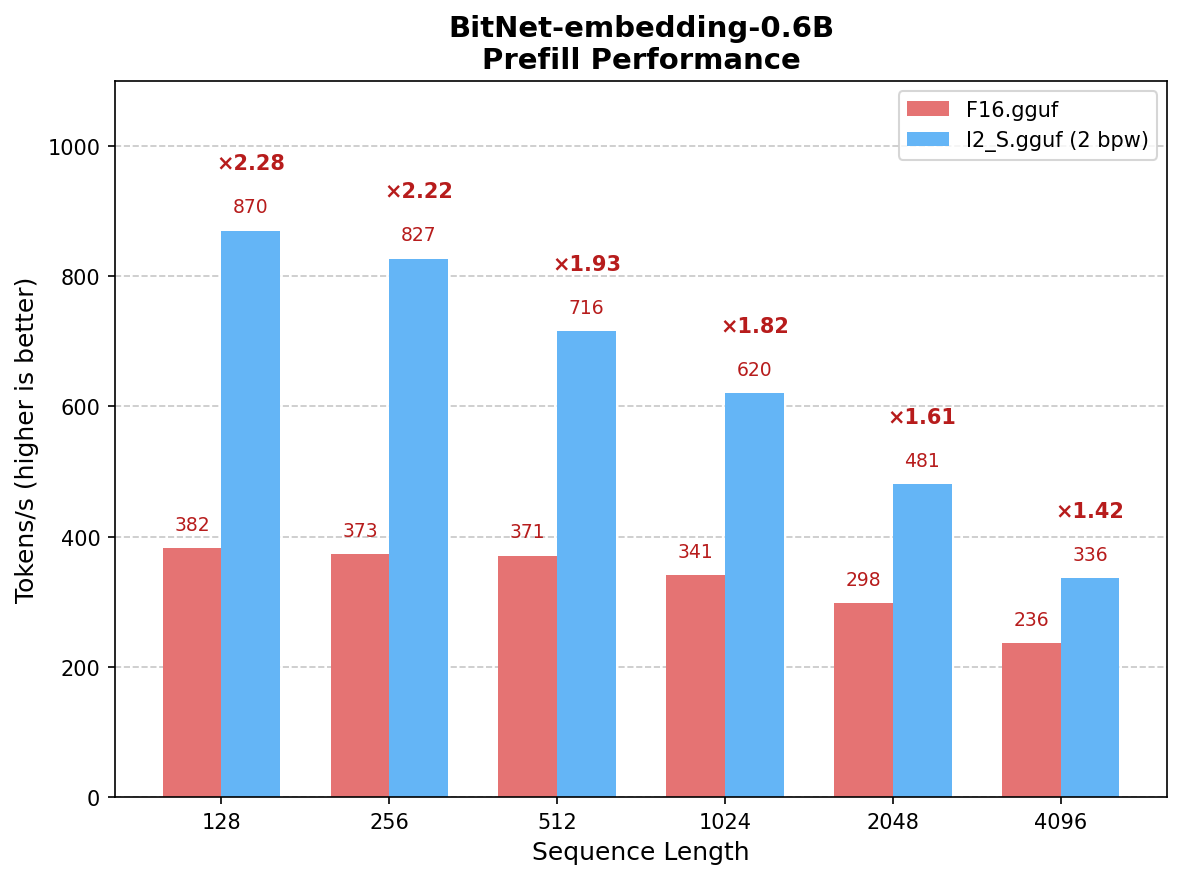
  • 1.42x to 2.28x speedup over F16 on BitNet-embedding-0.6B prefill (8 threads)
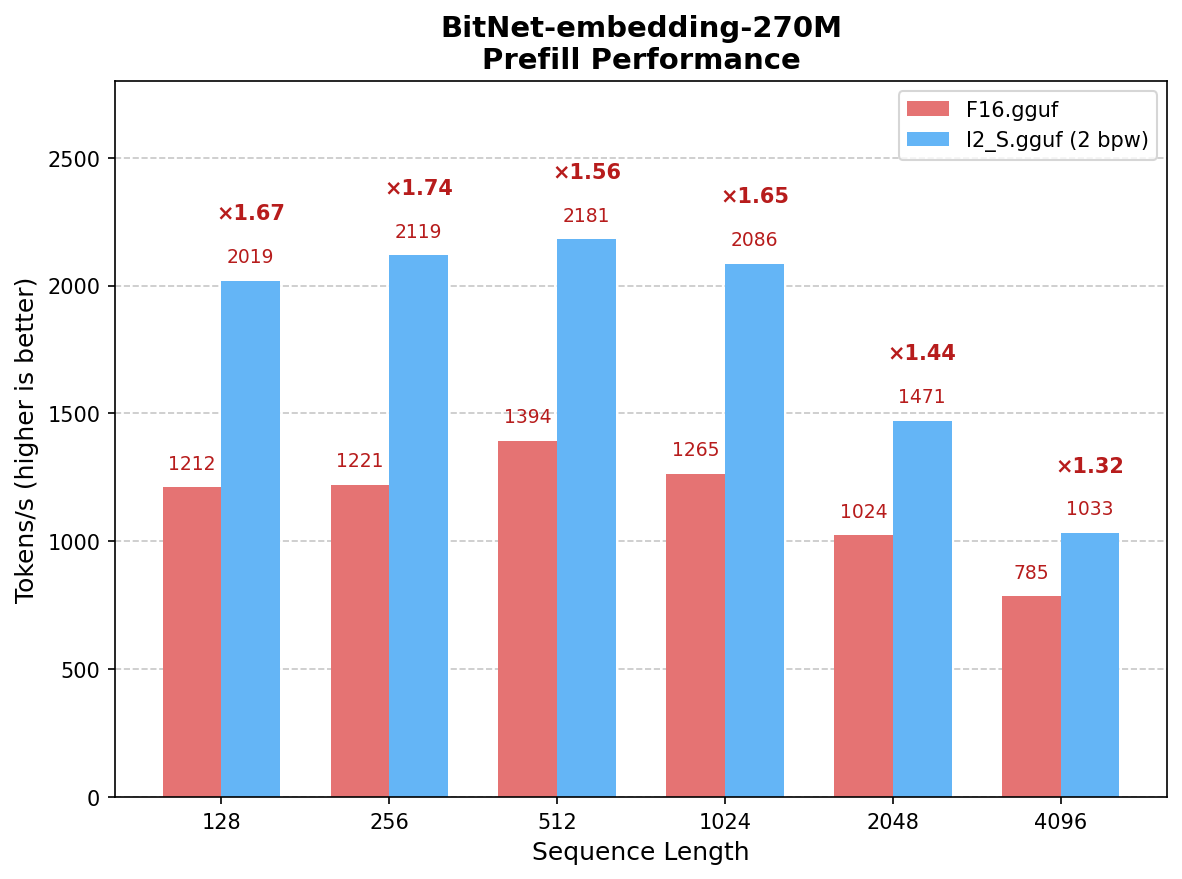
  • 1.32x to 1.74x speedup over F16 on BitNet-embedding-270M prefill (8 threads)
  • Supports I2_S conversion with optimized kernels on x86 CPUs
  • Lossless inference with 2 bits per weight

07/16/2026: 📣 Released BitNet Embeddings 0.6B/270M: I2_S Conversion and Inference Optimization — detailed guide for converting and running BitNet embedding models with optimized I2_S kernels.

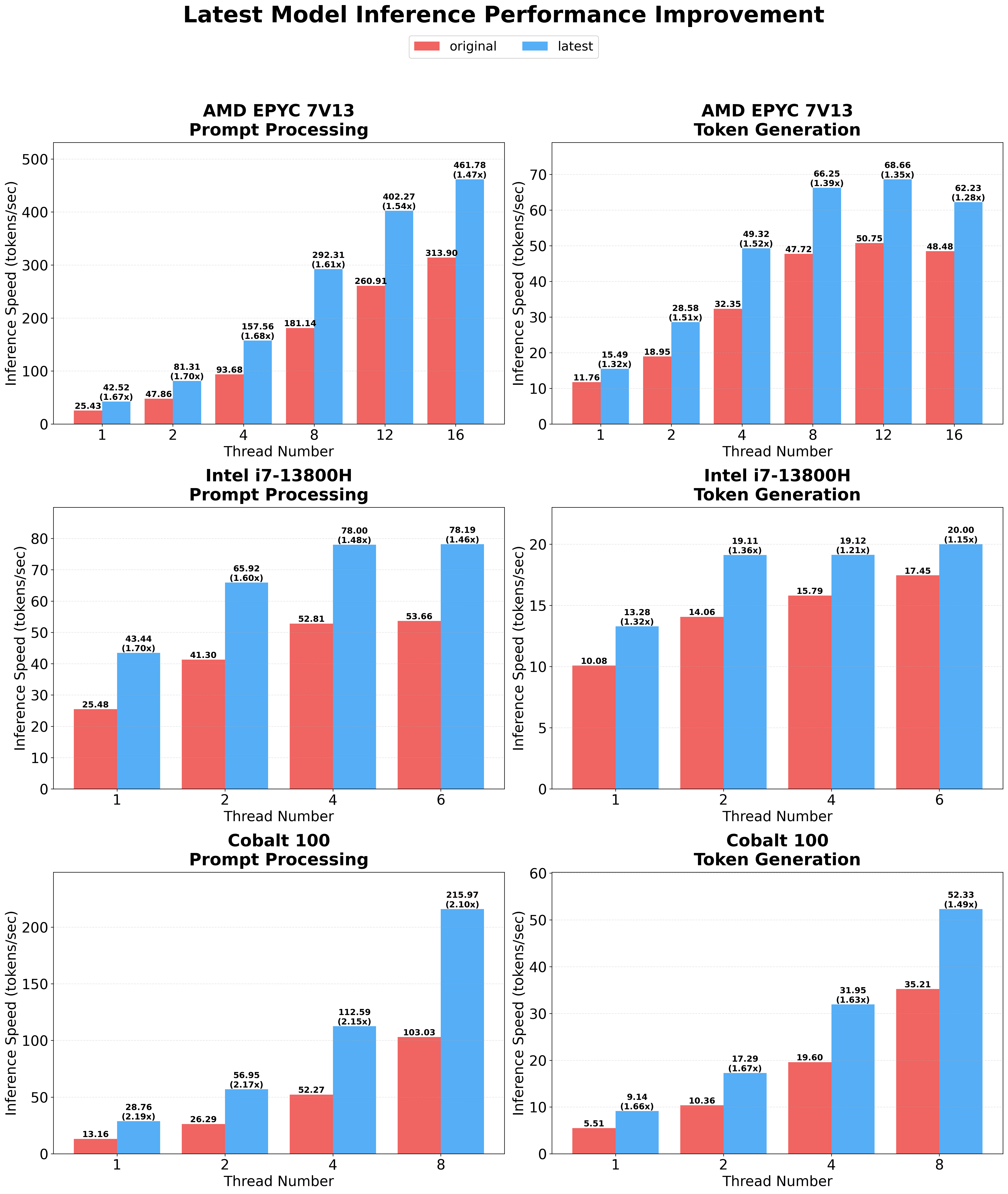
01/15/2026: 📣 Released BitNet CPU Inference Optimization — parallel kernel implementations with configurable tiling and embedding quantization support, achieving 1.15x to 2.1x additional speedup over the original implementation.

05/20/2025: 📣 Released BitNet Official GPU inference kernel — extending 1-bit inference beyond CPUs.

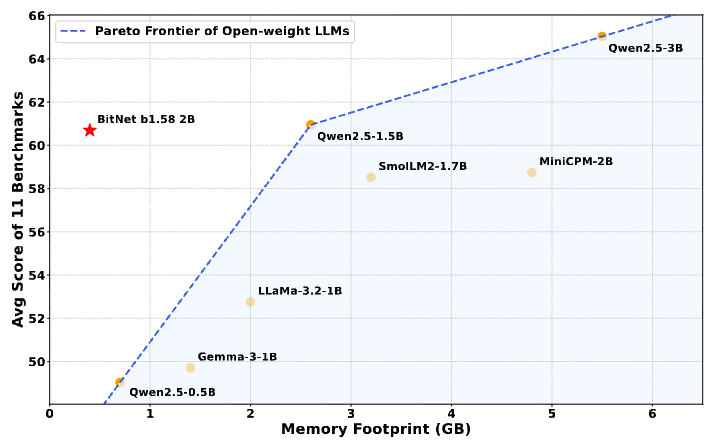
04/14/2025: 📣 Released BitNet Official 2B Parameter Model on Hugging Face — the first official BitNet b1.58 model trained with 4T tokens.

02/18/2025: 📑 Bitnet.cpp: Efficient Edge Inference for Ternary LLMs — system-level paper on bitnet.cpp's architecture and design.

11/08/2024: 📑 BitNet a4.8: 4-bit Activations for 1-bit LLMs — enabling 4-bit activations for further efficiency gains.

10/21/2024: 📑 1-bit AI Infra: Part 1.1, Fast and Lossless BitNet b1.58 Inference on CPUs — the technical report behind bitnet.cpp.

10/17/2024: 📣 bitnet.cpp 1.0 released.

03/21/2024: 📑 The-Era-of-1-bit-LLMs: Training Tips, Code, FAQ

02/27/2024: 📑 The Era of 1-bit LLMs: All Large Language Models are in 1.58 Bits — the foundational paper introducing BitNet b1.58.

10/17/2023: 📑 BitNet: Scaling 1-bit Transformers for Large Language Models — the original BitNet paper.

Overview

bitnet.cpp is the official inference framework for 1-bit LLMs (e.g., BitNet b1.58). It offers a suite of optimized kernels that support fast and lossless inference of 1.58-bit models on CPU and GPU (NPU support coming next).

Try it out via this online demo, or build and run it on your own CPU or GPU.

bitnet.cpp achieves speedups of 1.37x to 5.07x on ARM CPUs, with larger models experiencing greater performance gains. Additionally, it reduces energy consumption by 55.4% to 70.0%, further boosting overall efficiency. On x86 CPUs, speedups range from 2.37x to 6.17x with energy reductions between 71.9% to 82.2%. Furthermore, bitnet.cpp can run a 100B BitNet b1.58 model on a single CPU, achieving speeds comparable to human reading (5-7 tokens per second), significantly enhancing the potential for running LLMs on local devices. Please refer to the technical report for more details.

performance_comparison

Model Releases

1. BitNet-b1.58-2B-4T - 1-bit Large Language Model

BitNet-b1.58-2B-4T is the first official BitNet b1.58 model with 2.4B parameters, trained on 4 trillion tokens. It is a ternary (1.58-bit) language model that delivers competitive performance with full-precision models of similar size while enabling significantly faster and more energy-efficient inference.

🤗 Hugging Face | 🔗 Online Demo | 📄 Technical Report

BitNet b1.58 2B Benchmark

2. BitNet-embedding-0.6B - 1-bit Embedding Model

BitNet-embedding-0.6B is a 0.6B-parameter 1-bit embedding model that achieves competitive embedding quality with significantly faster CPU inference. It is the first model to demonstrate that ternary weights can deliver strong performance on embedding tasks.

🤗 Hugging Face | 📄 I2_S Guide

BitNet Embedding 0.6B Prefill Performance

3. BitNet-embedding-270M - Lightweight 1-bit Embedding Model

BitNet-embedding-270M is a compact 270M-parameter 1-bit embedding model designed for resource-constrained environments, offering fast inference with minimal memory footprint.

🤗 Hugging Face | 📄 I2_S Guide

BitNet Embedding 270M Prefill Performance

Supported Models

Model Parameters CPU Kernel
I2_S TL1 TL2
Official Models
BitNet-b1.58-2B-4T 2.4B x86 ✅ ❌ ✅
ARM ✅ ✅ ❌
BitNet-embedding-0.6B 0.6B x86 ✅ ❌ ❌
ARM ❌ ❌ ❌
BitNet-embedding-270M 270M x86 ✅ ❌ ❌
ARM ❌ ❌ ❌
Community Models
bitnet_b1_58-large 0.7B x86 ✅ ❌ ✅
ARM ✅ ✅ ❌
bitnet_b1_58-3B 3.3B x86 ❌ ❌ ✅
ARM ❌ ✅ ❌
Llama3-8B-1.58-100B-tokens 8.0B x86 ✅ ❌ ✅
ARM ✅ ✅ ❌
Falcon3 Family 1B-10B x86 ✅ ❌ ✅
ARM ✅ ✅ ❌
Falcon-E Family 1B-3B x86 ✅ ❌ ✅
ARM ✅ ✅ ❌

❗️We use existing 1-bit LLMs available on Hugging Face to demonstrate the inference capabilities of bitnet.cpp. We hope the release of bitnet.cpp will inspire the development of 1-bit LLMs in large-scale settings in terms of model size and training tokens.

Installation

Requirements

Build from source

[!IMPORTANT] If you are using Windows, please remember to always use a Developer Command Prompt / PowerShell for VS2022 for the following commands. Please refer to the FAQs below if you see any issues.

  1. Clone the repo
git clone --recursive https://github.com/microsoft/BitNet.git
cd BitNet
  1. Install the dependencies
# (Recommended) Create a new conda environment
conda create -n bitnet-cpp python=3.10
conda activate bitnet-cpp

pip install -r requirements.txt
  1. Build the project
# Manually download the model and run with local path
huggingface-cli download microsoft/BitNet-b1.58-2B-4T-gguf --local-dir models/BitNet-b1.58-2B-4T
python setup_env.py -md models/BitNet-b1.58-2B-4T -q i2_s
usage: setup_env.py [-h] [--hf-repo {1bitLLM/bitnet_b1_58-large,1bitLLM/bitnet_b1_58-3B,HF1BitLLM/Llama3-8B-1.58-100B-tokens,tiiuae/Falcon3-1B-Instruct-1.58bit,tiiuae/Falcon3-3B-Instruct-1.58bit,tiiuae/Falcon3-7B-Instruct-1.58bit,tiiuae/Falcon3-10B-Instruct-1.58bit}] [--model-dir MODEL_DIR] [--log-dir LOG_DIR] [--quant-type {i2_s,tl1}] [--quant-embd]
                    [--use-pretuned]

Setup the environment for running inference

optional arguments:
  -h, --help            show this help message and exit
  --hf-repo {1bitLLM/bitnet_b1_58-large,1bitLLM/bitnet_b1_58-3B,HF1BitLLM/Llama3-8B-1.58-100B-tokens,tiiuae/Falcon3-1B-Instruct-1.58bit,tiiuae/Falcon3-3B-Instruct-1.58bit,tiiuae/Falcon3-7B-Instruct-1.58bit,tiiuae/Falcon3-10B-Instruct-1.58bit}, -hr {1bitLLM/bitnet_b1_58-large,1bitLLM/bitnet_b1_58-3B,HF1BitLLM/Llama3-8B-1.58-100B-tokens,tiiuae/Falcon3-1B-Instruct-1.58bit,tiiuae/Falcon3-3B-Instruct-1.58bit,tiiuae/Falcon3-7B-Instruct-1.58bit,tiiuae/Falcon3-10B-Instruct-1.58bit}
                        Model used for inference
  --model-dir MODEL_DIR, -md MODEL_DIR
                        Directory to save/load the model
  --log-dir LOG_DIR, -ld LOG_DIR
                        Directory to save the logging info
  --quant-type {i2_s,tl1}, -q {i2_s,tl1}
                        Quantization type
  --quant-embd          Quantize the embeddings to f16
  --use-pretuned, -p    Use the pretuned kernel parameters

Usage

Basic usage

# Run inference with the quantized model
python run_inference.py -m models/BitNet-b1.58-2B-4T/ggml-model-i2_s.gguf -p "You are a helpful assistant" -cnv
usage: run_inference.py [-h] [-m MODEL] [-n N_PREDICT] -p PROMPT [-t THREADS] [-c CTX_SIZE] [-temp TEMPERATURE] [-cnv]

Run inference

optional arguments:
  -h, --help            show this help message and exit
  -m MODEL, --model MODEL
                        Path to model file
  -n N_PREDICT, --n-predict N_PREDICT
                        Number of tokens to predict when generating text
  -p PROMPT, --prompt PROMPT
                        Prompt to generate text from
  -t THREADS, --threads THREADS
                        Number of threads to use
  -c CTX_SIZE, --ctx-size CTX_SIZE
                        Size of the prompt context
  -temp TEMPERATURE, --temperature TEMPERATURE
                        Temperature, a hyperparameter that controls the randomness of the generated text
  -cnv, --conversation  Whether to enable chat mode or not (for instruct models.)
                        (When this option is turned on, the prompt specified by -p will be used as the system prompt.)

Demo

A demo of bitnet.cpp running a BitNet b1.58 3B model on Apple M2:

https://github.com/user-attachments/assets/7f46b736-edec-4828-b809-4be780a3e5b1

Benchmark

We provide scripts to run the inference benchmark providing a model.

usage: e2e_benchmark.py -m MODEL [-n N_TOKEN] [-p N_PROMPT] [-t THREADS]  
   
Setup the environment for running the inference  
   
required arguments:  
  -m MODEL, --model MODEL  
                        Path to the model file. 
   
optional arguments:  
  -h, --help  
                        Show this help message and exit. 
  -n N_TOKEN, --n-token N_TOKEN  
                        Number of generated tokens. 
  -p N_PROMPT, --n-prompt N_PROMPT  
                        Prompt to generate text from. 
  -t THREADS, --threads THREADS  
                        Number of threads to use. 

Here's a brief explanation of each argument:

For example:

python utils/e2e_benchmark.py -m /path/to/model -n 200 -p 256 -t 4  

This command would run the inference benchmark using the model located at /path/to/model, generating 200 tokens from a 256 token prompt, utilizing 4 threads.

For the model layout that do not supported by any public model, we provide scripts to generate a dummy model with the given model layout, and run the benchmark on your machine:

python utils/generate-dummy-bitnet-model.py models/bitnet_b1_58-large --outfile models/dummy-bitnet-125m.tl1.gguf --outtype tl1 --model-size 125M

# Run benchmark with the generated model, use -m to specify the model path, -p to specify the prompt processed, -n to specify the number of token to generate
python utils/e2e_benchmark.py -m models/dummy-bitnet-125m.tl1.gguf -p 512 -n 128

Convert from .safetensors Checkpoints

# Prepare the .safetensors model file
huggingface-cli download microsoft/bitnet-b1.58-2B-4T-bf16 --local-dir ./models/bitnet-b1.58-2B-4T-bf16

# Convert to gguf model
python ./utils/convert-helper-bitnet.py ./models/bitnet-b1.58-2B-4T-bf16

Acknowledgements

This project is based on the llama.cpp framework. We would like to thank all the authors for their contributions to the open-source community. Also, bitnet.cpp's kernels are built on top of the Lookup Table methodologies pioneered in T-MAC. For inference of general low-bit LLMs beyond ternary models, we recommend using T-MAC.

FAQ (Frequently Asked Questions)📌

Q1: The build dies with errors building llama.cpp due to issues with std::chrono in log.cpp?

A: This is an issue introduced in recent version of llama.cpp. Please refer to this commit in the discussion to fix this issue.

Q2: How to build with clang in conda environment on windows?

A: Before building the project, verify your clang installation and access to Visual Studio tools by running:

clang -v

This command checks that you are using the correct version of clang and that the Visual Studio tools are available. If you see an error message such as:

'clang' is not recognized as an internal or external command, operable program or batch file.

It in

BitNet (microsoft/BitNet)

Searching Database…

41.2K ·GitHub
Что это такое?bitnet.cpp — официальный фреймворк Microsoft для запуска больших языковых моделей с 1-битными (тернарными, 1.58-битными) весами, например BitNet b1.58, который позволяет им быстро работать на процессорах (CPU) и видеокартах (GPU).
Это библиотека, которую я встраиваю в код, или отдельная программа, которую я запускаю?Это движок инференса на C++, построенный на llama.cpp. Его используют через Python-скрипты настройки и запуска и скомпилированные исполняемые файлы, а не подключают как библиотеку в другое приложение.
Как запустить это с моделью?Склонируйте репозиторий, установите зависимости (рекомендуется conda), соберите проект, затем запустите setup_env.py, чтобы скачать и сконвертировать модель с Hugging Face, и run_inference.py, чтобы генерировать текст, при необходимости с флагом -cnv для режима чата.
Что нужно установить перед сборкой?Нужны Python >=3.10, CMake >=3.22 и clang >=18. В Windows также нужна Visual Studio 2022 с определёнными компонентами C++, Clang и CMake, а для сборки — Developer Command Prompt.
Работает ли каждая комбинация вычислительного ядра и модели на обоих типах CPU?Поддержка неравномерная: в таблице поддерживаемых моделей видно, что некоторые типы ядер (I2S, TL1, TL2) для конкретной модели доступны только на x86 или только на ARM, а поддержки NPU пока нет.
Для кого это — для исследователей или для тех, кто хочет локального чат-бота?Это для ML-исследователей, которые экспериментируют с 1-битными LLM, и для тех, кто хочет быстрый и энергоэффективный локальный инференс, в том числе запуск очень больших моделей на обычных CPU.
Какие модели выпущены официально?Microsoft выпустила BitNet-b1.58-2B-4T (2,4 млрд параметров, обучена на 4 трлн токенов), а также две модели эмбеддингов: BitNet-embedding-0.6B и меньшую BitNet-embedding-270M для периферийных устройств (edge).
Насколько это быстрее обычного инференса с полной точностью?На CPU x86 ускорение составляет 2.37x–6.17x при снижении энергопотребления на 71.9%–82.2%; на CPU ARM — 1.37x–5.07x и снижение энергопотребления на 55.4%–70.0%.
Можно ли использовать модели с 1-битными весами, обученные сообществом, а не только Microsoft?Да, скрипт настройки поддерживает несколько сторонних тернарных моделей с Hugging Face, включая варианты Falcon3 1B/3B/7B/10B Instruct 1.58-bit и Llama3-8B-1.58-100B-tokens.
Откуда взялись идеи ядер на основе таблиц поиска?Ядра TL1/TL2 на основе таблиц поиска опираются на методы проекта T-MAC, который указан и рекомендован в README для общих LLM с низкой разрядностью, а не только для тернарных моделей.
Creator
microsoft
Size
8.5 MB
Stars
41.2K
Updated
CommitJul 27
Age
2y
Commits · 90 Days