nanochat
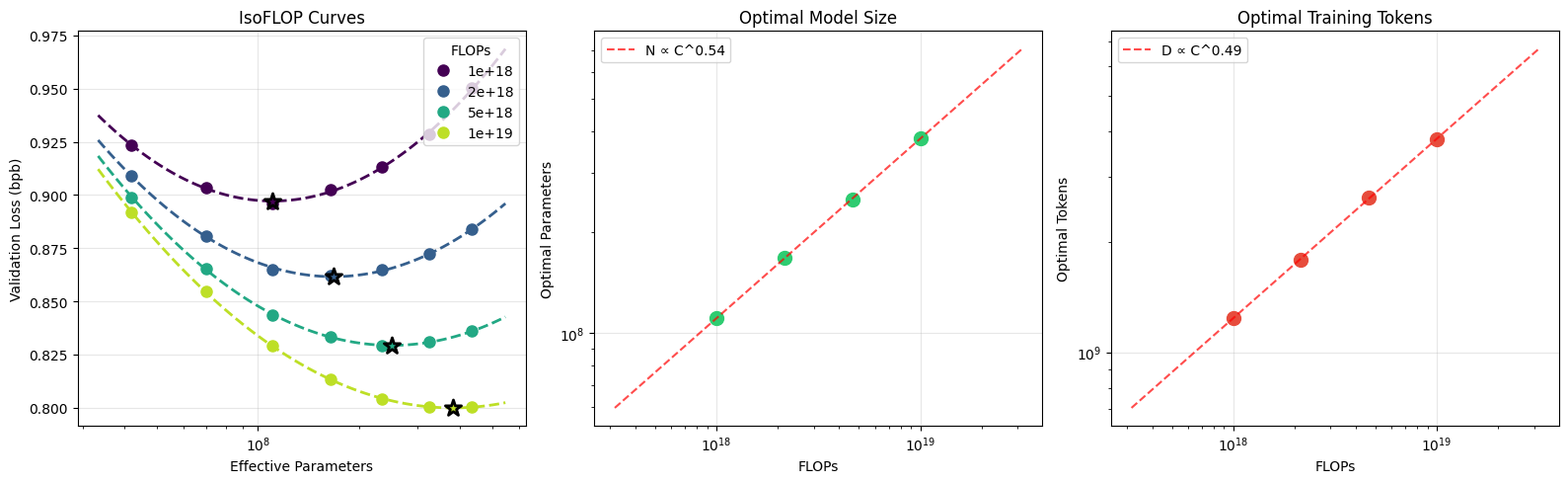
nanochat is the simplest experimental harness for training LLMs. It is designed to run on a single GPU node, the code is minimal/hackable, and it covers all major LLM stages including tokenization, pretraining, finetuning, evaluation, and inference. For example, you can train your own GPT-2 capability LLM (which cost $43,000 to train in 2019) for only $48 (2 hours of 8XH100 GPU node) and then talk to it over a simple CLI. On a spot instance, the total cost can be closer to ~$15. More generally, nanochat is configured out of the box to train an entire miniseries of compute-optimal models by setting one single complexity dial: --depth, the number of layers in the GPT transformer model (GPT-2 capability happens to be approximately depth 26). All other hyperparameters (the width of the transformer, number of heads, learning rate adjustments, training horizons, weight decays, ...) are calculated automatically in an optimal way.
For questions about the repo, I recommend either using DeepWiki from Devin/Cognition to ask questions about the repo, or use the Discussions tab, or come by the #nanochat channel on Discord.
Time-to-GPT-2 Leaderboard
Presently, the main focus of development is on tuning the pretraining stage, which takes the most amount of compute. Inspired by the modded-nanogpt repo and to incentivise progress and community collaboration, nanochat maintains a leaderboard for a "GPT-2 speedrun", which is the wall-clock time required to train a nanochat model to GPT-2 grade capability, as measured by the DCLM CORE score. The runs/speedrun.sh script always reflects the reference way to train GPT-2 grade model and talk to it. The current leaderboard looks as follows:
| # |
time |
val_bpb |
CORE |
Description |
Date |
Commit |
Contributors |
| 0 |
168 hours |
- |
0.2565 |
Original OpenAI GPT-2 checkpoint |
2019 |
- |
OpenAI |
| 1 |
3.04 |
0.74833 |
0.2585 |
d24 baseline, slightly overtrained |
Jan 29 2026 |
348fbb3 |
@karpathy |
| 2 |
2.91 |
0.74504 |
0.2578 |
d26 slightly undertrained +fp8 |
Feb 2 2026 |
a67eba3 |
@karpathy |
| 3 |
2.76 |
0.74645 |
0.2602 |
bump total batch size to 1M tokens |
Feb 5 2026 |
2c062aa |
@karpathy |
| 4 |
2.02 |
0.71854 |
0.2571 |
change dataset to NVIDIA ClimbMix |
Mar 4 2026 |
324e69c |
@ddudek @karpathy |
| 5 |
1.80 |
0.71808 |
0.2690 |
autoresearch round 1 |
Mar 9 2026 |
6ed7d1d |
@karpathy |
| 6 |
1.65 |
0.71800 |
0.2626 |
autoresearch round 2 |
Mar 14 2026 |
a825e63 |
@karpathy |
The primary metric we care about is "time to GPT-2" - the wall clock time needed to outperform the GPT-2 (1.6B) CORE metric on an 8XH100 GPU node. The GPT-2 CORE score is 0.256525. In 2019, the training of GPT-2 cost approximately $43,000 so it is incredible that due to many advances over 7 years across the stack, we can now do so much faster and for well below $100 (e.g. at the current ~$3/GPU/hr, an 8XH100 node is ~$24/hr, so 2 hours is ~$48).
See dev/LEADERBOARD.md for more docs on how to interpret and contribute to the leaderboard.
Getting started
Setup
nanochat uses uv for dependency management. To install:
uv sync --extra gpu    # Use for CUDA (A100/H100/etc.)
uv sync --extra cpu    # (or) Use for CPU-only / MPS
source .venv/bin/activate
For development (adds pytest, matplotlib, ipykernel, transformers, etc.):
uv sync --extra gpu --group dev
Reproduce and talk to GPT-2
The most fun you can have is to train your own GPT-2 and talk to it. The entire pipeline to do so is contained in the single file runs/speedrun.sh, which is designed to be run on an 8XH100 GPU node. Boot up a new 8XH100 GPU box from your favorite provider (e.g. I use and like Lambda), and kick off the training script:
bash runs/speedrun.sh
You may wish to do so in a screen session as this will take ~1.5 hours to run. Once it's done, you can talk to your model over the CLI. Make sure again that your local uv virtual environment is active (run source .venv/bin/activate), and chat:
python -m scripts.chat_cli
Get it to write stories or poems. Ask it to tell you who you are to see a hallucination. Ask it why the sky is blue. Or why it's green. The speedrun is a 4e19 FLOPs capability model so it's a bit like talking to a kindergartener :). An example conversation with a speedrun model:
User: Hello whats up?
Assistant: Hello! How can I help you today?
User: Why is the sky blue?
Assistant: The sky is blue due to an optical illusion called the Rayleigh Scattering of Light, which occurs when sunlight passes through tiny particles in the air. These particles are made up of tiny blue and violet particles that cause the light to bend in a particular way.
User: That's cool. Write a poem about it.
Assistant: In the twilight's glow, the sky is blue,
A canvas of shimmering blue, where skies unfold,
A world of blue, where blue and more blue,
Are woven together in a tapestry so fine,
Where every hue seems to sing a story.
...
A few more notes:
- The code will run just fine on the Ampere 8XA100 GPU node as well, but a bit slower.
- All code will run just fine on even a single GPU by omitting
torchrun, and will produce ~identical results (code will automatically switch to gradient accumulation), but you'll have to wait 8 times longer.
- If your GPU(s) have less than 80GB, you'll have to tune some of the hyperparameters or you will OOM / run out of VRAM. Look for
--device-batch-size in the scripts and reduce it until things fit. E.g. from 32 (default) to 16, 8, 4, 2, or even 1. Less than that you'll have to know a bit more what you're doing and get more creative.
- Most of the code is fairly vanilla PyTorch so it should run on anything that supports that - xpu, mps, or etc, but I haven't personally exercised all of these code paths so there might be sharp edges.
Research
If you are a researcher and wish to help improve nanochat, two scripts of interest are runs/scaling_laws.sh and runs/miniseries.sh. See Jan 7 miniseries v1 for related documentation. For quick experimentation (~5 min pretraining runs) my favorite scale is to train a 12-layer model (GPT-1 sized), e.g. like this:
OMP_NUM_THREADS=1 torchrun --standalone --nproc_per_node=8 -m scripts.base_train -- \
    --depth=12 \
    --run="d12" \
    --model-tag="d12" \
    --core-metric-every=999999 \
    --sample-every=-1 \
    --save-every=-1 \
This uses wandb (run name "d12"), only runs the CORE metric on last step, and it doesn't sample and save intermediate checkpoints. I like to change something in the code, re-run a d12 (or a d16 etc) and see if it helped, in an iteration loop. To see if a run helps, I like to monitor the wandb plots for:
val_bpb (validation loss in vocab-size-invariant units of bits per byte) as a function of step, total_training_time and total_training_flops.core_metric (the DCLM CORE score)- VRAM utilization,
train/mfu (Model FLOPS utilization), train/tok_per_sec (training throughput)
See an example here.
The important thing to note is that nanochat is written and configured around one single dial of complexity - the depth of the transformer. This single integer automatically determines all other hyperparameters (the width of the transformer, number of heads, learning rate adjustments, training horizons, weight decays, ...) so that the trained model comes out compute optimal. The idea is that the user doesn't have to think about or set any of this, they are simply asking for a smaller or bigger model using --depth, and everything "just works". By sweeping out the depth, you achieve the nanochat miniseries of compute optimal models at various sizes. GPT-2 capability model (which is of most interest at the moment) happens to be somewhere around d24-d26 range with the current code. But any candidate changes to the repo have to be principled enough that they work for all settings of depth.
Running on CPU / MPS
The script runs/runcpu.sh shows a very simple example of running on CPU or Apple Silicon. It dramatically shrinks the LLM that is being trained to make things fit into a reasonable time interval of a few ten minutes of training. You will not get strong results in this way.
Precision / dtype
nanochat does not use torch.amp.autocast. Instead, precision is managed explicitly through a single global COMPUTE_DTYPE (defined in nanochat/common.py). By default this is auto-detected based on your hardware:
| Hardware |
Default dtype |
Why |
| CUDA SM 80+ (A100, H100, ...) |
bfloat16 |
Native bf16 tensor cores |
| CUDA SM < 80 (V100, T4, ...) |
float32 |
No bf16; fp16 available via NANOCHAT_DTYPE=float16 (uses GradScaler) |
| CPU / MPS |
float32 |
Safe default. On recent macOS, MPS also runs NANOCHAT_DTYPE=bfloat16 fine (~25% less memory, similar speed) |
You can override the default with the NANOCHAT_DTYPE environment variable:
NANOCHAT_DTYPE=float32 python -m scripts.chat_cli -p "hello"   # force fp32
NANOCHAT_DTYPE=bfloat16 torchrun --nproc_per_node=8 -m scripts.base_train  # force bf16
How it works: model weights are stored in fp32 (for optimizer precision), but our custom Linear layer casts them to COMPUTE_DTYPE during the forward pass. Embeddings are stored directly in COMPUTE_DTYPE to save memory. This gives us the same mixed-precision benefit as autocast but with full explicit control over what runs in which precision.
Note: float16 training automatically enables a GradScaler in base_train.py to prevent gradient underflow. SFT supports this too but RL currently does not. Inference in fp16 works fine everywhere.
Guides
I've published a number of guides that might contain helpful information, most recent to least recent:
File structure
.
├── LICENSE
├── README.md
├── dev
│   ├── nanochat.png
│   └── repackage_data_reference.py # Pretraining data shard generation
├── nanochat
│   ├── __init__.py                 # empty
│   ├── checkpoint_manager.py       # Save/Load model checkpoints
│   ├── common.py                   # Misc small utilities, quality of life
│   ├── core_eval.py                # Evaluates base model CORE score (DCLM paper)
│   ├── dataloader.py               # Tokenizing Distributed Data Loader
│   ├── dataset.py                  # Download/read utils for pretraining data
│   ├── engine.py                   # Efficient model inference with KV Cache
│   ├── execution.py                # Allows the LLM to execute Python code as tool
│   ├── gpt.py                      # The GPT nn.Module Transformer
│   ├── loss_eval.py                # Evaluate bits per byte (instead of loss)
│   ├── optim.py                    # AdamW + Muon optimizer, 1GPU and distributed
│   └── tokenizer.py                # BPE Tokenizer wrapper in style of GPT-4
├── pyproject.toml
├── runs
│   ├── miniseries.sh               # Miniseries training script
│   ├── runcpu.sh                   # Small example of how to run on CPU/MPS
│   ├── scaling_laws.sh             # Scaling laws experiments
│   └── speedrun.sh                 # Train the ~$100 nanochat d20
├── scripts
│   ├── base_eval.py                # Base model: CORE score, bits per byte, samples
│   ├── base_train.py               # Base model: train
│   ├── chat_cli.py                 # Chat model: talk to over CLI
│   ├── chat_eval.py                # Chat model: eval tasks
│   ├── chat_rl.py                  # Chat model: reinforcement learning
│   ├── chat_sft.py                 # Chat model: train SFT
│   ├── infer_bench.py              # Inference: latency/throughput/VRAM bench
│   ├── tok_eval.py                 # Tokenizer: evaluate compression rate
│   └── tok_train.py                # Tokenizer: train it
├── tasks
│   ├── arc.py                      # Multiple choice science questions
│   ├── common.py                   # TaskMixture | TaskSequence
│   ├── gsm8k.py                    # 8K Grade School Math questions
│   ├── humaneval.py                # Misnomer; Simple Python coding task
│   ├── mmlu.py                     # Multiple choice questions, broad topics
│   └── smoltalk.py                 # Conglomerate dataset of SmolTalk from HF
├── tests
│   ├── test_attention_fallback.py  # FA3/SDPA attention fallback
│   ├── test_engine.py              # Inference engine, KV cache
│   ├── test_execution.py           # Sandboxed code execution
│   ├── test_optim.py               # MuonAdamW optimizer (needs GPU)
│   ├── test_tasks.py               # Task slicing, mixtures, HubDataset
│   └── test_tokenizer.py           # BPE round-trips, chat rendering
└── uv.lock
Contributing
The goal of nanochat is to improve the state of the art in micro models that are accessible to work with end to end on budgets of < $1000 dollars. Accessibility is about overall cost but also about cognitive complexity - nanochat is not an exhaustively configurable LLM "framework"; there are no giant configuration objects, model factories, or if-then-else monsters in the code base. It is a single, cohesive, minimal, readable, hackable, maximally-forkable "strong baseline" codebase designed to run start to end and produce a ChatGPT model you can talk to. Currently, the most interesting part personally is speeding up the latency to GPT-2 (i.e. getting a CORE score above 0.256525). Currently this takes ~1.5 hours (down from 3h), but by improving the pretraining stage we can improve this further.
Current AI policy: disclosure. When submitting a PR, please declare any parts that had substantial LLM contribution and that you have not written or that you do not fully understand.
Acknowledgements
- The name (nanochat) derives from my earlier project nanoGPT, which only covered pretraining.
- nanochat is also inspired by modded-nanoGPT, which gamified the nanoGPT repo with clear metrics and a leaderboard, and borrows a lot of its ideas and some implementation for pretraining.
- Thank you to HuggingFace for fineweb and smoltalk.
- Thank you Lambda for the compute used in developing this project.
- Thank you to chief LLM whisperer 🧙♂️ Alec Radford for advice/guidance.
- Thank you to the repo czar Sofie @svlandeg for help with managing issues, pull requests and discussions of nanochat.
Cite
If you find nanochat helpful in your research cite simply as:
@misc{nanochat,
  author = {Andrej Karpathy},
  title = {nanochat: The best ChatGPT that \$100 can buy},
  year = {2025},
  publisher = {GitHub},
  url = {https://github.com/karpathy/nanochat}
}
License
MIT

 一个精简、易于魔改的训练框架,让你在单 GPU 节点上端到端训练自己的大语言模型(分词、预训练、微调、评估、推理),最后得到一个能在命令行里对话的聊天机器人。