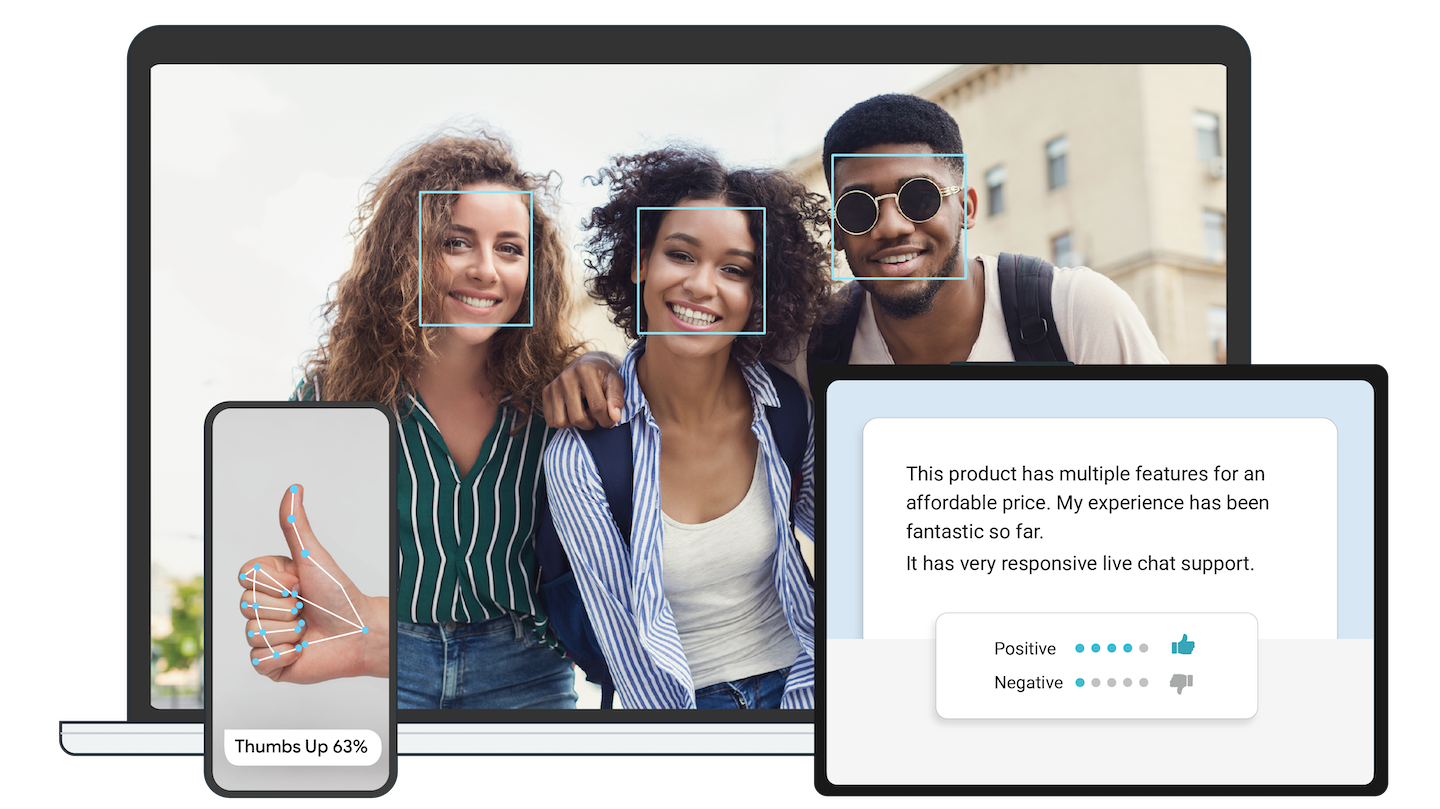
What is this?
 Google's open-source, cross-platform toolkit for on-device machine learning in live and streaming media: ready-made libraries and pre-trained models you plug straight into your own app.
Google's open-source, cross-platform toolkit for on-device machine learning in live and streaming media: ready-made libraries and pre-trained models you plug straight into your own app.Is it one library or a whole toolbox?A toolbox. MediaPipe Solutions bundles cross-platform Task APIs and libraries with pre-trained, ready-to-run models, while the low-level MediaPipe Framework lets you build your own efficient on-device ML pipelines.
A toolbox. MediaPipe Solutions bundles cross-platform Task APIs and libraries with pre-trained, ready-to-run models, while the low-level MediaPipe Framework lets you build your own efficient on-device ML pipelines.How do I get started with it?Pick a developer guide for the vision, text or audio task you want, then follow the setup guide for your platform: Android, web apps or Python. For the low-level Framework, you install it and start building the example apps in C++, Android and iOS.
Pick a developer guide for the vision, text or audio task you want, then follow the setup guide for your platform: Android, web apps or Python. For the low-level Framework, you install it and start building the example apps in C++, Android and iOS.Do I need to write C++ to use it?Not for the premade Solutions — you use them through the cross-platform MediaPipe Tasks APIs, with guides for Android, web and Python. C++ matters only if you build custom pipelines on the low-level Framework.
Not for the premade Solutions — you use them through the cross-platform MediaPipe Tasks APIs, with guides for Android, web and Python. C++ matters only if you build custom pipelines on the low-level Framework.Is everything in the repo still actively supported?No. Support for the old MediaPipe Legacy Solutions ended on March 1, 2023 — their code and prebuilt binaries remain available as-is while they get replaced by the new MediaPipe Solutions.
No. Support for the old MediaPipe Legacy Solutions ended on March 1, 2023 — their code and prebuilt binaries remain available as-is while they get replaced by the new MediaPipe Solutions.Where can apps built with it run?Mobile (Android and iOS), web, desktop, edge devices and IoT — the same solutions plug into apps across all of these development platforms.
Mobile (Android and iOS), web, desktop, edge devices and IoT — the same solutions plug into apps across all of these development platforms.Does my users' data leave the device?No — input data like images, video and text is processed on device and never sent to Google servers. One caveat: the Tasks APIs do send performance and usage metrics to Google, so you may need user consent for that.
No — input data like images, video and text is processed on device and never sent to Google servers. One caveat: the Tasks APIs do send performance and usage metrics to Google, so you may need user consent for that.What can I actually build with it?The project's publication list points at real-time hand tracking, full-body pose tracking with BlazePose, face and eye tracking with depth estimation, 3D object detection, instant motion tracking, and intelligent video reframing with AutoFlip — the same family of tech behind background features in Google Meet.
The project's publication list points at real-time hand tracking, full-body pose tracking with BlazePose, face and eye tracking with depth estimation, 3D object detection, instant motion tracking, and intelligent video reframing with AutoFlip — the same family of tech behind background features in Google Meet.Can I adapt the models to my own data?Yes. MediaPipe Model Maker customizes solution models with your data, MediaPipe Studio lets you visualize, evaluate and benchmark them in the browser, and since the solutions are part of the open-source project you can also modify the solution code itself.
Yes. MediaPipe Model Maker customizes solution models with your data, MediaPipe Studio lets you visualize, evaluate and benchmark them in the browser, and since the solutions are part of the open-source project you can also modify the solution code itself.Is it free to use in my own product?Yes — it is open source under the Apache-2.0 license, and it is designed exactly for plugging these solutions into your applications across mobile, web and desktop.
Yes — it is open source under the Apache-2.0 license, and it is designed exactly for plugging these solutions into your applications across mobile, web and desktop.What are similar projects?silero-vad, opencv, coyopedal, runanywhere-sdks, supertonic, ncnn, SmarterStreaming, MNN
silero-vad, opencv, coyopedal, runanywhere-sdks, supertonic, ncnn, SmarterStreaming, MNNWhich topics is it in?stream-processing, on-device-ai, edge-ai, c-plus-plus, audio-processing, iot, mobile-development, video-processing, google, real-time, artificial-intelligence, streaming
stream-processing, on-device-ai, edge-ai, c-plus-plus, audio-processing, iot, mobile-development, video-processing, google, real-time, artificial-intelligence, streaming