Teach your agent a website once. After that, it calls the site like an API instead of driving a browser.
API Anything watches a site's own page make a request and learns which parts of it are your
inputs. It saves the result as an operation. Your agent calls that operation with new inputs
over MCP, the CLI or TypeScript, and gets JSON back over plain HTTP.
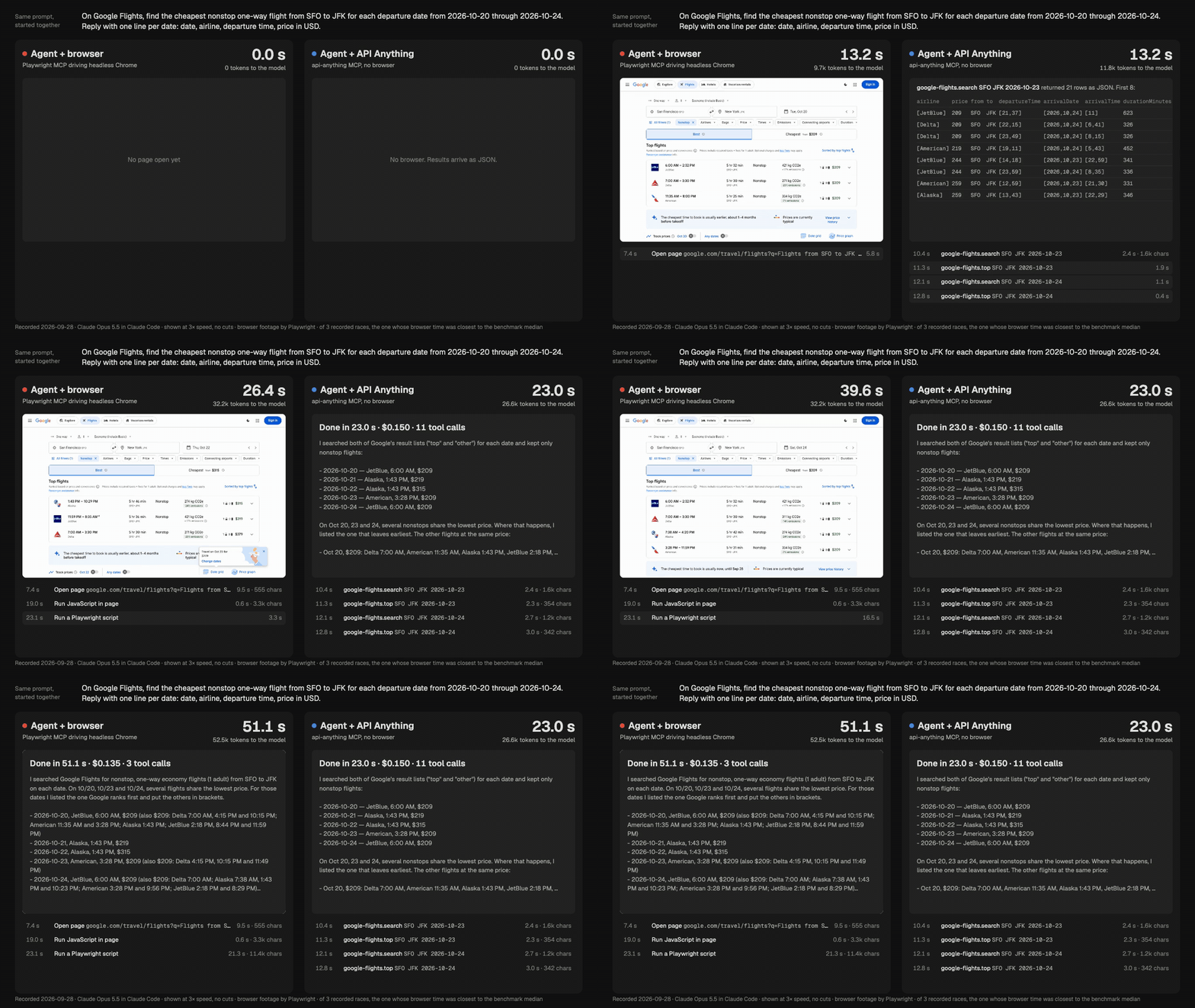
Same agent (Claude Opus 5.5), same prompt, started together. Left: it drives headless Chrome
through Playwright MCP. Right: it calls API Anything's Google Flights operation. Shown at 3× speed with no cuts;
the timers show real elapsed time. Recorded 2026-09-28. MP4 · how it was recorded
Across 5 runs of each task, the agent using API Anything answered 1.5 to 2× sooner, read about
half as many tokens, and cost the same or less. All 20 answers were correct.
Method, raw numbers and limits.
Install
Paste this into Claude Code, Codex or another coding agent:
Set up API Anything for me: https://github.com/goodnight000/api-anything/blob/main/INSTALL.md
The agent checks Node 22.13+, builds and installs the api-anything command, confirms that a
call works, then connects the MCP server and the skill to itself. Restart the agent, then ask it
something like "What does Goodreads rate Piranesi?"
Install by hand
The package isn't on npm yet. Don't use npm install -g github:..., because it fails under npm 11.
git clone https://github.com/goodnight000/api-anything.git && cd api-anything
npm ci && npm install -g "$(npm pack --silent)"
api-anything call hacker-news search query=sqlite
{"ok":true,"class":"ok","tier":1,"data":[{"title":"Hosting SQLite databases on GitHub Pages or any static file hoster","url":"https://phiresky.github.io/blog/2021/hosting-sqlite-databases-on-github-pages/", ...}, ...],"ms":111}
tier: 1 means plain HTTP with no browser. A failure returns ok: false with a class, a
reason and a next step. Connect an agent with codex mcp add api-anything -- api-anything mcp,
claude mcp add --scope user api-anything -- api-anything mcp, or this MCP entry:
Over MCP an agent calls operations, using four tools: list_sites, list_operations,
call_operation and login. To create operations, an agent needs a shell and the
skill. Google Chrome is needed only for creating operations and
for browser fallback. Setup details.
Teach it a new site
Give it the page URL with a placeholder, and two example inputs:
Headless Chrome loads the page once for each example. The part of the request that changed with
the input becomes a parameter, and the rest is stored as a template. The agent (or you) picks the
request and the fields. API Anything builds the template without an LLM.
Recorded demos.
Map a site from an intent
Tell an agent what you need from a site. The skill makes it do
this, in order:
Ask about whatever the request leaves unclear.
Propose operations and wait for your approval.
Scout each page with capture --outline. This is a summary of what each request returns, so
the agent doesn't have to read full responses.
Build each operation and check it with an input that wasn't an example.
Goodreads has had no public API since 2020. One run took 6.3 minutes and $1.19. It produced
search, book details, an author's books and reviews:
Tested on unseen books. The test used 30 books that nobody used while building the
operations. For the 29 books the search found, every checked field matched the page Chrome
rendered: title, rating, ratings count and pages. All 146 calls went over plain HTTP.
Agent comparison. An agent using the operations answered 5 books in 30.5 s; the browser
agent took 182.5 s. For one book, it cost a third as much.
No agent needed. A plain script (examples/reading-list.mjs)
builds the same five-book table in 16 s with no model.
google-flights: search, top flights, price calendar
hacker-news
x and instagram profiles
search on youtube, airbnb and amazon
linkedin: profiles, companies and search, with your own login
goodreads: search, books, author lists and reviews, built by the explorer above
They cover selected features, not whole sites. api-anything ops <site> lists parameters and
caveats.
How it works
Learn. Chrome records the page's requests for two example inputs. The request that
followed the inputs becomes a template with slots, and cookies and tokens become references to
a local store.
Call. Fill the slots and send the request with Node's fetch. If the site blocks that,
fetch from inside a Chrome page. As a last resort for reads, run the page itself and read its
own response.
Repair. If the request stops working (a rotated id, a moved field), re-learn it and save
the new version only after a replay succeeds. Otherwise the call returns an error, not
someone else's data.
For a site that needs an account, api-anything login <site> first tries to import that
site's cookies from a browser profile you are already signed in to, so there is usually no
password to type. If several profiles are signed in it asks which one, and if none can be
imported it opens a Chrome window to sign in by hand. A saved operation holds references to
cookies and tokens, never their values, so a refreshed session works without re-learning anything.
A session is kept current where that is possible. Cookies a site sets on a plain-HTTP response,
or while API Anything runs the site's page in Chrome, are saved. When a plain-HTTP call comes back
unauthorized, API Anything makes one recovery attempt, the first of these that applies:
re-import from the browser profile you chose at login;
take the cookies from its own Chrome profile, if they differ from the saved ones;
for a read that uses session tokens, reload the page so the site issues fresh ones.
If the call is still unauthorized, it returns class: "auth" with the login command to run.
Import reads Chrome, Arc, Brave, Edge, Chromium and Firefox profiles on macOS and Linux (on
Linux, not cookies encrypted with the desktop keyring). On Windows, login opens the Chrome
window. Details
Limits
It is a local tool, not a hosted API. It uses your machine, your network and your sessions.
It knows only the operations it was taught. It doesn't support every feature of every site.
Repair can fail. There is no CAPTCHA solving, and if a site challenges real Chrome, you have
to clear the challenge by hand.
No write operations are bundled. LinkedIn messaging isn't bundled and hasn't been tested
against LinkedIn. Writes are tested only against a local fixture, and they need
--allow-writes. An HTTP 2xx doesn't prove a message was delivered.
Credentials stay in ~/.api-anything, and specs hold references, never values. Read each
site's terms: you are responsible for how you use it.



 API Anything 会观察网站自身前端发出的请求,学习其中哪些部分是你的输入,并把它保存为一个操作。之后,你的代理可以通过 MCP、CLI 或 TypeScript 调用这个操作,直接拿回纯 JSON,而不用驱动无头浏览器。