




What is this?
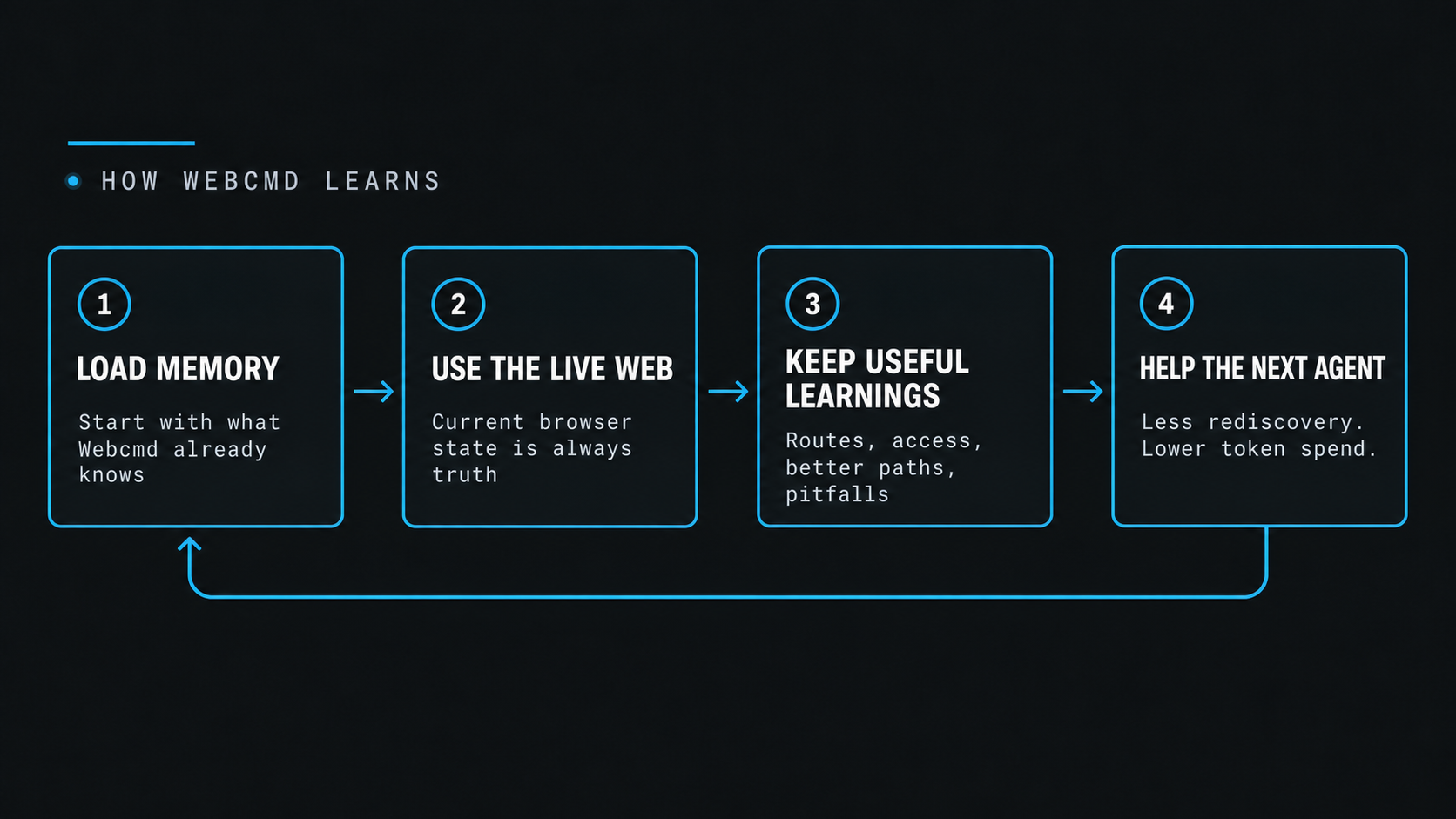
 Webcmd is self-learning browser infrastructure for AI agents: it lets an agent control a real browser to complete tasks, then saves what it learns about a site as local memory so future runs are faster, cheaper, and don't re-explore the same site.
Webcmd is self-learning browser infrastructure for AI agents: it lets an agent control a real browser to complete tasks, then saves what it learns about a site as local memory so future runs are faster, cheaper, and don't re-explore the same site.Is this a browser library I import, or a CLI skill for my coding agent?It is a skill you load into a coding-agent harness, not a library you import into code. The installer sets up exactly one skill called webcmd-browser that you load only when you need live browser control.
It is a skill you load into a coding-agent harness, not a library you import into code. The installer sets up exactly one skill called webcmd-browser that you load only when you need live browser control.How do I install and start using Webcmd?Run the quick-start install command, then pick your harness when prompted (Claude, Codex, another supported harness, or a custom skills path) to install the webcmd-browser skill.
Run the quick-start install command, then pick your harness when prompted (Claude, Codex, another supported harness, or a custom skills path) to install the webcmd-browser skill.What do I need installed before setting it up?You need Node.js 20.6 or newer, plus a supported coding-agent harness (Claude, Codex, Gemini, or your own) to actually load the installed skill.
You need Node.js 20.6 or newer, plus a supported coding-agent harness (Claude, Codex, Gemini, or your own) to actually load the installed skill.Any catches before relying on this?The hosted Webcmd Cloud option, used for running sessions on remote infrastructure and for seeding first-time learning, is explicitly still in active development and not yet stable; local-only usage is the steadier path today.
The hosted Webcmd Cloud option, used for running sessions on remote infrastructure and for seeding first-time learning, is explicitly still in active development and not yet stable; local-only usage is the steadier path today.Does my browsing/navigation data stay on my machine?Mostly yes: a site's first visit may pull a seed from Webcmd Cloud, but every learning step after that is stored and reused locally.
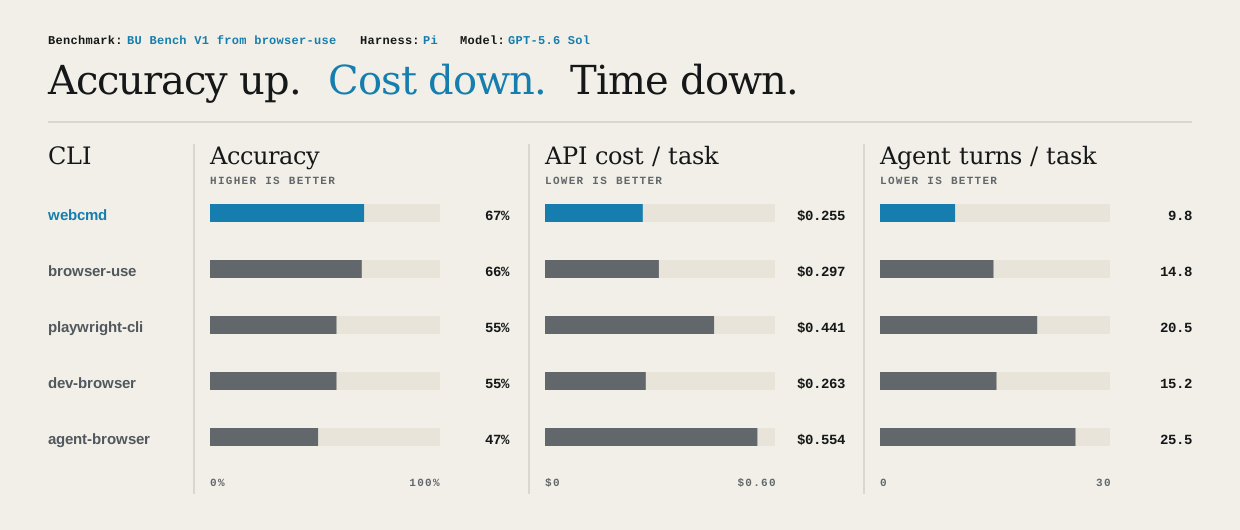
Mostly yes: a site's first visit may pull a seed from Webcmd Cloud, but every learning step after that is stored and reused locally.How does Webcmd actually perform versus other browser-automation tools?On BU Bench V1, a 100-task browser automation benchmark, Webcmd recorded the highest accuracy, lowest estimated cost per completed task, and fewest agent turns among tools compared under the same controller and judge setup.
On BU Bench V1, a 100-task browser automation benchmark, Webcmd recorded the highest accuracy, lowest estimated cost per completed task, and fewest agent turns among tools compared under the same controller and judge setup.What kinds of websites can it already handle?It already works across research sites (Hacker News, Reddit, PubMed), social platforms (X/Twitter, LinkedIn, TikTok), AI tools (ChatGPT, Claude, Gemini, NotebookLM), and shopping/booking sites (Amazon, Blinkit, Practo), though the README notes this list is illustrative rather than exhaustive.
It already works across research sites (Hacker News, Reddit, PubMed), social platforms (X/Twitter, LinkedIn, TikTok), AI tools (ChatGPT, Claude, Gemini, NotebookLM), and shopping/booking sites (Amazon, Blinkit, Practo), though the README notes this list is illustrative rather than exhaustive.What's the difference between a Session and a Profile in Webcmd?A Profile is a cookie jar, while a Session is an independent browser window inside that Profile; Session IDs are immutable and Profile-scoped, so parallel agents should each use their own Session.
A Profile is a cookie jar, while a Session is an independent browser window inside that Profile; Session IDs are immutable and Profile-scoped, so parallel agents should each use their own Session.Why not just give an agent raw Playwright access?Raw browser control makes agents rediscover the same site layout on every run. Webcmd adds a sitemap-memory layer on top of live browser control so repeated exploration is skipped, cutting browser-agent token spend by up to 90%.
Raw browser control makes agents rediscover the same site layout on every run. Webcmd adds a sitemap-memory layer on top of live browser control so repeated exploration is skipped, cutting browser-agent token spend by up to 90%.What are similar projects?Raven, scout, brigade, codify, nanobrowser, Agentlas-OS, testsprite-cli, holaOS
Raven, scout, brigade, codify, nanobrowser, Agentlas-OS, testsprite-cli, holaOSWhich topics is it in?browser-use, ai-agent-tools, llm-agents, playwright, node, agent-memory, web-scraping, memory, sandbox, browser-automation, chatgpt, cli-tool
browser-use, ai-agent-tools, llm-agents, playwright, node, agent-memory, web-scraping, memory, sandbox, browser-automation, chatgpt, cli-tool