New features and updates ship steadily. Follow @yourtowhid on X for all of it and new ways to use wigolo, and reach out there for collaborations or feedback · also on LinkedIn
wigolo gives an AI agent one surface for everything web-related: search, fetch, crawl, extract, cache, find-similar, research, and autonomous gather loops. It runs wherever your agent runs — as an MCP server next to your coding agent, as a REST/MCP endpoint on the box where your self-hosted agents live, or embedded through an SDK inside your own app. The core tools need no API keys, nothing it touches leaves ~/.wigolo/, and no bill grows with how much your agent thinks.
Quickstart
npx wigolo init                              # set up the local engine — any system
npx wigolo init --agents=claude-code,cursor  # …or set up + wire your day-to-day agents in one command
Requires Node ≥ 20 and ~1.5 GB of free disk on macOS, Linux, or Windows. Bare init sets up the local engine: it downloads the browser engine and on-device models, runs a health check, and reports each component. Adding --agents wires the named agents in the same run, so a coding agent you use daily is ready in one command.
Supported agents — --agents takes any of claude-code · cursor · codex · gemini-cli · opencode · vscode · windsurf · zed · antigravity (comma-separated); wigolo writes the MCP config and, where supported, instructions for each.
Any other setup — any MCP client, agent framework, or self-hosted agent registers npx -y wigolo in its own MCP config. The installation guide has the exact config block for every client, plus Docker, Homebrew, and single-file-binary channels.
More on the way — the supported list keeps growing, and a PR to add your agent is welcome; see CONTRIBUTING.md.
Interactive setup — --interactive is a plain-text flow; --wizard is the full terminal TUI.
Defer downloads — --no-warmup waits until first use. A failed component download never fails setup; init reports what's not ready with the exact fix and still completes.
init is unattended by default, so it's safe in scripts and CI, and any setup problem surfaces right here in the per-component report, before your agent's first call. Search, fetch, crawl, extract, cache, and find-similar work with no API key. Check it's healthy anytime:
npx wigolo doctor
To remove everything cleanly, run npx wigolo config --uninstall --yes. You can also paste the installation guide into any AI assistant and let it do the setup; it's written to be self-contained.
Recommended — a free key for research & agent
Search, fetch, crawl, extract, cache, and find-similar are fully keyless. research, agent, and search format=answer use an LLM to write the synthesized, cited answer. Without one they hand back a raw brief and evidence for your agent to assemble. A free Gemini key turns that into a finished answer:
export WIGOLO_LLM_PROVIDER=gemini
export GEMINI_API_KEY=<free-key>      # grab one at aistudio.google.com/apikey — the free tier is plenty
Any provider works (anthropic · openai · groq), or stay fully local and keyless with WIGOLO_LLM_PROVIDER=ollama (or any OpenAI-compatible URL). Set it in your shell or your agent's MCP env block. Providers, models, and the keyless local-model ladder are in the configuration guide.
What your agent gets back
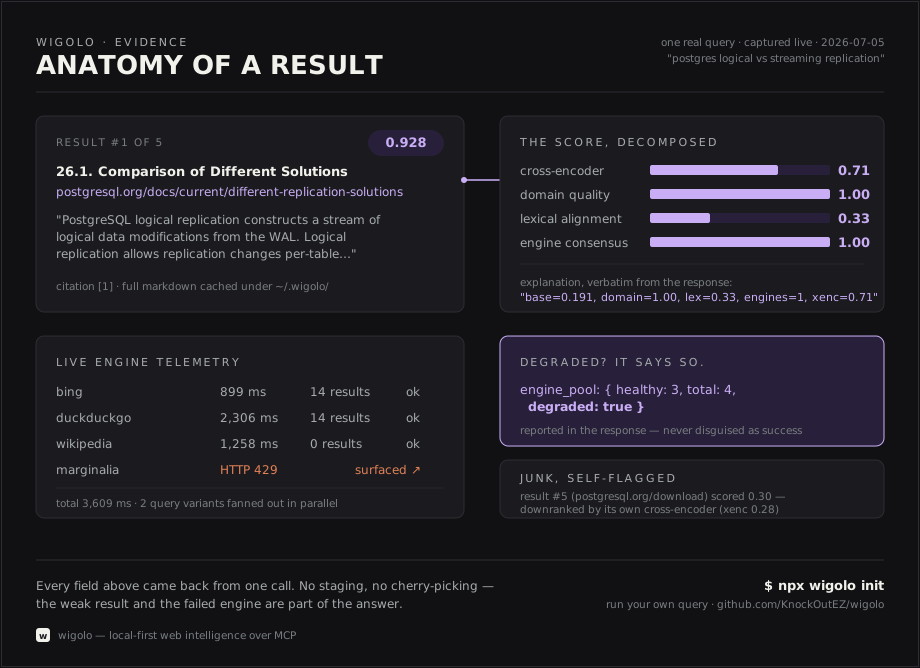
Every search result is evidence the agent can act on. It carries a verbatim excerpt pinned to its exact position in the source, a citation ID the agent can quote, and a score it can inspect (abridged real shape):
Weak results get flagged as junk by wigolo's own scorer. Failed engines are reported and stale cache is labeled, so the agent always knows what it's standing on. Full response contracts per tool are in the tools reference.
Tools
Tool
What it does
🔎 search
Multi-engine web search (18 direct adapters) with rank fusion, ML reranking, and an explainable per-result score. Pass a query array for parallel breadth. Scope by domain and time range, match an exact phrase, or return image results.
📄 fetch
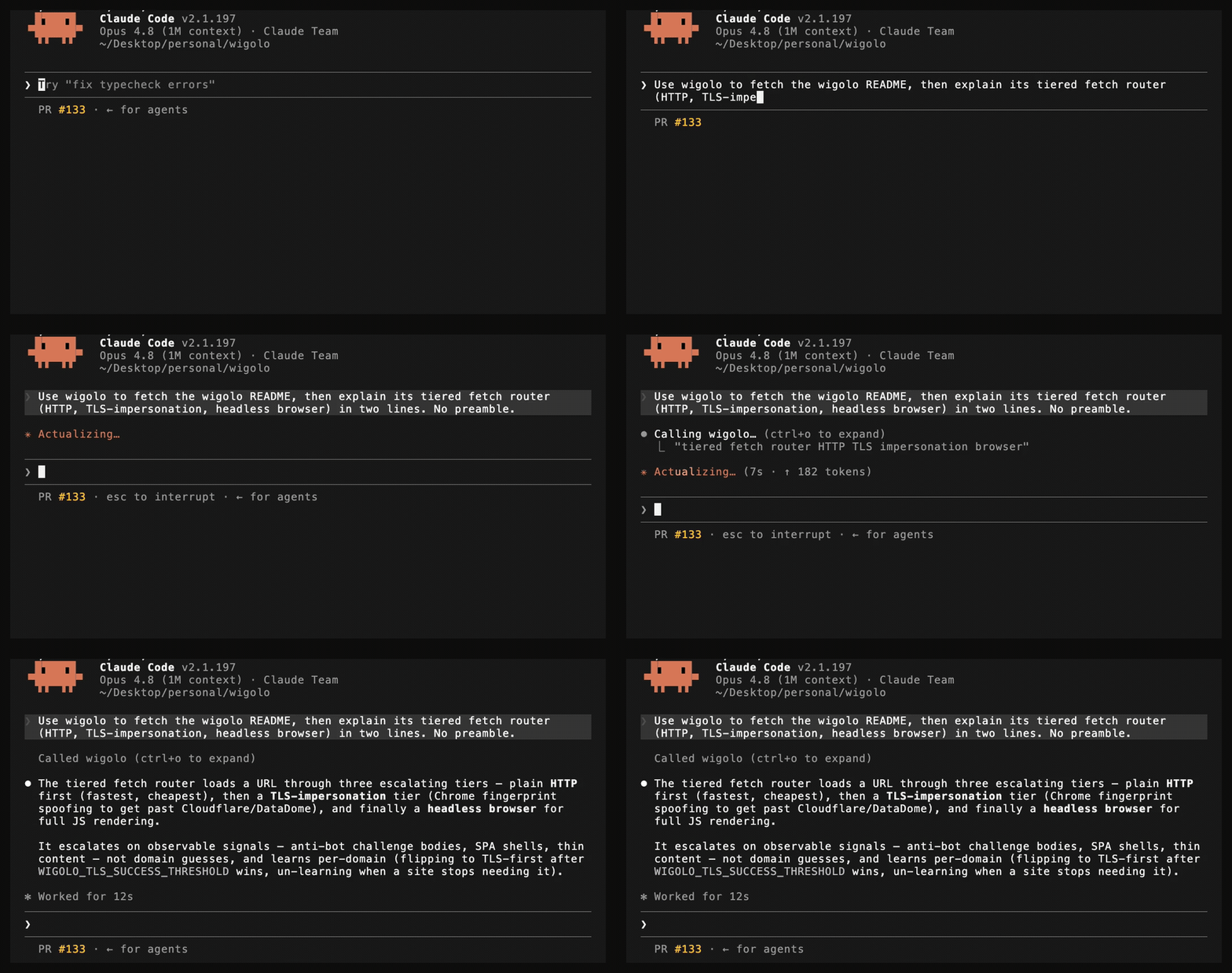
Load one URL through a tiered router that auto-escalates from plain HTTP to a headless browser engine on anti-bot challenges or SPA shells. Clean markdown + metadata + links. Handles PDFs, a single-heading section, authenticated sessions, and page actions (click / type / scroll / screenshot).
Structured data from a page: tables, metadata, JSON-LD, brand identity, named schemas (Article / Recipe / Product / …), or any custom JSON Schema.
💾 cache
Query everything already seen — keyword or hybrid semantic. Plus stats, clear, and change detection.
🧲 find_similar
Pages similar to a URL or a concept, via 3-way fusion of keyword + semantic + live web.
🧠 research
Decompose a question → fan out sub-queries → fetch sources → synthesize a cited report (or a structured brief the host LLM writes from).
🤖 agent
Autonomous gather loop: plan → search → fetch → extract → synthesize, with a step log, time budget, and optional output schema.
🔁 diff + ⏱️ watch
See exactly what changed on a page since last visit; re-check on demand and deliver changes to a webhook.
Every tool also runs from the terminal (wigolo search "…" --json), from an interactive shell with NDJSON piping (wigolo shell), over REST, and through the SDKs — CLI reference. Per-tool guides with the full parameter set are in docs/tools.md; runnable examples are in examples/.
Why it's different
wigolo isn't a free stand-in for the paid tools — it's built to match them. It's a focused web layer for your agents: an MCP and REST surface they call directly, with the search and extraction quality the paid services charge for. What separates it:
Built for agents. One MCP call fans out many queries across many engines in parallel, which a serial host tool-loop can't replicate. Every result carries transparent per-result scoring, and output is budget-aware.
Honest output. Stale cache, failed fetches, degraded backends, and truncation are surfaced in the result. When a bot-protected page can't be read, you get a labeled blocked_by_challenge failure, not a challenge shell returned as content.
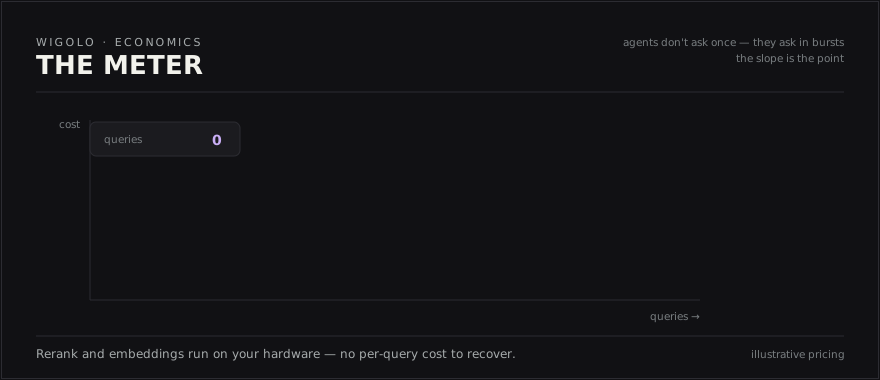
$0 per query, free to re-query. Default search talks to public engines through direct adapters; the reranker and embeddings run on-device. Every response is cached, so asking again is instant and costs nothing.
Private by default. Cache, embeddings, models, and config live under ~/.wigolo/. Nothing reaches a third party unless you explicitly opt into an LLM for synthesis.
Here's what one real result looks like, dissected. It includes the failed engine and the weak result, because those are part of the answer too:
Sponsors
Thank you to the sponsors below, who help keep wigolo maintained and free for everyone to use. Their support goes straight into the work.
TestMu AI (formerly LambdaTest) is the world's first full-stack agentic AI quality engineering platform, trusted by 18,000+ enterprises.
wigolo is free for all and is meant to stay that way. If you or your company would like to help keep it maintained, there's room for more sponsors — reach out at [email protected], or see SPONSORS.md for the terms. A one-off via Buy Me a Coffee is welcome too.
Benchmark
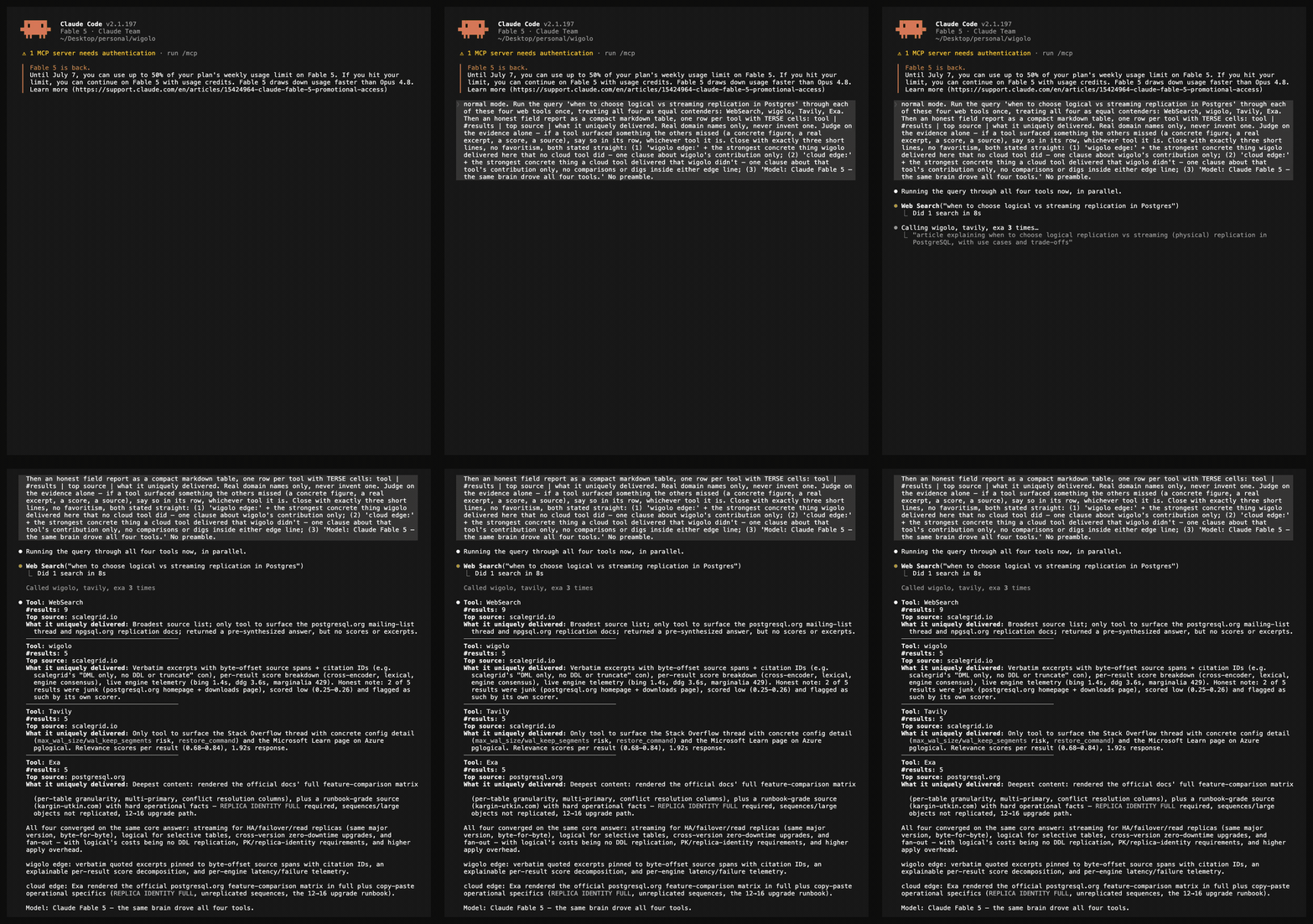
All four tools converged on the same core answer, and only one of them handed back verbatim, byte-pinned evidence while doing it.
One cold query ran live inside a single Claude Fable 5 session, fanned out to four web tools on equal footing (built-in WebSearch, wigolo, Tavily, Exa), and was judged by the agent on the evidence alone. All four converged on the same answer and the same top source, so the parity is demonstrated on-screen. wigolo alone returned verbatim excerpts pinned to byte-offset source spans, an explainable score decomposition, and live per-engine telemetry, and its own scorer flagged two weak results as junk. The cloud tools earn their place too: Exa rendered the official docs' comparison matrix in full. Run your own query and you'll see the same shape.
How it compares
wigolo
Firecrawl
Exa
Tavily
Multi-engine web search
✅
✅
✅
✅
Fetch & structured extraction
✅
✅
✅
✅
Whole-site crawl & map
✅
✅
—
✅
Verbatim excerpts pinned to byte-offset source spans
✅
—
—
—
Explainable per-result score decomposition
✅
—
—
—
Persistent local memory — re-query instantly, offline
✅
—
—
—
Query data stays on your machine
✅
—
—
—
API key / account
none
required
required
required
Cost per query
$0
metered
metered
metered
Feature standing as of July 2026 — check each vendor's docs for current state.
That last row compounds, because agents ask in bursts:
Beyond your editor
The same ten tools serve every kind of agent, over whichever surface fits: MCP for coding agents, REST for everything else, SDKs to embed, and framework wrappers to drop in.
REST API — wigolo serve
One process exposes a plain-JSON REST API next to the MCP transport. No MCP client needed, just curl:
wigolo serve                          # 127.0.0.1:3333 — loopback is open; off-loopback requires a token

curl -sX POST http://127.0.0.1:3333/v1/search \
  -H 'Content-Type: application/json' \
  -d '{"query":"local-first software","max_results":5}'
POST /v1/{tool} covers all ten tools, GET /openapi.json is the OpenAPI 3.1 contract, and /mcp + /sse serve remote MCP clients from the same port. Bind past loopback and a bearer token is required, so the server fails closed by default. Point n8n, a Hermes-style assistant, or any self-hosted agent at it. → REST API
SDKs — TypeScript & Python
Thin, typed clients with an embedded local mode that finds or starts the daemon for you. No separate serve step.
import { createLocalClient } from 'wigolo-sdk/local';

const { client, close } = await createLocalClient();   // reuse a running daemon, or spawn one
const res = await client.search({ query: 'local-first web search', max_results: 5 });
console.log(res.results.map((r) => r.title));
await close();                                          // stops the daemon only if this call spawned it
from wigolo import local_client

with local_client() as client:                          # reuse a healthy daemon, or spawn one
    res = client.search(query="local-first web search", max_results=5)
    for r in res["results"]:
        print(r["title"], r["url"])
Drop wigolo's tools into the framework you already use. You get the full ten-tool surface, including the cache / find_similar / research / agent that most framework web-tools don't ship:
Framework
Package
What you get
LangChain
wigolo-langchain
each tool as a BaseTool, plus a BaseRetriever over search / find_similar for RAG
CrewAI
wigolo-crewai
wigolo_tools() → hand the set to any crew
LlamaIndex
wigolo-llamaindex
a BaseReader that loads fetched / crawled / searched pages as documents
Vercel AI SDK
wigolo-vercel-ai-sdk
tool factories for generateText / streamText, edge-friendly
# stdio MCP — wire it into any MCP client as command: docker
docker run -i --rm -v wigolo-data:/data ghcr.io/knockoutez/wigolo

# HTTP server for remote / multi-client use
docker run -p 3333:3333 -v wigolo-data:/data \
  -e WIGOLO_API_TOKEN=a-long-random-secret \
  ghcr.io/knockoutez/wigolo serve --host 0.0.0.0
The slim image lazy-loads models into the volume; :full preinstalls the browser engine. Also on Docker Hub as towhid69420/wigolo. → installation & all channels
Agent skills
An 11-pack skill catalog teaches your coding agent to drive each tool well. It's installed by init and managed with wigolo skills add|list|remove. → skills
One note for self-hosters: some challenge-protected sites score IP reputation, so a datacenter IP won't clear walls a home connection would. wigolo labels those failures, and the self-hosting guide covers the opt-in proxy answer.
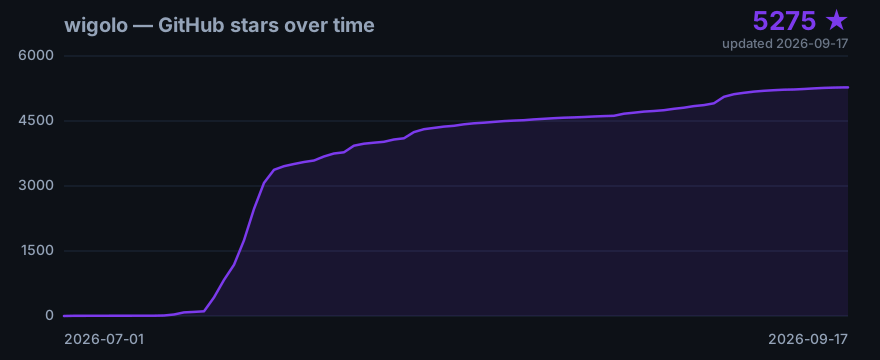
Star history
Refreshed daily from the GitHub API. Add a ⭐ if wigolo is useful to you.
Architecture
A single Node process speaks MCP (JSON-RPC over stdio). Everything heavy is local and lazy-loaded, so a zero-key install pays nothing for the parts it isn't using.
flowchart TD
    A["🤖 AI agent<br/>any MCP client · REST · SDK"]
    A -->|MCP over stdio| B["<b>wigolo</b><br/>10 tools · dynamic instructions<br/>in-process browser pool + cache + models"]

    B --> C{"Tool layer"}
    C --> T1["search · fetch · crawl · extract"]
    C --> T2["cache · find_similar · research · agent"]

    T1 --> F["⚙️ Fetch router<br/>tiered escalation, learned per domain"]
    T1 --> S["⚙️ Search<br/>18 engines → rank fusion → ML rerank<br/><i>explainable evidence score</i>"]
    T2 --> DB[("🗄️ Local cache<br/>keyword + vector index")]
    T2 --> ML["🧠 On-device ML<br/>embeddings + reranker"]

    F -.->|optional| LLM["☁️ LLM<br/>synthesis only · opt-in"]
    S -.->|optional| SX["🔀 Aggregator backend<br/>opt-in legacy / hybrid"]

    F --> WEB["🌍 Public web"]
    S --> WEB

    style B fill:#7c3aed,stroke:#5b21b6,color:#fff
    style WEB fill:#0ea5e9,stroke:#0369a1,color:#fff
    style DB fill:#1e293b,stroke:#334155,color:#fff
    style LLM stroke-dasharray: 5 5
    style SX stroke-dasharray: 5 5
Code beats model. Deterministic work stays off the LLM: canonicalization, rank fusion, dedup, and schema matching. The model is reserved for judgment, opt-in, and capped per request. LLM-filled fields are checked against the source and nulled if absent.
Signal-driven routing. The fetch ladder escalates to a real browser on observable signa
wigolo (KnockOutEZ/wigolo)
Choose a tag and it will appear here. With no tags selected, all catalog projects are shown.
Searching Database…
Choose a tag and it will appear here. With no tags selected, all catalog projects are shown.
What is this?wigolo is a local-first web toolkit for AI coding agents: one surface for search, fetch, crawl, extraction, caching, find-similar, and research, served over MCP, REST, SDKs, and a CLI. No API keys, no cloud, $0 per query.
Does it run on my machine, or is it a cloud service I sign up for?It runs locally as a single Node process: an MCP server beside your coding agent, a REST/MCP endpoint on the box where self-hosted agents live, or an SDK embedded in your own app. Cache, models, and config all stay under ~/.wigolo/.
How do I hook it up to my coding agent?Run npx -y wigolo init. Bare init downloads the browser engine and on-device models and health-checks each part; adding --agents claude-code,cursor (or any of the supported ones) writes the MCP config for those agents in the same run.
Do I need anything installed before running that?Node 20 or newer and about 1.5 GB of free disk, on macOS, Linux, or Windows. Setup is unattended, and a failed component download never fails init — it reports what's missing with the exact fix.
Does everything really work without an API key?The core tools (search, fetch, crawl, extract, cache, find-similar) are fully keyless. research, agent, and answer-format search use an LLM: without a key they hand back a raw brief plus evidence, or you can add a free Gemini key, any provider, or Ollama to stay local.
Does what my agent searches for ever leave my machine?No. Cache, embeddings, models, and config live under ~/.wigolo/, and nothing reaches a third party unless you explicitly opt into an LLM for synthesis.
What tools does my agent get?Ten: search (18 direct engines with rank fusion and ML reranking), fetch, crawl, extract, cache, findsimilar, research, agent, plus diff and watch for tracking page changes and delivering them to a webhook. Every tool also works from the terminal, REST, or the SDKs.
How does it compare to paid tools like Tavily or Exa?Per its own comparison table it matches their search, fetch, extraction, and crawl features, but with no account, no API key, and $0 per query. It also returns verbatim excerpts pinned to byte-offset source spans, explainable per-result scores, and a local cache that makes re-queries instant and free.
What happens when a site blocks bots?The fetch router escalates from plain HTTP to a headless browser on anti-bot challenges or SPA shells. When a wall still holds — datacenter IPs often fail IP-reputation checks — you get a labeled blockedbychallenge failure, never a challenge shell posing as content.
Can I use it without an MCP client?Yes. wigolo serve exposes a plain-JSON REST API (POST /v1/{tool} for all ten tools, OpenAPI 3.1 contract), plus TypeScript and Python SDKs with embedded local mode, framework packages for LangChain, CrewAI, LlamaIndex, and Vercel AI SDK, and a CLI with an interactive shell.










 wigolo is a local-first web toolkit for AI coding agents: one surface for search, fetch, crawl, extraction, caching, find-similar, and research, served over MCP, REST, SDKs, and a CLI. No API keys, no cloud, $0 per query.