


1.2K ·GitHub
Что это?
 API Anything следит, как фронтенд сайта выполняет запрос, определяет, какие части являются вашими входными данными, и сохраняет запрос как операцию. После этого ваш агент вызывает операцию через MCP, CLI или TypeScript и получает обычный JSON вместо управления headless-браузером.
API Anything следит, как фронтенд сайта выполняет запрос, определяет, какие части являются вашими входными данными, и сохраняет запрос как операцию. После этого ваш агент вызывает операцию через MCP, CLI или TypeScript и получает обычный JSON вместо управления headless-браузером.Это размещённый API или что-то, что я запускаю сам?Это локальный инструмент: CLI плюс MCP-сервер, которые работают на вашей машине, используя вашу сеть и ваши браузерные сессии, а не размещённый сервис.
Это локальный инструмент: CLI плюс MCP-сервер, которые работают на вашей машине, используя вашу сеть и ваши браузерные сессии, а не размещённый сервис.Как установить его и подключить к моему кодинг-агенту?Вставьте сниппет установки в Claude Code, Codex или другого кодинг-агента; он проверит наличие Node 22.13+, соберёт и установит команду api-anything, а затем сам подключит к себе MCP-сервер и skill. Можно также добавить вручную командами 'codex mcp add api-anything -- api-anything mcp' или 'claude mcp add --scope user api-anything -- api-anything mcp'.
Вставьте сниппет установки в Claude Code, Codex или другого кодинг-агента; он проверит наличие Node 22.13+, соберёт и установит команду api-anything, а затем сам подключит к себе MCP-сервер и skill. Можно также добавить вручную командами 'codex mcp add api-anything -- api-anything mcp' или 'claude mcp add --scope user api-anything -- api-anything mcp'.Сначала нужно установить Chrome или Node?Да — для сборки и запуска нужен Node 22.13+, а Google Chrome требуется только для создания новых операций и как запасной вариант, когда обычный HTTP-запрос блокируется.
Да — для сборки и запуска нужен Node 22.13+, а Google Chrome требуется только для создания новых операций и как запасной вариант, когда обычный HTTP-запрос блокируется.Что будет, если сайт изменится и сломает сохранённую операцию?Инструмент заново изучает запрос и сохраняет новую версию только после успешного повтора; если повтор всё равно не удаётся, вы получите ошибку вместо чужих данных. Решение CAPTCHA не предусмотрено, поэтому если сайт предъявляет проверку настоящему Chrome, придётся пройти её вручную.
Инструмент заново изучает запрос и сохраняет новую версию только после успешного повтора; если повтор всё равно не удаётся, вы получите ошибку вместо чужих данных. Решение CAPTCHA не предусмотрено, поэтому если сайт предъявляет проверку настоящему Chrome, придётся пройти её вручную.Работает ли он на Windows так же, как на macOS и Linux?Импорт cookie работает на macOS и Linux для профилей Chrome, Arc, Brave, Edge, Chromium и Firefox (кроме cookie, зашифрованных в keyring, на Linux); на Windows вход просто открывает окно Chrome вместо импорта cookie.
Импорт cookie работает на macOS и Linux для профилей Chrome, Arc, Brave, Edge, Chromium и Firefox (кроме cookie, зашифрованных в keyring, на Linux); на Windows вход просто открывает окно Chrome вместо импорта cookie.Где хранятся мои сессии входа и учётные данные?Учётные данные хранятся в ~/.api-anything, а сохранённые операции содержат только ссылки на cookie и токены, но не сами значения, поэтому обновлённая сессия продолжает работать без повторного изучения.
Учётные данные хранятся в ~/.api-anything, а сохранённые операции содержат только ссылки на cookie и токены, но не сами значения, поэтому обновлённая сессия продолжает работать без повторного изучения.Какие сайты и операции входят в комплект?В комплект входит 22 операции чтения для 9 сайтов, включая Google Flights, Hacker News, X, Instagram, YouTube, Airbnb, Amazon, LinkedIn и Goodreads.
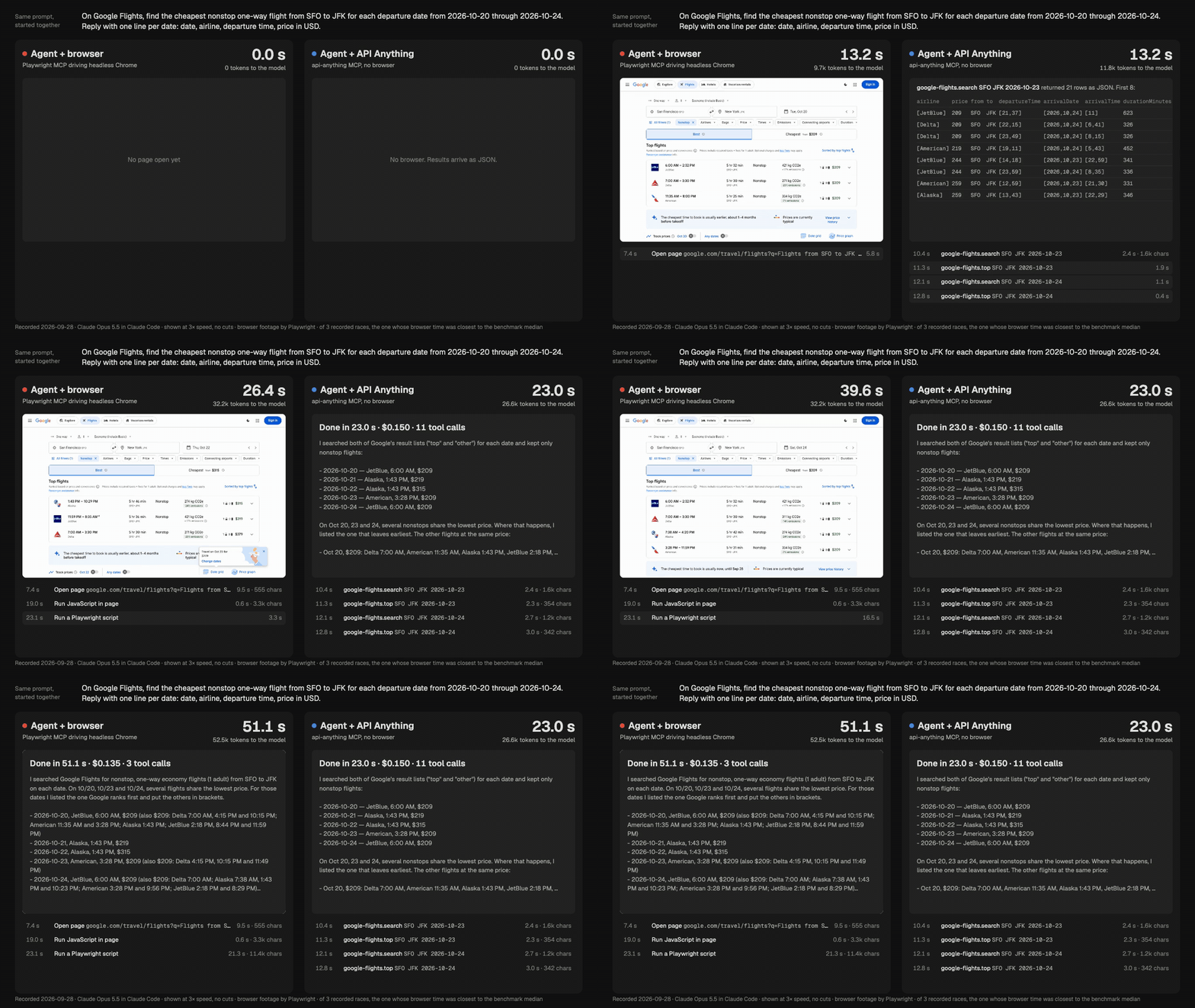
В комплект входит 22 операции чтения для 9 сайтов, включая Google Flights, Hacker News, X, Instagram, YouTube, Airbnb, Amazon, LinkedIn и Goodreads.Насколько это быстрее, чем агент, управляющий браузером?В бенчмарке Google Flights тот же агент отвечал в 1,5–2 раза быстрее, читал примерно вдвое меньше токенов и стоил столько же или меньше; на Goodreads он выдал ответ про 5 книг за 30,5 с против 182,5 с у агента, управляющего браузером.
В бенчмарке Google Flights тот же агент отвечал в 1,5–2 раза быстрее, читал примерно вдвое меньше токенов и стоил столько же или меньше; на Goodreads он выдал ответ про 5 книг за 30,5 с против 182,5 с у агента, управляющего браузером.Как он самостоятельно осваивает новый сайт?Вы даёте ему URL страницы с плейсхолдером и два примера входных данных; headless Chrome загружает страницу для каждого примера, изменившаяся часть становится параметром, а остальное — шаблоном, и всё это без использования LLM.
Вы даёте ему URL страницы с плейсхолдером и два примера входных данных; headless Chrome загружает страницу для каждого примера, изменившаяся часть становится параметром, а остальное — шаблоном, и всё это без использования LLM.Может ли он выполнять записи на сайт, например отправлять сообщение в LinkedIn?Операции записи в комплект не входят. Для записи нужен флаг --allow-writes, и она проверялась только на локальном fixture, а не на реальных сайтах вроде LinkedIn.
Операции записи в комплект не входят. Для записи нужен флаг --allow-writes, и она проверялась только на локальном fixture, а не на реальных сайтах вроде LinkedIn.What are similar projects?bb-browser, stagehand, oc, browser, reverse-api-engineer, webcmd, testsprite-cli, wigolo
bb-browser, stagehand, oc, browser, reverse-api-engineer, webcmd, testsprite-cli, wigoloWhich topics is it in?playwright, web-scraping, browser-automation, local-first, mcp-server, codex, agent, claude-code, mcp, api, automation, ai-agents
playwright, web-scraping, browser-automation, local-first, mcp-server, codex, agent, claude-code, mcp, api, automation, ai-agents