FrontierHarness Eval







Explore the live results →
·
Read the blog →
·
Evaluate your own harness →
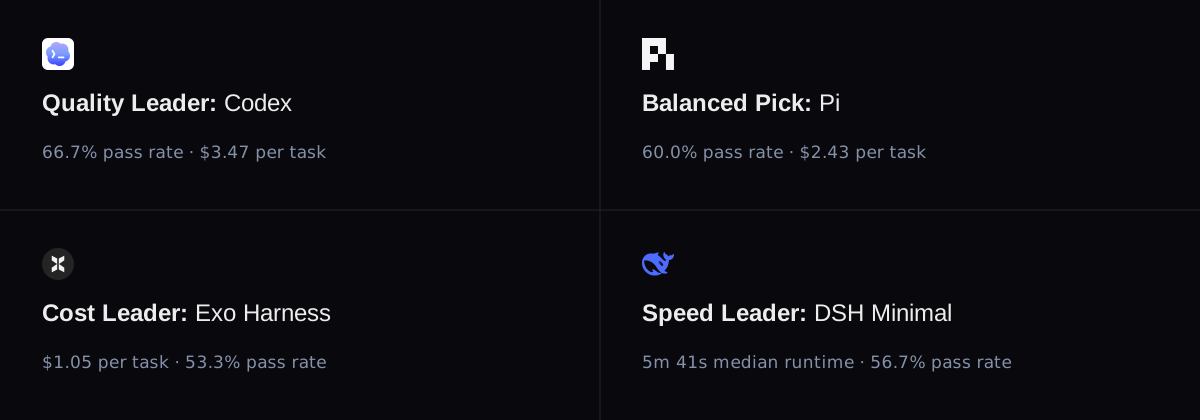
Similar pass rate. 17.5x cost differences.
We ran the same Kimi K3 model through nine coding-agent harnesses—12 configurations in total—on the same 30 software-engineering tasks. With the model, tasks, and runtime held constant, changing the harness changed pass rate, cost, cache behavior, and speed.
Full results
| Harness (configuration) |
Pass rate |
Median cost per pass |
Cache, median cell |
Median time |
| Codex |
66.7% |
$3.47 |
88.0% |
6m 43s |
| DSH Creator |
63.3% |
$3.28 |
84.3% |
6m 44s |
| Claude Code |
63.3% |
$18.34 |
67.8% |
9m 38s |
| Pi |
60.0% |
$2.43 |
79.4% |
7m 33s |
| DSH PTC |
60.0% |
$4.58 |
87.2% |
7m 44s |
| DSH Standard |
60.0% |
$3.46 |
86.5% |
6m 17s |
| Oh My Pi |
56.7% |
$4.75 |
82.2% |
6m 46s |
| Kimi Code |
56.7% |
$3.65 |
88.0% |
7m 56s |
| DSH Minimal |
56.7% |
$4.72 |
84.6% |
5m 41s |
| Exo Harness |
53.3% |
$1.05 |
70.3% |
6m 17s |
| OpenCode |
50.0% |
$3.24 |
78.4% |
6m 27s |
| Hermes |
50.0% |
$2.90 |
85.9% |
6m 58s |
The interactive report includes failed runs, total cost per task, cache behavior, speed, and task-level results. For the evaluation design and analysis, read the launch article.
What is in this repository
.
├── benchmark.json              # Public benchmark definition
├── cli/index.mjs               # `npx @frontierharness/eval`: workspace + skill installer
├── metadata/
│   ├── difficulty.json         # Difficulty assignments and source methodology
│   └── harness-versions.json   # Harness versions used for the run
├── results/
│   └── eval-data.json          # Normalized aggregate and task-level results
├── tasks/<task>/
│   ├── instruction.md          # Prompt shown to every harness
│   └── task.toml               # Public task metadata and environment definition
└── skills/frontierharness-eval/  # Agent-neutral skill, usable by hand
    ├── SKILL.md                # Evaluation workflow for a third-party harness
    ├── PROMPT.md               # Copy-paste prompt that points an agent at the skill
    ├── reference.md            # Command reference, runner templates, troubleshooting
    └── scripts/                # Provisioning, trial runner, scoring, chart, report
The repository intentionally contains results, task definitions, and the evaluation workflow. Internal infrastructure, credentials, runtime identifiers, private evidence, solutions, and deployment configuration are not included.
Evaluate your own harness
This repository ships a reproduction workflow for evaluating another harness on the published task set. It records environment differences from the original baseline run; a matched control run is needed to establish comparability.
Trial network access. Agents have access to the package registries and source hosts needed by the verifiers, including Ubuntu/Debian apt mirrors, PyPI, npm, PyTorch, GitHub download hosts, and Harbor's task registry. Runta applies the allowlist to the whole runtime, including agent containers; any additional Harbor/Pier isolation still applies. Verifiers install dependencies during trials, so allowing only the model provider and uv downloads blocks valid verification. Task images are pulled before the trial policy is applied. The exact hosts are defined in providers.sh.
Each run.json records egress_policy with its mode, scope, and exact allowed_hosts; the same policy is used for both suites and is included in candidate data and reports. The published baselines did not record their applied allowlist, so new runs default to methodology_comparable: false and receive no leaderboard rank. Evaluate a control harness under the same policy and environment before claiming comparability. Resuming with a changed or unrecorded policy is refused; use a new run id for the new policy and preserve earlier evidence.
skills/frontierharness-eval/ is an agent-neutral skill: point any coding agent that reads SKILL.md at it and it will drive the whole run — freezing the golden checkpoint, running every task from an identical fresh restore, scoring the trials, and building the report.
How to use the skill
Let an agent drive it
Install the evaluation skill and its Runta companion skills
with the Skills CLI (Node.js and Git required).
Run these in the project where you use your coding agent:
npx skills add https://runta.com/docs --skill runta-installer runta-cli
npx skills add frontier-harness-eval/eval --skill frontierharness-eval
runta-installer handles Runta tooling setup and verification; runta-cli provides
runtime operation guidance. frontierharness-eval drives the benchmark, scoring, and
report. If the Runta skills are already installed, only the second command is needed.
Choose the same agent for both commands when prompted, or select one directly:
npx skills add https://runta.com/docs --skill runta-installer runta-cli --agent codex -y
npx skills add frontier-harness-eval/eval --skill frontierharness-eval --agent codex -y
Add --global to both commands to make the skills available across projects. Start a new agent session
in the project and ask:
Use the frontierharness-eval skill to evaluate https://github.com/acme/my-harness.
Start with one Terminal-Bench task and one DeepSWE task.
The skill sets up a benchmark checkout for the task definitions and baseline results,
uses the Runta skills for tooling setup, then checks prerequisites and guides the
evaluation. Installing skills alone does not run evaluations. For a prompt with explicit harness, commit, provider, and build
settings, see PROMPT.md.
Already cloned this repository? Install the local copy from its root:
npx skills add . --skill frontierharness-eval
Run it by hand instead
The skill's scripts are the same ones an agent would call, so the run works without an agent at all. Every path is relative to the workspace root, and this repo has its own scripts/ directory, so address the skill's scripts through a variable:
FH=skills/frontierharness-eval/scripts
1. Prerequisites. The runta CLI (brew install runta-dev/tap/runta or npm i -g @runta/runta-cli) authenticated with runta login, plus jq, node >= 18, and Python >= 3.9 for token cost accounting.
2. Install script. Write a script that builds your harness on a clean Linux box. If it is not a built-in agent for Harbor or Pier, register it as a custom agent in both runner registries there, and use the registered name as --harness. For a service on the runtime host or an external host, set --harness-topology runtime-service or external-service when provisioning and document its resource limits and state reset.
3. Provider key. Store it once as a Runta secret, named after the env var for your provider (FIREWORKS_API_KEY, MOONSHOT_API_KEY, OPENROUTER_API_KEY, or TOGETHER_API_KEY). The interactive prompt keeps the value out of your shell history:
runta secret set FIREWORKS_API_KEY --prompt
The API never hands the value back, so provisioning reuses the stored secret instead of asking for plaintext again. A --value-env or --value-stdin route works too if you already have the key in the environment.
4. Golden checkpoint. One command creates the clean runtime, clones the harness at a pinned commit, installs the Harbor and Pier stacks, and freezes a small checkpoint. The trial runner pulls each task image after its restore:
$FH/provision-golden-checkpoint.sh \
  --runtime fh-build --checkpoint fh-golden-myharness-v1 \
  --harness my-harness --provider fireworks \
  --repo https://github.com/acme/my-harness --commit 9f2c1ab \
  --cpus 4 --memory 8192 --disk-size-gib 50 --keep-runtime \
  --install-script ./install-my-harness.sh
The real key stays in the egress proxy, so confirm the runtime only ever sees a stub:
runta exec fh-build -- sh -lc 'test "$FIREWORKS_API_KEY" = runta-secret-stub'
The example keeps the build runtime for inspection. After confirming the checkpoint
is ready, remove that build runtime with runta rm fh-build.
5. Trials. Each task gets its own fresh restore, which is deleted after the full evidence archive is verified locally. With no --tasks, this runs the published 30-task set read from tasks/:
$FH/run-trials.sh \
  --checkpoint fh-golden-myharness-v1 --harness my-harness \
  --provider fireworks --run-id 2026-09-02-myharness --out runs
Pass a file of suite-prefixed ids to --tasks to run a subset — worth doing first with one Terminal-Bench and one DeepSWE task to prove the plumbing before spending the full budget. Re-running the same --run-id resumes pending evidence collection, retries infrastructure setup failures, and preserves every valid attempt. Disconnected execution and incomplete copies retain the runtime for recovery. Use a new run id for an intentional new experiment. If a trial dies on infrastructure twice, mark it rather than scoring it as a failure:
trial=runs/2026-09-02-myharness/trials/terminal-bench-<task>/trial.json
jq '.status = "infra_invalid" | .success = false' "$trial" > "$trial.tmp" && mv "$trial.tmp" "$trial"
6. Score, chart, and report.
node $FH/normalize-results.mjs --run runs/2026-09-02-myharness --label "My Harness"
node $FH/generate-chart.mjs    --run runs/2026-09-02-myharness
node $FH/build-report.mjs      --run runs/2026-09-02-myharness
Per-step reasoning, runner templates, and troubleshooting are in SKILL.md and reference.md.
Keeping a result comparable
A score only belongs next to the published numbers if the run holds these invariants. The report states any that were relaxed.
- Kimi K3, the same model every published configuration used, otherwise harness effects and model effects are inseparable. Any provider serving it is fine for pass rate; for cost, check its token prices match the ones in
reference.md.
- One golden checkpoint, one fresh restore per task, with identical vCPU, memory, and disk on every restore.
- No formal task executed before the checkpoint is frozen. Pre-pulling images is environment prep; running a task early is warm-cache bias. The provisioning script only ever warms on
terminal-bench-sample.
- Infrastructure failures marked
infra_invalid, not scored as task failures.
Cost is compared on effective_cost_per_pass, which is total cost across all tasks divided by passes and is reproducible from raw per-task cost. The *_normalized fields in results/eval-data.json reprice first-turn cache reads using data that is not public, so the scoring script leaves them empty rather than inventing values.
Metric definitions and the trial record contract are in SKILL.md. Runner templates, the alternative Harbor-with-Runta-provider topology, and troubleshooting are in reference.md.
Methodology
Tested harness configurations
| Configuration |
Version |
Configuration |
Version |
| Codex |
0.148.0 |
DSH Creator |
0.1.0-rc.8 |
| Claude Code |
2.1.237 |
DSH Minimal |
0.1.0-rc.8 |
| Pi |
0.84.2 |
DSH PTC |
0.1.0-rc.8 |
| DSH Standard |
0.1.0-rc.8 |
Oh My Pi |
17.4.0 |
| Kimi Code |
0.37.2 |
Exo Harness |
0.1.0 |
| OpenCode |
1.18.19 |
Hermes |
0.20.4 |
- FrontierHarness v1.0 focuses on software engineering contexts and terminal-based tasks. It may not generalize to other areas of knowledge work.
- Evaluated on Runta agent runtimes. For each task, all harnesses and the environment defined in
task.toml are prepared once as a golden checkpoint. Every run is a fresh restore with identical vCPU, memory, disk size, disk contents, and memory state.
- Kimi K3 is served by Fireworks.
Benchmark scope
- 30 tasks: 21 Terminal-Bench tasks and 9 DeepSWE tasks
- 9 harnesses: Claude Code, Codex, DeepSeek Harness, Exo Harness, Hermes, Kimi Code, Oh My Pi, OpenCode, and Pi
- 12 configurations: one canonical result for every task and harness-configuration pair
- 360 evaluations: complete task-by-harness coverage
- Deterministic scoring: verifier-based pass/fail outcomes
- Comparable cost: first-turn cache reads repriced consistently across harnesses
See benchmark.json for the public benchmark definition and results/eval-data.json for the complete normalized result set.
Use the data
jq '.harnesses[] | {name, successful, effective_cost_per_pass}' results/eval-data.json
Every task directory contains the exact public instruction and task metadata used by the benchmark.
Runta provided the isolated runtimes and Golden Checkpoint restores used across all 360 evaluations.


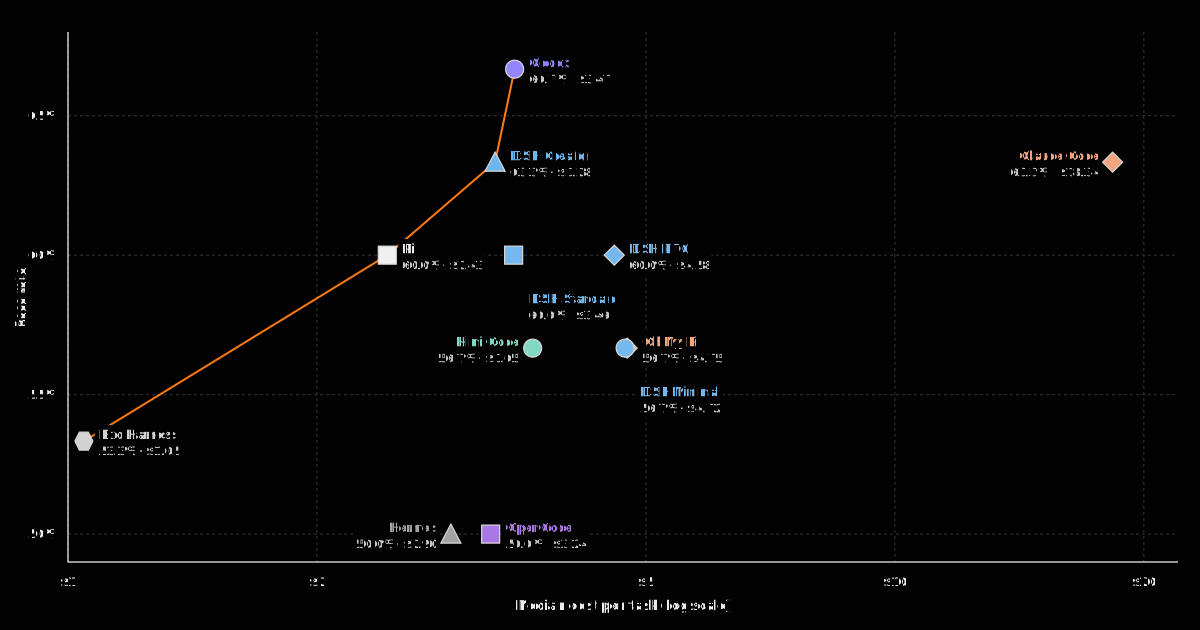

 FrontierHarness Eval is a public benchmark that ran the same Kimi K3 model through nine coding-agent harnesses (12 configurations) on the same 30 software-engineering tasks, to see how pass rate, cost, cache behavior and speed change when only the harness changes.