


DeepSeek-Reasonix README

The project's README from github.com/esengine/DeepSeek-Reasonix. As one markdown file: README.md.

Reasonix

English  ·  简体中文  ·  Guide  ·  ACP  ·  Extensions  ·  Spec  ·  Website  ·  Discord

npm version CI license downloads GitHub stars AtomGit stars contributors Discussions Discord

esengine/DeepSeek-Reasonix | Trendshift esengine/DeepSeek-Reasonix | Trendshift


Open source · MIT · a single Go binary

A coding agent you can leave running.

One local engine, four ways in — terminal, desktop app, browser, or your editor over ACP. Plan mode, permissions, a workspace sandbox and per-turn checkpoints keep a long autonomous run something you can still read and undo.


[!IMPORTANT] Community · 加入社区 — bilingual Discord for setup help (#help / #求助), workflow showcases, and feature ideas. → https://discord.gg/XF78rEME2D


Features

Install

Choose the path that matches how you want to use Reasonix. The CLI/TUI, desktop app, and VS Code extension all use the same local Reasonix engine.

Path A: CLI / TUI

Install the native binary through npm on any supported platform, or use Homebrew on macOS:

npm i -g reasonix                  # any OS; pulls the prebuilt native binary
brew install esengine/reasonix/reasonix   # macOS

Prebuilt archives (darwin|linux|windows × amd64|arm64) and SHA256SUMS are on every GitHub release.

Path B: Desktop app

Use the official download page for the latest desktop build.

Platform Package Architecture
macOS Universal .dmg or .zip Apple Silicon / Intel
Windows Installer .exe or portable .zip x64 / ARM64
Linux .deb or .tar.gz x64

Windows installers are code-signed through SignPath.io with a free certificate provided by the SignPath Foundation.

Path C: VS Code extension

Complete Path A first. The extension does not bundle the CLI; it starts your local reasonix acp backend and adds native chat, editor context, tool-call approvals, model selection, and workspace sessions.

Path D: Build from source

Clone the repository first:

git clone https://github.com/esengine/DeepSeek-Reasonix.git
cd DeepSeek-Reasonix

CLI

The CLI build requires Go 1.26+. The module pins a toolchain directive; keep GOTOOLCHAIN=auto so Go downloads the pinned toolchain, or install it.

make build      # -> bin/reasonix(.exe)
make cross      # -> dist/ (darwin|linux|windows × amd64|arm64)

Desktop

The desktop build additionally requires Node 24+ and pnpm 10 (npm install -g pnpm@10) for the frontend and the Electron shell:

scripts/desktop-build.sh darwin/arm64 v0.0.0-dev   # one platform per run

No platform webview dependencies are needed — the shell ships its own Chromium. See the desktop build guide.

Quick start

CLI / TUI

These commands are for the CLI/TUI installed through Path A:

reasonix setup                      # configure a provider and model
reasonix                            # start an interactive session
reasonix run "implement the TODOs in main.go"

In an interactive session, run /init when you want Reasonix to create project instructions.

Desktop app

Download the installer for your platform from the official download page, install and launch Reasonix, then configure a provider and model in the app. The CLI commands above are not required for the desktop app.

For advanced CLI usage and configuration, see the CLI reference, Guide, and configuration paths.

Documentation

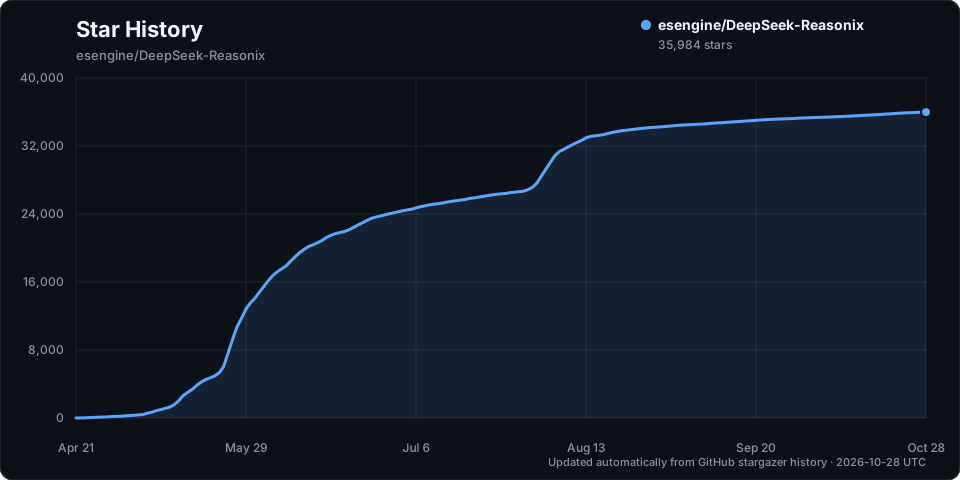
Star History

Star History Chart

Acknowledgments

A small list of folks whose work has shaped Reasonix the most — the current top 20 contributors by commit count. The full contributor graph is on GitHub.

Contributor Contributor Contributor Contributor
SivanCola esengine ttmouse lifu963
reasonix HUQIANTAO GTC2080 light-front-theory
merge-order-check Li-Charles-One eghrhegpe wufengfan
CVEngineer66 dependabot[bot] lanshi17 SuMuxi66
CnsMaple cyq1017 JesonChou XTLine

Special thanks to Bernardxu123 for designing the project logo and intro video.

Contributors to esengine/DeepSeek-Reasonix


MIT — see LICENSE
Built by the community at esengine/DeepSeek-Reasonix


Support this project

If Reasonix has been useful and you'd like to say thanks, you can. It stays a coffee, not a contract — donations don't buy feature priority or change how issues get triaged.

WeChat Pay QR code

DeepSeek-Reasonix (esengine/DeepSeek-Reasonix)

Searching Database…

这是什么?Reasonix 是一款面向复杂软件工程任务的编码智能体,它是一个本地引擎,你可以通过终端、桌面应用、浏览器,或借助 ACP 在编辑器中使用它。
这是命令行工具、桌面应用,还是两者都是?两者都是,而且还不止:同一个本地 Reasonix 引擎驱动着 CLI/TUI、桌面应用(基于 Electron),以及一个通过 ACP 与其通信的 VS Code 扩展。
我该怎么安装和启动?可以通过 npm 或 Homebrew(macOS)安装 CLI/TUI,也可以从官方下载页面获取桌面应用安装包(.dmg、.exe、.deb)。VS Code 扩展需要先安装 CLI,因为它只是启动本地的 'reasonix acp' 后端。
使用它需要先安装 Go 或 Node 吗?使用预编译二进制文件、npm 包、Homebrew 或桌面安装程序时不需要,这些都是自包含的静态二进制文件。只有从源码构建时才需要 Go 1.26+(桌面端外壳还需要 Node 24+ 和 pnpm 10)。
它只能用于 DeepSeek 模型吗?不是。DeepSeek 只是内置的一个预设;任何兼容 OpenAI 的接口都可以配置,甚至可以同时运行两个模型,一个作为执行者,一个作为规划者。
支持哪些平台?macOS(Apple Silicon 和 Intel)、Windows(x64/ARM64)和 Linux(x64),通过预编译二进制文件或桌面安装程序提供。
它如何通过插件扩展自身?MCP 服务器可以提供工具、提示词和资源;Extension Protocol v1 的 sidecar 可以拦截运行时事件、添加 Provider 与界面,并发布带版本号的插件包。
配置是怎么管理的?一切都通过 reasonix.toml 文件进行配置驱动:Provider、智能体、启用的工具和插件都在该文件中声明,而不是硬编码在程序里。
能在 VS Code 里使用吗?可以。官方 VS Code 扩展(SivanLiu.reasonix-agent)会启动你本地的 reasonix ACP 后端,并提供原生聊天、编辑器上下文、工具调用审批、模型选择以及工作区会话。
长时间会话中它如何管理上下文?启动时会注入一段简短而稳定的环境摘要;在做摘要压缩之前,会先裁剪或修剪过时的工具输出,从而在长时间自主运行中保持缓存稳定的上下文。
Creator
esengine
Size
198.9 MB
Stars
35.8K
Age
5mo
Commits · 90 Days