



What is this?
 An open-source AI coding agent that lives in your terminal — it edits code and runs commands in your project, powered by Qwen, OpenAI, Anthropic, or Gemini APIs, or local models via Ollama and vLLM.
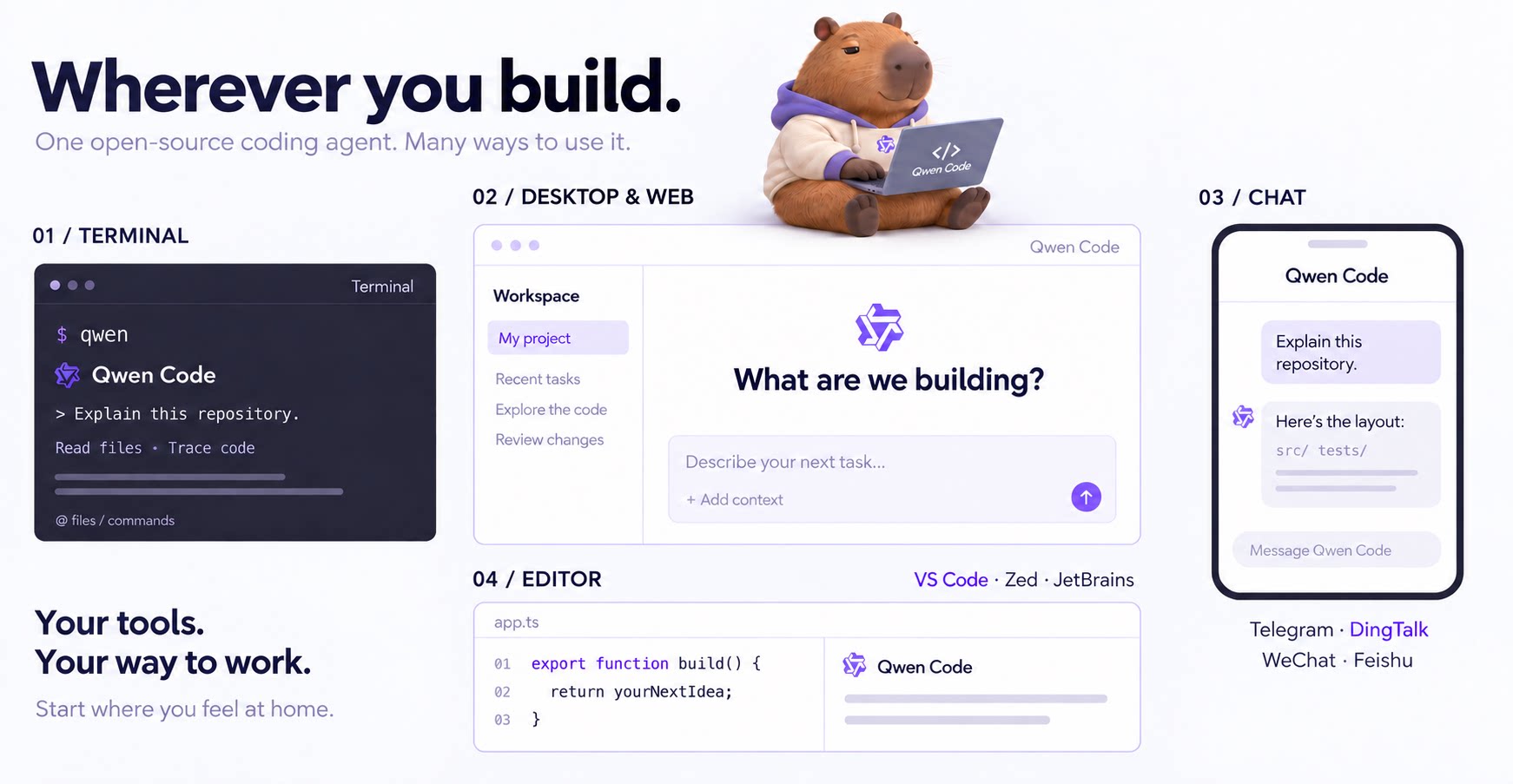
An open-source AI coding agent that lives in your terminal — it edits code and runs commands in your project, powered by Qwen, OpenAI, Anthropic, or Gemini APIs, or local models via Ollama and vLLM.Is it a terminal-only tool, or does it run anywhere else?Terminal first — run qwen in your project — plus a desktop app for macOS, Windows, and Linux, a Web UI, IDE plugins for VS Code, Zed, and JetBrains, and chat integrations (Telegram, DingTalk, WeChat, Feishu).
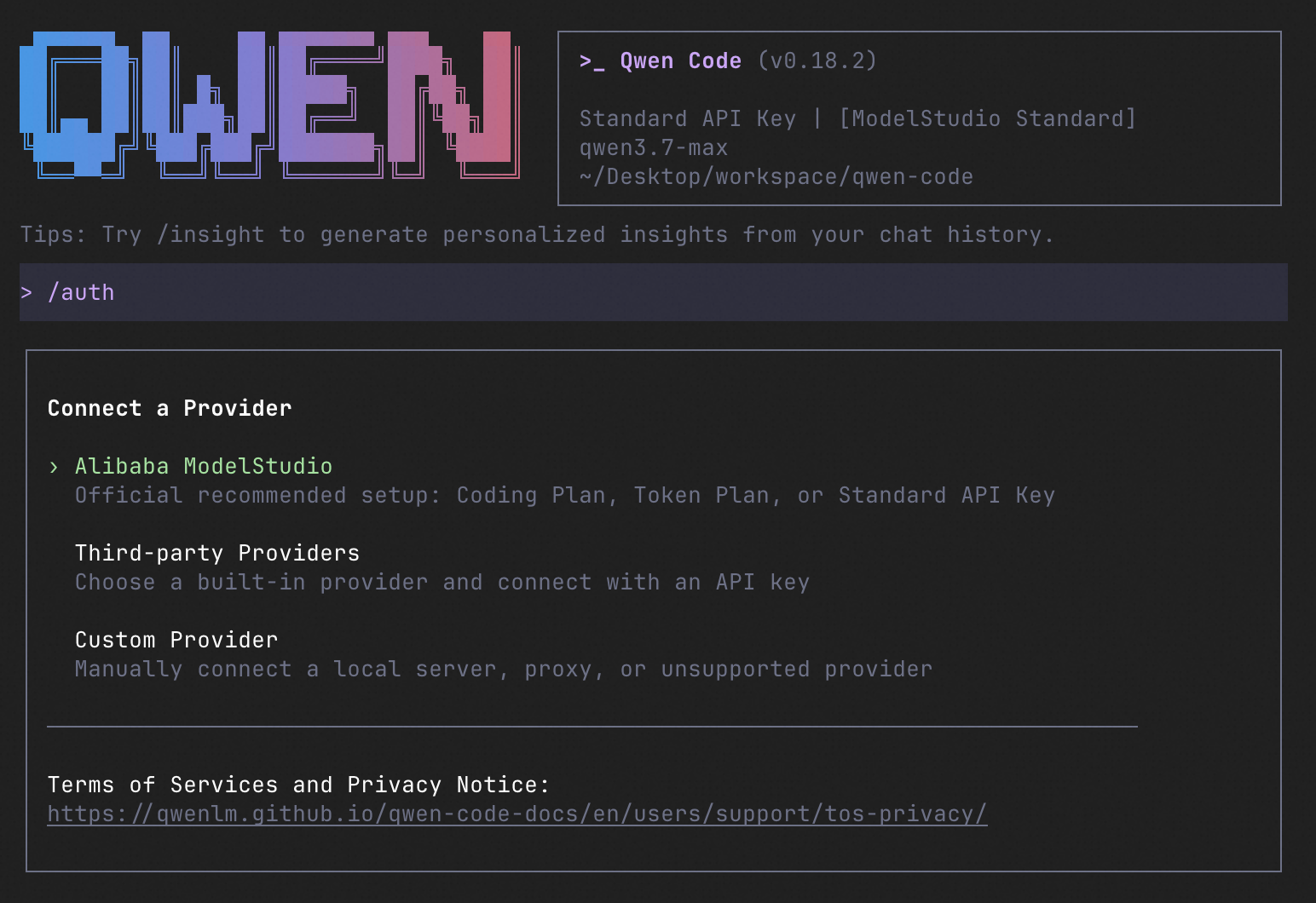
Terminal first — run qwen in your project — plus a desktop app for macOS, Windows, and Linux, a Web UI, IDE plugins for VS Code, Zed, and JetBrains, and chat integrations (Telegram, DingTalk, WeChat, Feishu).How do I get it installed and running?Install with npm (needs Node.js 22+), Homebrew, or the install script — on Windows, restart your terminal afterwards. Then run qwen in your project and use /auth to set your provider and API key.
Install with npm (needs Node.js 22+), Homebrew, or the install script — on Windows, restart your terminal afterwards. Then run qwen in your project and use /auth to set your provider and API key.Do I have to use Qwen models, or can I plug in other providers?No vendor lock-in: /auth configures Qwen, OpenAI, Anthropic, or Gemini APIs, any third-party provider, or a local model via Ollama or vLLM — and you can switch providers at runtime.
No vendor lock-in: /auth configures Qwen, OpenAI, Anthropic, or Gemini APIs, any third-party provider, or a local model via Ollama or vLLM — and you can switch providers at runtime.What's still experimental or rough around the edges?The Web UI and the qwen serve daemon mode are marked experimental. On Windows you must restart your terminal after install so environment variables take effect.
The Web UI and the qwen serve daemon mode are marked experimental. On Windows you must restart your terminal after install so environment variables take effect.I already use Claude Code — what does this give me that Claude Code doesn't?It's built to match Claude Code feature-for-feature — subagents, skills, MCP, plan mode, sandboxes — and adds open models and framework, multi-protocol providers, Agent Arena, daemon mode, and IM channels.
It's built to match Claude Code feature-for-feature — subagents, skills, MCP, plan mode, sandboxes — and adds open models and framework, multi-protocol providers, Agent Arena, daemon mode, and IM channels.Is the whole thing actually open source, or just the wrapper?Fully open: Apache-2.0 code, and the Qwen models are open too — framework and models evolve together with no vendor lock-in. Hosted provider APIs still cost whatever those providers charge.
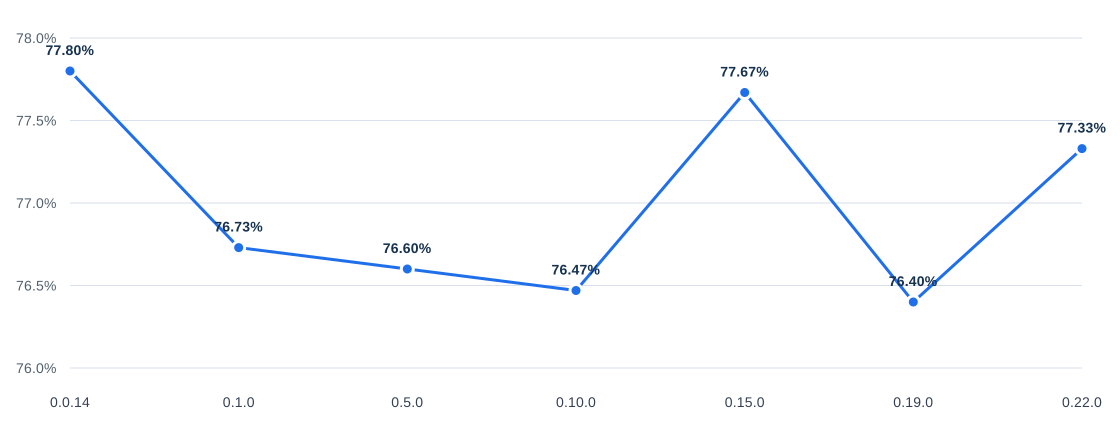
Fully open: Apache-2.0 code, and the Qwen models are open too — framework and models evolve together with no vendor lock-in. Hosted provider APIs still cost whatever those providers charge.How well does it do on SWE-bench Verified?Across seven versions tested on all 500 SWE-bench Verified cases with Qwen 3.7 Max, average scores stay in the 76–78% band with pass rates of 83–85% (0.0.14 scored 77.80% avg, 84.6% pass rate).
Across seven versions tested on all 500 SWE-bench Verified cases with Qwen 3.7 Max, average scores stay in the 76–78% band with pass rates of 83–85% (0.0.14 scored 77.80% avg, 84.6% pass rate).Why build a new agent when Gemini CLI already exists?It originally forked Google Gemini CLI v0.8.2, but from v0.1 the team stopped syncing upstream and went independent as a multi-protocol, multi-platform agent framework with deep Qwen integrations.
It originally forked Google Gemini CLI v0.8.2, but from v0.1 the team stopped syncing upstream and went independent as a multi-protocol, multi-platform agent framework with deep Qwen integrations.What does it do out of the box, agent-wise?Auto-Memory, Auto-Skills, SubAgents, Agent Teams, dynamic workflows, MCP, plan mode, LSP integration, git worktrees, sandboxing, and desktop automation (computer use) — zero setup, per the README.
Auto-Memory, Auto-Skills, SubAgents, Agent Teams, dynamic workflows, MCP, plan mode, LSP integration, git worktrees, sandboxing, and desktop automation (computer use) — zero setup, per the README.Does the project use itself to develop itself?Yes — the README says Qwen Code actively iterates on itself: its own agent and models file issues, submit PRs, review code, and run tests, powered by the community.
Yes — the README says Qwen Code actively iterates on itself: its own agent and models file issues, submit PRs, review code, and run tests, powered by the community.What are similar projects?ordewell, harness-sdk, hive, Baize, open-swe, claude-code, cline, opensquilla
ordewell, harness-sdk, hive, Baize, open-swe, claude-code, cline, opensquillaWhich topics is it in?jetbrains, headless, computer-use, vscode-extension, agentic, webui, ai-coding, telegram, agent-framework, coding-agents, qwen, sandbox
jetbrains, headless, computer-use, vscode-extension, agentic, webui, ai-coding, telegram, agent-framework, coding-agents, qwen, sandbox