Search code and documents in plain English. Runs locally.
Why sgrep
Agents often know what code should do before they know a name to search.
sgrep finds local passages by words and meaning. It can also rank the results of a focused ripgrep command.
No account, hosted index, or model server is needed.
When to use ripgrep, CK, or mgrep
ripgrep is the right tool for known names, exact text, and regexes. For an intent query, an agent must first choose useful patterns. Broad patterns can return too much; narrow ones can miss relevant code.
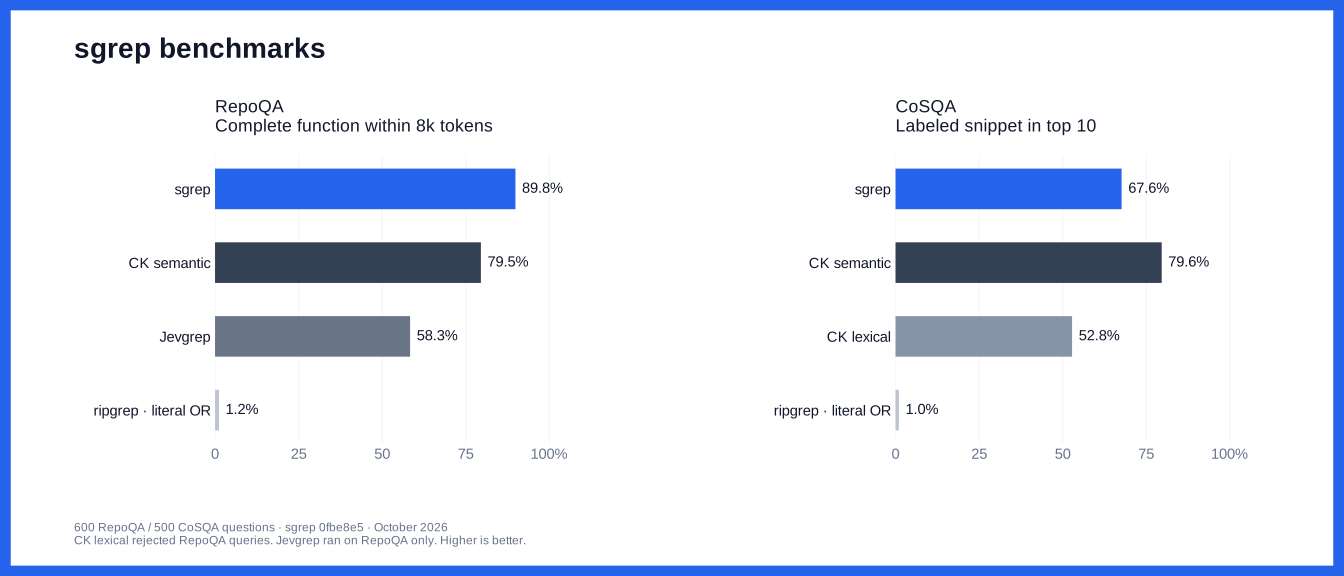
CK offers local semantic and hybrid search, several embedding models, and an MCP server. Account for index construction and updates as well as query time. Its semantic mode beats sgrep on our CoSQA test. Our CK results use BGE Small, not every CK model or mode.
mgrep offers hosted semantic search, reranking, and agent integrations. It syncs files to Mixedbread and needs authentication. Agents must account for sync completion, network access, and upload limits. It is not measured in this benchmark.
Use sgrep when local semantic discovery and a small CPU model suit the job.
The benchmark notes also record CK query-parser failures and missing indexed files.
Or download a macOS Apple Silicon binary.
Remove any older Python install with uv tool uninstall sgrep or pip uninstall sgrep first.
Search
sgrep "when does a failed scrape consume credits" ./src
Results show the file, line range, and source. Use -n 10 for ten results or --json for JSON output.
To rank only the results from ripgrep:
rg --json -C 3 'creditCost|shouldBill' ./src \
  | sgrep "when does a failed scrape consume credits" --stdin
Run both commands from the same directory. Use ripgrep for exact matches; sgrep can return approximate matches.
The first search downloads a model (32–34 MB) and any required code parsers. Later searches can run offline.
Source and queries stay on your machine. The local index stores copies of source passages.
Code and documents
Auto mode selects the text model only when all candidate passages have prose extensions, such as .md or .txt.
Mixed code and prose use the code model. Text mode targets general English prose. To choose explicitly:
sgrep "retry with exponential backoff" ./src --model code
sgrep "how do refunds work" ./docs --model text
Code uses syntax-aware chunks where supported. Other text uses text chunks. This does not parse PDFs or images.
Both modes return source passages, not generated answers. The benchmarks below measure code retrieval, not document search.
Static embeddings
A static model stores one learned vector per token.
The code model distills CodeRankEmbed and trains on code/query pairs.
sgrep looks up those vectors, averages them, and normalizes the result to 256 numbers.
Related text can have similar vectors without sharing exact words.
There is no transformer pass at search time. This supports local CPU search with a small model and no per-query API call.
Averaging loses token order and can miss context. sgrep combines semantic scores with BM25 and gives exact identifiers priority.
A high score is a ranking signal, not proof that code performs a task.
Benchmarks
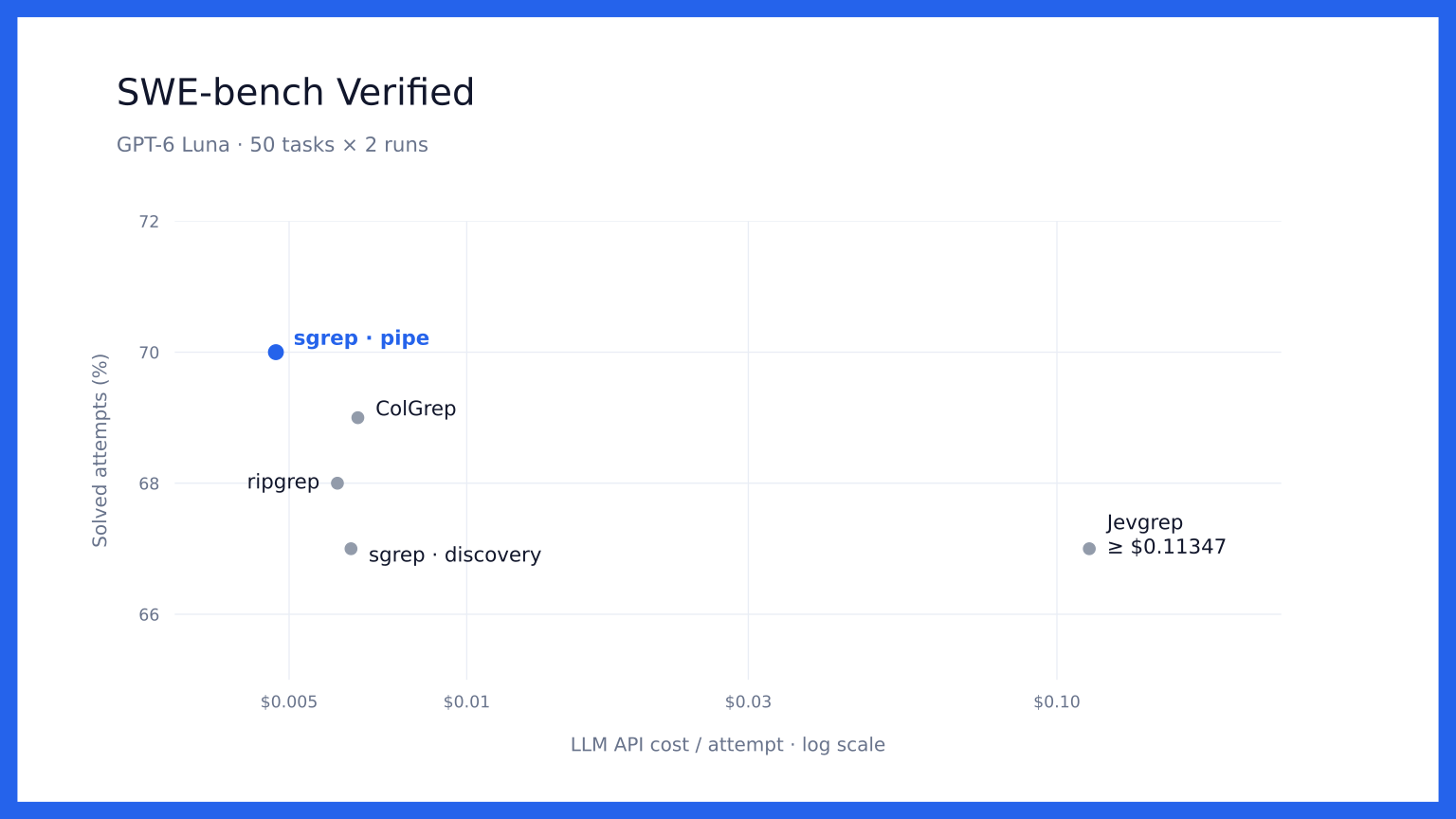
Piped sgrep used 21.3% less LLM API spend than ripgrep, with 70/100 vs. 68/100 solved attempts. Costs include prompt caching and retrieval LLM calls. Code, results, methodology and chart exclusions.
600 RepoQA questions and 500 CoSQA questions. sgrep leads on complete-function retrieval; CK semantic leads on snippet retrieval.
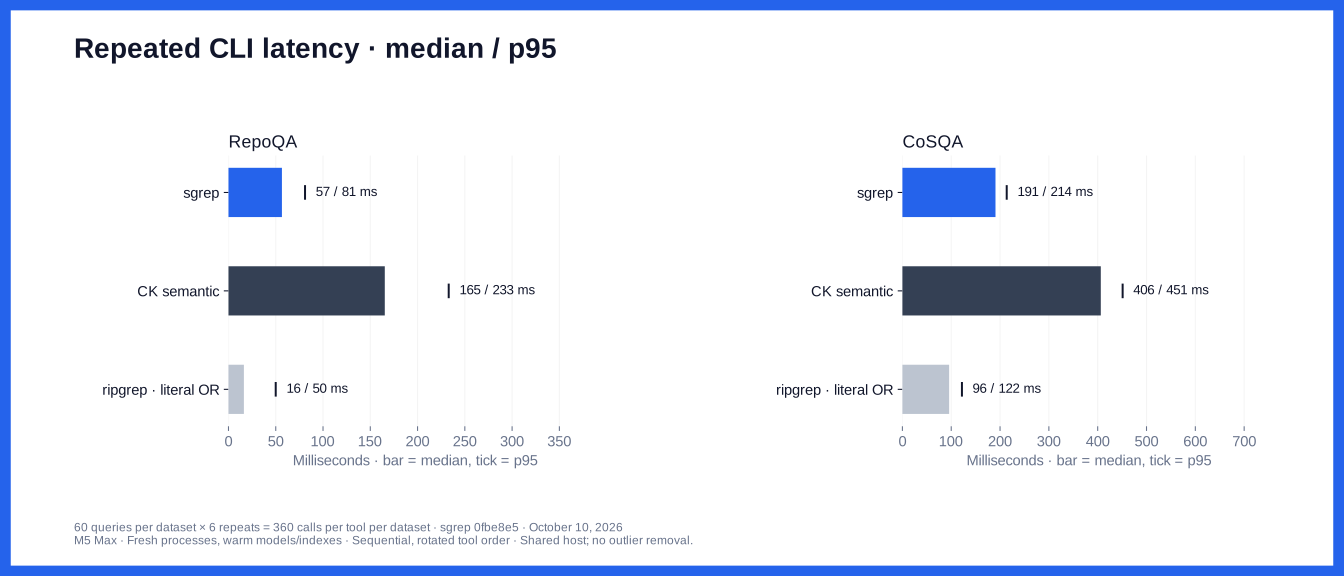
Latency uses 120 fixed queries, six repeats, and fresh CLI processes. Models and indexes are warm.
Results, setup costs, and method.
Reference
Search options
--stdin: rank only the supplied ripgrep match and context blocks.
--rg-json FILE: add saved ripgrep results to a search. Use - to read from stdin.
--model code or --model text: select a model. Auto mode selects text when all candidate passages are prose, and code otherwise.
--json --explain: include lexical, semantic, and combined scores.
Ripgrep paths are relative to the current directory. Files must be within the search path and match the current source.
Added ripgrep results can include hidden or ignored files. Normal searches follow ripgrep's ignore rules and skip hidden and binary files.
Auto mode treats .md, .mdx, .txt, .rst, .adoc, .org, and .text as prose. Extension matching ignores case.
Exit codes: 0 for results, 1 for no results, 2 for errors. Empty piped input returns [] with --json.
Cache controls
--refresh-cache: rebuild the search index. Cached models allow offline use.
--no-cache: search without reading or writing the index.
--cache-dir DIR: store indexes, models, and parsers in one directory.
--fresh-assets: use temporary model and parser downloads. Requires network access.
HF_HUB_OFFLINE=1: prevent model and parser downloads.
Each search checks file content. Changes to files, ignore rules, or models invalidate the index.
Source is checked again before results are returned. Freeze files when you need repeatable measurements.
Warm search still checks files and scans stored vectors. Changed source rebuilds the scope's index.
Piped ranking does not use the index.
The index cache has limits of 256 MiB and 128 entries. Cleanup removes the least recently used entries and entries unused for 30 days.
Set SGREP_CACHE_MAX_BYTES to change the size limit; use 0 to disable the index cache.
Large entries are not saved. Cache failures fall back to a search without the index.
Source copies remain until cleanup or manual deletion. Models and parsers are outside these limits.
Parsers: TREE_SITTER_LANGUAGE_PACK_CACHE_DIR, then the platform cache under tree-sitter-language-pack/v<version>.
--cache-dir overrides these paths. Index files have private permissions on Unix.
Model files are checked against pinned hashes. Parser downloads use archive checksums.
Temporary downloads are removed on normal exit; forced termination can leave files behind.
Refresh options do not clear the operating system's file cache.
How search works
Ripgrep lists files. Rust splits them into passages with Chonkie and Tree-sitter.
Code parsers support Python, C/C++, C#, Go, Java, Rust, JavaScript/JSX, and TypeScript/TSX.
Other files use text splitting. Passages target 2,048 characters and keep whole lines.
Search combines the top 200 lexical matches with the top 200 semantic matches.
Each embedding uses the file path and passage text. Scores combine 75% semantic and 25% BM25 after scaling each to 0–1.
Exact, case-sensitive identifier matches rank first. In longer queries, this applies to names with camelCase, underscores, dollar signs, or digits.
Scores are relative to the candidates, not confidence values.
Piped mode ranks only the supplied passages. Results fully contained in earlier results are removed.
These E2E checks use real models and save JSON receipts.
To compare builds, run python3 tests/benchmark.py BEFORE AFTER queries.json results.
Each query needs id, query, and an absolute root path. Add --refresh-cache to rebuild indexes before timing.


 sgrep 是一个本地搜索工具,用大白话描述需求就能找到代码和文档中的相关内容。它把语义向量匹配和 ripgrep 式的精确文本匹配结合起来,不需要注册账号,也没有托管索引。